
使用Razor模板引擎实现自动生成代码
自动生成代码方案千千万,在C#世界中,可用官方的Razor引擎快速生成代码。
比如要想实现从数据库表直接生成实体类、业务逻辑类、接口层、UI层所有代码。使用Razor就可以办到。
或者用CodeFirst的方式,通过实体类生成其他层代码,同样可以使用Razor实现。
一、Razor引擎介绍
Razor引擎本身是微软官方的Web模板引擎,模板中可使用C#代码,功能更强大,自定义更灵活。不管是生成HTML代码还是生成Winform代码都是可以的,任何后缀格式的除二进制文件之外的文档都可以生成。
首先引用nuget包:RazorEngine或者RazorEngine.NetCore

代码如:
private void button1_Click(object sender, EventArgs e)
{
     var template = "Hello @Model.Name, welcome to use RazorEngine!";
     var result = RazorEngine.Engine.Razor.RunCompile(template, "templateKey1", null, new { Name = "World" });
     richTextBox1.Text = result;
}
运行结果将得到:
"Hello World, welcome to use RazorEngine!"
就是这么简单,模板中可用使用@Model.来引用第四个参数中的属性值。
使用@{}格式可在{}中使用C#代码,我们只需要定义好了数据库表字段,就可以生成其对应的实体类,
例如Entity.txt模板文件内容:
using SqlSugar;
using System.ComponentModel.DataAnnotations;

namespace YourNameSpace.Entity
{
    /// <summary>
    /// @((Model.Description+"").Replace("\r","").Replace("\n",""))
    ///</summary>
    [SugarTable(null, "@((Model.Description+"").Replace("\r","").Replace("\n",""))")]
    public partial class @(Model.ClassName) : LongFullEntity
    {
@foreach (var item in Model.PropertyGens)
{
    var isPrimaryKey = item.IsPrimaryKey ? ",IsPrimaryKey = true" : "";
    var isIdentity = item.IsIdentity ? ",IsIdentity = true" : "";
    var isNull=(item.IsNullable&&item.Type!="string"&&item.IsSpecialType==false&&item.Type!="byte[]")?"?":"";
    var isIgnore=(item.IsIgnore?",IsIgnore = true":"");
    var isJson=(item.CodeType.StartsWith("json")?",IsJson= true":"");

    var newPropertyName=item.PropertyName; //这里可以用C#处理 实体属性的显式格式
    //想和数据库一样就用 newPropertyName=item.DbColumnName
    if(System.Text.RegularExpressions.Regex.IsMatch(newPropertyName.Substring(0,1), "[0-9]"))
    {
        newPropertyName="_"+newPropertyName;//处理属性名开头为数字情况
    }
    if(newPropertyName==Model.ClassName)
    {
        newPropertyName="_"+newPropertyName;//处理属性名不能等于类名
    }
    if (newPropertyName == "Id" || newPropertyName == "id") continue; //继承LongFullEntity则不再需要Id

    var desc=(item.Description+"").Replace("\r","").Replace("\n","");//处理换行

    if(isIgnore!="")
    {
       isPrimaryKey =isIdentity =isNull="";
     }
        @:/// <summary>
        @:/// @(desc)
        @if(item.DefaultValue!=null)
        {
        @:/// 默认值: @Raw(item.DefaultValue)
        }
        @:///</summary>
        @: [SugarColumn(ColumnName="@item.DbColumnName" @(isPrimaryKey) @(isIdentity) @(isIgnore) @(isJson))]
        @: public @Raw(item.Type)@isNull @newPropertyName { get; set; }
    }
    }
}
其中@foreach的用法就是直接使用C#的循环,还可以使用@if 或者@{ //你的代码 } 而上面代码中使用的Model.ClassName、Model.ProperyGens 是我们自定义的数据结构,你可以按自己的方式将表名、表字段等信息定义成数据结构供模板调用。
二、实现代码自动生成逻辑
1.定义表结构信息
我们定义的结构信息如下,可参考:
/// <summary>
/// 生成实体结构
/// </summary>
public class EntitiesGen
{
    public EntitiesGen()
    {
        name_space = "DefaultModels";
    }
    public string name_space { get; set; }
    /// <summary>
    /// 类名
    /// </summary>
    public string ClassName { get; set; }
    /// <summary>
    /// 表名
    /// </summary>
    public string TableName { get; set; }
    /// <summary>
    /// 备注
    /// </summary>
    public string Description { get; set; }

    /// <summary>
    /// 列集合
    /// </summary>
    public List<PropertyGen> PropertyGens { get; set; }

}

/// <summary>
/// 属性和列
/// </summary>
public class PropertyGen
{
    /// <summary>
    /// 属性名
    /// </summary>
    public string PropertyName { get; set; }
    /// <summary>
    /// 列名
    /// </summary>
    public string DbColumnName { get; set; }
    /// <summary>
    /// 主键
    /// </summary>
    public bool IsPrimaryKey { get; set; }
    /// <summary>
    /// 自增列
    /// </summary>
    public bool IsIdentity { get; set; }
    /// <summary>
    /// 备注
    /// </summary>
    public string Description { get; set; }
    /// <summary>
    /// 属性类型
    /// </summary>
    public string Type { get; set; }
    /// <summary>
    /// 是否是为NULL
    /// </summary>
    public bool IsNullable { get; set; }
    /// <summary>
    /// Mapping精度
    /// </summary>
    public int? DecimalDigits { get; set; }
    /// <summary>
    /// Mapping长度
    /// </summary>
    public int? Length { get; set; }
    /// <summary>
    /// Mapping数据库类型
    /// </summary>
    public string DbType { get; set; }
    /// <summary>
    /// 是否忽略
    /// </summary>
    public bool IsIgnore { get; set; }
    /// <summary>
    /// 特殊类型
    /// </summary>
    public bool IsSpecialType { get; set; }
    /// <summary>
    /// 配置的类型名称 (比如 string100)
    /// </summary>
    public string CodeType { get; set; }
    /// <summary>
    /// 默认值
    /// </summary>
    public string DefaultValue { get; set; }

    /// <summary>
    /// 数据库长度
    /// </summary>
    public int? Db_Length { get; set; }
    /// <summary>
    /// 数据库精度
    /// </summary>
    public int? Db_DecimalDigits { get; set; }
    /// <summary>
    /// 数据库类型
    /// </summary>
    public string Db_DateType { get; set; }
}
2.建立项目模板
项目模板做好之后可以一劳永逸,以后新增一个表的维护,就是分分钟的事情了。
项目模板可能不止一个,那么我们就需要定义一个统一的json文件来管理所有模板,之后可以读取此json文件来依次生成代码。
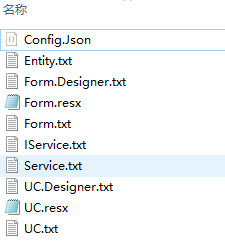
json格式如:
[
  {
    "模版": "Entity.txt",
    "文件夹": "Your.Entity",
    "子目录": "",
    "文件后缀": "cs",
    "描述": "实体"
  },
  {
    "模版": "Service.txt",
    "文件夹": "Your.Service",
    "子目录": "{0}Service",
    "文件后缀": "cs",
    "描述": "业务"
  },
  {
    "模版": "IService.txt",
    "文件夹": "Your.Service.Interface",
    "子目录": "I{0}Service",
    "文件后缀": "cs",
    "描述": "业务"
  },
  {
    "模版": "UC.txt",
    "文件夹": "Your.App.OilPipPre",
    "子目录": "Modules/UC{0}",
    "文件后缀": "cs",
    "描述": "UI"
  },
  {
    "模版": "UC.Designer.txt",
    "文件夹": "Your.App.OilPipPre",
    "子目录": "Modules/UC{0}.Designer",
    "文件后缀": "cs",
    "描述": "UI"
  },
  {
    "模版": "UC.resx",
    "文件夹": "Your.App.OilPipPre",
    "子目录": "Modules/UC{0}",
    "文件后缀": "resx",
    "描述": "UI"
  },
  {
    "模版": "Form.txt",
    "文件夹": "Your.App.OilPipPre",
    "子目录": "Modules/Form{0}",
    "文件后缀": "cs",
    "描述": "UI"
  },
  {
    "模版": "Form.Designer.txt",
    "文件夹": "Your.App.OilPipPre",
    "子目录": "Modules/Form{0}.Designer",
    "文件后缀": "cs",
    "描述": "UI"
  },
  {
    "模版": "Form.resx",
    "文件夹": "Your.App.OilPipPre",
    "子目录": "Modules/Form{0}",
    "文件后缀": "resx",
    "描述": "UI"
  }
]
前文已经给出了Entity.txt模板的代码。
3.生成整个项目代码
接下来我们生成所有代码,步骤如下:
- 定义表结构,或实体类;
- 制作模板文件;
- 调用Engine.Razor.RunCompile方法生成目标代码;
- 生成目标文件并写入代码内容;
核心逻辑如下:
public static string GetTemplateValue<T>(string key, string template, T model)
{
    try
    {
        var result = Engine.Razor.RunCompile(template, key, model.GetType(), model);
        return result;
    }
    catch (Exception ex)
    {
        var message = ex.Message.Substring(801, 700);
        throw new Exception("模版解析出错," + message);
    }
}

/// <summary>
/// 使用模板生成代码
/// </summary>
/// <param name="template">模板名称</param>
/// <param name="entity">实体类</param>
public static void CreateFile(string template, Type entity)
{
    //解析实体类
    EntitiesGen eg= GenFomat(entity);
    //根据模板根目录下json,解析多个模板文件,分别生成文件。
    string jsonFile = "./template/" + template + "/Config.Json";
    string jsonstr= File.ReadAllText(jsonFile,System.Text.Encoding.UTF8);
    var projects = JArray.Parse(jsonstr);
    foreach (var item in projects)
    {
        var tp = item["模版"].ToString();
        var dir = item["文件夹"].ToString();
        var subdir = item["子目录"].ToString();
        var fileex = item["文件后缀"].ToString();
        var desc = item["描述"].ToString();

        string tpPath= "./template/" + template + "/"+ tp;
        string tpContent=File.ReadAllText(tpPath,System.Text.Encoding.UTF8);
        string key = TemplateHelper.EntityKey + tpContent.GetHashCode();
        string result = GetTemplateValue(key, tpContent, eg);
        string filename = subdir;
        if (string.IsNullOrEmpty(filename))
        {
            filename = eg.ClassName;
        }
        string disFileName= (DisDir+ template+"/"+dir+"/"+ filename + "."+fileex).Replace("{0}",eg.ClassName);
        string directoryPath = Path.GetDirectoryName(disFileName);
        if (!Path.Exists(directoryPath))
        {
            Directory.CreateDirectory(directoryPath);
        }
        File.WriteAllText(disFileName, result);
    }
    //生成完了打开文件夹
    XTrace.Log.Info("代码生成完成,保存在路径:" + DisDir + template);
    Task.Run(() =>
    {
        try
        {
            System.Diagnostics.Process.Start("explorer.exe", new System.IO.DirectoryInfo(DisDir + template).Parent.FullName);
        }
        catch
        {

        }
    });
}

//将实体类特征提取出来
private static EntitiesGen GenFomat(Type entityType)
{
    EntitiesGen eg = new EntitiesGen
    {
        ClassName = entityType.Name,
        PropertyGens = new List<PropertyGen>()
    };
    // 第一步:提取表名(读取SugarTable特性)
    string tableName = string.Empty;
    var sugarTableAttr = entityType.GetCustomAttribute<SugarTable>();
    if (sugarTableAttr != null)
    {
        if(!string.IsNullOrEmpty(sugarTableAttr.TableName))
            eg.TableName= sugarTableAttr.TableName;
        else
            eg.TableName= entityType.Name;

        eg.Description = sugarTableAttr.TableDescription ?? string.Empty;

    }
    else
    {
        eg.TableName = entityType.Name;
        eg.Description = entityType.Name;
    }
    // 第二步:提取所有属性字段
    PropertyInfo[] properties = entityType.GetProperties(BindingFlags.Public | BindingFlags.Instance | BindingFlags.DeclaredOnly);
    foreach (PropertyInfo prop in properties)
    {
        // 过滤:只处理带有SugarColumn特性的属性(SqlSugar的有效字段)
        var sugarColumnAttr = prop.GetCustomAttribute<SugarColumn>();
        if (sugarColumnAttr == null)
        {
            continue;
        }

        // 构造字段信息对象
        PropertyGen columnInfo = new PropertyGen
        {
            DbColumnName = prop.Name,
            Description = sugarColumnAttr.ColumnDescription ?? string.Empty,
            IsIdentity = sugarColumnAttr.IsIdentity,
            IsPrimaryKey = sugarColumnAttr.IsPrimaryKey,
            PropertyName = prop.Name,
            Type = prop.PropertyType.Name,
            IsNullable = sugarColumnAttr.IsNullable,
            DbType = "",
            Length = sugarColumnAttr.Length > 0 ? sugarColumnAttr.Length : 0,
            DecimalDigits = 0,
            IsIgnore = sugarColumnAttr.IsIgnore,
            CodeType = prop.PropertyType.Name,
            DefaultValue = sugarColumnAttr.DefaultValue
        };

        eg.PropertyGens.Add(columnInfo);
    }

    return eg;
}
仅供参考,不可直接套用,请根据自身项目实际情况修改。
-----------------------------------------------------------------
- 我做的各种程序们
- 小y的QQ:28657321 (欢迎交流)

 浙公网安备 33010602011771号