
I have docker running on my Windows. A Postgres database is running in a docker container. I can connect to the Postgres using hostname 'localhost' and port '5432'. Can I connect the Postgres in WSL using hostname 'localhost' and port '5432'?
Yes, you can, but it depends on how you have configured your Docker Desktop settings.
Because WSL2 and Windows run in different network namespaces, localhost in your WSL terminal does not automatically point to the same thing as localhost in Windows. However, Docker Desktop provides built-in features to bridge this gap.
1. The Easy Way: WSL Integration
If you are using Docker Desktop, the most reliable way to connect is to enable WSL Integration. This makes the Docker engine available directly inside your WSL distribution.
-
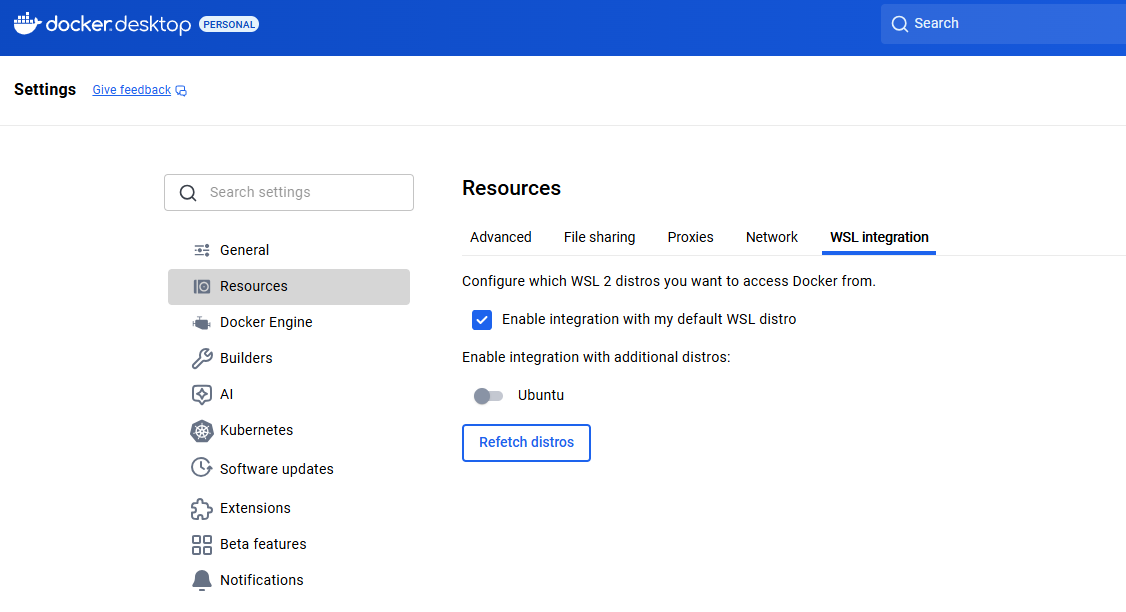
Open Docker Desktop Settings.
-
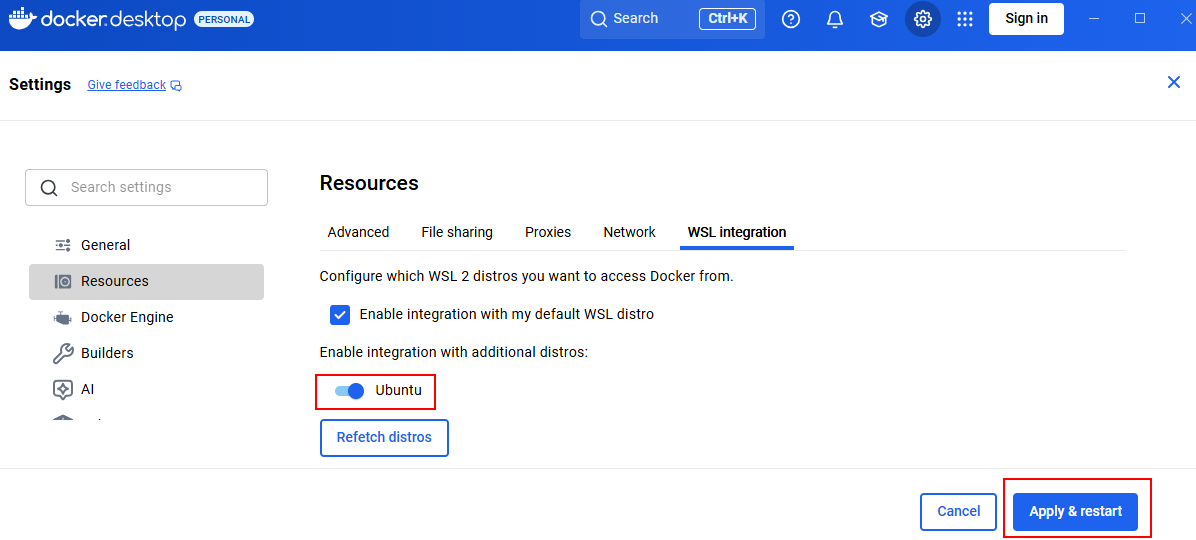
Go to Resources > WSL Integration.
-
Ensure "Enable integration with my default WSL distro" is checked (or toggle the switch for your specific distro, e.g., Ubuntu).
-
Click Apply & Restart.
Once this is enabled, running psql -h localhost -p 5432 inside WSL will work exactly as it does in Windows because Docker effectively "shares" the localhost interface with your WSL instance.
2. The Alternative: Using the Host IP
If you don't want to use WSL Integration, localhost inside WSL refers to the WSL VM itself, not your Windows host. To reach the Postgres container from WSL in this case, you must use the IP address that Windows assigns to the WSL gateway.
-
Host Alias: In many setups, you can use the special DNS name
host.docker.internalinstead oflocalhost. -
Manual IP: You can find the correct IP by running this command inside your WSL terminal:
cat /etc/resolv.conf | grep nameserver | awk '{print $2}'You would then connect using that IP (e.g.,
psql -h 172.25.160.1 -p 5432).
3. Troubleshooting "Connection Refused"
If you still can't connect, check these two common blockers:
-
Postgres Configuration: Ensure your Docker container is listening on all interfaces. In your
docker runcommand ordocker-compose.yml, you should be mapping the port like-p 5432:5432. -
Windows Firewall: Sometimes the Windows Defender Firewall blocks traffic coming from the WSL virtual network to the Windows host. You may need to create an Inbound Rule to allow TCP traffic on port 5432 for the WSL IP range.


 浙公网安备 33010602011771号