In Airflow, what's the difference between TaskMarker and TaskSensor?
In Airflow, TaskSensor and TaskMarker both relate to dependencies between DAGs, but they serve very different purposes and are used in different directions of dependency.
Below is a clear, practical explanation.
High-level difference
| Aspect | TaskSensor | TaskMarker |
|---|
| Purpose |
Waits for another task to finish |
Declares a dependency target for another DAG |
| Direction |
Downstream waits on upstream |
Upstream advertises itself |
| Is it a real task? |
✅ Yes (runs, pokes, can wait) |
❌ No (metadata-only marker) |
| Scheduling impact |
Can block a DAG run |
Does not run or wait |
| Typical use |
Cross-DAG waiting |
Cross-DAG dependency declaration |
TaskSensor
What it is
A sensor that waits until a specific task in another DAG reaches a desired state.
Common examples:
What it does
Example
This means:
“Don’t run until upstream_dag.final_task succeeds.”
Characteristics
-
Consumes scheduler resources while waiting
-
Can slow down pipelines if misused
-
Enforces hard runtime dependency
TaskMarker
What it is
A metadata marker, not a runnable task.
Specifically:
What it does
-
Declares:
“This task is depended on by another DAG”
-
Helps Airflow:
Example
This means:
“A task in downstream_dag depends on me.”
Characteristics
-
Does not run
-
Does not wait
-
Exists only for:
-
Dependency visualization
-
Clearing behavior
-
DAG integrity
Why both exist (and why one isn’t enough)
Without TaskMarker
If you use only ExternalTaskSensor:
-
Clearing the upstream DAG won’t clear downstream DAGs
-
Lineage is invisible to Airflow
-
Risk of inconsistent state
With TaskMarker + TaskSensor
Airflow can:
This is why Airflow recommends using both together.
Typical paired usage (recommended)
Upstream DAG
Downstream DAG
This creates a bi-directional, safe dependency.
Mental model
-
TaskSensor:
“I will WAIT until something happens elsewhere.”
-
TaskMarker:
“Someone else depends on me — remember that.”
Key takeaways
-
TaskSensor blocks execution
-
TaskMarker does not run
-
Sensors enforce runtime ordering
-
Markers enable safe dependency tracking
-
Use both for cross-DAG dependencies
If you want, I can also explain:
-
Why sensors can cause scheduler bottlenecks
-
Alternatives like Dataset-based scheduling
-
How clearing behaves with and without markers
-
When you should not use cross-DAG sensors
You said 'If you use only ExternalTaskSensor, clearing the upstream DAG won’t clear downstream DAGs'. What does clearing mean?
Great follow-up — “clearing” is a very specific (and very important) concept in Airflow.
What does “clearing” mean in Airflow?
Clearing a task or DAG run means:
Resetting task instance state so Airflow will run it again
When you clear something, Airflow:
-
Sets the task instance state back to none
-
Keeps the DAG run and execution date
-
Allows the scheduler to re-execute the task
Clearing is not deleting.
How clearing is used in practice
Clearing is commonly used when:
-
A task failed and you fixed the issue
-
Upstream data changed
-
You want to re-run part of a pipeline
-
You want to re-process historical data
Example (UI):
Clearing vs deleting (important difference)
| Action | What happens |
|---|
| Clear task |
Task state reset → runs again |
| Clear DAG run |
All tasks reset → runs again |
| Delete DAG run |
DAG run removed permanently |
Clearing with cross-DAG dependencies
This is where ExternalTaskSensor vs ExternalTaskMarker matters.
Scenario
What happens when you clear DAG A?
-
DAG A tasks are cleared and re-run
-
DAG B:
This creates a data consistency problem:
How ExternalTaskMarker fixes this
When DAG A uses an ExternalTaskMarker:
Airflow now knows:
“This task is depended on by another DAG.”
So when you clear DAG A:
This keeps pipelines consistent.
What “recursive clearing” means
Recursive clearing means:
“Clear this task and everything that depends on it — even across DAGs.”
This only works if:
Visual example
Without marker
Clear A1:
-
A1 reruns
-
B1 remains success ❌
With marker + sensor
Clear A1:
-
A1 reruns
-
B1 is cleared too ✅
Why this matters in production
Without proper clearing:
This is why Airflow strongly recommends:
Always pair ExternalTaskSensor with ExternalTaskMarker.
Key takeaway
-
Clearing = resetting task state to rerun
-
It is essential for recovery and reprocessing
-
Sensors alone do not propagate clears
-
Markers enable safe, recursive clearing across DAGs
from __future__ import annotations

import pendulum

from airflow.providers.standard.operators.empty import EmptyOperator
from airflow.providers.standard.sensors.external_task import ExternalTaskMarker, ExternalTaskSensor
from airflow.sdk import DAG

start_date = pendulum.datetime(2021, 1, 1, tz="UTC")

with DAG(
    dag_id="example_external_task_marker_parent",
    start_date=start_date,
    catchup=False,
    schedule=None,
    tags=["example2"],
) as parent_dag:
    # [START howto_operator_external_task_marker]
    parent_task = ExternalTaskMarker(
        task_id="parent_task",
        external_dag_id="example_external_task_marker_child",
        external_task_id="child_task1",
    )
    # [END howto_operator_external_task_marker]

with DAG(
    dag_id="example_external_task_marker_child",
    start_date=start_date,
    schedule=None,
    catchup=False,
    tags=["example2"],
) as child_dag:
    # [START howto_operator_external_task_sensor]
    child_task1 = ExternalTaskSensor(
        task_id="child_task1",
        external_dag_id=parent_dag.dag_id,
        external_task_id=parent_task.task_id,
        timeout=600,
        allowed_states=["success"],
        failed_states=["failed", "skipped"],
        mode="reschedule",
    )
    # [END howto_operator_external_task_sensor]

    # [START howto_operator_external_task_sensor_with_task_group]
    child_task2 = ExternalTaskSensor(
        task_id="child_task2",
        external_dag_id=parent_dag.dag_id,
        external_task_group_id="parent_dag_task_group_id",
        timeout=600,
        allowed_states=["success"],
        failed_states=["failed", "skipped"],
        mode="reschedule",
    )
    # [END howto_operator_external_task_sensor_with_task_group]

    child_task3 = EmptyOperator(task_id="child_task3")
    child_task1 >> child_task2 >> child_task3
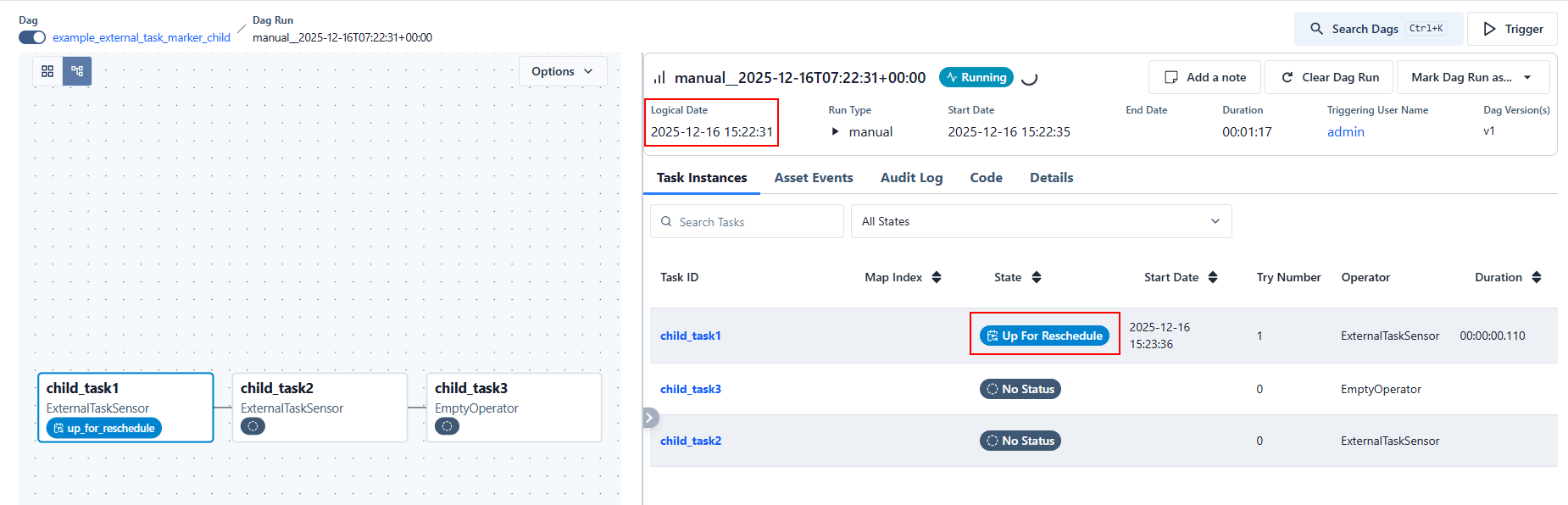
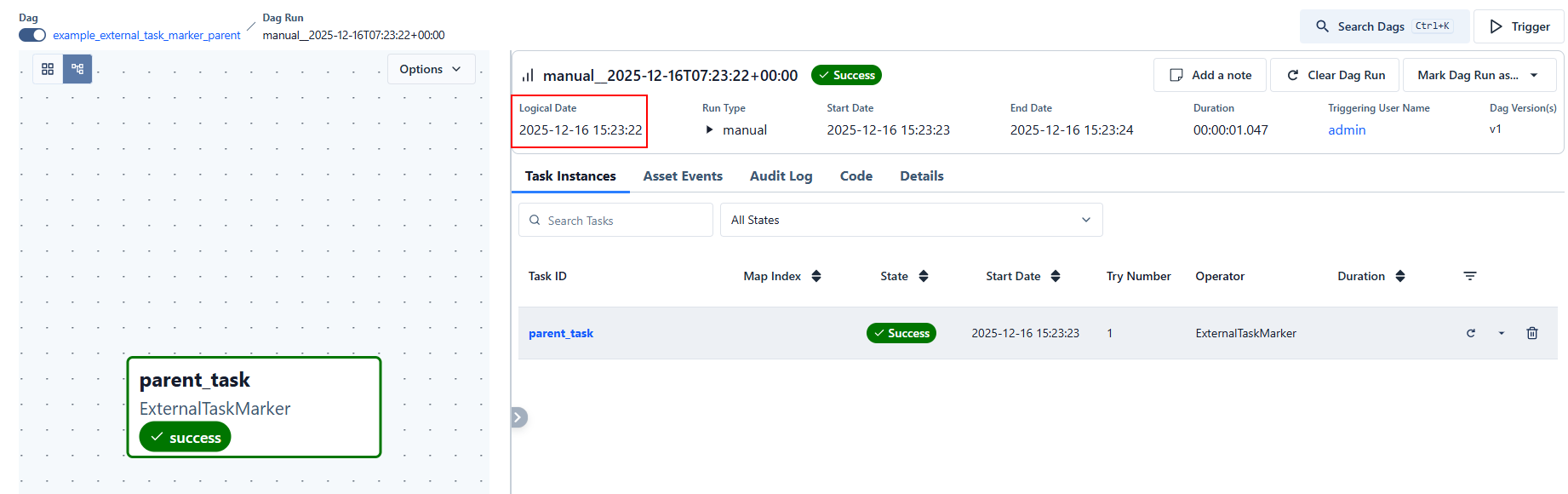
For the above code, I manually ran the two DAGs, the task parent_task of the first DAG succeeded, the state of the task child_task1 in the second DAG became 'Up for Reschedule', why?
Key concepts that explain everything
Before looking at each task, there are three important Airflow behaviors involved:
1. ExternalTaskSensor + execution dates
An ExternalTaskSensor does not just look for a successful task in another DAG.
It looks for a task with the same logical date (execution date).
If the parent DAG and child DAG were manually triggered at different times, their logical dates will not match → the sensor will never find the external task.
This is the most common source of confusion with ExternalTaskSensor.
2. mode='reschedule'
When a sensor runs in reschedule mode:
This is not a failure.
How to make the logical date same when manually ran the two DAGs?
To make the logical date (execution date) the same when manually running two DAGs, you must explicitly control the logical date at trigger time. Simply clicking “Trigger DAG” in the UI is not enough, because each click gets its own logical date.
Below are the correct and supported ways to do this.
✅ Best Practice: Trigger one DAG from the other (recommended)
Use TriggerDagRunOperator so Airflow automatically propagates the logical date.
Parent DAG
✔ The child DAG run will have the exact same logical date
✔ This is the safest and cleanest solution
✔ Works perfectly with ExternalTaskSensor
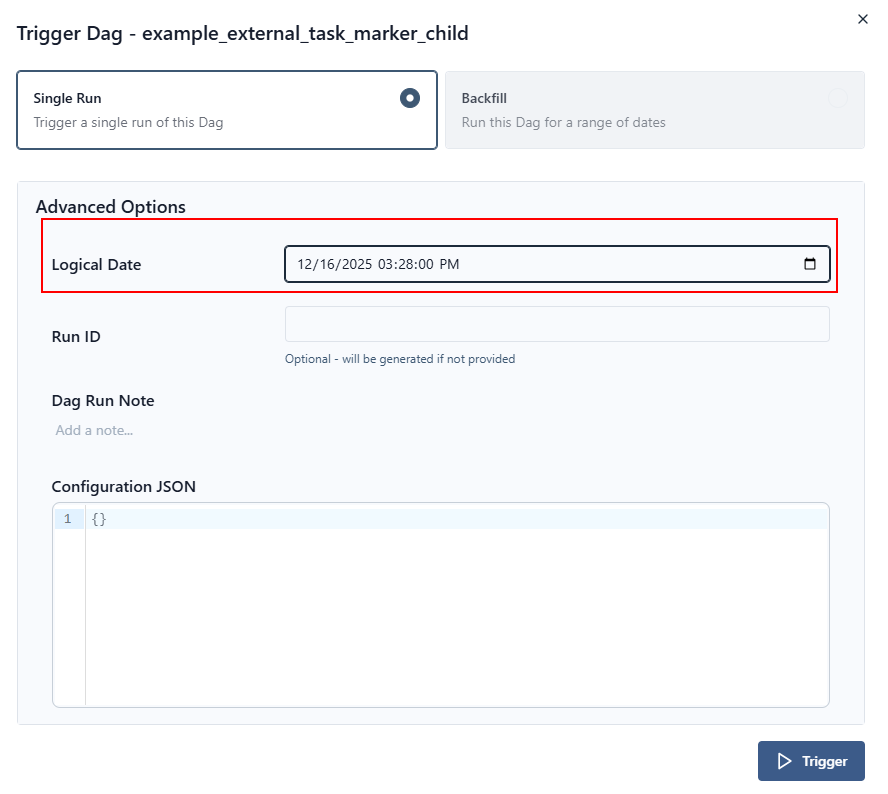
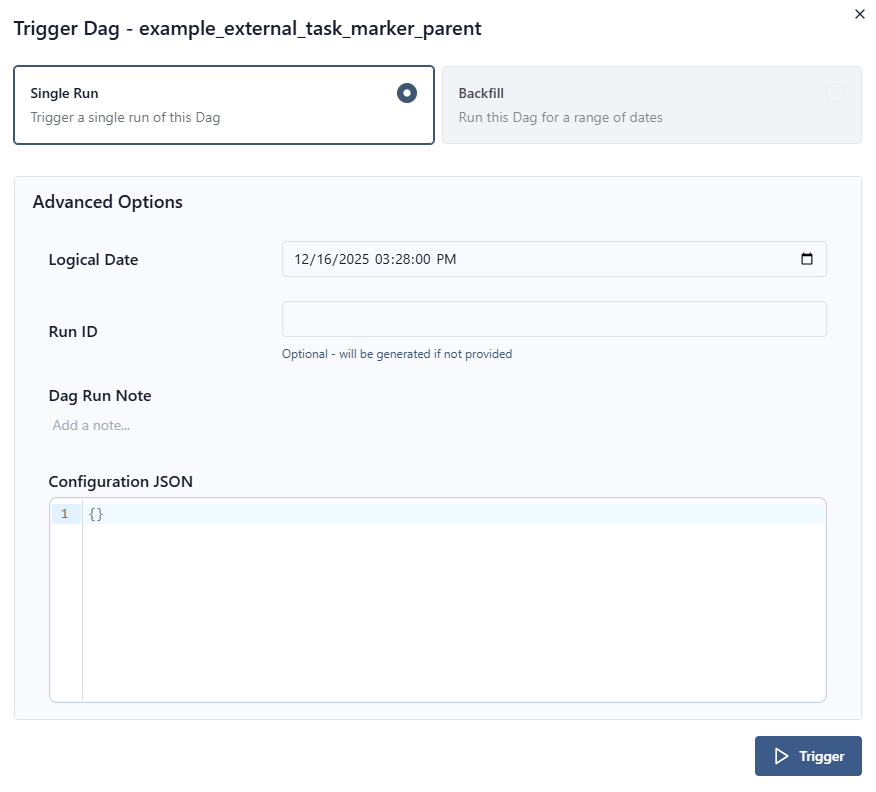
✅ Manual Trigger via Airflow UI (advanced but works)
When triggering manually in the UI:
-
Click Trigger DAG
-
Open Advanced options
-
Set Logical date explicitly
Example:
-
Trigger both DAGs using the exact same value
⚠️ Even a one-second difference will break ExternalTaskSensor.
✅ Trigger via CLI (most precise manual method)
✔ Guaranteed match
✔ Ideal for testing
🚫 What does NOT work
| Method | Why |
|---|
| Clicking “Trigger DAG” twice |
Each click gets a different logical date |
| Relying on start_date |
Only used for scheduling, not manual runs |
execution_delta |
Still requires aligned logical dates |
| Sensors without date control |
Will wait forever |
🔎 How to verify logical dates match
In the Airflow UI:
-
Open Graph View
-
Click the DAG run
-
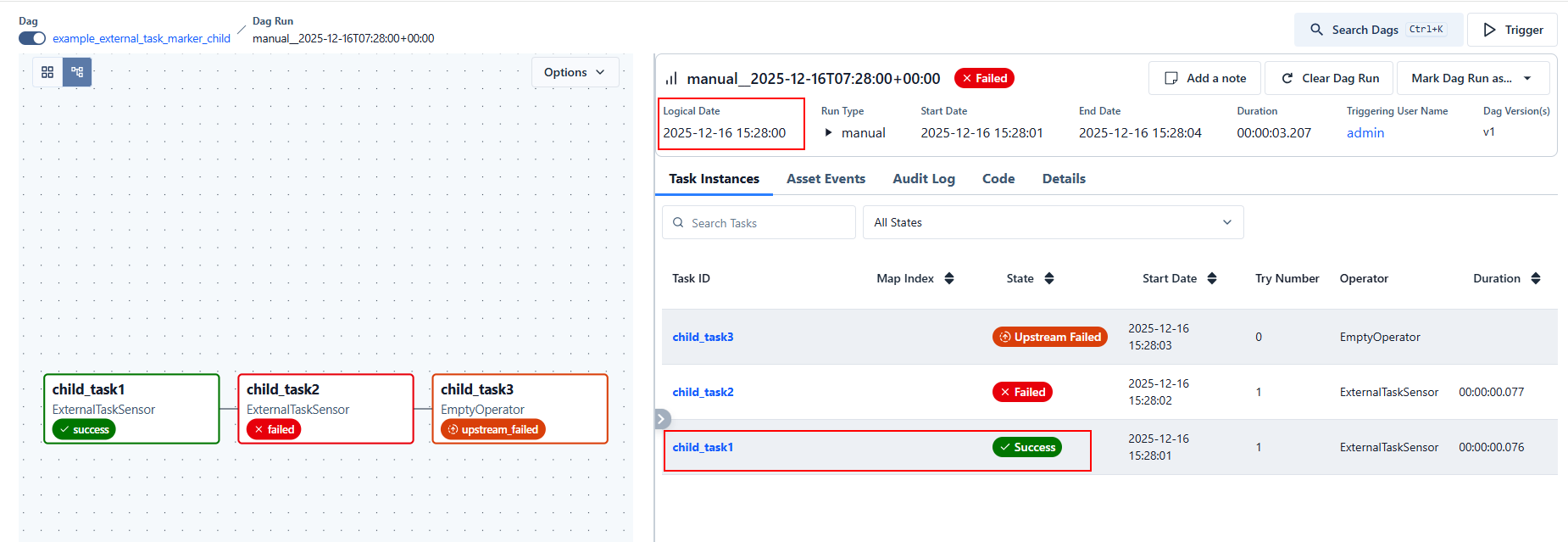
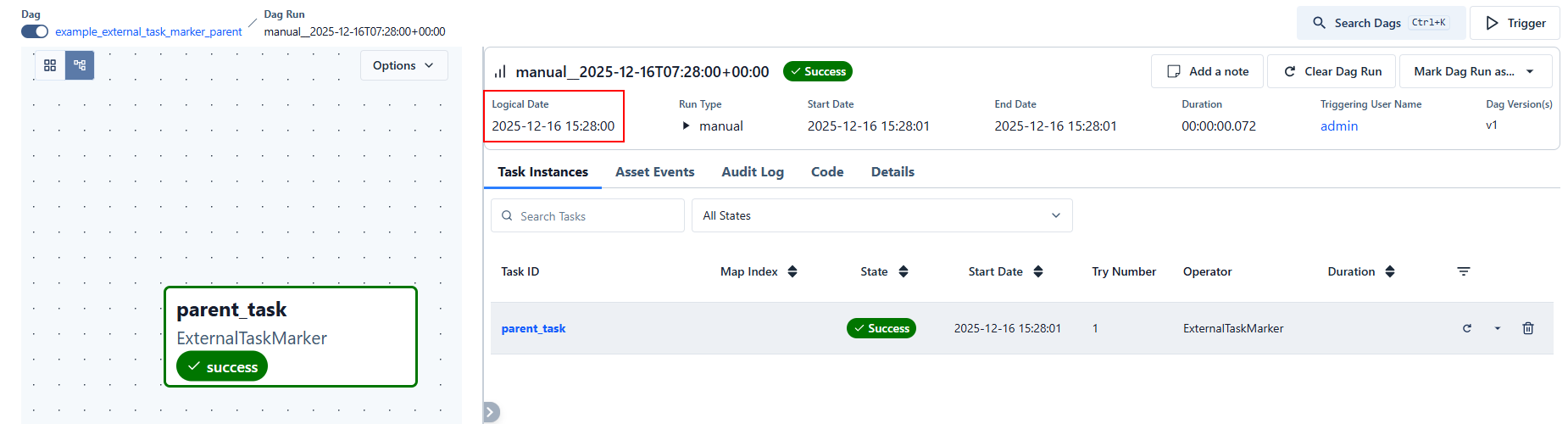
Check Logical date
Or via CLI:
🧠 Key mental model
ExternalTaskSensor waits for:
-
Same external_dag_id
-
Same external_task_id
-
Same logical date
-
Desired task state
If any of those differ → sensor waits.
![1]()
![2]()
![3]()
![4]()
![5]()
![6]()
![7]()



 浙公网安备 33010602011771号