


🌈 What is Colorama?
Colorama is a lightweight Python library that makes it easy to print colored and styled text in the terminal.
It helps your console output look more readable, expressive, and visually appealing.
It is widely used in:
-
CLI (Command-Line Interface) applications
-
Logging
-
Interactive scripts
-
Educational programs
⭐ Why Use Colorama?
✔ Cross-platform compatibility
On Windows terminals, ANSI escape sequences (used to color text) don’t work by default.
Colorama translates them so your colors work the same on Windows, macOS, and Linux.
✔ Simple and intuitive
Colorama provides easy constants like Fore.RED, Back.BLUE, and Style.BRIGHT.
✔ Minimal and fast
It has no heavy dependencies and works instantly.
🚀 Installation
🖥️ Basic Usage Example
from colorama import init, Fore, Back, Style

# Initialize Colorama (especially important on Windows)
init()

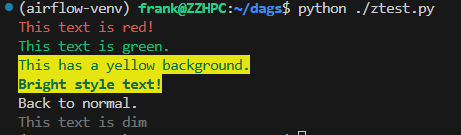
print(Fore.RED + "This text is red!")
print(Fore.GREEN + "This text is green.")
print(Back.YELLOW + "This has a yellow background.")
print(Style.BRIGHT + "Bright style text!")
print(Style.RESET_ALL + "Back to normal.")
print(Style.DIM + 'This text is dim' + Style.RESET_ALL)
🎨 Common Colorama Constants
Foreground colors (Fore)
-
Fore.RED -
Fore.GREEN -
Fore.BLUE -
Fore.YELLOW -
Fore.MAGENTA -
Fore.CYAN -
Fore.WHITE -
Fore.RESET
Background colors (Back)
-
Back.RED -
Back.GREEN -
Back.BLUE -
…
Styles (Style)
-
Style.DIM -
Style.NORMAL -
Style.BRIGHT -
Style.RESET_ALL
🧹 Resetting Styles
Colorama styles are persistent—they continue until reset.
Use:
📦 Advanced Feature: autoreset=True
Avoid manually resetting styles:
🛠️ Suitable Use Cases
-
Making your CLI tool more user-friendly
-
Color-coding log levels (e.g., errors in red)
-
Making terminal output easier to scan
-
Educational tools that need colorful output


 浙公网安备 33010602011771号