


SKIP
SKIP (and its synonym OFFSET) defines from which row to start including the rows in the output.
By using SKIP, the result set will get trimmed from the top.

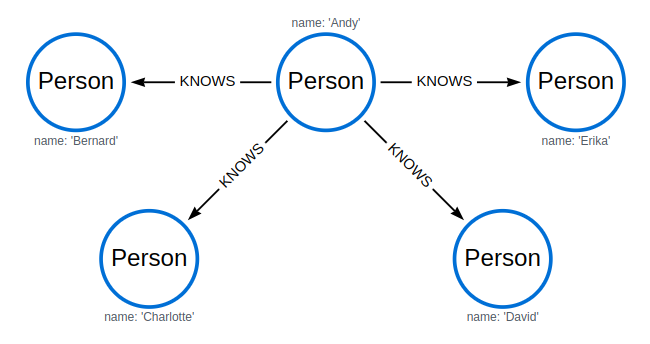
MATCH (n)
RETURN n.name
ORDER BY n.name
SKIP 3
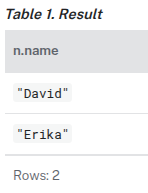
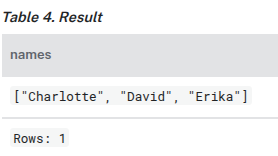
MATCH (n)
SKIP 2
RETURN collect(n.name) AS names
UNION
UNION combines the results of two or more queries into a single result set that includes all the rows that belong to any queries in the union.
The number and the names of the columns must be identical in all queries combined by using UNION.
To keep all the result rows, use UNION ALL. Using just UNION (or UNION DISTINCT) will combine and remove duplicates from the result set.
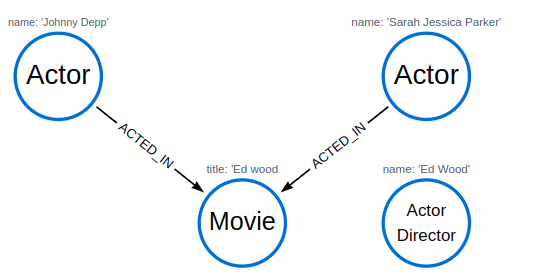
MATCH (n:Actor)
RETURN n.name AS name
UNION ALL
MATCH (n:Movie)
RETURN n.title AS name
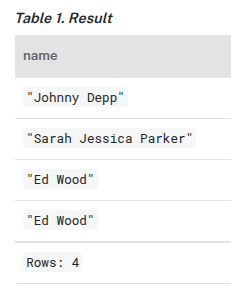
MATCH (n:Actor)
RETURN n.name AS name
UNION
MATCH (n:Movie)
RETURN n.title AS name
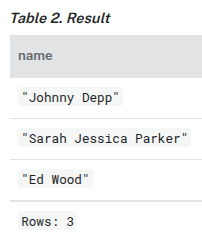
UNION DISTINCT
Removal of duplicates can also be accomplished by explicitly including DISTINCT in the UNION. The UNION DISTINCT keyword was introduced as part of Cypher®'s GQL conformance, and using it is functionally the same as using simple UNION.
Post-union processing
The UNION clause can be used within a CALL subquery to further process the combined results before a final output is returned.

CALL () {
  MATCH (a:Actor)
  RETURN a.name AS name
UNION ALL
  MATCH (m:Movie)
  RETURN m.title AS name
}
RETURN name, count(*) AS count
ORDER BY count
UNWIND
The UNWIND clause makes it possible to transform any list back into individual rows. These lists can be parameters that were passed in, previously collect-ed result, or other list expressions.

Common usage of the UNWIND clause:
-
Create distinct lists.
-
Create data from parameter lists that are provided to the query.

Unwinding a list
UNWIND [1, 2, 3, null] AS x
RETURN x, 'val' AS y
╒════╤═════╕
│x   │y    │
╞════╪═════╡
│1   │"val"│
├────┼─────┤
│2   │"val"│
├────┼─────┤
│3   │"val"│
├────┼─────┤
│null│"val"│
└────┴─────┘
Creating a distinct list
We want to transform a list of duplicates into a set using DISTINCT.
WITH [1, 1, 2, 2] AS coll
UNWIND coll AS x
WITH DISTINCT x
RETURN collect(x) AS setOfVals
╒═════════╕
│setOfVals│
╞═════════╡
│[1, 2]   │
└─────────┘
Using UNWIND with any expression returning a list
WITH
  [1, 2] AS a,
  [3, 4] AS b
UNWIND (a + b) AS x
RETURN x
╒═══╕
│x  │
╞═══╡
│1  │
├───┤
│2  │
├───┤
│3  │
├───┤
│4  │
└───┘
Using UNWIND with a list of lists
Multiple UNWIND clauses can be chained to unwind nested list elements.
WITH [[1, 2], [3, 4], 5] AS nested
UNWIND nested AS x
UNWIND x AS y
RETURN y
╒═══╕
│y  │
╞═══╡
│1  │
├───┤
│2  │
├───┤
│3  │
├───┤
│4  │
└───┘
Using UNWIND with an empty list
Using an empty list with UNWIND will produce no rows, irrespective of whether or not any rows existed beforehand, or whether or not other values are being projected.
Essentially, UNWIND [] reduces the number of rows to zero, and thus causes the query to cease its execution, returning no results. This has value in cases such as UNWIND v, where v is a variable from an earlier clause that may or may not be an empty list — when it is an empty list, this will behave just as a MATCH that has no results.
UNWIND [] AS empty
RETURN 'literal_that_is_not_returned'
(no changes, no records)
To avoid inadvertently using UNWIND on an empty list, CASE may be used to replace an empty list with a null:
WITH [] AS list
UNWIND
  CASE
    WHEN list = [] THEN [null]
    ELSE list
  END AS emptylist
RETURN emptylist
╒═════════╕
│emptylist│
╞═════════╡
│null     │
└─────────┘
Using UNWIND with an expression that is not a list
Using UNWIND on an expression that does not return a list, will return the same result as using UNWIND on a list that just contains that expression. As an example, UNWIND 5 is effectively equivalent to UNWIND[5]. The exception to this is when the expression returns null — this will reduce the number of rows to zero, causing it to cease its execution and return no results.
UNWIND null AS x
RETURN x, 'some_literal'
(no changes, no records)
Creating nodes from a list parameter
Create a number of nodes and relationships from a parameter-list without using FOREACH.
:param {
  "events" : [ {
    "year" : 2014,
    "id" : 1
  }, {
    "year" : 2014,
    "id" : 2
  } ]
}
UNWIND $events AS event
MERGE (y:Year {year: event.year})
MERGE (y)<-[:IN]-(e:Event {id: event.id})
RETURN e.id AS x ORDER BY x
╒═══╕
│x  │
╞═══╡
│1.0│
├───┤
│2.0│
└───┘
USE
The USE clause determines which graph a query, or query part, is executed against. It is supported for queries and schema commands.
Syntax
USE <graph>
<other clauses>
Composite database syntax
When running queries against a composite database, the USE clause can also appear as the first clause of:
-
Union parts:
USE <graph> <other clauses> UNION USE <graph> <other clauses> -
Subqueries:
CALL () {
  USE <graph>
  <other clauses>
}
In subqueries, a
USEclause may appear directly following the variable scope clause:CALL () { … }(introduced in Neo4j 5.23). Or, if you are using an older version of Neo4j, directly following an importingWITHclause.
When executing queries against a composite database, the USE clause must only refer to graphs that are part of the current composite database.
Query a graph
This example assumes that the DBMS contains a database named myDatabase:
USE myDatabase
MATCH (n) RETURN n
Query a composite database constituent graph
In this example it is assumed that the DBMS contains a composite database named myComposite, which includes an alias named myConstituent:
USE myComposite.myConstituent
MATCH (n) RETURN n
Query a composite database constituent graph dynamically
The graph.byName() function can be used in the USE clause to resolve a constituent graph from a STRING value containing the qualified name of a constituent.
USE graph.byName('myComposite.myConstituent')
MATCH (n) RETURN n
USE graph.byName($graphName)
MATCH (n) RETURN n
Query a composite database constituent using elementId
The graph.byElementId() function can be used in the USE clause to resolve a constituent graph to which a given element id belongs. As of Neo4j 5.26, it is supported on both standard and composite databases (on previous versions it is only available on composite databases).

In the below example, it is assumed that the DBMS contains the database corresponding to the given element id. If you are connected to a composite database it needs to be a element id to a constituent database, which is a standard database in the DBMS.
USE graph.byElementId("4:c0a65d96-4993-4b0c-b036-e7ebd9174905:0")
MATCH (n) RETURN n
WHERE
Introduction
The WHERE clause is not a clause in its own right — rather, it is part of the MATCH, OPTIONAL MATCH, and WITH clauses.
When used with MATCH and OPTIONAL MATCH, WHERE adds constraints to the patterns described. It should not be seen as a filter after the matching is finished.
In the case of WITH, however, WHERE simply filters the results.
In the case of multiple MATCH / OPTIONAL MATCH clauses, the predicate in WHERE is always a part of the patterns in the directly preceding MATCH / OPTIONAL MATCH. Both results and performance may be impacted if WHERE is put inside the wrong MATCH clause.
Indexes may be used to optimize queries using WHERE in a variety of cases.
Basic usage
Node pattern predicates
WHERE can appear inside a node pattern in a MATCH clause or a pattern comprehension:
WITH 30 AS minAge
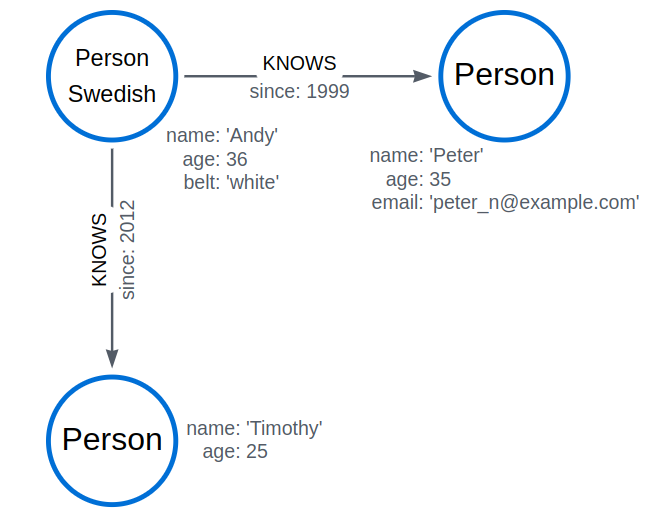
MATCH (a:Person WHERE a.name = 'Andy')-[:KNOWS]->(b:Person WHERE b.age > minAge)
RETURN b.name
When used this way, predicates in WHERE can reference the node variable that the WHERE clause belongs to, but not other elements of the MATCH pattern.
The same rule applies to pattern comprehensions:
MATCH (a:Person {name: 'Andy'})
RETURN [(a)-->(b WHERE b:Person) | b.name] AS friends
╒════════════════════╕
│friends             │
╞════════════════════╡
│["Timothy", "Peter"]│
└────────────────────┘
Boolean operations
The following boolean operators can be used with the WHERE clause: AND, OR, XOR, and NOT. For more information on how operators work with null, see the chapter on Working with null.
MATCH (n:Person)
WHERE n.name = 'Peter' XOR (n.age < 30 AND n.name = 'Timothy') OR NOT (n.name = 'Timothy' OR n.name = 'Peter')
RETURN
  n.name AS name,
  n.age AS age
ORDER BY name
Filter on node label
To filter nodes by label, write a label predicate after the WHERE keyword using WHERE n:foo:
MATCH (n)
WHERE n:Swedish
RETURN n.name, n.age
Filter on node property
To filter on a node property, write your clause after the WHERE keyword:
MATCH (n:Person)
WHERE n.age < 30
RETURN n.name, n.age
Filter on relationship property
To filter on a relationship property, write your clause after the WHERE keyword:
MATCH (n:Person)-[k:KNOWS]->(f)
WHERE k.since < 2000
RETURN f.name, f.age, f.email
Filter on dynamically-computed node property
MATCH (n:Person)
WHERE n[$propname] < 30
RETURN n.name, n.age
Property existence checking
Use the IS NOT NULL predicate to only include nodes or relationships in which a property exists:
MATCH (n:Person)
WHERE n.belt IS NOT NULL
RETURN n.name, n.belt
Using WITH
As WHERE is not considered a clause in its own right, its scope is not limited by a WITH directly before it.
MATCH (n:Person)
WITH n.name as name
WHERE n.age = 25
RETURN name
╒═════════╕
│name     │
╞═════════╡
│"Timothy"│
└─────────┘
The name for Timothy is returned because the WHERE clause still acts as a filter on the MATCH. WITH reduces the scope for the rest of the query moving forward. In this case, name is now the only variable in scope for the RETURN clause.
STRING matching
The prefix and suffix of a STRING can be matched using STARTS WITH and ENDS WITH. To undertake a substring search (that is, match regardless of the location within a STRING), use CONTAINS.
The matching is case-sensitive. Attempting to use these operators on values which are not STRING values will return null.
MATCH (n:Person)
WHERE n.name STARTS WITH 'Pet'
RETURN n.name, n.age
MATCH (n:Person)
WHERE n.name ENDS WITH 'ter'
RETURN n.name, n.age
MATCH (n:Person)
WHERE n.name CONTAINS 'ete'
RETURN n.name, n.age
Checking if a STRING IS NORMALIZED
The IS NORMALIZED operator (introduced in Neo4j 5.17) is used to check whether the given STRING is in the NFC Unicode normalization form:
MATCH (n:Person)
WHERE n.name IS NORMALIZED
RETURN n.name AS normalizedNames
The given STRING values contain only normalized Unicode characters, therefore all the matched name properties are returned. For more information, see the section about the normalization operator.
╒═══════════════╕
│normalizedNames│
╞═══════════════╡
│"Andy"         │
├───────────────┤
│"Timothy"      │
├───────────────┤
│"Peter"        │
└───────────────┘
String matching negation
Use the NOT keyword to exclude all matches on given STRING from your result:
MATCH (n:Person)
WHERE NOT n.name ENDS WITH 'y'
RETURN n.name, n.age
Regular expressions
Cypher® supports filtering using regular expressions. The regular expression syntax is inherited from the Java regular expressions. This includes support for flags that change how STRING values are matched, including case-insensitive (?i), multiline (?m), and dotall (?s).
Flags are given at the beginning of the regular expression. For an example of a regular expression flag given at the beginning of a pattern, see the case-insensitive regular expression section.
Matching using regular expressions
To match on regular expressions, use =~ 'regexp':
MATCH (n:Person)
WHERE n.name =~ 'Tim.*'
RETURN n.name, n.age
Escaping in regular expressions
Characters like . or * have special meaning in a regular expression. To use these as ordinary characters, without special meaning, escape them.
MATCH (n:Person)
WHERE n.email =~ '.*\\.com'
RETURN n.name, n.age, n.email
The name, age, and email values for Peter are returned because his email ends with ".com":
╒═══════╤═════╤═════════════════════╕
│n.name │n.age│n.email              │
╞═══════╪═════╪═════════════════════╡
│"Peter"│35   │"peter_n@example.com"│
└───────┴─────┴─────────────────────┘
Note that the regular expression constructs in Java regular expressions are applied only after resolving the escaped character sequences in the given string literal. It is sometimes necessary to add additional backslashes to express regular expression constructs. This list clarifies the combination of these two definitions, containing the original escape sequence and the resulting character in the regular expression:
| String literal sequence | Resulting Regex sequence | Regex match |
|---|---|---|
|
|
Tab |
Tab |
|
|
|
Tab |
|
|
Backspace |
Backspace |
|
|
|
Word boundary |
|
|
Newline |
NewLine |
|
|
|
Newline |
|
|
Carriage return |
Carriage return |
|
|
|
Carriage return |
|
|
Form feed |
Form feed |
|
|
|
Form feed |
|
|
Single quote |
Single quote |
|
|
Double quote |
Double quote |
|
|
Backslash |
Backslash |
|
|
|
Backslash |
|
|
Unicode UTF-16 code point (4 hex digits must follow the |
Unicode UTF-16 code point (4 hex digits must follow the |
|
|
|
Unicode UTF-16 code point (4 hex digits must follow the |

Case-insensitive regular expressions
By pre-pending a regular expression with (?i), the whole expression becomes case-insensitive:
MATCH (n:Person)
WHERE n.name =~ '(?i)AND.*'
RETURN n.name, n.age
Path pattern expressions
Similar to existential subqueries, path pattern expressions can be used to assert whether a specified path exists at least once in a graph. While existential subqueries are more powerful and capable of performing anything achievable with path pattern expressions, path pattern expressions are more concise.
Path pattern expressions have the following restrictions (use cases that require extended functionality should consider using existential subqueries instead):
-
Path pattern expressions may only use a subset of graph pattern semantics.
-
A path pattern expression must be a path pattern of length greater than zero. In other words, it must contain at least one relationship or variable-length relationship.
-
Path pattern expressions may not declare new variables. They can only reference existing variables.
-
Path pattern expressions may only be used in positions where a boolean expression is expected. The following sections will demonstrate how to use path pattern expressions in a
WHEREclause.
Filter on patterns
MATCH
  (timothy:Person {name: 'Timothy'}),
  (other:Person)
WHERE (other)-->(timothy)
RETURN other.name, other.age
╒══════════╤═════════╕
│other.name│other.age│
╞══════════╪═════════╡
│"Andy"    │36       │
└──────────┴─────────┘
Filter on patterns using NOT
The NOT operator can be used to exclude a pattern:
MATCH
  (peter:Person {name: 'Peter'}),
  (other:Person)
WHERE NOT (other)-->(peter)
RETURN other.name, other.age
The name and age values for nodes that do not have an outgoing relationship to Peter are returned:
╒══════════╤═════════╕
│other.name│other.age│
╞══════════╪═════════╡
│"Timothy" │25       │
├──────────┼─────────┤
│"Peter"   │35       │
└──────────┴─────────┘
Filter on patterns with properties
Properties can also be added to patterns:
MATCH (other:Person)
WHERE (other)-[:KNOWS]-({name: 'Timothy'})
RETURN other.name, other.age
Lists
IN operator
To check if an element exists in a list, use the IN operator.
MATCH (a:Person)
WHERE a.name IN ['Peter', 'Timothy']
RETURN a.name, a.age
Missing properties and values
Default to false if property is missing
As missing properties evaluate to null, the comparison in the example will evaluate to false for nodes without the belt property:
MATCH (n:Person)
WHERE n.belt = 'white'
RETURN n.name, n.age, n.belt
Only the name, age, and belt values of nodes with white belts are returned:
MATCH (n:Person)
WHERE n.belt = 'white'
RETURN n.name, n.age, n.belt
Default to true if property is missing
To compare node or relationship properties against missing properties, use the IS NULL operator:
MATCH (n:Person)
WHERE n.belt = 'white' OR n.belt IS NULL
RETURN n.name, n.age, n.belt
ORDER BY n.name
This returns all values for all nodes, even those without the belt property:
╒═════════╤═════╤═══════╕
│n.name   │n.age│n.belt │
╞═════════╪═════╪═══════╡
│"Andy"   │36   │"white"│
├─────────┼─────┼───────┤
│"Peter"  │35   │null   │
├─────────┼─────┼───────┤
│"Timothy"│25   │null   │
└─────────┴─────┴───────┘
Filter on null
To test if a value or variable is null, use the IS NULL operator. To test if a value or variable is not null, use the IS NOT NULL operator NOT(IS NULL x) also works.
Using ranges
Simple range
To check whether an element exists within a specific range, use the inequality operators <, ⇐, >=, >:
MATCH (a:Person)
WHERE a.name >= 'Peter'
RETURN a.name, a.age
Composite range
Several inequalities can be used to construct a range:
MATCH (a:Person)
WHERE a.name > 'Andy' AND a.name < 'Timothy'
RETURN a.name, a.age
Pattern element predicates
WHERE clauses can be added to pattern elements in order to specify additional constraints:
Relationship pattern predicates
WHERE can also appear inside a relationship pattern in a MATCH clause:
WITH 2000 AS minYear
MATCH (a:Person)-[r:KNOWS WHERE r.since < minYear]->(b:Person)
RETURN r.since
However, it cannot be used inside of variable-length relationships, as this would lead to an error. For example:
WITH 2000 AS minYear
MATCH (a:Person)-[r:KNOWS*1..3 WHERE r.since > b.yearOfBirth]->(b:Person)
RETURN r.since

Putting predicates inside a relationship pattern can help with readability. Note that it is strictly equivalent to using a standalone WHERE sub-clause.
WITH 2000 AS minYear
MATCH (a:Person)-[r:KNOWS]->(b:Person)
WHERE r.since < minYear
RETURN r.since
Relationship pattern predicates can also be used inside pattern comprehensions, where the same caveats apply:
WITH 2000 AS minYear
MATCH (a:Person {name: 'Andy'})
RETURN [(a)-[r:KNOWS WHERE r.since < minYear]->(b:Person) | r.since] AS years
WITH
The WITH clause allows query parts to be chained together, piping the results from one to be used as starting points or criteria in the next.

Using WITH, you can manipulate the output before it is passed on to the following query parts. Manipulations can be done to the shape and/or number of entries in the result set.
One common usage of WITH is to limit the number of entries passed on to other MATCH clauses. By combining ORDER BY and LIMIT, it is possible to get the top X entries by some criteria and then bring in additional data from the graph.
WITH can also be used to introduce new variables containing the results of expressions for use in the following query parts (see Introducing variables for expressions). For convenience, the wildcard * expands to all variables that are currently in scope and carries them over to the next query part (see Using the wildcard to carry over variables).
Another use is to filter on aggregated values. WITH is used to introduce aggregates which can then be used in predicates in WHERE. These aggregate expressions create new bindings in the results.
WITH is also used to separate reading from updating of the graph. Every part of a query must be either read-only or write-only. When going from a writing part to a reading part, the switch must be done with a WITH clause.
Introducing variables for expressions
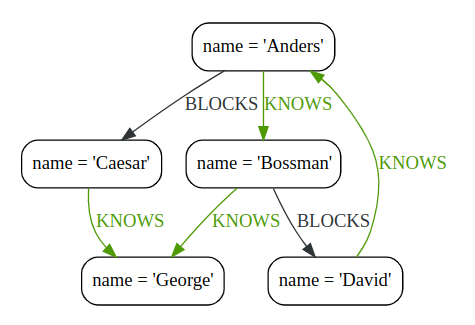
MATCH (george {name: 'George'})<--(otherPerson)
WITH otherPerson, toUpper(otherPerson.name) AS upperCaseName
WHERE upperCaseName STARTS WITH 'C'
RETURN otherPerson.name
Using the wildcard to carry over variables
MATCH (person)-[r]->(otherPerson)
WITH *, type(r) AS connectionType
RETURN person.name, otherPerson.name, connectionType
Filter on aggregate function results
MATCH (david {name: 'David'})--(otherPerson)-->()
WITH otherPerson, count(*) AS foaf
WHERE foaf > 1
RETURN otherPerson.name
Sort results before using collect on them
MATCH (n)
WITH n
ORDER BY n.name DESC
LIMIT 3
RETURN collect(n.name)
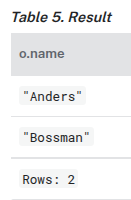
Limit branching of a path search
MATCH (n {name: 'Anders'})--(m)
WITH m
ORDER BY m.name DESC
LIMIT 1
MATCH (m)--(o)
RETURN o.name
Limit and Filtering
It is possible to limit and filter on the same WITH clause. Note that the LIMIT clause is applied before the WHERE clause.
UNWIND [1, 2, 3, 4, 5, 6] AS x
WITH x
LIMIT 5
WHERE x > 2
RETURN x
The limit is first applied, reducing the rows to the first 5 items in the list. The filter is then applied, reducing the final result as seen below:
╒═══╕
│x  │
╞═══╡
│3  │
├───┤
│4  │
├───┤
│5  │
└───┘
If the desired outcome is to filter and then limit, the filtering needs to occur in its own step:
UNWIND [1, 2, 3, 4, 5, 6] AS x
WITH x
WHERE x > 2
LIMIT 5
RETURN x
╒═══╕
│x  │
╞═══╡
│3  │
├───┤
│4  │
├───┤
│5  │
├───┤
│6  │
└───┘


 浙公网安备 33010602011771号