网页访问deepseek服务
开发html5网页,通过JavaScript访问deepseek服务。


 1 <!DOCTYPE html>
 2 <html lang="zh-CN">
 3 <head>
 4     <meta charset="UTF-8">
 5     <meta name="viewport" content="width=device-width, initial-scale=1.0">
 6     <title>DeepSeek API 问答系统</title>
 7     <link rel="stylesheet" href="styles.css">
 8 </head>
 9 <body>
10     <div class="container">
11         <h1>DeepSeek API 问答系统</h1>
12         <div class="input-group">
13             <input type="text" id="questionInput" placeholder="请输入您的问题,例如:消防法规有哪些?">
14             <button id="askButton">提问</button>
15         </div>
16         <div id="response" class="response-box"></div>
17     </div>
18     <script src="script1.js"></script>
19 </body>
20 </html>
css样式:
 1 /* styles.css */
 2 body {
 3     font-family: Arial, sans-serif;
 4     background-color: #f4f4f4;
 5     margin: 0;
 6     padding: 0;
 7     display: flex;
 8     justify-content: center;
 9     align-items: center;
10     height: 100vh;
11 }
12
13 .container {
14     background-color: #fff;
15     padding: 20px;
16     border-radius: 8px;
17     box-shadow: 0 0 10px rgba(0, 0, 0, 0.1);
18     width: 400px;
19     text-align: center;
20 }
21
22 h1 {
23     margin-bottom: 20px;
24     font-size: 24px;
25     color: #333;
26 }
27
28 .input-group {
29     display: flex;
30     justify-content: space-between;
31     margin-bottom: 20px;
32 }
33
34 #questionInput {
35     width: 70%;
36     padding: 10px;
37     border: 1px solid #ccc;
38     border-radius: 4px;
39     font-size: 16px;
40 }
41
42 #askButton {
43     padding: 10px 20px;
44     background-color: #007bff;
45     color: #fff;
46     border: none;
47     border-radius: 4px;
48     cursor: pointer;
49     font-size: 16px;
50 }
51
52 #askButton:hover {
53     background-color: #0056b3;
54 }
55
56 .response-box {
57     background-color: #f9f9f9;
58     padding: 15px;
59     border: 1px solid #ddd;
60     border-radius: 4px;
61     font-size: 16px;
62     color: #333;
63     text-align: left;
64 }
1.在线版本:
 1 // script.js
 2 document.getElementById('askButton').addEventListener('click', function() {
 3     const question = document.getElementById('questionInput').value;
 4     if (question.trim() === '') {
 5         alert('请输入问题!');
 6         return;
 7     }
 8
 9     // 这里假设DeepSeek API的端点是 'https://api.deepseek.com/v1/ask'
10     const apiUrl = 'https://api.deepseek.com/v1/chat/completions';
11     const apiKey = 'sk-f4711749144249028??'; // 替换为你的DeepSeek API密钥
12
13     fetch(apiUrl, {
14         method: 'POST',
15         headers: {
16             'Content-Type': 'application/json',
17             'Authorization': `Bearer ${apiKey}`
18             //'Access-Control-Allow-Origin':true
19         },
20         body: JSON.stringify({
21                         model: "deepseek-chat", // 根据实际模型修改
22                         messages: [{
23                             role: "user",
24                             content: question
25                         }],
26                         "stream": false
27                     })
28     })
29     .then(response => response.json())
30     .then(data => {
31         document.getElementById('response').innerText = data.choices[0].message.content;;
32     })
33     .catch(error => {
34         console.error('Error:', error);
35         document.getElementById('response').innerText = '获取答案时出错,请稍后重试。';
36     });
37 });
2.本地部署的ollama,deepseek-r1:14b
 1 // script.js
 2 document.getElementById('askButton').addEventListener('click', function() {
 3     const question = document.getElementById('questionInput').value;
 4     if (question.trim() === '') {
 5         alert('请输入问题!');
 6         return;
 7     }
 8
 9     // 这里假设DeepSeek API的端点是 'https://api.deepseek.com/v1/ask'
10     const apiUrl = 'http://localhost:11434/v1/chat/completions';
11     const apiKey = ''; // 替换为你的DeepSeek API密钥
12
13     fetch(apiUrl, {
14         method: 'POST',
15         headers: {
16             'Content-Type': 'application/json',
17             //'Authorization': `Bearer ${apiKey}`
18             //'Access-Control-Allow-Origin':true
19         },
20         body: JSON.stringify({
21                         model: "deepseek-r1:14b", // 根据实际模型修改
22                         messages: [{
23                             role: "user",
24                             content: question
25                         }],
26                         "stream": false
27                     })
28     })
29     .then(response => response.json())
30     .then(data => {
31         document.getElementById('response').innerText = data.choices[0].message.content;;
32     })
33     .catch(error => {
34         console.error('Error:', error);
35         document.getElementById('response').innerText = '获取答案时出错,请稍后重试。';
36     });
37 });
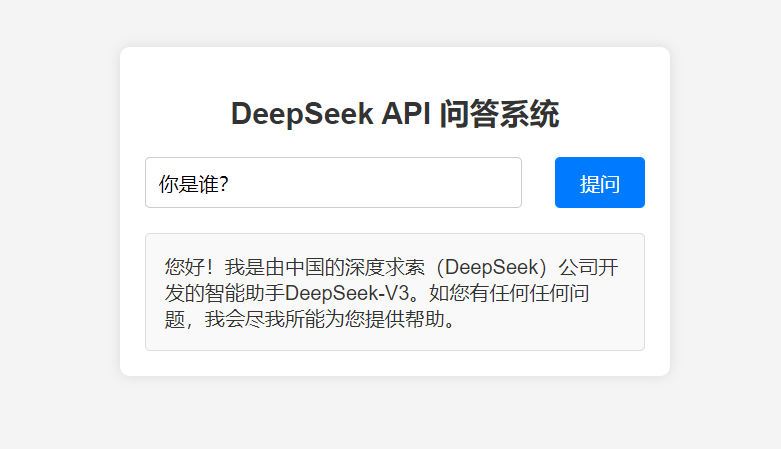
效果:
作者:太一吾鱼水
文章未经说明均属原创,学习笔记可能有大段的引用,一般会注明参考文献。
欢迎大家留言交流,转载请注明出处。

 浙公网安备 33010602011771号