

pointTransformerV1 C++推理
前面介绍了pointTransformerV1的导出和python推理,python借助的是onnxruntime_extensions库,通过装饰器的方式可以帮助我们快速验证,但实际部署的时候还是用C++的较多,这一篇介绍一下onnxruntime的C++推理。
一、onnxruntime库安装与配置
官方文档参考:https://oliviajain.github.io/onnxruntime/docs/install/。
可以参考以上文档进行源码编译,我这里选择的是发布的版本1.14.1。下载地址:https://github.com/microsoft/onnxruntime/releases
下载完后解压有对应的include和lib目录
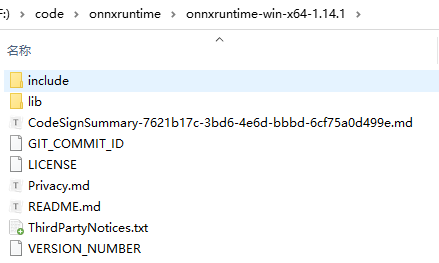
下载完后在CMakeLists.txt中进行配置即可
cmake_minimum_required(VERSION 3.9)

project(seg VERSION 1.0)

# >>> CXX11
set(CMAKE_CXX_STANDARD 11)				# C++ 11 编译器
SET(CMAKE_CXX_STANDARD_REQUIRED TRUE)
# <<< CXX11

set(ONNX_ROOT "F:/code/onnxruntime/onnxruntime-win-x64-1.14.1")
include_directories(${ONNX_ROOT}/include)

set(ONNX_LIBRARIES
	"${ONNX_ROOT}/lib/onnxruntime.lib"
	"${ONNX_ROOT}/lib/onnxruntime_providers_shared.lib"
CACHE INTERNAL "")
set(ONNX_RUNTIME_LIBRARIES
	"${ONNX_ROOT}/lib/onnxruntime.dll"
	"${ONNX_ROOT}/lib/onnxruntime_providers_shared.dll"
CACHE INTERNAL "")
二、C++推理
参考文档:https://github.com/onnx/tutorials/tree/master/PyTorchCustomOperator
https://onnxruntime.ai/docs/reference/operators/add-custom-op.html
大体可以分为以下几步:
- 第一步:定义一个算子核函数,包括构造函数和关键的接口,
void Compute(OrtKernelContext* context); - 第二步:实现Compute接口,自定义算子的核心功能在此实现
- 第三步:构造OnnxRuntime自定义算子,主要涉及算子名称,算子输入输出个数和类型
- 第四步:加载运行
接下来以FurthestSampling为例分别展示,KNNQuery算子类似。
第一步
引入头文件:#include "onnxruntime_cxx_api.h"
定义一个算子结构体如下:
struct FurthestSamplingKernel {
    FurthestSamplingKernel(const OrtApi& ort_api, const OrtKernelInfo* /*info*/) : ort_(ort_api) {
    }

    void Compute(OrtKernelContext* context);

private:
    const OrtApi& ort_;
};
第二步
这一步主要是从网络节点中解析出输入和输出,并实现采样算法。
void FurthestSamplingKernel::Compute(OrtKernelContext* context) {
    // 获取输入输出张量
    Ort::KernelContext ctx(context);

    // 输入1: 点云数据 [total_points, 3]
    auto xyz_input = ctx.GetInput(0);
    const float* xyz_data = xyz_input.GetTensorData<float>();
    auto xyz_shape = xyz_input.GetTensorTypeAndShapeInfo().GetShape();
    int64_t total_points = xyz_shape[0];

    // 输入2: 批次偏移量 [batch_size]
    auto offset_input = ctx.GetInput(1);
    const int* offset_data = offset_input.GetTensorData<int>();
    int64_t batch_size = offset_input.GetTensorTypeAndShapeInfo().GetShape()[0];

    // 输入3: 采样偏移量 [batch_size]
    auto new_offset_input = ctx.GetInput(2);
    const int* new_offset_data = new_offset_input.GetTensorData<int>();

    // 输出: 采样点索引 [total_samples]
    auto output = ctx.GetOutput(0, { new_offset_data[batch_size - 1] });
    int* idx_data = output.GetTensorMutableData<int>();

    // 分配临时内存
    std::vector<float> tmp_dist(total_points);
    float* tmp_data = tmp_dist.data();

    // 调用核心算法实现
    auto start = std::chrono::high_resolution_clock::now();
    furthestsampling_kernel(
        batch_size,
        xyz_data,
        offset_data,
        new_offset_data,
        tmp_data,
        idx_data
    );
    auto end = std::chrono::high_resolution_clock::now();
    auto duration = std::chrono::duration_cast<std::chrono::milliseconds>(end - start).count();
    std::cout << "FPS 推理耗时: " << duration << "ms" << std::endl;
第三步
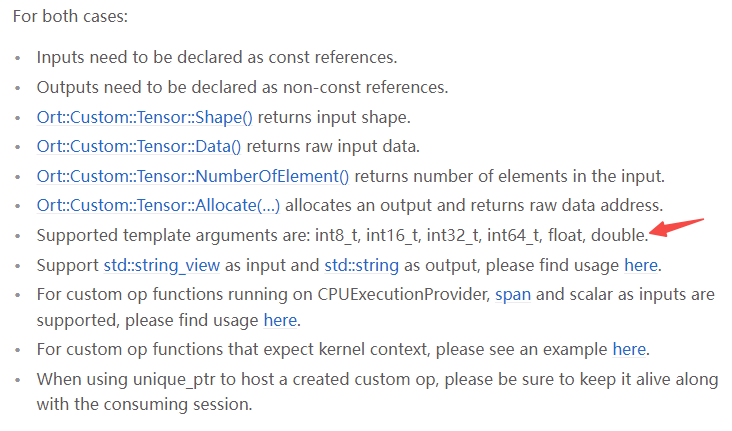
这一步主要是和上面定义的结构体以及核心函数进行关联,并对算子的输入输出个数和类型进行说明。官网相关接口和类型说明如下:
struct FurthestSamplingOptionalOnnx : Ort::CustomOpBase<FurthestSamplingOptionalOnnx, FurthestSamplingKernel> {
    explicit FurthestSamplingOptionalOnnx(const char* provider) : provider_(provider) {}

    void* CreateKernel(const OrtApi& api, const OrtKernelInfo* info) const {
        return new FurthestSamplingKernel(api, info);
    };
    const char* GetName() const { return "FurthestSampling"; };

    const char* GetExecutionProviderType() const { return provider_; };

    size_t GetInputTypeCount() const { return 3; };
    ONNXTensorElementDataType GetInputType(size_t index/*index*/) const {
        if (index == 0) {
            return ONNX_TENSOR_ELEMENT_DATA_TYPE_FLOAT;
        }
        else if (index == 1) {
            return ONNX_TENSOR_ELEMENT_DATA_TYPE_INT32;
        }
        else if (index == 2) {
            return ONNX_TENSOR_ELEMENT_DATA_TYPE_INT32;
        }
        return ONNX_TENSOR_ELEMENT_DATA_TYPE_UNDEFINED;
    };
    OrtCustomOpInputOutputCharacteristic GetInputCharacteristic(size_t index) const {
        /*if (index == 1)
            return OrtCustomOpInputOutputCharacteristic::INPUT_OUTPUT_OPTIONAL;*/
        return OrtCustomOpInputOutputCharacteristic::INPUT_OUTPUT_REQUIRED;
    }

    size_t GetOutputTypeCount() const { return 1; };
    ONNXTensorElementDataType GetOutputType(size_t /*index*/) const {
        return ONNX_TENSOR_ELEMENT_DATA_TYPE_INT32;
    };
    OrtCustomOpInputOutputCharacteristic GetOutputCharacteristic(size_t /*index*/) const {
        return OrtCustomOpInputOutputCharacteristic::INPUT_OUTPUT_REQUIRED;
    }

private:
    const char* provider_;
};
第四步
算子定义好后,则可以进行加载运行,主要配置的地方是输入输出名称
    Ort::CustomOpDomain custom_op_domain("ai.onnx.contrib");
    FurthestSamplingOptionalOnnx fps_op("CPUExecutionProvider");
    KNNQueryKernelOptionalOnnx knnQuery_op("CPUExecutionProvider");
    custom_op_domain.Add(&fps_op);
    custom_op_domain.Add(&knnQuery_op);

    Ort::SessionOptions session_options;
    session_options.Add(custom_op_domain);
    Ort::Env env_ = Ort::Env(ORT_LOGGING_LEVEL_ERROR, "Default"); //Ort::Env(ORT_LOGGING_LEVEL_INFO, "Default");

    ...

    Ort::Session session(env_, MODEL_URI, session_options);
    auto end = std::chrono::high_resolution_clock::now();
    auto duration = std::chrono::duration_cast<std::chrono::milliseconds>(end - start).count();
    std::cout << "加载耗时: " << duration << "ms" << std::endl;
    end = std::chrono::high_resolution_clock::now();
    ort_outputs = session.Run(Ort::RunOptions{ nullptr }, input_names.data(), input_tensors.data(), input_tensors.size(), &output_name, 1);
    auto end2 = std::chrono::high_resolution_clock::now();
    duration = std::chrono::duration_cast<std::chrono::milliseconds>(end2 - end).count();
    std::cout << "推理耗时: " << duration << "ms" << std::endl;
三、其他细节
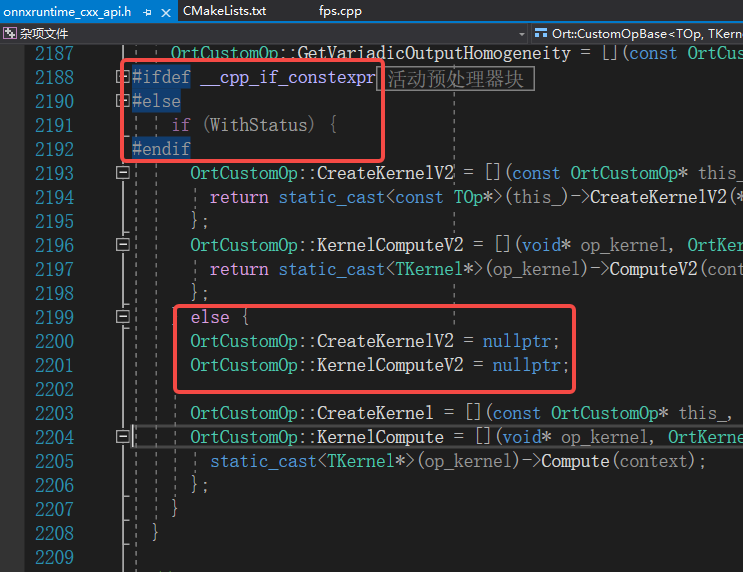
1.16.0后兼容需要设置C++ 17
1.16.0版本之后需要C++17支持,如果采用这些版本需要将CMakeLists.txt中的C++版本进行修改,否则会报以下错误
error C2039: "ComputeV2": 不是 "FurthestSamplingKernel" 的成员
2>F:\code\onnxruntime\test_fps\1.20.0\fps.cpp(130): message : 参见“FurthestSamplingKernel”的声明
2>F:\code\onnxruntime\pkg_1.20.0\win\include\onnxruntime_cxx_api.h(2334,1): error C2039: "__this": 不是 "FurthestSamplingKernel" 的成员
原因是1.16.0及之后的版本内部有个选项如下:
推理加速
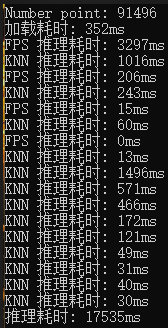
通过onnxruntime的日志分析,大体可以看到两个自定义算子耗时较多,因此需要对其进行加速优化

- 优化前
- 优化后
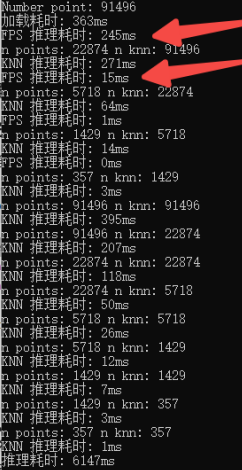
打印后可以看到9万个点,推理时间由原先的17s能提速到6s左右
量化
还可以进一步对模型进行量化处理,进一步减小模型大小
def quantization():
    from onnxruntime.quantization import QuantType, quantize_dynamic

    # 模型路径
    model_fp32 = "./tfv1_sim.onnx"
    model_quant_dynamic = "./tfv1_quant_dynamic.onnx"

    # 动态量化
    quantize_dynamic(
        model_input=model_fp32, # 输入模型
        model_output=model_quant_dynamic, # 输出模型
        weight_type=QuantType.QInt8, # 参数类型 Int8 / UInt8
        optimize_model=True,  # 关闭全局优化
        # extra_options={
        #     'SkipOpTypes': ['KNNQuery', 'FurthestSampling'],  # 跳过所有自定义算子
        #     'ForceQuantizeNoInputCheck': True,  # 避免输入类型校验
        #     'AddQDQPairToWeight': False  # 禁止权重量化节点
        # }
    )
四、参考链接
https://github.heygears.com/onnx/tutorials/tree/master/PyTorchCustomOperator
https://onnxruntime.ai/docs/reference/operators/add-custom-op.html
fps: https://arxiv.org/pdf/2208.08795#page=5.38
量化:https://aistudio.baidu.com/projectdetail/3875525?channelType=0&channel=0
https://aistudio.baidu.com/projectdetail/3924447
https://onnxruntime.ai/docs/performance/model-optimizations/quantization.html

 浙公网安备 33010602011771号