

02、BeautifulSoup学习💪💪💪
BeautifulSoup
一、BeautifulSoup是什么❓
1、爬虫的四个步骤:
①获取数据
②解析数据
③提取数据
④存储数据
其中获取数据用requests库实现,解析数据所用的是HTML的知识和BeautifulSoup知识,那么提取数据则需要今天所学的BeautifulSoup模块
2、理解什么是“解析数据”
①我们平时使用浏览器上网,浏览器会把服务器返回的HTML代码翻译为我们能够看懂的东西。
②对应的话我们使用爬虫获取数据,也就是把HTML翻译成我们能看懂的样子
3、接着我们看提取数据
①提取数据指的是我们需要把数据源数据有针对性的挑选出来
二、BeautifulSoup怎么用❓
1、安装库
①Windows安装:pip[ install bs4
②MacOs安装:pip3 install BeautifulSoup4
2、使用BeautifulSoup解析器
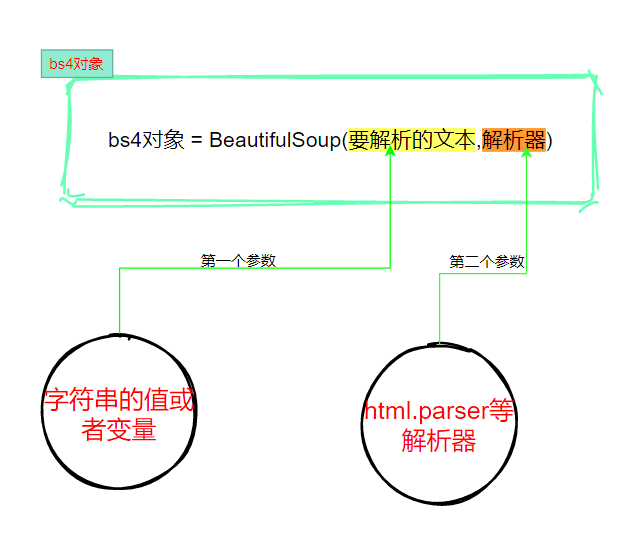
3、提取数据
①find()和find_all()
二者唯一的区别就是find()提取满足条件的首个数据,而find_all()提取所有满足条件的数据


"""

    1、目标:糗事百科段子
    2、网址:https://www.qiushibaike.com/text/
    3、目标:获取段子的作者名字、作者年龄、内容、点赞数、评论数
    4、所需要的库:requests和BeautifulSoup库(win系统下使用>>>pip install 库名 安装)
    5、爬取页数不少于2页

"""
# ①导入库
import requests
from bs4 import BeautifulSoup


# ②创建一个函数,向服务器发送请求
def send_request(url):
    # 请求头,模拟浏览器
    headers = {
        "User-Agent": "Mozilla/5.0 (Windows NT 10.0; Win64; x64) AppleWebKit/537.36 (KHTML, like Gecko) Chrome/88.0.4324.104 Safari/537.36"
    }
    res = requests.get(url, headers=headers)
    return res.text


# 定义一个函数,解析提取目标数据
def get_data(html, page):
    output = """第{}页 作者:{} 性别:{} 年龄:{} 点赞:{} 评论:{}\n{}\n--------------------\n"""
    soup = BeautifulSoup(html, 'html.parser')
    con = soup.find('div', class_='col1')
    con_list = con.find_all('div', class_='article')
    for data in con_list:
        author = data.find('h2').string  # 获取作者名字
        contents = data.find('div', class_='content').find('span').text  # 获取内容
        content = contents.replace('\n', '')
        stats = data.find('div', class_='stats')
        vote = stats.find('span', class_='stats-vote').find('i', class_='number').string
        comment = stats.find('span', class_='stats-comments').find('i', class_='number').string
        author_info = data.find('div', class_='articleGender')  # 获取作者 年龄,性别
        if author_info is not None:  # 非匿名用户
            class_list = author_info['class']
            if "womenIcon" in class_list:
                gender = '女'
            elif "manIcon" in class_list:
                gender = '男'
            else:
                gender = ''
            age = author_info.string  # 获取年龄
        else:  # 匿名用户
            gender = ''
            age = ''

        # print(output.format(page, author, gender, age, vote, comment, content))
        save_txt(output.format(page, author, gender, age, vote, comment, content))


# 数据保存
def save_txt(*args):
    for i in args:
        with open('qiushi.txt', 'a', encoding='utf-8') as f:
            f.write(i)


# 主函数
def main():
    for i in range(1, 5):
        url = 'https://qiushibaike.com/text/page/{}'.format(i)
        html = send_request(url)
        get_data(html, i)


if __name__ == '__main__':
    main()
    print('爬取完成')
②Tag对象
| 属性/方法 | 作用 |
| Tag.find()和Tag.find_all() | 提取Tag中的Tag |
| Tag.text | 提取Tag中的文字 |
| Tag["属性名"] | 输入参数:属性名,可以提取Tag中的属性的值 |
总结:
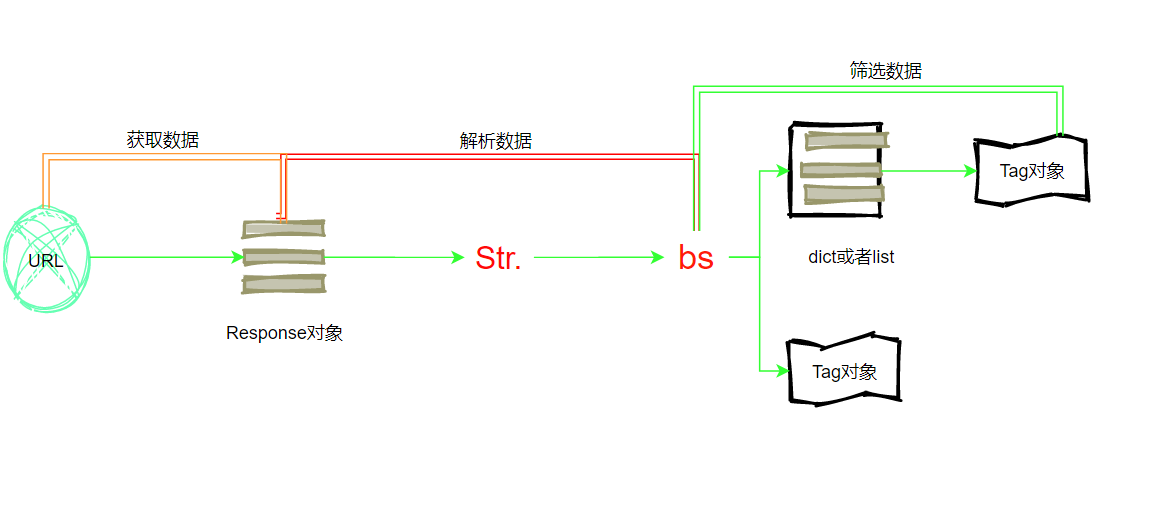
案例:爬取猎聘大数据招聘信息
import requests from bs4 import BeautifulSoup import csv """ 1、爬取猎聘大数据招聘信息 2、爬取每个招聘信息(招聘岗位,、薪资、学历要求信息) 3、将爬取的数据保存为csv格式 4、要求至少爬取3页数据据 """ # ①目标网址:https://www.liepin.com/zhaopin/?sfrom=click-pc_homepage-centre_searchbox-search_new&d_sfrom=search_fp&key=%E5%A4%A7%E6%95%B0%E6%8D%AE for num in range(7): url = 'https://www.liepin.com/zhaopin/?compkind=&dqs=&pubTime=&pageSize=40&salary=&compTag=&sortFlag=°radeFlag=0&compIds=&subIndustry=&jobKind=&industries=&compscale=&key=%E5%A4%A7%E6%95%B0%E6%8D%AE&siTag=LGV-fc5u_67LtFjetF6ACg~fA9rXquZc5IkJpXC-Ycixw&d_sfrom=search_fp&d_ckId=6d1eecfef82fa6583c5c0bbe1ee060ac&d_curPage=0&d_pageSize=40&d_headId=6d1eecfef82fa6583c5c0bbe1ee060ac&curPage='+str(num) print(url) # 请求头 headers = { "User-Agent": 'Mozilla/5.0 (Windows NT 10.0; Win64; x64) AppleWebKit/537.36 (KHTML, like Gecko) Chrome/87.0.4280.141 Safari/537.36 ' } res = requests.get(url, headers=headers) soup = BeautifulSoup(res.text, 'html.parser') # print(soup) data = soup.find_all("div", class_='job-info') for item in data: post_name = item.find('h3').text.replace('\n', '').replace('\t', '') pay = item.find('span', class_='text-warning').text education = item.find('span', class_='edu').text # ites = item.find('h3>a').text time = item.find('time')['title'] time1 = item.find('time').text print(post_name, pay, education, time+time1)

 浙公网安备 33010602011771号