smartfusion2 Embedded Flash (ENVM) Configuration
写这篇笔记的目的是找到 libero 自带的 flash pro 工具 能擦除 smartfusion2 的 envm 擦除! 但是很遗憾没有找到!
问题已解决,SmartFusion2 使用 libero 烧录 softconsole 编译的 HEX 文件 到 eNVM 的方法 - 所长 - 博客园
1、以下内容:来自UG 8.5 x 11 Template
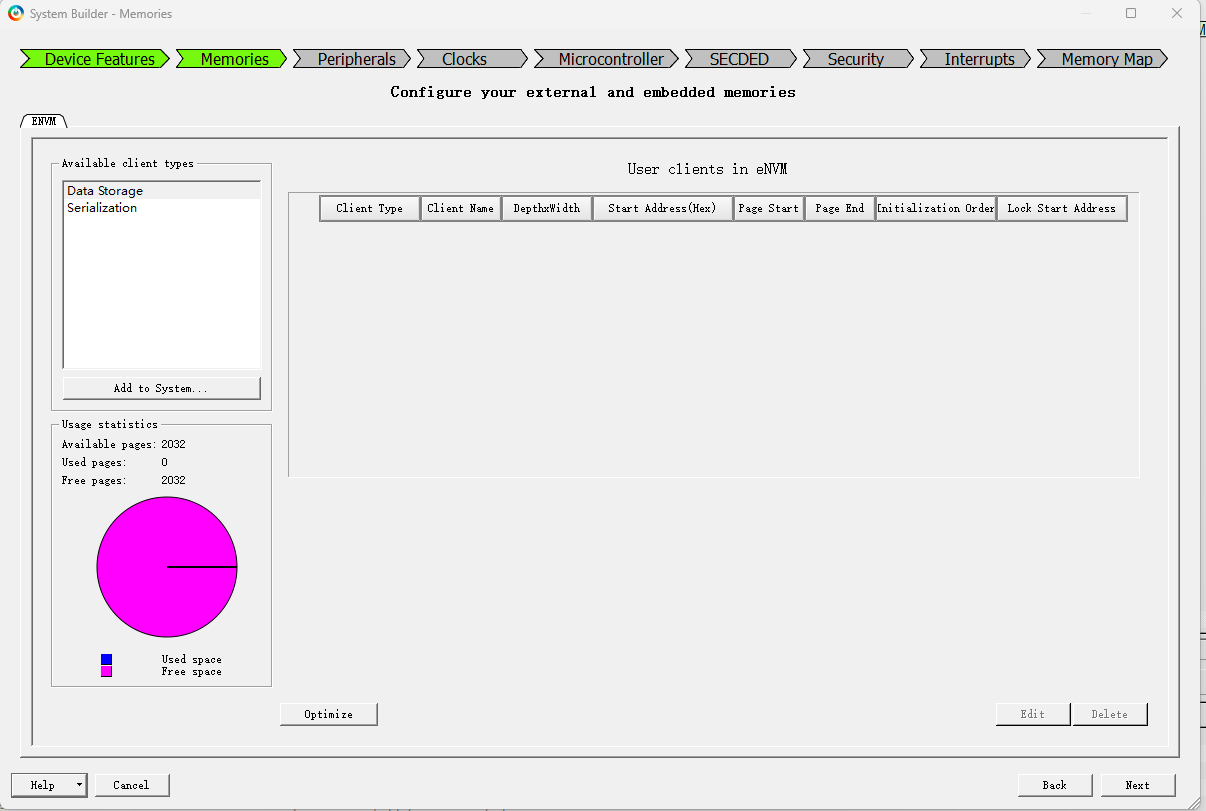
The ENVM tab lets you specify data storage and Serialization clients in the embedded Non-volatile Flash Memory (eNVM). Data storage clients are typically used to store your application firmware image or other types of data, such as DSP coefficients. For example. Serialization clients are used to add unique device information during programming. From the Memories page, click the ENVM tab to access the eNVM Configurator. Select Data Storage or Serialization for the Client type and select Add to System (Figure 2-4). Click Edit to modify the configuration of your eNVM client. Note: The number of available pages in the Flash Memory is device-dependent. Refer to your device data sheet for specific information on Flash Memory size. Some eNVM pages are reserved to store the Certificate/Digest. The number of Available Pages displayed in the eNVM Configurator is the total number of pages available to you after the Reserved Pages have been taken into account. For example, the M2S050 device data sheet shows a total of 2048 pages in the eNVM, but the eNVM Configurator (Figure 2-5) shows 2032 Available Pages, because 16 pages are reserved and are unavailable to the user.
For details about the eNVM Configurator, refer to the SmartFusion2 MSS Embedded Nonvolatile Memory (eNVM) Configuration User Guide.
deepseek 翻译:
ENVM(嵌入式非易失性闪存)选项卡允许您在嵌入式非易失性闪存 (eNVM) 中配置数据存储和序列化客户端。数据存储客户端通常用于存储您的应用程序固件映像或其他类型的数据,例如 DSP 系数。序列化客户端则用于在编程过程中添加唯一的设备信息。
从“存储器 (Memories)”页面,点击 ENVM 选项卡 以访问 eNVM 配置器。为客户端类型 (Client type) 选择数据存储 (Data Storage) 或序列化 (Serialization),然后选择添加到系统 (Add to System)(参见图 2-4)。点击编辑 (Edit) 以修改您的 eNVM 客户端配置。
注意: 闪存中可用的页数取决于具体器件。有关闪存大小的具体信息,请参阅您的器件数据手册。部分 eNVM 页被保留用于存储证书/摘要信息。eNVM 配置器中显示的可用页数 (Available Pages) 是扣除保留页 (Reserved Pages) 后您可用的总页数。
例如,M2S050 器件数据手册显示 eNVM 中共有 2048 页,但 eNVM 配置器(图 2-5)显示只有 2032 个可用页,这是因为有 16 页被保留,用户无法使用。
有关 eNVM 配置器的详细信息,请参阅《SmartFusion2 MSS 嵌入式非易失性存储器 (eNVM) 配置用户指南》。
2、coredocs.s3.amazonaws.com/Libero/SmartFusion2MSS/MSS_ENVM/sf2_mss_envm_config_ug_1.pdf
3、保留页,不应该写入代码
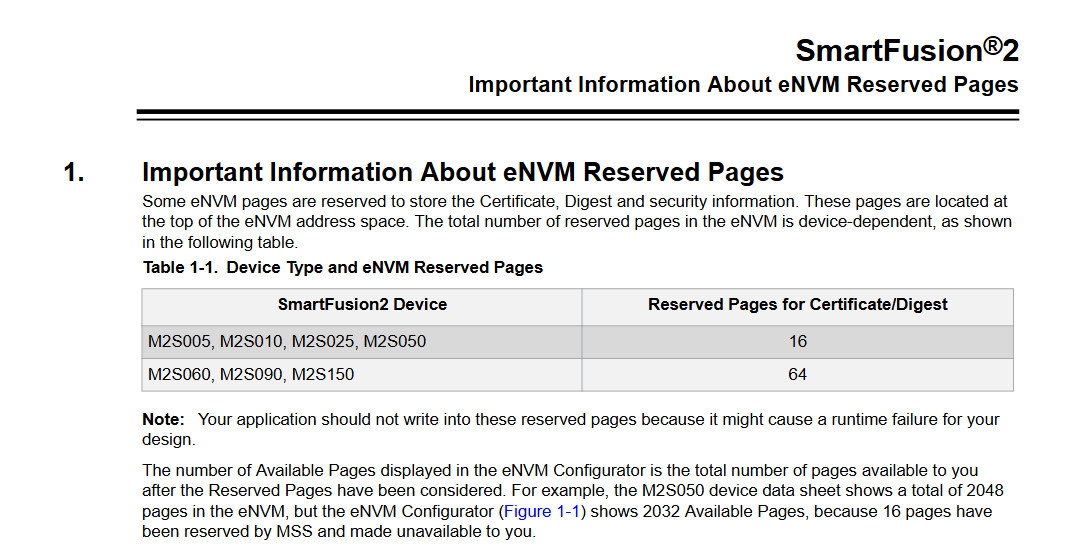
Note: Your application should not write into these reserved pages because it might cause a runtime failure for your design.
4、FlashPro for Libero SoC v11.8 User Guide
FlashPro enables you to program security settings, FPGA Array, eNVM and embedded flash memory blocks (EFMB), and FlashROM features for AFS device support. You can program these features separately using different programming files or you can combine them into one programming file.
Note: If you are programming SmartFusion devices you are using eNVM. If you are programming Fusion devices you are using the Embedded Flash Memory Block (EFMB). When referring to these elements together we refer to them as eNVM/EFMB.
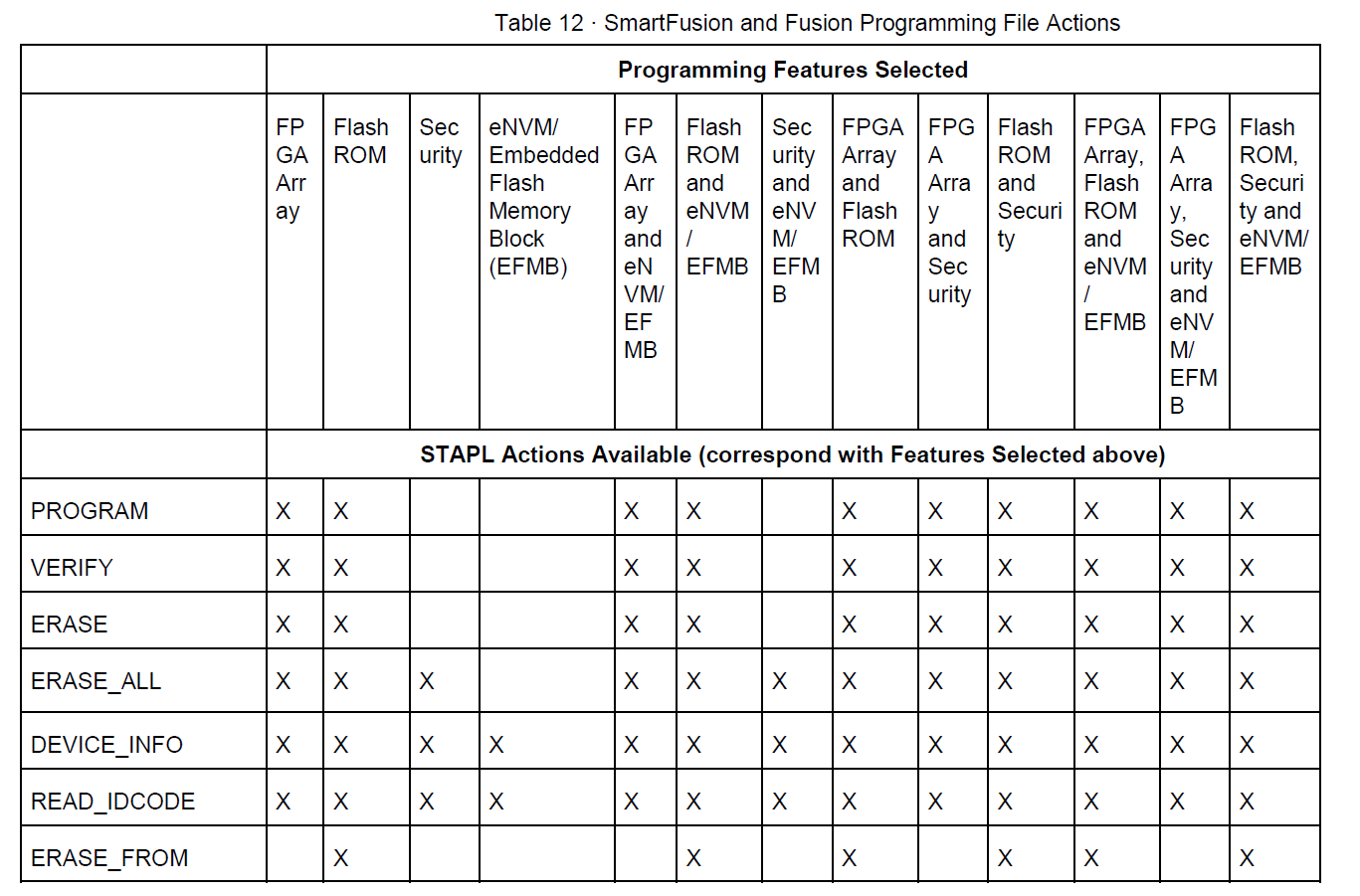
The STAPL files for SmartFusion and Fusion devices include actions targeted at one, two, or all four of the programming features: FPGA Array and FlashROM, Security Settings, and eNVM/EFMB. The combinations of the features you selected to target, results in different actions that are available in the STAPL file. See the following table for an illustration.
The table indicates that if you select ERASE_ALL that it will affect any Programming Feature (or combination of features) marked with an X. According to the table, the only Programming Feature unaffected by ERASE_ALL is the eNVM/EFMB.
Compare that to the ERASE command: ERASE does not have any effect on the following Programming Features: Security; Embedded Flash Memory Block; Security AND eNVM/EFMB.
FlashPro 使您能够为支持 AFS 架构的器件编程以下功能:安全设置、FPGA 阵列、eNVM、嵌入式闪存模块 (EFMB) 以及 FlashROM。 您可以使用不同的编程文件分别对这些功能进行编程,也可以将它们合并到一个编程文件中。
注意: 如果您正在为 SmartFusion 器件编程,您使用的是 eNVM(嵌入式非易失性存储器)。如果您正在为 Fusion 器件编程,您使用的是 EFMB(嵌入式闪存模块)。当同时指代这两者时,我们统称为 eNVM/EFMB。
针对 SmartFusion 和 Fusion 器件的 STAPL 文件 包含针对一个、两个或全部四个编程功能(FPGA 阵列和 FlashROM、安全设置以及 eNVM/EFMB)的操作(Actions)。您选择要定位的编程功能的组合,决定了该 STAPL 文件中可用的不同操作。请参阅下表了解说明。
该表指出,如果您选择 ERASE_ALL(全部擦除)操作,它将影响所有标有 X 的编程功能(或其组合)。根据该表,唯一不受 ERASE_ALL 影响的编程功能是 eNVM/EFMB。
与此相比,ERASE(擦除)命令对以下编程功能没有任何影响:安全设置(Security);嵌入式闪存模块(EFMB);安全设置 和 eNVM/EFMB 的组合。
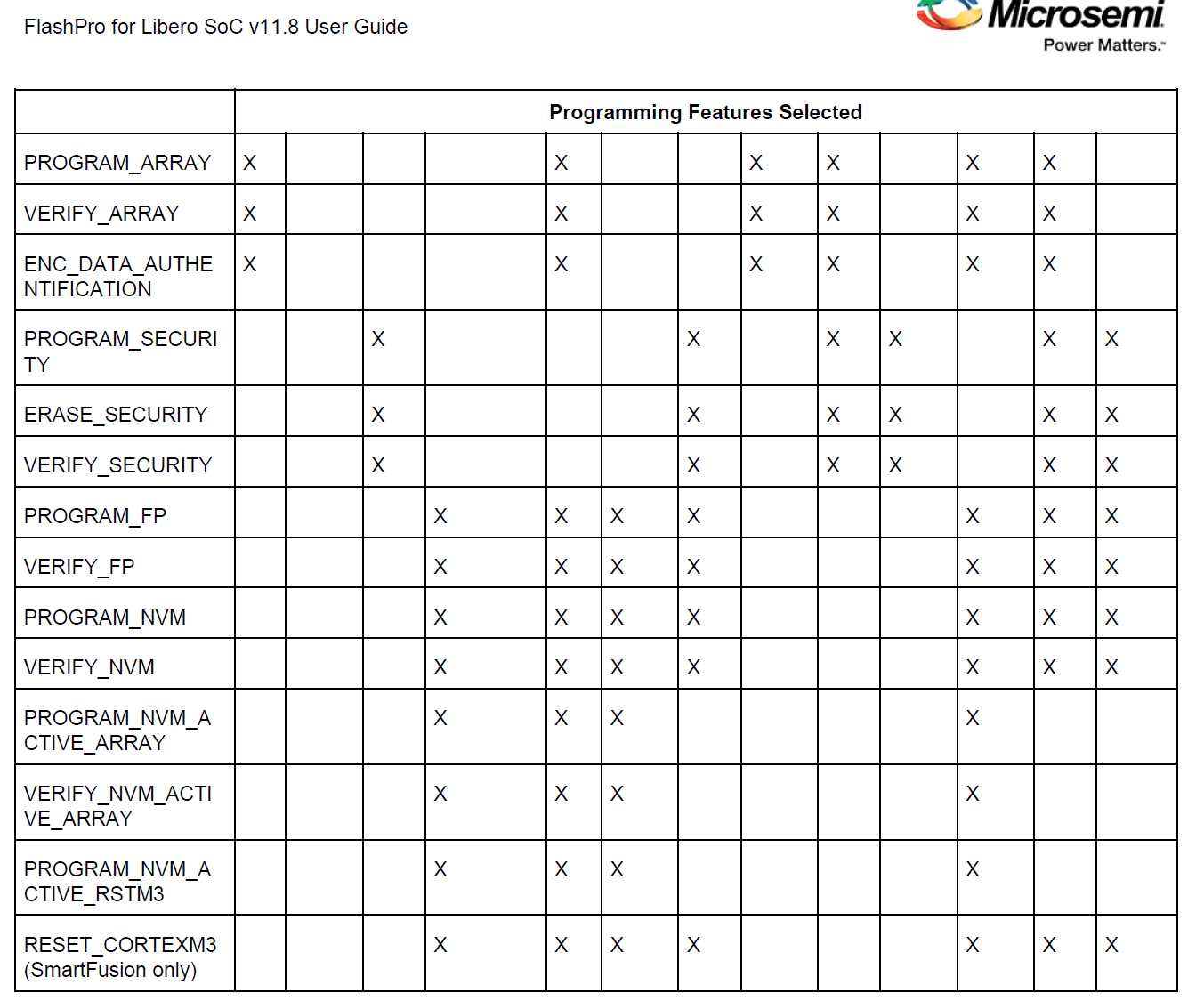

为啥我这里显示没这么多???


 浙公网安备 33010602011771号