


五、使用Spring AI Alibaba实现Rag
五、使用Spring AI Alibaba实现Rag
==================================================================================
==================================================================================
参考资料:
==================================================================================
Spring AI与DeepSeek实战三:打造企业知识库 (qq.com)
快速开始-阿里云Spring AI Alibaba官网官网 (java2ai.com)
在LinuxmacOS和Windows上配置APIKey为环境变量-大模型服务平台百炼-阿里云 (aliyun.com)
==================================================================================
集成大语言模型(LLM)落地的两大痛点:
- 知识局限性:LLM依赖静态训练数据,无法覆盖实时更新或垂直领域的知识;
- 幻觉:当LLM遇到训练数据外的提问时,可能生成看似合理但错误的内容。
用最低的成本解决以上问题,需要使用 RAG 技术,它是一种结合信息检索技术与 LLM 的框架,通过从外部 知识库 动态检索相关上下文信息,并将其作为 Prompt 融入生成过程,从而提升模型回答的准确性。
向量模型是实现 RAG 的核心组件之一,用于将非结构化数据(如文本、图像、音频)转换为 高维向量(Embedding)的机器学习模型。这些向量能够捕捉数据的语义或结构信息,使计算机能通过数学运算处理复杂关系。
1、准备工作
如果要使用一些大模型的高级功能,比如RAG、文生图、文生音频等,使用SpringAI Alibaba框架开发比较方便,配套的申请使用阿里云百炼上的大模型。
访问阿里云百炼页面并登录账号 https://www.aliyun.com/product/bailian
开通“百炼大模型推理”服务,获取API Key。
2、创建SpringBoot工程
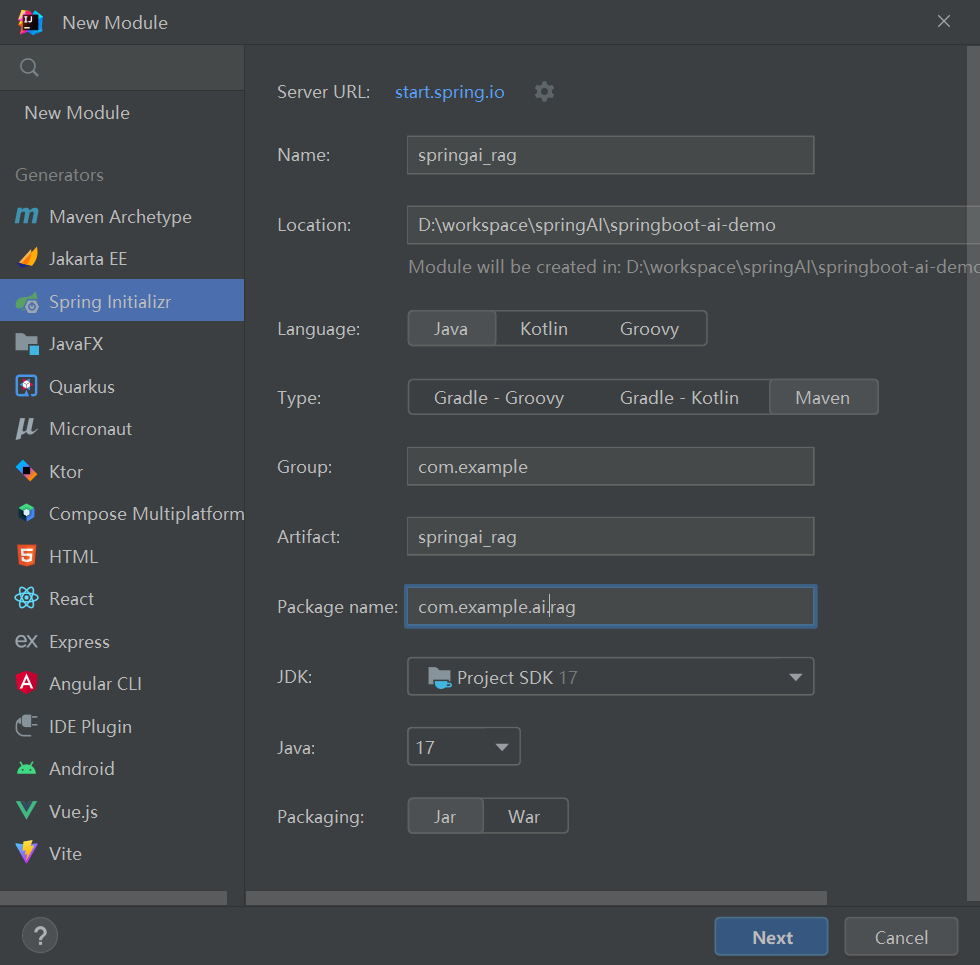
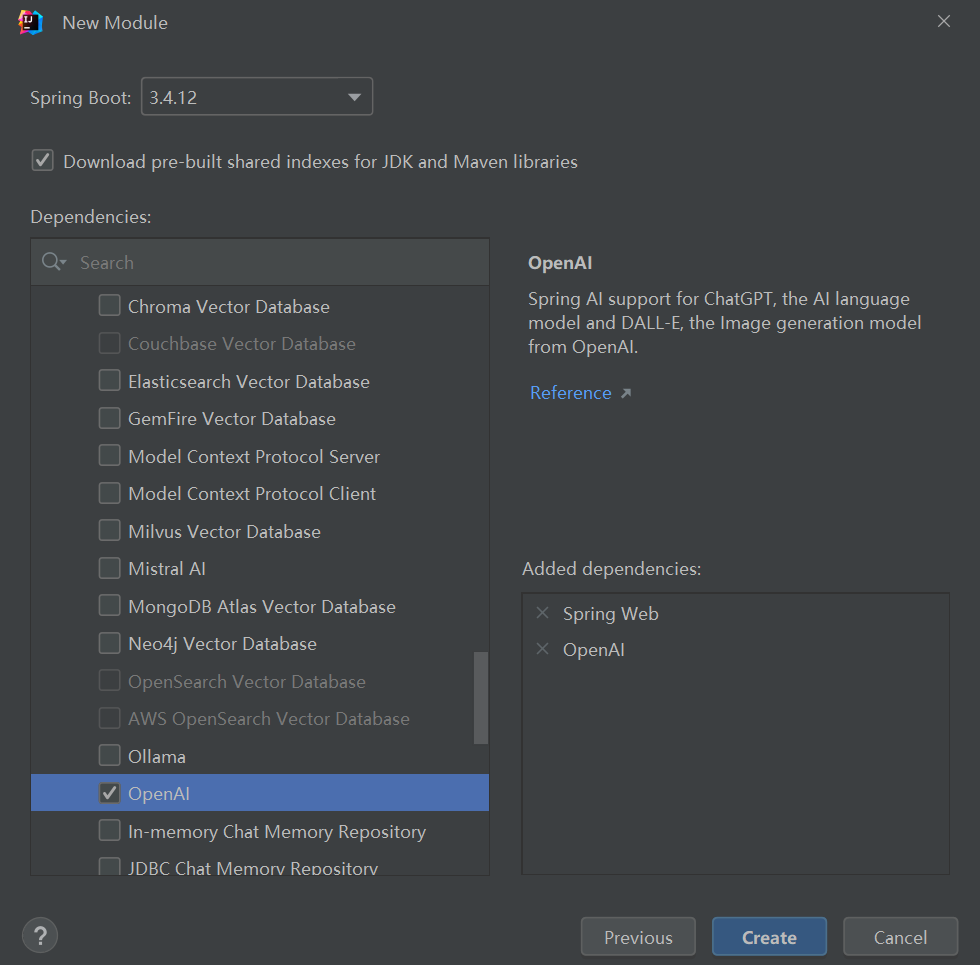
2.1、application.yml
server:
  port: 8898
spring:
  application:
    name: springai_rag

  ai:
    dashscope:
      # 阿里百炼 api_key
      api-key: ${BAILIAN_API_KEY}  # 从环境变量读取密钥
2.2、pom.xml
<?xml version="1.0" encoding="UTF-8"?>
<project xmlns="http://maven.apache.org/POM/4.0.0" xmlns:xsi="http://www.w3.org/2001/XMLSchema-instance"
         xsi:schemaLocation="http://maven.apache.org/POM/4.0.0 https://maven.apache.org/xsd/maven-4.0.0.xsd">
    <modelVersion>4.0.0</modelVersion>
    <parent>
        <groupId>org.springframework.boot</groupId>
        <artifactId>spring-boot-starter-parent</artifactId>
        <version>3.4.12</version>
        <relativePath/> <!-- lookup parent from repository -->
    </parent>
    <groupId>com.example</groupId>
    <artifactId>springai_rag</artifactId>
    <version>0.0.1-SNAPSHOT</version>
    <name>springai_rag</name>
    <description>springai_rag</description>
    <url/>
    <licenses>
        <license/>
    </licenses>
    <developers>
        <developer/>
    </developers>
    <scm>
        <connection/>
        <developerConnection/>
        <tag/>
        <url/>
    </scm>
    <properties>
        <java.version>17</java.version>
        <spring-ai.version>1.0.0-M6</spring-ai.version>
        <spring-ai-alibaba.version>1.0.0-M6.1</spring-ai-alibaba.version>
    </properties>
    <dependencies>
        <dependency>
            <groupId>org.springframework.boot</groupId>
            <artifactId>spring-boot-starter-web</artifactId>
        </dependency>
        <dependency>
            <groupId>com.alibaba.cloud.ai</groupId>
            <artifactId>spring-ai-alibaba-starter</artifactId>
            <version>${spring-ai-alibaba.version}</version>
        </dependency>
        <dependency>
            <groupId>org.projectlombok</groupId>
            <artifactId>lombok</artifactId>
            <optional>true</optional>
        </dependency>
        <dependency>
            <groupId>org.springframework.boot</groupId>
            <artifactId>spring-boot-starter-test</artifactId>
            <scope>test</scope>
        </dependency>
    </dependencies>

    <repositories>
        <repository>
            <snapshots>
                <enabled>false</enabled>
            </snapshots>
            <id>spring-milestones</id>
            <name>Spring Milestones</name>
            <url>https://repo.spring.io/milestone</url>
        </repository>
        <repository>
            <releases>
                <enabled>false</enabled>
            </releases>
            <snapshots>
                <enabled>true</enabled>
                <updatePolicy>always</updatePolicy>
            </snapshots>
            <id>sonatype-snapshots</id>
            <name>Sonatype Snapshot Repository</name>
            <url>https://oss.sonatype.org/content/repositories/snapshots</url>
        </repository>
    </repositories>

    <build>
        <plugins>
            <plugin>
                <groupId>org.springframework.boot</groupId>
                <artifactId>spring-boot-maven-plugin</artifactId>
            </plugin>

            <plugin>
                <groupId>org.apache.maven.plugins</groupId>
                <artifactId>maven-compiler-plugin</artifactId>
                <configuration>
                    <annotationProcessorPaths>
                        <path>
                            <groupId>org.projectlombok</groupId>
                            <artifactId>lombok</artifactId>
                        </path>
                    </annotationProcessorPaths>
                    <source>15</source>
                    <target>15</target>
                </configuration>
            </plugin>
            <plugin>
                <groupId>org.springframework.boot</groupId>
                <artifactId>spring-boot-maven-plugin</artifactId>
                <configuration>
                    <excludes>
                        <exclude>
                            <groupId>org.projectlombok</groupId>
                            <artifactId>lombok</artifactId>
                        </exclude>
                    </excludes>
                </configuration>
            </plugin>
        </plugins>
    </build>
</project>
3、创建RAG 知识库
3.1、构建向量数据
创建 resources/rag/data-resources.txt 文件
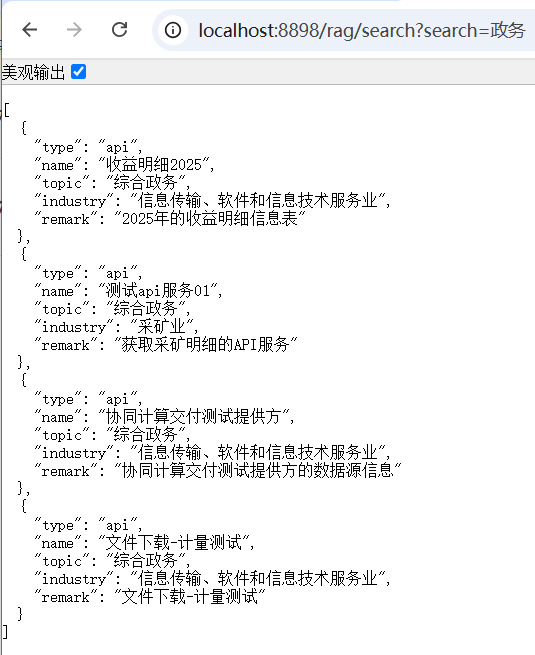
1. {"type":"api","name":"测试api服务01","topic":"综合政务","industry":"采矿业","remark":"获取采矿明细的API服务"}
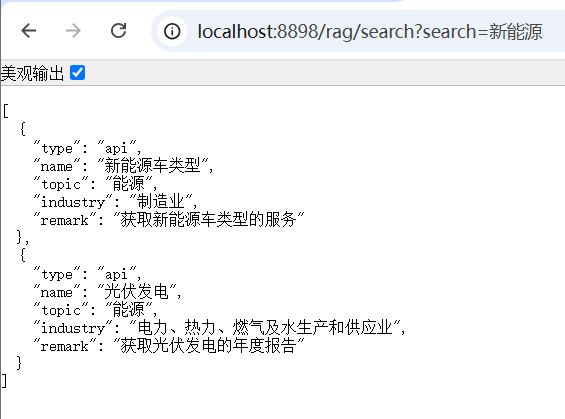
2. {"type":"api","name":"新能源车类型","topic":"能源","industry":"制造业","remark":"获取新能源车类型的服务"}
3. {"type":"api","name":"罚款报告","topic":"交通","industry":"制造业","remark":"获取罚款报告的接口"}
4. {"type":"api","name":"光伏发电","topic":"能源","industry":"电力、热力、燃气及水生产和供应业","remark":"获取光伏发电的年度报告"}
5. {"type":"api","name":"协同计算交付测试提供方","topic":"综合政务","industry":"信息传输、软件和信息技术服务业","remark":"协同计算交付测试提供方的数据源信息"}
6. {"type":"api","name":"文件下载-计量测试","topic":"综合政务","industry":"信息传输、软件和信息技术服务业","remark":"文件下载-计量测试"}
7. {"type":"api","name":"收益明细2025","topic":"综合政务","industry":"信息传输、软件和信息技术服务业","remark":"2025年的收益明细信息表"}
3.2、添加配置类
@Configuration
public class VectorStoreConfig {
    @Bean
    public VectorStore vectorStore(EmbeddingModel embeddingModel
            , @Value("classpath:rag/data-resources.txt") Resource docs) {
        VectorStore vectorStore = SimpleVectorStore.builder(embeddingModel).build();
        vectorStore.write(new TokenTextSplitter().transform(new TextReader(docs).read()));
        return vectorStore;
    }
}
4、创建ChatClient和查询接口
@RestController
@RequestMapping("/rag")
public class RagController {
    private final ChatClient chatClient;

    public RagController(ChatClient.Builder builder, VectorStore vectorStore) {
        String sysPrompt = """
                您是一个智能搜索引擎,负责根据用户输入的内容进行精准匹配、模糊匹配和近义词匹配,以搜索相关的数据记录。
                您只能搜索指定的内容,不能回复其他内容或添加解释。
                您可以通过[search_content]标识符来表示需要搜索的具体内容。要求您返回匹配内容的完整记录,以JSON数组格式呈现。
                如果搜索不到内容,请返回[no_data]。
                """;
        this.chatClient = builder
                .defaultSystem(sysPrompt)
                .defaultAdvisors(
                        new QuestionAnswerAdvisor(vectorStore, new SearchRequest())
                )
                .defaultOptions(
                        DashScopeChatOptions.builder()
                                .withModel("deepseek-r1")
                                .build()
                )
                .build();
    }

    @GetMapping(value = "/search")
    public List<SearchVo> search(@RequestParam String search, HttpServletResponse response) {
        response.setCharacterEncoding("UTF-8");
        PromptTemplate promptTemplate = new PromptTemplate("[search_content]: {search}");
        Prompt prompt = promptTemplate.create(Map.of("search", search));

        return chatClient.prompt(prompt)
                .call()
                .entity(new ParameterizedTypeReference<List<SearchVo>>() {
                });
    }

    @Setter
    @Getter
    @NoArgsConstructor
    @JsonAutoDetect(fieldVisibility = JsonAutoDetect.Visibility.ANY)
    public static class SearchVo {
        private String type;
        private String name;
        private String topic;
        private String industry;
        private String remark;
    }
}
5、测试
本文来自博客园,作者:老羅,转载请注明原文链接:https://www.cnblogs.com/laoluo2025/p/19260493

 浙公网安备 33010602011771号