UE4之PVD调试
PhysX在编译时必须开启PX_SUPPORT_PVD宏(PhysX的Debug、Profiler版本的库会开启该宏),才能支持 PVD 的调试。
游戏缺省会使用localhost,端口为5425,连接超时时间为100ms来与Physx Visual Debugger工具建立连接。
如果要修改PVD的端口号,只能修改pvd.exe的31150000(为5425的16进制小端序)数值,如下:
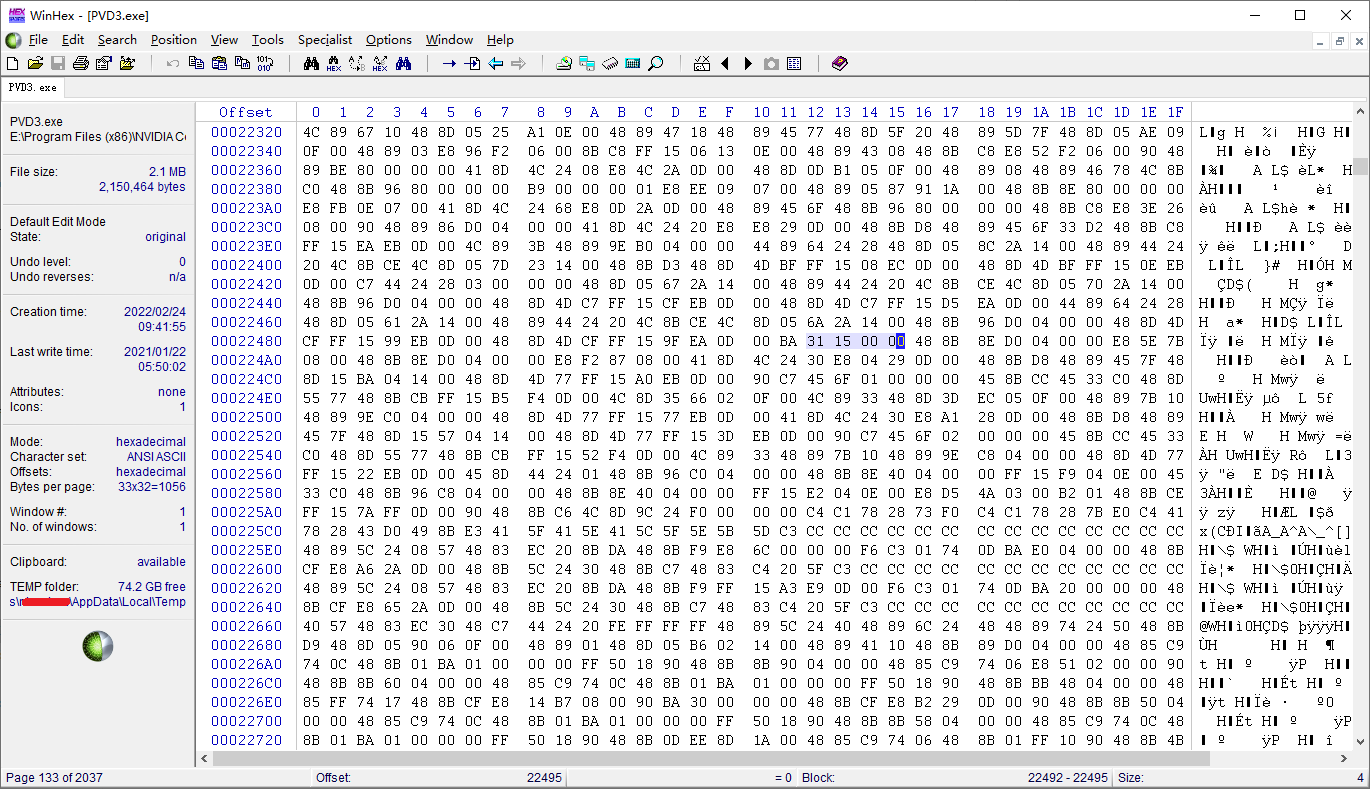
引擎连接PVD的逻辑在:UnrealEngine\Engine\Source\Runtime\PhysicsCore\Private\PhysXSupportCore.cpp的void PvdConnect(FString Host, bool bVisualization)函数中。
注意
1. 在使用PVD之前,必须先启动Physx Visual Debugger工具。
2. 不可同时运行多个PVD进程(打开任务管理器进行确认)
通过命令行参数连接Physx Visual Debugger工具
UE4Editor.exe "%GameDir%\MyGame.uproject" TestMap_Main -game -pvd // 单机启动TestMap_Main地图,并自动连接本机正在运行的PhysX Visual Debugger
通过控制台命令连接Physx Visual Debugger工具
pvd CONNECT // 连接本机正在运行的PVD 注:调用void PvdConnect(FString Host, bool bVisualization)函数
pvd CONNECT 10.46.80.77 // 连接ip为10.46.80.77上正在运行的PVD 注:缺省端口为5425,连接超时时间为100ms
pvd CONNECT NODEBUG 10.46.80.77 // 连接ip为10.46.80.77上正在运行的PVD,仅用于profile和meomry,不绘制 注:缺省端口为5425,连接超时时间为100ms
pvd DISCONNECT // 断开与PVD的连接
Physx Visual Debugger主界面

注:使用左手系(Left-Handed),与虚幻引擎保证画面一致
线框模式:

绘制出Velocity(速度)

在Physx Visual Debugger中不同rigid(刚体)的颜色

注:PVD 的 Cloth 可视化只对 legacy PxCloth 有效(已废弃的 PxCloth);而NvCloth 完全没有 PVD 集成,且其对象不在 PxScene 中,所以在PVD中看不到
使用菜单Commands -- Find Objects来搜索目标对象
例如搜索名字中带有:UamCharacter字样的对象
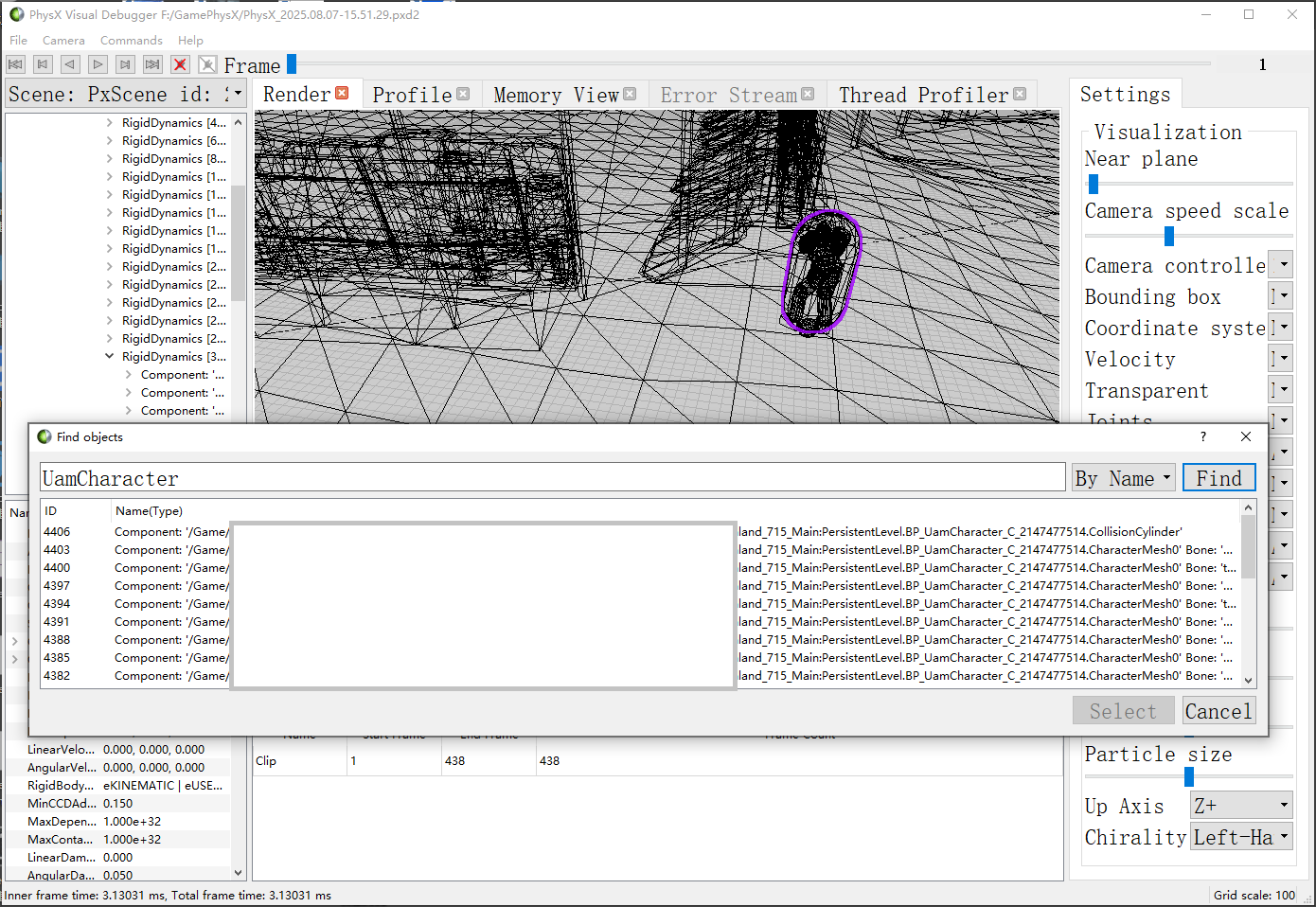
在Physx Visual Debugger中实时查看游戏的物理

在编辑器Preview模式下所有物体都会创建物理对象
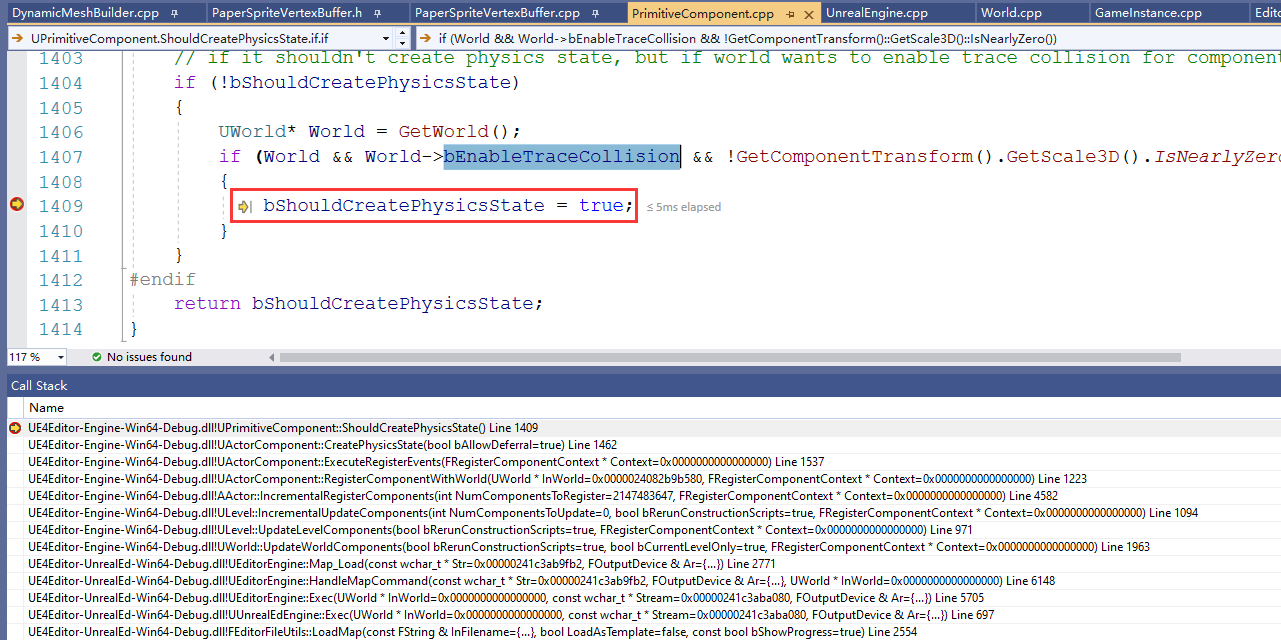
>    UE4Editor-Engine-Win64-Debug.dll!UPrimitiveComponent::ShouldCreatePhysicsState() Line 1409    C++
     UE4Editor-Engine-Win64-Debug.dll!UActorComponent::CreatePhysicsState(bool bAllowDeferral=true) Line 1462    C++
     UE4Editor-Engine-Win64-Debug.dll!UActorComponent::ExecuteRegisterEvents(FRegisterComponentContext * Context=0x0000000000000000) Line 1537    C++
     UE4Editor-Engine-Win64-Debug.dll!UActorComponent::RegisterComponentWithWorld(UWorld * InWorld=0x0000024082b9b580, FRegisterComponentContext * Context=0x0000000000000000) Line 1223    C++
     UE4Editor-Engine-Win64-Debug.dll!AActor::IncrementalRegisterComponents(int NumComponentsToRegister=2147483647, FRegisterComponentContext * Context=0x0000000000000000) Line 4582    C++
     UE4Editor-Engine-Win64-Debug.dll!ULevel::IncrementalUpdateComponents(int NumComponentsToUpdate=0, bool bRerunConstructionScripts=true, FRegisterComponentContext * Context=0x0000000000000000) Line 1094    C++
     UE4Editor-Engine-Win64-Debug.dll!ULevel::UpdateLevelComponents(bool bRerunConstructionScripts=true, FRegisterComponentContext * Context=0x0000000000000000) Line 971    C++
     UE4Editor-Engine-Win64-Debug.dll!UWorld::UpdateWorldComponents(bool bRerunConstructionScripts=true, bool bCurrentLevelOnly=true, FRegisterComponentContext * Context=0x0000000000000000) Line 1963    C++
     UE4Editor-UnrealEd-Win64-Debug.dll!UEditorEngine::Map_Load(const wchar_t * Str=0x00000241c3ab9fb2, FOutputDevice & Ar={...}) Line 2771    C++
     UE4Editor-UnrealEd-Win64-Debug.dll!UEditorEngine::HandleMapCommand(const wchar_t * Str=0x00000241c3ab9fb2, FOutputDevice & Ar={...}, UWorld * InWorld=0x0000000000000000) Line 6148    C++
     UE4Editor-UnrealEd-Win64-Debug.dll!UEditorEngine::Exec(UWorld * InWorld=0x0000000000000000, const wchar_t * Stream=0x00000241c3aba080, FOutputDevice & Ar={...}) Line 5705    C++
     UE4Editor-UnrealEd-Win64-Debug.dll!UUnrealEdEngine::Exec(UWorld * InWorld=0x0000000000000000, const wchar_t * Stream=0x00000241c3aba080, FOutputDevice & Ar={...}) Line 697    C++
     UE4Editor-UnrealEd-Win64-Debug.dll!FEditorFileUtils::LoadMap(const FString & InFilename={...}, bool LoadAsTemplate=false, const bool bShowProgress=true) Line 2554    C++
注1:在编辑器Preview模式下,打开地图时,World的bEnableTraceCollsion为true,ECollisionEnabled::NoCollision的物体也会创建物理对象
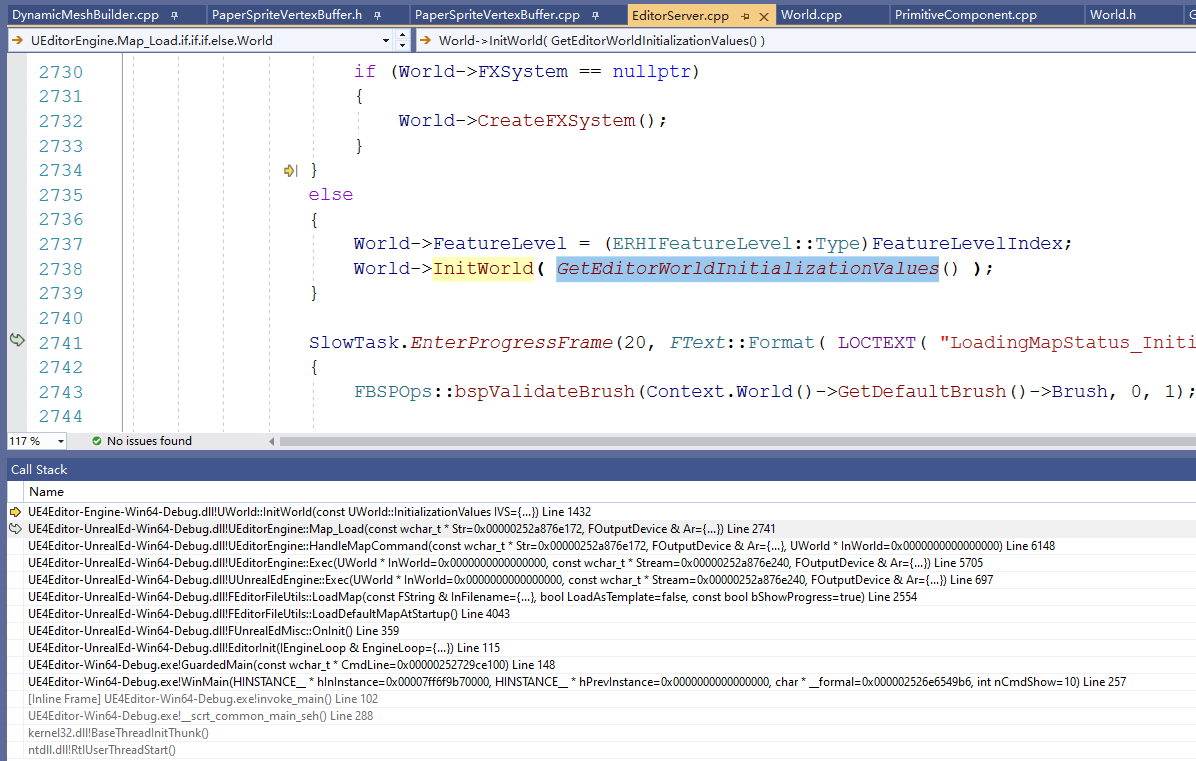
注2:PIE下,InitWorld时传入缺省的InitializationValues()参数,使得World的bEnableTraceCollsion为false,但由于此时存在2个World(Preview World和PIE World),在PVD中依然会显示ECollisionEnabled::NoCollision的物体
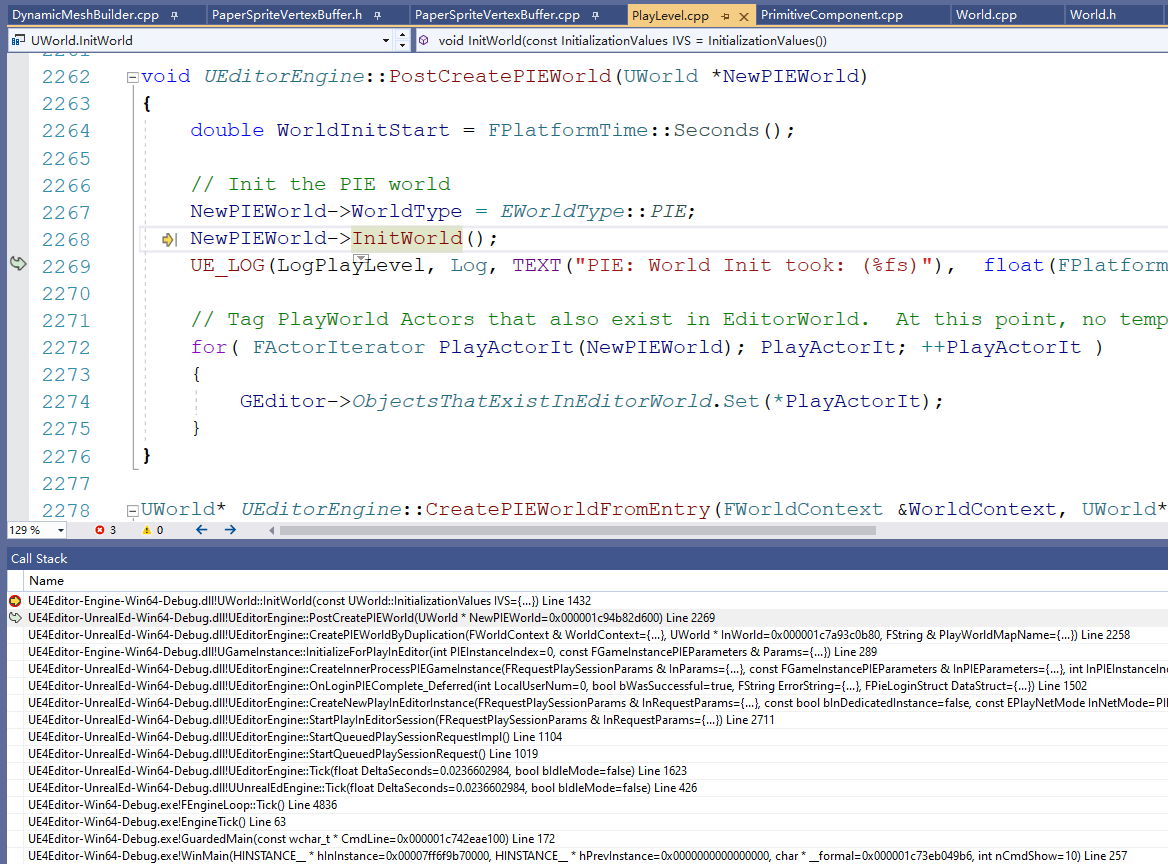
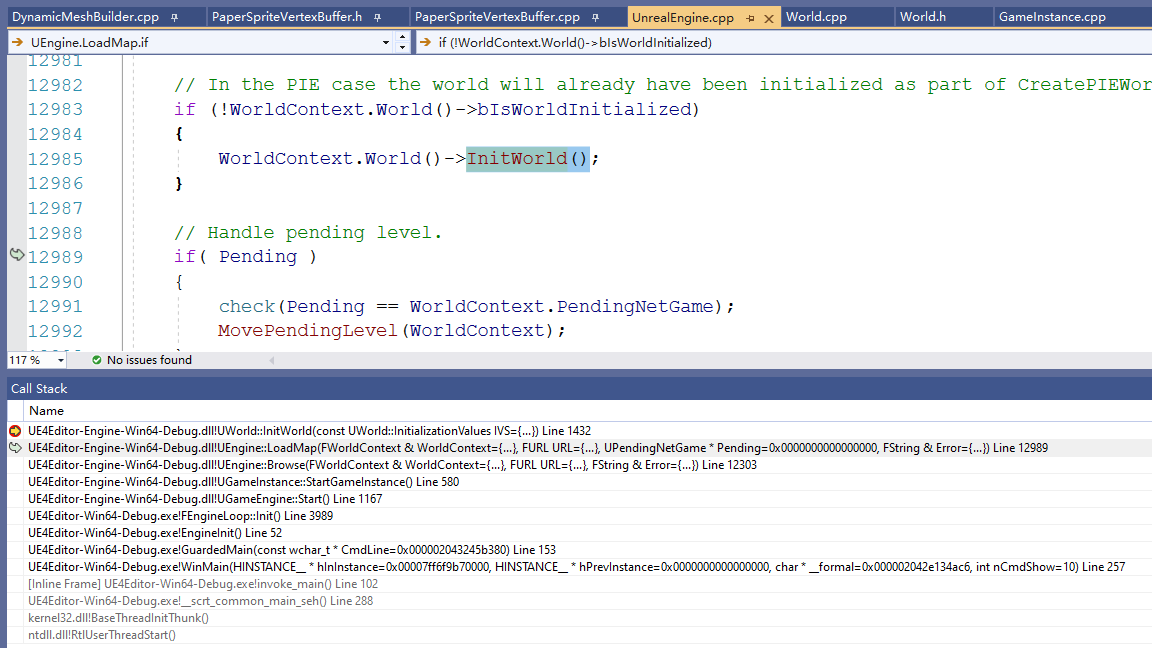
注3:Standalone下,打开地图时,InitWorld时传入缺省的InitializationValues()参数,使得World的bEnableTraceCollsion为false,ECollisionEnabled::NoCollision的物体不会创建物理对象
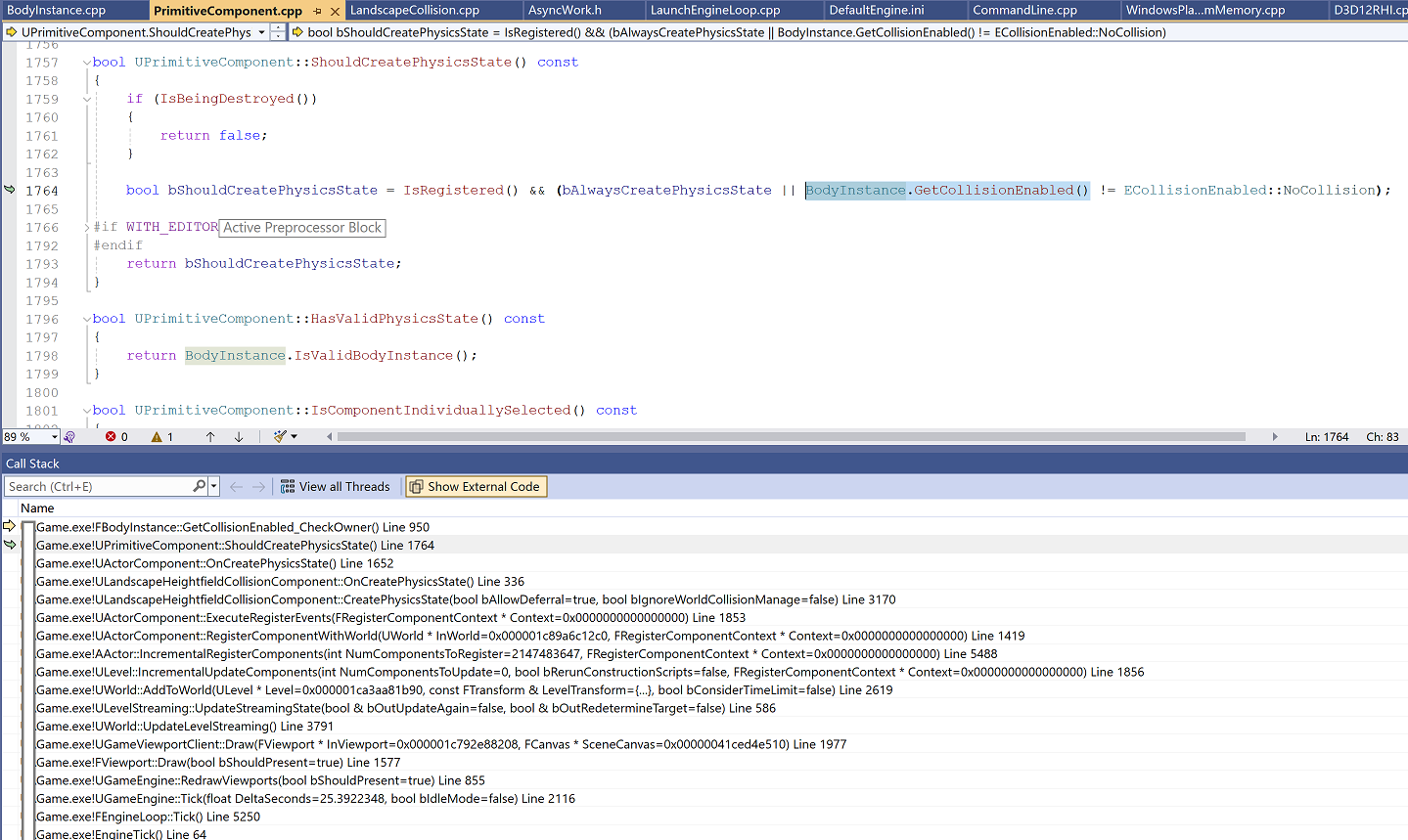
Landscape没有Owner,缺省无法通过ECollisionEnabled::NoCollision来关闭物理的创建:
注意2
因此,要在Standalone模式下,使用PhysX Visual Debugger工具来查看对象的物理。
或者,在编辑器中打开的空场景,并PIE运行,然后open切换到目标地图,就可以用PhysX Visual Debugger工具来查看目标地图的物理了。
PhysX中函数的耗时情况

PhysX内存统计

PhysX中线程执行情况

对上图的后面时间段进行放大:

注意3
Physx Visual Debugger工具非常不稳定,容易发生崩溃。
在使用时,建议工具栏上点击Disconnect按钮停止采集,保存到pxd2文件后,再查看场景中的对象和性能相关的数据。
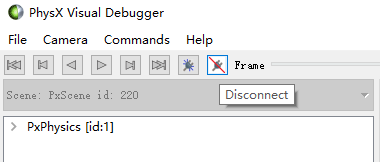
写pxd2文件
/** UnrealEngine\Engine\Source\Runtime\PhysicsCore\Private\PhysXSupportCore.cpp */
void PvdConnect(FString Host, bool bVisualization)
{
    int32    Port = 5425;         // TCP port to connect to, where PVD is listening

    uint32    Timeout = 1000;          // timeout in milliseconds to wait for PVD to respond, consoles and remote PCs need a higher timeout.

    PxPvdInstrumentationFlags ConnectionFlags = bVisualization ? PxPvdInstrumentationFlag::eALL : (PxPvdInstrumentationFlag::ePROFILE | PxPvdInstrumentationFlag::eMEMORY);

    PxPvdTransport* transport = nullptr;
    if (Host == FString(TEXT("localfile")))
    {
        FString PhysXProfilingPath = FPaths::ProfilingDir() + TEXT("PhysXProfiling");
        if (!IFileManager::Get().DirectoryExists(*PhysXProfilingPath))
        {
            IFileManager::Get().MakeDirectory(*PhysXProfilingPath, true);
        }

        FString PvdToSave = FString::Printf(TEXT("%s/PhysX_%s.pxd2"), *PhysXProfilingPath, *FDateTime::Now().ToString());
        transport = PxDefaultPvdFileTransportCreate(TCHAR_TO_ANSI(*PvdToSave));
    }
    else
    {
        transport = PxDefaultPvdSocketTransportCreate(TCHAR_TO_ANSI(*Host), Port, Timeout);
    }

    if (transport != nullptr)
    {
        GPhysXVisualDebugger->disconnect();    //make sure we're disconnected first
        GPhysXVisualDebugger->connect(*transport, ConnectionFlags);
    }

    // per scene properties (e.g. PxPvdSceneFlag::eTRANSMIT_CONSTRAINTS) are
    // set on the PxPvdSceneClient in PhysScene.cpp, FPhysScene::InitPhysScene
}
#endif // WITH_PHYSX
pvd CONNECT localfile // 写pvd文件 注:dev包有效 test包写出的pxd2文件大小为0KB
pvd CONNECT NODEBUG localfile // 写pvd文件,仅用于profile和meomry,不绘制
pvd DISCONNECT // 断开与PVD的连接

PVD打开.pxd2文件提示: “the file is corrupted”
原因1:该.pxd2文件被其他进程占用着
原因2:使用老的pvd软件(如:3.2018.04.23896843),可下载3.2021.01.29532135版本来使用
PVD打开.pxd2文件发生崩溃
==============================================================================
   A Program Fault occurred:
   Error code 0xC0000005: EXCEPTION_ACCESS_VIOLATION
   Address: 0x00007FF7FB2AAE15
   Flags: 0x00000000
==============================================================================
==                             STACK TRACE                                  ==
==============================================================================
function: OpenGLWidget::renderContactPass at 0x7FF7FB2AAE15
        ***  0 called from 0x00007FF7FB2AAE15  STACK 0x000000531F0F9070   AddrReturn 0x00007FF7FB2AEC06
function: OpenGLWidget::paintGL at 0x7FF7FB2AEC06
        ***  1 called from 0x00007FF7FB2AEC06  STACK 0x000000531F0F9170   AddrReturn 0x000000006D6A649B
function: QGLWidget::glDraw at 0x6D6A649B
        ***  2 called from 0x000000006D6A649B  STACK 0x000000531F0F9280   AddrReturn 0x000000006D6ABD0C
function: QGLWidget::updateGL at 0x6D6ABD0C
        ***  3 called from 0x000000006D6ABD0C  STACK 0x000000531F0F92C0   AddrReturn 0x00007FF7FB2F0F8B
function: PVDRenderer::updateRender at 0x7FF7FB2F0F8B
        ***  4 called from 0x00007FF7FB2F0F8B  STACK 0x000000531F0F92F0   AddrReturn 0x00007FF7FB298CBC
function: PVDMainWindow::initClip at 0x7FF7FB298CBC
        ***  5 called from 0x00007FF7FB298CBC  STACK 0x000000531F0F9900   AddrReturn 0x00007FF7FB29741B
function: PVDMainWindow::open at 0x7FF7FB29741B
        ***  6 called from 0x00007FF7FB29741B  STACK 0x000000531F0F99F0   AddrReturn 0x00007FF7FB2F589B
function: PVDMainWindow::qt_static_metacall at 0x7FF7FB2F589B
        ***  7 called from 0x00007FF7FB2F589B  STACK 0x000000531F0FA030   AddrReturn 0x000000006CD8F5FF
function: QMetaObject::activate at 0x6CD8F5FF
        ***  8 called from 0x000000006CD8F5FF  STACK 0x000000531F0FA130   AddrReturn 0x000000006D1586DE
function: QAction::activate at 0x6D1586DE
        ***  9 called from 0x000000006D1586DE  STACK 0x000000531F0FA250   AddrReturn 0x000000006D2C0235
function: QMenu::actionGeometry at 0x6D2C0235
        *** 10 called from 0x000000006D2C0235  STACK 0x000000531F0FA290   AddrReturn 0x000000006D2C0007
function: QMenu::actionGeometry at 0x6D2C0007
        *** 11 called from 0x000000006D2C0007  STACK 0x000000531F0FA330   AddrReturn 0x000000006D2C5499
function: QMenu::mouseReleaseEvent at 0x6D2C5499
        *** 12 called from 0x000000006D2C5499  STACK 0x000000531F0FA3E0   AddrReturn 0x000000006D18B98C
function: QWidget::event at 0x6D18B98C
        *** 13 called from 0x000000006D18B98C  STACK 0x000000531F0FA410   AddrReturn 0x000000006D2C181C
function: QMenu::event at 0x6D2C181C
        *** 14 called from 0x000000006D2C181C  STACK 0x000000531F0FA5E0   AddrReturn 0x000000006D1685A0
function: QApplicationPrivate::notify_helper at 0x6D1685A0
        *** 15 called from 0x000000006D1685A0  STACK 0x000000531F0FA670   AddrReturn 0x000000006D1662B3
function: QApplication::notify at 0x6D1662B3
        *** 16 called from 0x000000006D1662B3  STACK 0x000000531F0FA6A0   AddrReturn 0x000000006CD6FB89
function: QCoreApplication::notifyInternal2 at 0x6CD6FB89
        *** 17 called from 0x000000006CD6FB89  STACK 0x000000531F0FAD90   AddrReturn 0x000000006D169B93
function: QApplicationPrivate::sendMouseEvent at 0x6D169B93
        *** 18 called from 0x000000006D169B93  STACK 0x000000531F0FAE10   AddrReturn 0x000000006D1B46A8
function: QSizePolicy::QSizePolicy at 0x6D1B46A8
        *** 19 called from 0x000000006D1B46A8  STACK 0x000000531F0FAEE0   AddrReturn 0x000000006D1B2DE5
function: QSizePolicy::QSizePolicy at 0x6D1B2DE5
        *** 20 called from 0x000000006D1B2DE5  STACK 0x000000531F0FB280   AddrReturn 0x000000006D1685A0
function: QApplicationPrivate::notify_helper at 0x6D1685A0
        *** 21 called from 0x000000006D1685A0  STACK 0x000000531F0FB410   AddrReturn 0x000000006D167557
function: QApplication::notify at 0x6D167557
        *** 22 called from 0x000000006D167557  STACK 0x000000531F0FB440   AddrReturn 0x000000006CD6FB89
function: QCoreApplication::notifyInternal2 at 0x6CD6FB89
        *** 23 called from 0x000000006CD6FB89  STACK 0x000000531F0FBB30   AddrReturn 0x00007FF99BD5FAFF
function: QGuiApplicationPrivate::processMouseEvent at 0x7FF99BD5FAFF
        *** 24 called from 0x00007FF99BD5FAFF  STACK 0x000000531F0FBBB0   AddrReturn 0x00007FF99BD44412
function: QWindowSystemInterface::sendWindowSystemEvents at 0x7FF99BD44412
        *** 25 called from 0x00007FF99BD44412  STACK 0x000000531F0FBFF0   AddrReturn 0x000000006CDB8336
function: QEventDispatcherWin32::processEvents at 0x6CDB8336
        *** 26 called from 0x000000006CDB8336  STACK 0x000000531F0FC020   AddrReturn 0x00007FFAF4C683F1
function: DispatchMessageW at 0x7FFAF4C683F1
        *** 27 called from 0x00007FFAF4C683F1  STACK 0x000000531F0FC170   AddrReturn 0x00007FFAF4C67EB1
function: DispatchMessageW at 0x7FFAF4C67EB1
        *** 28 called from 0x00007FFAF4C67EB1  STACK 0x000000531F0FC2D0   AddrReturn 0x000000006CDB7B00
function: QEventDispatcherWin32::processEvents at 0x6CDB7B00
        *** 29 called from 0x000000006CDB7B00  STACK 0x000000531F0FC350   AddrReturn 0x00007FF99BBFD9C9
function: qt_plugin_query_metadata at 0x7FF99BBFD9C9
        *** 30 called from 0x00007FF99BBFD9C9  STACK 0x000000531F0FF4C0   AddrReturn 0x000000006CD6B99B
function: QEventLoop::exec at 0x6CD6B99B
        *** 31 called from 0x000000006CD6B99B  STACK 0x000000531F0FF4F0   AddrReturn 0x000000006CD6EA21
function: QCoreApplication::exec at 0x6CD6EA21
        *** 32 called from 0x000000006CD6EA21  STACK 0x000000531F0FF570   AddrReturn 0x00007FF7FB28026F
function: main at 0x7FF7FB28026F
        *** 33 called from 0x00007FF7FB28026F  STACK 0x000000531F0FF5E0   AddrReturn 0x00007FF7FB366DD4
function: WinMain at 0x7FF7FB366DD4
    filename: c:\users\qt\work\qt\qtbase\src\winmain\qtmain_win.cpp, line 104
        *** 34 called from 0x00007FF7FB366DD4  STACK 0x000000531F0FFBE0   AddrReturn 0x00007FF7FB36601A
function: __scrt_common_main_seh at 0x7FF7FB36601A
    filename: d:\agent\_work\1\s\src\vctools\crt\vcstartup\src\startup\exe_common.inl, line 288
        *** 35 called from 0x00007FF7FB36601A  STACK 0x000000531F0FFC70   AddrReturn 0x00007FFAF42D257D
function: BaseThreadInitThunk at 0x7FFAF42D257D
        *** 36 called from 0x00007FFAF42D257D  STACK 0x000000531F0FFCB0   AddrReturn 0x00007FFAF516AF08
function: RtlUserThreadStart at 0x7FFAF516AF08
        *** 37 called from 0x00007FFAF516AF08  STACK 0x000000531F0FFCE0   AddrReturn 0x0000000000000000
function: RtlUserThreadStart at 0x7FFAF516AF08
        *** 38 called from 0x00007FFAF516AF08  STACK 0x000000531F0FFCE0   AddrReturn 0x0000000000000000
解决办法:将右边的Setting调整成默认值,如下

https://docs.nvidia.com/gameworks/content/gameworkslibrary/physx/apireference/files/inherits.html


 浙公网安备 33010602011771号