

Angular 20+ 高阶教程 – Component 组件 の Angular Components vs Custom Elements
前言
在上一篇 Angular Components vs Web Components 中,我们整体对比了 Angular Components 和 Web Components 的区别。
这一篇我们将针对 Custom Elements 的部分继续对比学习。
同样地,请先看我以前写的 DOM – Web Components の Custom Elements。
Attribute、Property、Custom Event
对于一个封装好的 Custom Element,若外部想与其交互,有两种方式:
-
修改 property 或 attribute (外面影响里面 -- in)
-
监听 custom event (里面影响外面 -- out)
Angular Components 也是如此,只是在 Component 内部,Angular 替我们封装了许多繁琐的实现代码。
Cookie Acknowledge Component Step by Step
我们来做一个 cookie acknowledge 组件。
最终长这样:

使用 Cookie Acknowledge Component
<app-cookie-acknowledge websiteName="兴杰 Blog" (acknowledge)="alert($event)" />
"websiteName" 是组件的 attribute / property。它是组件中 <p> Welcome to "兴杰 Blog" 的一部分。
下面这句是 Angular 的 binding syntax
(acknowledge)="alert($event)"
后面的章节会详细介绍,这里只需要知道它相等于 addEventListener 就可以了,类似于:
document.querySelector('app-cookie-acknowledge')!.addEventListener('acknowledge', (event: string) => alert(event))注:Angular 没有强制使用 CustomEvent 作为 event,dispatch 的 event 可以是任何类型,比如一个 string 也可以。
Create Cookie Acknowledge Component
ng g c cookie-acknowledge
input and output
cookie-acknowledge.ts
import { Component, input, output } from '@angular/core';

export class CookieAcknowledge {
  readonly websiteName = input.required<string>();
  readonly acknowledgeEmitter = output<string>({ alias: 'acknowledge' });
}
input 和 output 是 Angular built-in 的特殊函数。
为什么说它们特殊?
因为它们不仅仅用于 runtime。
在 compile 阶段,Angular compiler 会识别出它们并进行特殊编译。
具体怎样编译,我以后有机会再讲解,这里我们只需要知道 input 和 output 的含义就可以了。
input
input 代表说,这个属性 "websiteName" 会被用作 element 的 attribute / property。


websiteName 属性值是透过 html element attribute 传进来的。
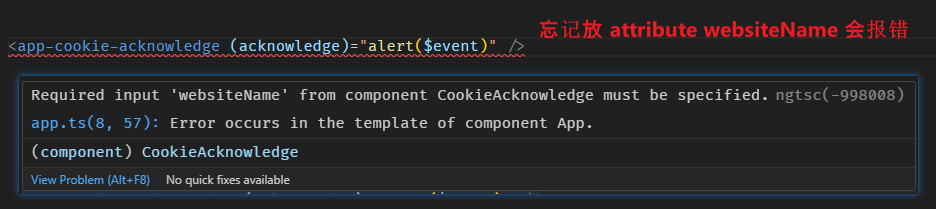
input.required 则表示 element 一定要附上这个 attribute,不然 IDE 会直接报错。
output
有 input 自然就有 output。
input 用于 attribute,output 则用来表示 dispatch event。
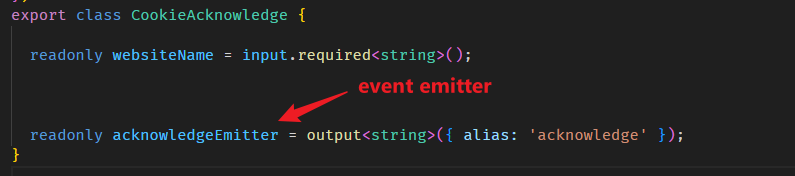
alias 是配置别名,如果没有配置的话,属性名 "acknowledgeEmitter" 会被用作 event name。

cookie-acknowledge.html
<h1>Cookie Acknowledge</h1>
<p>Welcome to {{ websiteName() }}, to allow we track you, please press acknowledge button.</p>
<button (click)="acknowledgeEmitter.emit('Yes, track me!')">Acknowledge</button>
{{ websiteName() }} 是 binding syntax -- 意思是把 websiteName 属性值写入 <p> 中。(另外提一点: input 函数返回的是 InputSignal (Signal 的一种),因此它是 getter 函数,取值需要以调用的方式)
(click) 也是 binding syntax -- 意思是 addEventListener('click')。
acknowledgeEmitter.emit('Yes, track me!') 是 click event 的 callback,其行为是 dispatch custom event "acknowledge"。
Custom event 通常是 dispatch CustomEvent 对象,传值是透过 event.detail 属性;但 Angular 没有这个限制,我们可以 dispatch 任何类型。
当然,如果我们想 follow custom event 的规范,dispatch CustomEvent 对象也是可以。
小结
Angular Components 和 Custom Elements 一样,都是透过 component attribute / property 和 listen event dispatch 来与组件交互。
Angular 用 input 和 output 函数声明对外 (HTML) 开放的属性和可监听的事件,并透过 OutputEmitterRef 对象 dispatch event。
Angular dispatch event 没有强制要求使用 CustomEvent 对象,我们可以 dispatch 任何类型作为 event。
input 函数
element attribute 和 element property 是两个不同的东西。
attribute & property
<input readonly>
上面这个是 attribute
-
它可以有,也可以没有 (没有就是这样
<input>)。 -
它的 value 类型一定是 string。(
<input readonly="false">,value 是 string "false") - 如果只有 attribute key,没有 attribute value (
<input readonly>),那它的 value 是 empty string。
const input = document.createElement('input');
console.log(input.readOnly); // false
上面这个是 property
-
它一定有
-
它的 value 类型是 boolean
- 当有 attribute 时 (不管 value 是什么),readOnly 就是 true;反之 readOnly 就是 false。
attribute 和 property 是相互关联的:
-
当有 "readonly" attribute 时,"readOnly" property 就是 true;反之就是 false。
-
当你改变其中一个,另一个也要自动改变
const input = document.createElement('input');
console.log(input.readOnly);                 // by default property 是 false
input.setAttribute('readonly', '');          // set attribute
console.log(input.readOnly);                 // property 变成了 true
input.readOnly = false;                      // set property
console.log(input.hasAttribute('readonly')); // attribute 变没了
input の required
Angular input 函数的主要职责就是替我们维护组件 attribute 和 property 的映射关系。
上面我们已经看了一个例子
export class CookieAcknowledge {
  readonly websiteName = input.required<string>();
}
这表示 CookieAcknowledge 组件有一个 property "websiteName",相应地,它也会有一个 "websiteName" attribute。
<app-cookie-acknowledge websiteName="兴杰 Blog" />
input.required 的 required 则表示这个 attribute 是必填的。
如果我们忘记填,IDE 会直接报错。

如果没有 required 则是这样
export class CookieAcknowledge {
  readonly websiteName: InputSignal<string | undefined> = input<string>();
}
attribute 可以不需要填,当没有 attribute 时,"websiteName" property getter value 会是 undefined。
注:input 返回的是 InputSignal,它继承自 readonly Signal,因此是一个 getter 函数。
如果我们不希望它是 undefined,可以提供一个 default value;当没有 attribute 时,"websiteName" property getter value 就会是 default value。
export class CookieAcknowledge {
  readonly websiteName: InputSignal<string> = input<string>('default value'); // 这样就不会 undefined 了
}
input の alias
alias 是一个 input options,它可以让 attribute name 和 property name 不相同,但却可以正确映射。
export class CookieAcknowledge {
  readonly websiteName = input.required<string>({ alias: 'name' });
}
property name 是 "websiteName",但配置了 alias "name",因此 attribute name 是 "name" 而不是 "websiteName"。
<app-cookie-acknowledge name="兴杰 Blog" />
input の transform
transform 也是一个 input options,它的作用是在 set property value 时拦截,并对 value 进行转换 (transform),常用于类型转换。
上面我们说了,attribute value 的类型一定是 string,而 property value 的类型则可以是任何类型,比如说 boolean。
export class CookieAcknowledge {
  readonly required = input.required<boolean>();
}
有一个 "required" property,类型是 boolean。
<app-cookie-acknowledge required />         <!--Error: Type 'string' is not assignable to type 'boolean'.-->

<app-cookie-acknowledge required="true" />  <!--Error: Type 'string' is not assignable to type 'boolean'.-->

<app-cookie-acknowledge required="false" /> <!--Error: Type 'string' is not assignable to type 'boolean'.-->

<app-cookie-acknowledge required="" />      <!--Error: Type 'string' is not assignable to type 'boolean'.-->
无论我们怎样设置 "required" attribute 它都会报错,因为 attribute 是 string,但 property 却是 boolean。
有两种方法可以解决:
-
binding syntax (模板语法)
<app-cookie-acknowledge [required]="true" />
<app-cookie-acknowledge [required]="false" />
[required]是 binding syntax,它的作用是 set value to property。注意:不是 set value to attribute 哦,是 set value to property。
另外,它的 value 是 JavaScript 表达式 (Angular 限缩版的),而不是普通的 string。
<app-cookie-acknowledge [websiteName]="'兴杰 Blog'" [required]="true" />
注意看,
[websiteName]的 value "'兴杰 Blog'" 有多一层 single quote,因为它是 JavaScript 表达式。binding syntax 博大精深,以后会单独写一篇来教,这里点到为止。
-
transform
import { booleanAttribute, Component, input } from '@angular/core'; export class CookieAcknowledge { readonly required = input.required({ transform: booleanAttribute }); }booleanAttribute是一个把 value 转换成 boolean 的函数,它是 Angular built-in 的,源码在 coercion.ts![]()
如果 value 是 boolean 那直接返回。
如果 value 是 null or undefined or 'false' 就返回 false
其它情况则返回 true
<app-cookie-acknowledge required />         <!--true-->
<app-cookie-acknowledge required="" />      <!--true-->
<app-cookie-acknowledge required="true" />  <!--true-->
<app-cookie-acknowledge required="false" /> <!--false-->
string value 除了 'false' 以外,其它的都会 transform 成 true。
搭配 binding syntax,它会是这样
<app-cookie-acknowledge [required]="null" />      <!--false-->
<app-cookie-acknowledge [required]="undefined" /> <!--false-->
<app-cookie-acknowledge [required]="false" />     <!--false-->
<app-cookie-acknowledge [required]="'false'" />   <!--false-->

<app-cookie-acknowledge [required]="0" />  <!--true-->
<app-cookie-acknowledge [required]="1" />  <!--true-->
<app-cookie-acknowledge [required]="[]" /> <!--true-->
<app-cookie-acknowledge [required]="{}" /> <!--true-->
首先,transform 是 for property value 而不是 attribute value,所以采用 binding syntax direct set value to property 也依然会 transform。
除了头 4 个 null, undefined, false, 'false' 会 transform 成 false 以外,其它的 value 一律都 transform 成 true。

除了 booleanAttribute,Angular 还有一个 built-in 的 transform 函数 -- numberAttribute。
顾名思义,它是用来 transform to number 的,源码在 coercion.ts

主要是透过 parseFloat 和 Number 做转化,转换失败会 fallback to NaN。
undefined as no set attribute
function createComponent(websiteName = 'default value') {}这是一个函数,它有一个 optional parameter with default value。
createComponent();
createComponent(undefined);
调用函数时,可以不传参数,也可以传 undefined,这两个方式是等价的,websiteName 最终都是 'default value'。
export class CookieAcknowledge {
  readonly websiteName = input('default value');
}
"websiteName" property 是 optional with default value。
我们可以不设置 "websiteName" attribute,像这样
<app-cookie-acknowledge />
但却不能透过 binding syntax 直接设置 property value to undefined

这意味着,我们无法 "动态" 的决定是否要设置 attribute 给它。
解决方案是配置 transform
export class CookieAcknowledge {
  readonly websiteName = input('default value', {
    transform: (value : string | undefined | null) => value == null ? 'default value' : value
  });
}
如果传入的是 null or undefined 就 transform to 'default value'。
虽然代码有点繁琐,不优雅,但勉强能用。
input の compilation
input除了是一个函数,它在 compile 阶段还是一个识别符。
因此,下面这个写法会报错
export class CookieAcknowledge {
  readonly websiteName: InputSignal<string>;

  constructor() {
    // Error : Unsupported call to the input.required function. This function can only be called in the initializer of a class member.
    this.websiteName = input.required<string>();
  }
}
从 JavaScript 的角度看,这个写法完全没有问题。
但 IDE 却报错了,因为 Angular compiler 无法解析这么复杂的写法。
所以,我们只能这样定义 input
export class CookieAcknowledge {
  readonly websiteName = input.required<string>();
}
output 函数
todo 写 custom element + custom event 例子 (用上面例子,但不需要写完整)
然后用 output 实现
接下来写 lifecycle custom element vs angular 的,可以尝试引入 @Attribute 那个 inject(token)
@Attribute
@Input 是用来拿 property 的,@Attribute 是用来拿 attribute 的。
看例子:
<app-item name="iPhone 14" />
有一个 Item 组件,它有一个 attrbute name,value 是 'iPhone 14'。
在 AppItem 组件 constructor 参数使用 @Attribute decorator
export class ItemComponent {
  constructor(
    // 1. 在 constructor 使用 @Attribute decorator 获取 name attribute
    @Attribute('name') name: string,
  ) {
    console.log(name); // 'iPhone 14'
  }
}
这样就可以拿到 attribute value 了。
这里有 2 个点要注意:
-
@Attribute 是 apply 在 constructor 参数,而不是像 @Input 那样 appy 在 property。
-
@Attribute 不可以和 @Input 撞,两者只能有一个存在。
-
@Attribute 没有 binding 概念,它一定是 static string value。
@Attribute 相对 @Input 来说是非常冷门的,组件一般上很少会用 @Attribute,指令 + 原生 DOM 才可能会用到 @Attribute。(指令后面章节才会教)
@Input 和 @Output Decorator 正在被放弃
Decorator 目前普遍不受待见,两大原因。
1. ECMA 把 Decorator 拆成了两个版本,而且第二个还没有定稿。
2. 函数式的天下,Decorator 自然也变成小众了。
所以,Angular 从 v14 开始就有了弃暗投明的想法。一步一步靠拢 react、vue、solid、svelte 等等前端技术。
当然所谓的靠拢只是在开发体验上,写法上不同而已,概念是靠拢不了的。
metadata 写法
metadata inputs 写法
@Component({
  inputs: [
    { name: 'boolValue', alias: 'value', required: true, transform: booleanAttribute }
  ]
})
取代了原本的 @Input,接口都一样,只是搬家而已。
我个人是觉得没有必要这么写啦,逻辑分开有时候也很乱,建议大家还是等 Signal-based Component 吧。
Signal-based 写法
export class CardComponent {
  title = input<string>();
}
上面这个就是 Signal-based Component Input 的写法。title 是属性,input 是全局函数。
这个写法和 DI 的 inject 函数非常相识。
Angular v17.1.0 正式推出了 Signal-based Input,想学可以看这篇 Signals # Signal-based Input。
Angular Component Lifecycle vs Custom Elements Lifecycle
Custom Elements Lifecycle
Custom Elements 有 3 个 Lifecycle Hook.
1. connectedCallback 当被 append to document
2. disconnectedCallback 当被 remove from document
3. attributeChangedCallback 当监听的 attributes add, remove, change value 的时候触发
Angular Component Lifecycle
Angular 有好多 Lifecycle Hook...我先介绍 5 个基本的,后面的章节还会介绍其它的。
首先,我们添加一些交互
一个 change attribute 和一个 remove element

app.component.ts


export class AppComponent {
  alert = alert;
  websiteName = '兴杰 Blog';
  showCookieAcknowledge = true;
}
app.component.html
<div class="container">
  <div class="action">
    <button (click)="websiteName = 'Derrick\'s Blog'">Change Website Name</button>
    <button (click)="showCookieAcknowledge = false">Delete Cookie Acknowledge</button>
  </div>
  @if (showCookieAcknowledge) {
    <app-cookie-acknowledge [websiteName]="websiteName" (acknowledge)=" alert($event)"></app-cookie-acknowledge>
  }
</div>
不要在意 @if 和 [websiteName],后面章节会教,我们 focus Lifecycle Hook 就好了。
添加 5 个 Lifecycle Hook 到 Cookie Acknowledge Component
cookie-acknowledge.component.ts
export class CookieAcknowledgeComponent
  implements OnInit, OnChanges, OnDestroy, AfterViewInit
{
  @Input({ required: true })
  websiteName!: string;

  @Output('acknowledge')
  acknowledgeEmitter = new EventEmitter<string>();

  constructor() {
    console.log('constructor', '@Input value not ready yet');
    console.log(
      'constructor, this.websiteName === undefined',
      this.websiteName === undefined
    );
  }

  ngOnInit(): void {
    console.log('OnInit', '@Input value ready');
    console.log(
      'OnInit, this.websiteName !== undefined',
      this.websiteName !== undefined
    );
  }

  ngOnChanges(changes: SimpleChanges): void {
    if ('websiteName' in changes) {
      const change = changes['websiteName'];
      if (change.firstChange) {
        console.log(
          'OnChanges first change',
          `prev: ${change.previousValue}, curr: ${change.currentValue}`
        );
        console.log(
          'OnChanges first change, paragraph appended',
          document.querySelector('.paragraph') !== null
        );
        console.log(
          'OnChanges first change, paragraph data binding no complete yet',
          document.querySelector('.paragraph')!.textContent === ''
        );
      } else {
        console.log(
          'OnChanges second change',
          `previous value : ${change.previousValue}`
        );
        console.log(
          'OnChanges second change',
          `current value : ${change.currentValue}`
        );
      }
    }
  }

  ngAfterViewInit(): void {
    console.log(
      'AfterViewInit, paragraph data binding completed',
      document.querySelector('.paragraph')!.textContent !== ''
    );
  }

  ngOnDestroy(): void {
    console.log('OnDestroy', `element has been removed`);
    console.log(
      'OnDestroy, query app-cookie-acknowledge === null',
      document.querySelector('app-cookie-acknowledge') === null
    );
  }
}
不需要看 code, 下面我们看 runtime console 就可以了。
1. constructor
组件是 class,第一个被 call 的自然是 constructor。在这个阶段 @Input 的是还没有输入值的,它是 undefined。
template 也还没有 append 到 document 里。
2. ngOnChanges (first time)
ngOnChanges 对应 Custom Elements 的 attributeChangedCallback。每当 attribute 变化的时候就会 call。
websiteName 从开始的 undefined 变成 '兴杰 blog' 后就会触发 first time onchanges。
注:Custom Elements 的 attributeChangedCallback 是没有 first time call 的,它只有后续改变才会 call。
另外,template 在这个阶段已经 append to document 了,但如果有 binding data 的部分则还没有完成。
比如这句
<p class="paragraph">Welcome to {{ websiteName }}, to allow we track you, please press acknowledge button.</p>
假如这个阶段我们 document.query .paragraph 会获得 element,但是 element.textContent 将会是 empty string。
3. ngOnInit
ngOnInit 对应 Custom Elements connectedCallback。在这个阶段 @Input 的 value 已经有值了。
通常我们会在这个阶段发 ajax 取 data 什么的。
这个阶段 binding data 依旧还没开始,paragraph.textContent 依然是 emtpty string。
4. ngAfterViewInit
这个阶段 binding data 就完成了。paragraph.textContent 已经有包括 websiteName '兴杰 blog' 在内的 text 了。
在这个阶段我们不应该再去修改 view model 了,如果修改它会报错的。

如果真的有需要修改的话,那么就用 setTimeout 让它开启下一个循环。
5. ngOnChanges(second time)
当 @Input 值被修改后,又会触发 ngOnChanges。记得,这个阶段 data binding 是还没有完成的哦。
如果想监听到 data binding 完成,可以使用 ngAfterViewChecked,但这个比较冷门,我不想在这里展开,以后的章节会详解介绍。
6. ngOnDestroy
ngOnDestroy 对应 Custom Elements 的 disconnectedCallback,这个阶段 element 已经从 document 移除了。
我们通常会在这里做一些释放资源的动作。
console 结果

Future (Signal-based Components)
参考: Github – Sub-RFC 3: Signal-based Components
这篇提到的 @Input @Output 还有 Lifecycle Hook 写法,在未来(一年后)会有很大的变化。
因为 Angular 正在向 React 学习,希望透过改变开放体验来吸引一些新用户。
感受一下:
@Input

Angular v17.1.0 正式推出了 Input Signal,想学可以看这篇 Signals。
@Output

Lifecycle Hook

改变的方向是尽可能移除 Decorator 和增加函数式特性,同时减少面向对象特性。
虽然写法上区别很大,但是底层思路改变的不多,而且 Angular 依然会保留目前的写法很长一度时间(maybe 2 more years)。
所以短期内大家还是可以学习和安心使用的。
目录
上一篇 Angular 20+ 高阶教程 – Component 组件 の Angular Component vs Web Component
下一篇 Angular 20+ 高阶教程 – Component 组件 の Angular Component vs Shadow DOM (CSS Isolation & slot)
想查看目录,请移步 Angular 20+ 高阶教程 – 目录
喜欢请点推荐👍,若发现教程内容以新版脱节请评论通知我。happy coding 😊💻

 浙公网安备 33010602011771号