
VContainer 介绍
VContainer





专为 Unity 游戏引擎设计的超快DI(依赖注入)库。
"V" 意味着让 Unity 初始的 "U" 更轻量更稳固 ... !
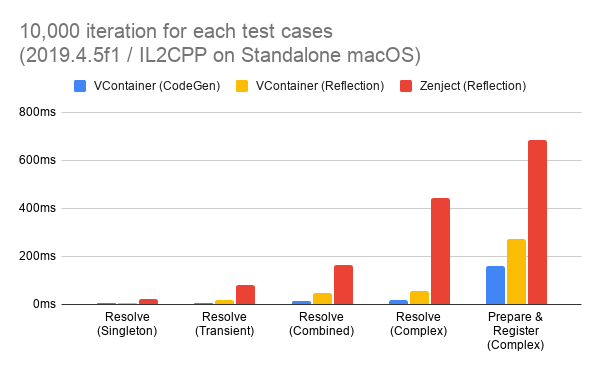
- 极速解析: 基础性能比 Zenject 快5-10倍。
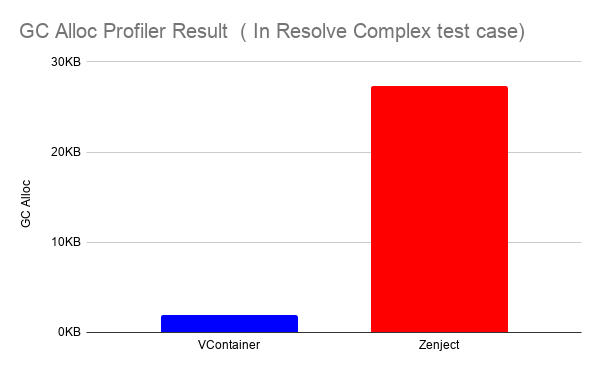
- 零GC分配: 解析过程中(除实例生成外)完全实现了零内存分配。
- 精简代码: 少量内部类型与 .callvirt 调用。
- 规范 DI 实践: 提供简单透明的 API,谨慎选择功能特性,防止 DI 声明过度复杂化。
- 不可变容器: 线程安全和健壮性。
核心功能
- 构造函数注入 / 方法注入 / 属性和字段注入
- 自管理 PlayerLoopSystem 调度
- 灵活作用域控制
- 可自由创建嵌套的生命周期作用域 (Lifetime Scope),支持异步。
- 基于源码生成器 SourceGenerator 的加速模式(可选)
- Unity编辑器诊断 (Diagnositcs) 窗口
- 集成 UniTask
- 集成 ECS beta
文档
访问 vcontainer.hadashikick.jp 阅读完整文档
性能表现
GC 内存分配实测


安装指南
要求 Unity 2018.4+
通过 UPM 安装 (使用 Git 链接)
- 打开项目 Packages 文件夹下的 manifest.json 文件。
- 在 "dependencies": { 行下添加以下内容:
-
"jp.hadashikick.vcontainer": "https://github.com/hadashiA/VContainer.git?path=VContainer/Assets/VContainer#1.16.8",
-
- UPM 将自动安装该包。
通过 OpenUPM 安装
- 该包已发布于 openupm registry 。 推荐通过 openupm-cli 进行安装。
- 执行以下 openum 命令:.
-
openupm add jp.hadashikick.vcontainer
-
手动安装(使用.unitypackage)
- 从 releases 页面下载 .unitypackage 。
- 导入 VContainer.x.x.x.unitypackage
基础用法
首先创建作用域,在此注册的类型会自动完成依赖解析:
public class GameLifetimeScope : LifetimeScope
{
    public override void Configure(IContainerBuilder builder)
    {
        builder.RegisterEntryPoint<ActorPresenter>();

        builder.Register<CharacterService>(Lifetime.Scoped);
        builder.Register<IRouteSearch, AStarRouteSearch>(Lifetime.Singleton);

        builder.RegisterComponentInHierarchy<ActorsView>();
    }
}
相关类定义:
public interface IRouteSearch
{
}

public class AStarRouteSearch : IRouteSearch
{
}

public class CharacterService
{
    readonly IRouteSearch routeSearch;

    public CharacterService(IRouteSearch routeSearch)
    {
        this.routeSearch = routeSearch;
    }
}
视图组件:
public class ActorsView : MonoBehaviour
{
}
以及入口类:
public class ActorPresenter : IStartable
{
    readonly CharacterService service;
    readonly ActorsView actorsView;

    public ActorPresenter(
        CharacterService service,
        ActorsView actorsView)
    {
        this.service = service;
        this.actorsView = actorsView;
    }

    void IStartable.Start()
    {
        // 通过 VContainer PlayerLoopSystem 调度 Start()
    }
}
- 示例中,当解析 CharacterService 时,CharacterService 的 routeSearch 会自动解析为 AStarRouteSearch 实例。
- VContainer 支持纯 C# 类作为入口点(可指定 Start/Update 等生命周期),实现"业务逻辑与表现层分离"。
使用异步 (async) 的灵活作用域
LifetimeScope 支持动态创建子作用域,轻松应对游戏中的异步资源加载:
public void LoadLevel()
{
    // ... 加载资源

    // 创建子作用域
    instantScope = currentScope.CreateChild();

    // 使用 LifetimeScope 预制件创建子作用域
    instantScope = currentScope.CreateChildFromPrefab(lifetimeScopePrefab);

    // 额外注册创建子作用域
    instantScope = currentScope.CreateChildFromPrefab(
        lifetimeScopePrefab,
        builder =>
        {
            // 额外注册...
        });

    instantScope = currentScope.CreateChild(builder =>
    {
        // 额外注册...
    });

    instantScope = currentScope.CreateChild(extraInstaller);
}

public void UnloadLevel()
{
    instantScope.Dispose();
}
在附加场景中建立 LifetimeScope 父子关系:
class SceneLoader
{
    readonly LifetimeScope currentScope;

    public SceneLoader(LifetimeScope currentScope)
    {
        this.currentScope = currentScope; // 注入此类所属的 LifetimeScope
    }

    IEnumerator LoadSceneAsync()
    {
        // 在此区块中生成的 LifetimeScope 将设置`this.lifetimeScope`为父级
        using (LifetimeScope.EnqueueParent(currentScope))
        {
            // 如果此场景有一个 LifetimeScope,它的父级将是 `parent`
            var loading = SceneManager.LoadSceneAsync("...", LoadSceneMode.Additive);
            while (!loading.isDone)
            {
                yield return null;
            }
        }
    }

    // UniTask 示例
    async UniTask LoadSceneAsync()
    {
        using (LifetimeScope.EnqueueParent(parent))
        {
            await SceneManager.LoadSceneAsync("...", LoadSceneMode.Additive);
        }
    }
}
// 在此区块中生成的 LifetimeScope 将被额外注册。
using (LifetimeScope.Enqueue(builder =>
{
    // 为尚未加载的下一个场景注册
    builder.RegisterInstance(extraInstance);
}))
{
    // 加载场景...
}
查看 scoping 获得更多信息。
UniTask
public class FooController : IAsyncStartable
{
    public async UniTask StartAsync(CancellationToken cancellation)
    {
        await LoadSomethingAsync(cancellation);
        await ...
        ...
    }
}
builder.RegisterEntryPoint<FooController>();
查看 integrations 获取更多信息。
Diagnositcs 诊断窗口
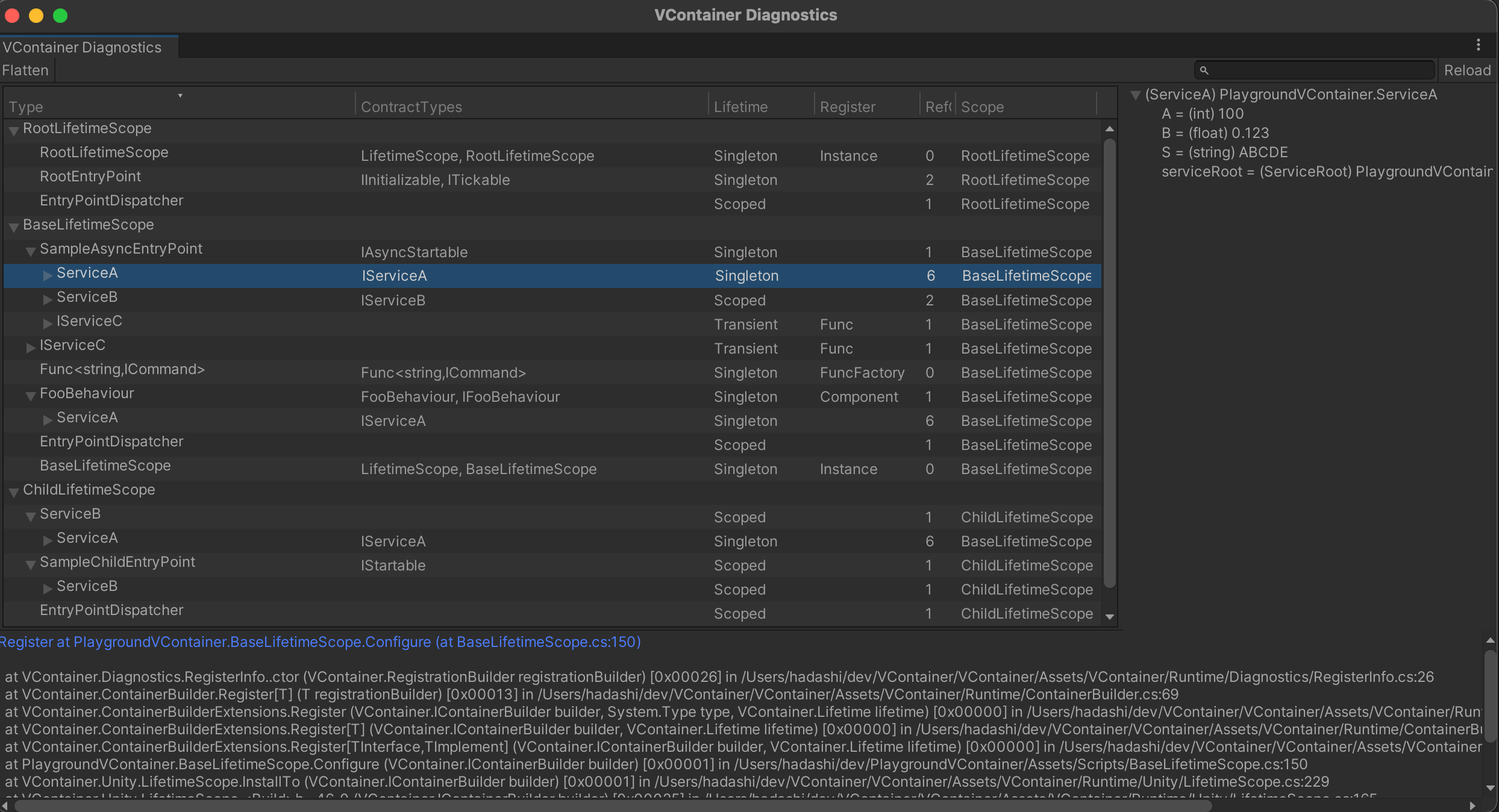
查看 diagnostics 获得更多信息。
致谢
VContainer 灵感来源:
作者
许可协议
MIT

 浙公网安备 33010602011771号