
使用ListBox实现一个对话框控件
介绍
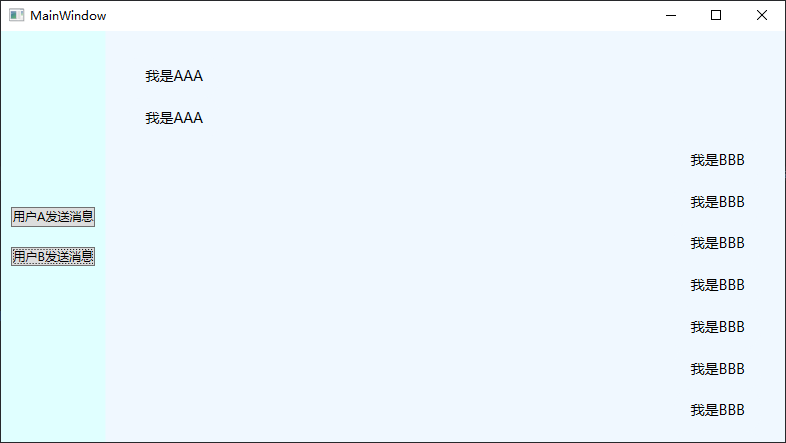
为了突出重点,本文只介绍具体的实现方法。不去过多美化控件样式了。总体实现效果大概如下图所示。双方的消息会分别显示在两侧,然后消息框会随着消息的出现自动下拉。
实现方法
大体思路是,通过编写自定义控件重写ListBox的GetContainerForItemOverride方法,根据Items中不同的消息类型创建不同的容器,将消息分别显示在两侧。
样式编写
-
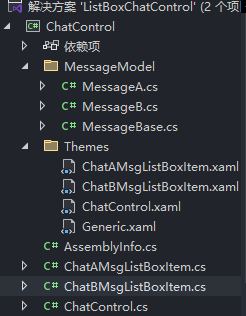
首先在WPF项目中创建一个自定义控件库,在这里面定义ListBox,以及不同消息的Container的样式。项目结构如下。(添加的MessageModel是在
GetContainerForItemOverride会用到的消息类型。)
-
创建自定义控件后,在Themes中创建对应的资源字典文件,其中编写对应控件的样式。由于过程很简单,我就直接给出这4个资源字典的内容。
ChatAMsgListBoxItem
<ResourceDictionary
    xmlns="http://schemas.microsoft.com/winfx/2006/xaml/presentation"
    xmlns:x="http://schemas.microsoft.com/winfx/2006/xaml"
    xmlns:units="clr-namespace:ChatControl">
    <Style TargetType="units:ChatAMsgListBoxItem">
        <Setter Property="Template">
            <Setter.Value>
                <ControlTemplate TargetType="units:ChatAMsgListBoxItem">
                    <StackPanel MaxWidth="400" HorizontalAlignment="Left">
                        <Border
                            x:Name="MessageBorder"
                            Padding="16,12,16,12"
                            Background="AliceBlue"
                            CornerRadius="16,16,16,4">
                            <TextBlock
                                x:Name="MessageText"
                                FontSize="14"
                                Foreground="Black"
                                Text="{Binding Msg}"
                                TextWrapping="Wrap" />
                        </Border>
                    </StackPanel>

                </ControlTemplate>
            </Setter.Value>
        </Setter>
    </Style>
</ResourceDictionary>
ChatBMsgListBoxItem
<ResourceDictionary
    xmlns="http://schemas.microsoft.com/winfx/2006/xaml/presentation"
    xmlns:x="http://schemas.microsoft.com/winfx/2006/xaml"
    xmlns:units="clr-namespace:ChatControl">
    <Style TargetType="units:ChatBMsgListBoxItem">
        <Setter Property="Template">
            <Setter.Value>
                <ControlTemplate TargetType="units:ChatBMsgListBoxItem">
                    <!--  让这个Container在 ItemsPanel中靠右对齐  -->
                    <StackPanel MaxWidth="400" HorizontalAlignment="Right">
                        <Border
                            x:Name="MessageBorder"
                            Padding="16,12,16,12"
                            Background="AliceBlue"
                            CornerRadius="16,16,16,4">
                            <TextBlock
                                x:Name="MessageText"
                                FontSize="14"
                                Foreground="Black"
                                Text="{Binding Msg}"
                                TextWrapping="Wrap" />
                        </Border>
                    </StackPanel>

                </ControlTemplate>
            </Setter.Value>
        </Setter>
    </Style>
</ResourceDictionary>
ChatControl
<ResourceDictionary
    xmlns="http://schemas.microsoft.com/winfx/2006/xaml/presentation"
    xmlns:x="http://schemas.microsoft.com/winfx/2006/xaml"
    xmlns:units="clr-namespace:ChatControl">

    <Style TargetType="units:ChatControl">
        <Setter Property="Background" Value="Transparent" />
        <Setter Property="Template">
            <Setter.Value>
                <ControlTemplate TargetType="units:ChatControl">
                    <ScrollViewer Grid.Row="1" Background="AliceBlue" HorizontalScrollBarVisibility="Hidden" VerticalScrollBarVisibility="Hidden">
                        <ItemsPresenter Margin="24" />
                    </ScrollViewer>
                </ControlTemplate>
            </Setter.Value>
        </Setter>
    </Style>
</ResourceDictionary>
Generic
<ResourceDictionary
    xmlns="http://schemas.microsoft.com/winfx/2006/xaml/presentation"
    xmlns:x="http://schemas.microsoft.com/winfx/2006/xaml"
    xmlns:local="clr-namespace:ChatControl">
    <ResourceDictionary.MergedDictionaries>
        <ResourceDictionary Source="/ChatControl;component/Themes/ChatControl.xaml" />
        <ResourceDictionary Source="/ChatControl;component/Themes/ChatAMsgListBoxItem.xaml" />
        <ResourceDictionary Source="/ChatControl;component/Themes/ChatBMsgListBoxItem.xaml" />
    </ResourceDictionary.MergedDictionaries>

</ResourceDictionary>
最后一定要把资源字典文件添加到Generic.xaml文件中,才能正确显示我们在当前项目中编写的自定义控件。
- 在ChatControl控件中重写,我们之前说的方法,并为其添加一个自动下滑的行为事件。这是我认为这种实现方法下最困难的一步,ListBox中的Items为ItemCollection类型,虽然其实现了INotifyCollectionChanged接口,但它是显示实现的,我们必须将其转换为INotifyCollectionChanged类型,才能订阅CollectionChanged事件,实现自动下滑。
点击查看代码
using ListBoxChatControl.MessageModel;
using System.Collections.Specialized;
using System.Net.Mail;
using System.Text;
using System.Windows;
using System.Windows.Controls;
using System.Windows.Data;
using System.Windows.Documents;
using System.Windows.Input;
using System.Windows.Media;
using System.Windows.Media.Imaging;
using System.Windows.Navigation;
using System.Windows.Shapes;

namespace ChatControl
{

    public class ChatControl : ListBox
    {
        private int _currentItemIndex;

        public ChatControl()
        {

            DefaultStyleKeyProperty.OverrideMetadata(typeof(ChatControl), new FrameworkPropertyMetadata(typeof(ChatControl)));
            _currentItemIndex = -1;
            ListBoxAutoScrollBehavior.SetAutoScroll(this,true);
        }


        protected override DependencyObject GetContainerForItemOverride()
        {
            if (Items.Count > 0)
            {
                var currentItem = Items[Items.Count - 1];
                if (currentItem is MessageA)
                {
                    return new ChatAMsgListBoxItem();
                }
                else if (currentItem is MessageB)
                {
                    return new ChatBMsgListBoxItem();
                }
            }
            return base.GetContainerForItemOverride();
        }

        protected override void OnItemsChanged(NotifyCollectionChangedEventArgs e)
        {
            base.OnItemsChanged(e);
            _currentItemIndex = -1;
        }
    }

    public static class ListBoxAutoScrollBehavior
    {
        public static readonly DependencyProperty AutoScrollProperty =
            DependencyProperty.RegisterAttached(
                "AutoScroll",
                typeof(bool),
                typeof(ListBoxAutoScrollBehavior),
                new PropertyMetadata(false, OnAutoScrollChanged));

        public static bool GetAutoScroll(DependencyObject obj) =>
            (bool)obj.GetValue(AutoScrollProperty);

        public static void SetAutoScroll(DependencyObject obj, bool value) =>
            obj.SetValue(AutoScrollProperty, value);

        private static void OnAutoScrollChanged(DependencyObject d, DependencyPropertyChangedEventArgs e)
        {
            if (d is ListBox listBox)
            {
                if ((bool)e.NewValue)
                {
                    var items = listBox.Items;
                    var ic = items as INotifyCollectionChanged;
                    if (ic != null)
                    {
                        //ItemCollection 显示实现INotifyCollectionChanged接口 只有转换为INotifyCollectionChanged接口才能订阅这个事件

                        ic.CollectionChanged += (sender, args) =>
                        {
                            if (args.Action == NotifyCollectionChangedAction.Add)
                            {
                                if (listBox.Items.Count > 0)
                                {
                                    listBox.ScrollIntoView(listBox.Items[listBox.Items.Count - 1]);
                                }
                            }
                        };
                    }
                }
            }
        }
    }
}
- 在前端使用我们的自定义控件。
点击查看代码
<Window
    x:Class="ListBoxChatControl.MainWindow"
    xmlns="http://schemas.microsoft.com/winfx/2006/xaml/presentation"
    xmlns:x="http://schemas.microsoft.com/winfx/2006/xaml"
    xmlns:d="http://schemas.microsoft.com/expression/blend/2008"
    xmlns:local="clr-namespace:ListBoxChatControl"
    xmlns:mc="http://schemas.openxmlformats.org/markup-compatibility/2006"
    xmlns:units="clr-namespace:ChatControl;assembly=ChatControl"
    Title="MainWindow"
    Width="800"
    Height="450"
    mc:Ignorable="d">
    <Window.DataContext>
        <local:MainViewModel />
    </Window.DataContext>

    <Window.Resources>
        <ResourceDictionary>
            <ResourceDictionary.MergedDictionaries />


            <Style TargetType="ListBoxItem">
                <Setter Property="Template">
                    <Setter.Value>
                        <ControlTemplate TargetType="ListBoxItem">
                            <Border>
                                <ContentPresenter />
                            </Border>
                        </ControlTemplate>
                    </Setter.Value>
                </Setter>
            </Style>

        </ResourceDictionary>

    </Window.Resources>

    <Grid Background="LightCyan">
        <Grid.ColumnDefinitions>
            <ColumnDefinition Width="auto" />
            <ColumnDefinition Width="*" />
        </Grid.ColumnDefinitions>

        <StackPanel
            Grid.Column="0"
            VerticalAlignment="Center"
            Orientation="Vertical">
            <Button
                Margin="10"
                Command="{Binding SendAMessageCommand}"
                Content="用户A发送消息" />
            <Button
                Margin="10"
                Command="{Binding SendBMessageCommand}"
                Content="用户B发送消息" />
        </StackPanel>

        <units:ChatControl
            Grid.Column="1"
            ItemsSource="{Binding MsgList}"
            />
    </Grid>
</Window>

 浙公网安备 33010602011771号