
OpenGL渲染时必要数据的简单总结,Assimp数据结构&模型文件导入
渲染时必要数据:
- shader是 最终执行渲染的程序,检查shader的input接口,可以得到渲染所需数据:
- vertexShader: 具体代码详见 > UV坐标,2D贴图,冯氏光照模型和材质
- layout (location = 0) in vec3 vertexPos
- layout (location = 1) in vec3 Normal;
-
layout (location = 2) in vec2 TexCoords;
- 来自 vertexArrayBuffer,以顶点为单位,一次仅汇入一个顶点的相关数据
- vertexShader: 具体代码详见 > UV坐标,2D贴图,冯氏光照模型和材质
-
-
- uniform mat4 modelTransMatrix
- uniform mat4 viewTransMatrix
- uniform mat4 projectionTransMatrix
- 直接来自 [外部代码] ,通过:glUniform1i(glGetUniformLocation(shaderID, name.c_str()), value);
- 此处使用 的glUniform1i,仅支持灌入一个int值,如需灌入mat4,则需使用:
-
-
-
-
-
- glUniformMatrix4fv(glGetUniformLocation(ID, name.c_str()), 1, GL_FALSE, &mat[0][0]);
- 不同于单一int值,Matrix4是聚合值,需要给出首地址。
-
-
-
-
-
-
- 向shaderID标识的shaderProgram中的 名为name.c_str()的uniform栏位灌入值。
-
-
-
- fragmentShader: 具体代码详见 > UV坐标,2D贴图,冯氏光照模型和材质
-
-
- in vec3 FragPos > 经变换后的 vertexPos,来自vertexShader
- in vec3 Normal > 经变换 [防止缩放后走形] 后的 Normal,来自vertexShader
- in vec2 TexCoord > 来自vertexShader的UV值,因为UV值来自vertexArrayBuffer,所以只能先由vertexShader代为缓冲。
- uniform vec3 viewPos > 摄像机在 [世界空间坐标系] 中的坐标。
-
-
-
- uniform Material material;
-
struct Material {sampler2D diffuse;sampler2D specular;float shininess;};
- 本次所绘制片元的材质,如果此片元没有specular材质,则无需装填specular
- 相应的,若specular默认为空,则【specular光照渲染值 = 0】不生效。
-
-
-
-
- 当一个网格拥有多个贴图时(多个片元共用一个贴图,可以是共取贴图的不同部分)
- 需要的specular&diffuseTexture,就不止一个,当然,shininess也可能会有不同。
- struct Material {
- sampler2D diffuse;
- sampler2D diffuse2;
- sampler2D ...
- sampler2D specular;
- float shininess;
- sampler2D specular2;
- float shininess;
- ...
- };
- 但本次仅考虑一组的情况。
-
-
-
-
- uniform Light light;
-
struct Light {vec3 position;
vec3 ambient;vec3 diffuse;vec3 specular;}; - 此片元受到的光照,无论此片元是否有 specularTexture,都应装填 specularLight(vec3)
- 因为,虚拟现实与真实世界>理应是一样 光源是的公用的,仅在材质上做区分即可。
-
- uniform Light light;
-
Assimp数据结构:
- 如图:
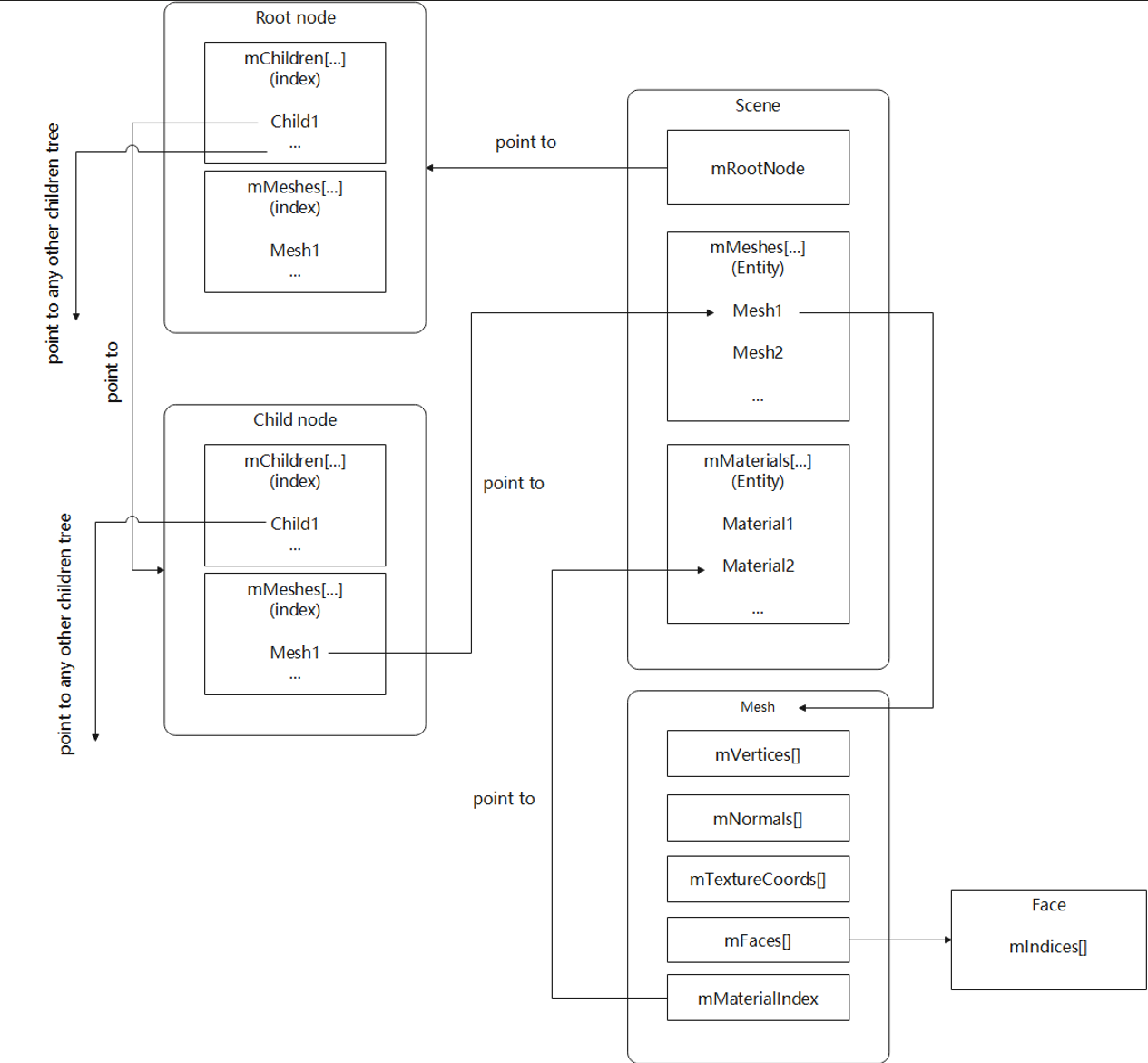
- Assimp数据结构解释:
- Scene | aiScene* > 指向场景内全部数据的指针
-
-
- mRootNode | aiNode* > 场景内所有节点的父节点的 指针
-
-
-
-
- mChildren | aiNode** > 子节点指针 的聚合体
- mChildren* (其中一个子节点指针)
- mChildren | aiNode** > 子节点指针 的聚合体
-
-
-
-
-
-
-
- mChildren | aiNode** >子节点指针的聚合体
- mChildren* > 其中一个子节点指针
- 。。。
- mMeshes | unsigned int*
- mChildren | aiNode** >子节点指针的聚合体
-
-
-
-
-
-
-
- mMeshes | unsigned int* 每个子节点指针 对应网格的 [线性索引]。
- 使用这个索引对应在Scene -> mMeshes内查找 该节点层级所包含的网格数据 的地址。
- mMeshes | unsigned int* 每个子节点指针 对应网格的 [线性索引]。
-
-
-
-
- mMeshes | aiMesh** > 网格数据指针 的聚合体。
- aiMesh:
- mVertices | aiVector3D*(aiVector3t<float>*)
- mNormals | aiVector3D*(aiVector3t<float>*)
- mTextureCoords | aiVector3D*(aiVector3t<float>*)
- 因为存在 3D贴图,所以预置 3个维度:UVT
- 2D贴图时,仅前两个分量有值,载入时,也仅使用前两个分量。
- mFaces | aiFace*
- 顶点索引。
- mIndices | unsigned int*
- mNumIndices | unsigned int
- mMaterialIndex > 材质信息索引,来自Scene > mMaterials
- aiMesh:
- mMeshes | aiMesh** > 网格数据指针 的聚合体。
-
-
-
- mMaterials | aiMaterial** > 材质信息指针 的聚合体
- aiMaterial:
- mNumAllocated | unsigned int
- mNumProperties | unsigned int
- mProperties | aiMaterialProperty**
- aiMateralProperty:
- mData | char*
- mDataLength | unsigned int
- mIndex | unsigned int > 索引
- mKey | aiString
- mSemantic | unsigned int > 贴图文件
- mType | aiPropertyTypeInfo > 贴图文件类型
- aiMateralProperty:
- aiMaterial:
- mMaterials | aiMaterial** > 材质信息指针 的聚合体
-
- 使用Assimp加载数据:
-
// read file via ASSIMP
Assimp::Importer importer;
const aiScene* scene = importer.ReadFile(
    /*-------模型文件路径-------*/
    path,
    /*-------aiPostProcessSteps(enums)--------*/
    /*此标志存在的目的是:如果模型文件成功加载,则按照以下flags执行操作*/
    aiProcess_Triangulate          //将所有的索引模式,都转化为三角形片元模式
    | aiProcess_GenSmoothNormals   //为所有顶点创建平滑法线,如果源文件中已经存在法线,则忽略此标志
    | aiProcess_FlipUVs            //沿Y轴翻转所有UV坐标,主要是为了防止贴图方向加载出错,如果方向正确,则不要使用此flags
    | aiProcess_CalcTangentSpace   //为导入的网格计算切线和双切线,此处暂时还未用到,洒家也不懂,以后再说吧。

);

// check for errors
if(!scene || scene->mFlags & AI_SCENE_FLAGS_INCOMPLETE || !scene->mRootNode) // if is Not Zero
{
    cout << "ERROR::ASSIMP:: " << importer.GetErrorString() << endl;
    return;
}
- aiPostProcessSteps的详细信息见 AssimpDoc_AiPostProcessSteps
- 加载Assimp数据到代码文件中:
- 自定义vertexDatapack_Single:用以封装单个顶点的相关数据
-
struct Vertex {
    glm::vec3 Position;
    glm::vec3 Normal;
    glm::vec2 TexCoords;
};
-
- 自定义textureDatapack_Single:用以封装单个贴图的相关数据
-
struct Texture {
    unsigned int id;    //textureID
    string type;        //Specular | Diffuse
};
- 自定义mesh类型:
-
 1     class Mesh {
 2     public:
 3         /*  网格数据  */
 4         vector<Vertex> vertices;
 5         vector<unsigned int> indices;
 6         vector<Texture> textures;
 7         /*  函数  */
 8         Mesh(vector<Vertex> vertices, vector<unsigned int> indices, vector<Texture> textures);
 9         void Draw(Shader shader);
10     private:
11         /*  渲染数据  */
12         unsigned int VAO, VBO, EBO;
13         /*  函数  */
14         void setupMesh();
15     };
16
17     Mesh(vector<Vertex> vertices, vector<unsigned int> indices, vector<Texture> textures)
18     {
19         this->vertices = vertices;
20         this->indices = indices;
21         this->textures = textures;
22
23         setupMesh();
24     }
25
26     void setupMesh()
27     {
28         glGenVertexArrays(1, &VAO);
29         glGenBuffers(1, &VBO);
30         glGenBuffers(1, &EBO);
31
32         glBindVertexArray(VAO);
33
34         glBindBuffer(GL_ARRAY_BUFFER, VBO);
35         glBufferData(GL_ARRAY_BUFFER, vertices.size() * sizeof(Vertex), &vertices[0], GL_STATIC_DRAW);
36
37         glBindBuffer(GL_ELEMENT_ARRAY_BUFFER, EBO);
38         glBufferData(GL_ELEMENT_ARRAY_BUFFER, indices.size() * sizeof(unsigned int),
39                      &indices[0], GL_STATIC_DRAW);
40
41         // 顶点位置
42         glEnableVertexAttribArray(0);
43         glVertexAttribPointer(0, 3, GL_FLOAT, GL_FALSE, sizeof(Vertex), (void*)0);
44         // 顶点法线
45         glEnableVertexAttribArray(1);
46         glVertexAttribPointer(1, 3, GL_FLOAT, GL_FALSE, sizeof(Vertex), (void*)offsetof(Vertex, Normal));
47         // 顶点纹理坐标
48         glEnableVertexAttribArray(2);
49         glVertexAttribPointer(2, 2, GL_FLOAT, GL_FALSE, sizeof(Vertex), (void*)offsetof(Vertex, TexCoords));
50
51         glBindVertexArray(0);
52     }
53
54     void Draw(Shader shader)
55     {
56         unsigned int diffuseNr = 1;
57         unsigned int specularNr = 1;
58         for(unsigned int i = 0; i < textures.size(); i++)
59         {
60             glActiveTexture(GL_TEXTURE0 + i); // 在绑定之前激活相应的纹理单元
61
62             // 获取纹理序号(diffuse_textureN 中的 N)
63             string number;
64             string name = textures[i].type;
65             if(name == "texture_diffuse")
66                 number = std::to_string(diffuseNr++);
67             else if(name == "texture_specular")
68                 number = std::to_string(specularNr++);
69
70             shader.setFloat(("material." + name + number).c_str(), i);
71             glBindTexture(GL_TEXTURE_2D, textures[i].id);
72         }
73         glActiveTexture(GL_TEXTURE0);
74
75         // 绘制网格
76         glBindVertexArray(VAO);
77         glDrawElements(GL_TRIANGLES, indices.size(), GL_UNSIGNED_INT, 0);
78         glBindVertexArray(0);
79     }
- mesh是model中的一个层级,可视为 [子model] 是模型文件的最小单位。
- 你也可以认为model就是一个巨型mesh,而此mesh可以分块绘制。
- 此处的mesh仅考虑自身仅包含 specularTexture | diffuseTexture 的情况。
-
- 自定义model类型:
-
  1     class Model
  2     {
  3         public:
  4             /*  函数   */
  5             Model(char *path)
  6             {
  7                 loadModel(path);
  8             }
  9             void Draw(Shader shader);
 10         private:
 11             vector<Texture> textures_loaded;
 12             /*  模型数据  */
 13             vector<Mesh> meshes;
 14             string directory;
 15             /*  函数   */
 16             void loadModel(string path);
 17             void processNode(aiNode *node, const aiScene *scene);
 18             Mesh processMesh(aiMesh *mesh, const aiScene *scene);
 19             vector<Texture> loadMaterialTextures(aiMaterial *mat, aiTextureType type,
 20                                                  string typeName);
 21     };
 22
 23     Mesh processMesh(aiMesh *mesh, const aiScene *scene)
 24     {
 25         // data to fill
 26         vector<Vertex> vertices;
 27         vector<unsigned int> indices;
 28         vector<Texture> textures;
 29
 30         // walk through each of the mesh's vertices
 31         for(unsigned int i = 0; i < mesh->mNumVertices; i++)
 32         {
 33             Vertex vertex;
 34             glm::vec3 vector;
 35             // positions
 36             vector.x = mesh->mVertices[i].x;
 37             vector.y = mesh->mVertices[i].y;
 38             vector.z = mesh->mVertices[i].z;
 39             vertex.Position = vector;
 40             // normals
 41             if (mesh->HasNormals())
 42             {
 43                 vector.x = mesh->mNormals[i].x;
 44                 vector.y = mesh->mNormals[i].y;
 45                 vector.z = mesh->mNormals[i].z;
 46                 vertex.Normal = vector;
 47             }
 48             // texture coordinates
 49             if(mesh->mTextureCoords[0]) // does the mesh contain texture coordinates?
 50             {
 51                 glm::vec2 vec;
 52                 // a vertex can contain up to 8 different texture coordinates. We thus make the assumption that we won't
 53                 // use models where a vertex can have multiple texture coordinates so we always take the first set (0).
 54                 vec.x = mesh->mTextureCoords[0][i].x;
 55                 vec.y = mesh->mTextureCoords[0][i].y;
 56                 vertex.TexCoords = vec;
 57                 // tangent
 58                 vector.x = mesh->mTangents[i].x;
 59                 vector.y = mesh->mTangents[i].y;
 60                 vector.z = mesh->mTangents[i].z;
 61                 vertex.Tangent = vector;
 62                 // bitangent
 63                 vector.x = mesh->mBitangents[i].x;
 64                 vector.y = mesh->mBitangents[i].y;
 65                 vector.z = mesh->mBitangents[i].z;
 66                 vertex.Bitangent = vector;
 67             }
 68             else
 69                 vertex.TexCoords = glm::vec2(0.0f, 0.0f);
 70
 71             vertices.push_back(vertex);
 72         }
 73         // now wak through each of the mesh's faces (a face is a mesh its triangle) and retrieve the corresponding vertex indices.
 74         for(unsigned int i = 0; i < mesh->mNumFaces; i++)
 75         {
 76             aiFace face = mesh->mFaces[i];
 77             // retrieve all indices of the face and store them in the indices vector
 78             for(unsigned int j = 0; j < face.mNumIndices; j++)
 79                 indices.push_back(face.mIndices[j]);
 80         }
 81         // process materials
 82         aiMaterial* material = scene->mMaterials[mesh->mMaterialIndex];
 83         // we assume a convention for sampler names in the shaders. Each diffuse texture should be named
 84         // as 'texture_diffuseN' where N is a sequential number ranging from 1 to MAX_SAMPLER_NUMBER.
 85         // Same applies to other texture as the following list summarizes:
 86         // diffuse: texture_diffuseN
 87         // specular: texture_specularN
 88         // normal: texture_normalN
 89
 90         // 1. diffuse maps
 91         vector<Texture> diffuseMaps = loadMaterialTextures(material, aiTextureType_DIFFUSE, "texture_diffuse");
 92         textures.insert(textures.end(), diffuseMaps.begin(), diffuseMaps.end());
 93         // 2. specular maps
 94         vector<Texture> specularMaps = loadMaterialTextures(material, aiTextureType_SPECULAR, "texture_specular");
 95         textures.insert(textures.end(), specularMaps.begin(), specularMaps.end());
 96         // 3. normal maps
 97         std::vector<Texture> normalMaps = loadMaterialTextures(material, aiTextureType_HEIGHT, "texture_normal");
 98         textures.insert(textures.end(), normalMaps.begin(), normalMaps.end());
 99         // 4. height maps
100         std::vector<Texture> heightMaps = loadMaterialTextures(material, aiTextureType_AMBIENT, "texture_height");
101         textures.insert(textures.end(), heightMaps.begin(), heightMaps.end());
102
103         // return a mesh object created from the extracted mesh data
104         return Mesh(vertices, indices, textures);
105     }
106
107     // checks all material textures of a given type and loads the textures if they're not loaded yet.
108     // the required info is returned as a Texture struct.
109     vector<Texture> loadMaterialTextures(aiMaterial *mat, aiTextureType type, string typeName)
110     {
111         vector<Texture> textures;
112         for(unsigned int i = 0; i < mat->GetTextureCount(type); i++)
113         {
114             aiString str;
115             mat->GetTexture(type, i, &str);
116             // check if texture was loaded before and if so, continue to next iteration: skip loading a new texture
117             bool skip = false;
118             for(unsigned int j = 0; j < textures_loaded.size(); j++)
119             {
120                 if(std::strcmp(textures_loaded[j].path.data(), str.C_Str()) == 0)
121                 {
122                     textures.push_back(textures_loaded[j]);
123                     skip = true; // a texture with the same filepath has already been loaded, continue to next one. (optimization)
124                     break;
125                 }
126             }
127             if(!skip)
128             {   // if texture hasn't been loaded already, load it
129                 Texture texture;
130                 texture.id = TextureFromFile(str.C_Str(), this->directory);
131                 texture.type = typeName;
132                 texture.path = str.C_Str();
133                 textures.push_back(texture);
134                 textures_loaded.push_back(texture);  // store it as texture loaded for entire model, to ensure we won't unnecesery load duplicate textures.
135             }
136         }
137         return textures;
138     }
139 };
140
141
142 unsigned int TextureFromFile(const char *path, const string &directory, bool gamma)
143 {
144     string filename = string(path);
145     filename = directory + '/' + filename;
146
147     unsigned int textureID;
148     glGenTextures(1, &textureID);
149
150     int width, height, nrComponents;
151     unsigned char *data = stbi_load(filename.c_str(), &width, &height, &nrComponents, 0);
152     if (data)
153     {
154         GLenum format;
155         if (nrComponents == 1)
156             format = GL_RED;
157         else if (nrComponents == 3)
158             format = GL_RGB;
159         else if (nrComponents == 4)
160             format = GL_RGBA;
161
162         glBindTexture(GL_TEXTURE_2D, textureID);
163         glTexImage2D(GL_TEXTURE_2D, 0, format, width, height, 0, format, GL_UNSIGNED_BYTE, data);
164         glGenerateMipmap(GL_TEXTURE_2D);
165
166         glTexParameteri(GL_TEXTURE_2D, GL_TEXTURE_WRAP_S, GL_REPEAT);
167         glTexParameteri(GL_TEXTURE_2D, GL_TEXTURE_WRAP_T, GL_REPEAT);
168         glTexParameteri(GL_TEXTURE_2D, GL_TEXTURE_MIN_FILTER, GL_LINEAR_MIPMAP_LINEAR);
169         glTexParameteri(GL_TEXTURE_2D, GL_TEXTURE_MAG_FILTER, GL_LINEAR);
170
171         stbi_image_free(data);
172     }
173     else
174     {
175         std::cout << "Texture failed to load at path: " << path << std::endl;
176         stbi_image_free(data);
177     }
178
179     return textureID;
180 }
- 加载贴图时,尚考虑了 法线贴图 和 高程贴图(高程纹理),但这些都暂时未使用。

 浙公网安备 33010602011771号