
十八、定制特性(Custom Attribute)
CLR #特性 #attribute
✅ 第18章:定制特性(Custom Attributes)
📌 一、什么是定制特性?
-
特性(Attribute)是一种声明式元数据,贴在类、方法、字段等上方,用于为 CLR 或框架提供额外信息。
-
常见示例:
[Serializable],[Obsolete],[DllImport],[Flags]等。
Unity原生特性
| 特性名 | 用途说明 |
|---|---|
[SerializeField] |
强制私有字段显示在 Inspector 面板 |
[HideInInspector] |
不显示字段于 Inspector,即使是 public |
[Header("标题")] |
在 Inspector 中字段组上方添加标题文字 |
[Tooltip("说明")] |
鼠标悬停字段时显示提示 |
[Range(min, max)] |
为数值类型添加滑块输入 |
[Space] |
Inspector 中添加额外空行(用于美化布局) |
[ContextMenu("方法名")] |
在组件右键菜单中添加可调用函数 |
[ExecutInEditMode] |
脚本可在编辑器状态下运行 Update / Awake 等方法 |
编辑器开发相关特性
| 特性名 | 说明 |
|---|---|
[CustomEditor] |
指定类的 Inspector 自定义绘制脚本 |
[CanEditMultipleObjects] |
允许多选对象编辑 |
[MenuItem("路径")] |
添加菜单按钮(顶部、右键) |
[CustomEditor(typeof(Player))]
public class PlayerEditor : Editor {
    public override void OnInspectorGUI() {
        DrawDefaultInspector();
        if(GUILayout.Button("恢复血量")) {
            ((Player)target).RestoreHealth();
        }
    }
}
自定义特性
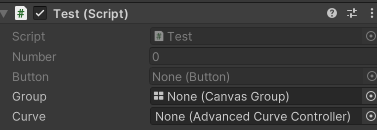
#if UNITY_EDITOR
using UnityEditor;
using UnityEngine;

[System.AttributeUsage(System.AttributeTargets.Field)]
public class ReadOnlyAttribute : PropertyAttribute
{
}

[CustomPropertyDrawer(typeof(ReadOnlyAttribute))]
public class ReadOnlyDrawer : PropertyDrawer {
    public override void OnGUI(Rect position, SerializedProperty property, GUIContent label) {
        GUI.enabled = false;
        EditorGUI.PropertyField(position, property, label);
        GUI.enabled = true;
    }}
#endif
Unity 高阶特性实用指南
| 场景 | 技术组合 |
|---|---|
| 行为节点、AI 状态系统 | [State]/[Transition] + 反射调用 |
| 自动 UI 映射、验证系统 | [Validate], [Range] + Drawer |
| 热更/注册框架插件化 | [AutoRegister], [Entry] + 扫描 |
| 组件自动注入、依赖注册 | [Inject], [Service] |
| 编辑器工具 / 属性驱动控件 | [Drawer], [ShowIf] |
| 示例:结合 ScriptableObject:配置驱动系统 |
[System.Serializable]
public class ActionNode {
    [Action("Move")]
    public string action;
}
``
在编辑器中将 Action 字段显示为方法列表,通过反射分析 [Action] 标记的所有方法。
→ 用于:
- 行为树节点系统
- 对话事件节点
- 流程驱动器(如流程图编辑器)
🛠 二、哪些场景用特性最常见?
-
序列化框架(如 JSON.NET):使用
[JsonProperty("name")] -
ORM 框架(如 Entity Framework):例如
[Key]、[Table("Users")] -
调试工具:如
[Conditional("DEBUG")]和[Obsolete] -
自定义逻辑控制:例如日志、权限、缓存插桩
🧱 三、定义自定义特性(Attribute)
[AttributeUsage(AttributeTargets.Method | AttributeTargets.Class, AllowMultiple = false, Inherited = true)]
public class MyNoteAttribute : Attribute
{
    public string Note { get; }
    public int Priority { get; set; }

    public MyNoteAttribute(string note)
    {
        Note = note;
    }
}
-
AttributeUsage控制使用范围、是否多用、是否继承。 -
特性类继承
System.Attribute。 -
支持通过构造器传递参数,使用属性或字段作为可选设置。
🔍 四、在代码中使用特性
[MyNote("Performance", Priority = 5)]
public void DoWork() { ... }
🧠 五、检测特性(Reflection + 不实例化)
反射时的高性能调用:
var mi = typeof(MyClass).GetMethod("DoWork");
var attrs = mi.GetCustomAttributesData(); // 获取元数据,不创建实例
foreach (var ad in attrs)
    Console.WriteLine(ad.AttributeType.Name);
避免实例化特性的好处:
- ✅ 减少 GC 压力
- ✅ 无需执行构造器逻辑
- ✅ 适合大规模元数据扫描
🔄 六、两个特性能否匹配?
如果想判断是否类型和参数都一致,如:
var attr = mi.GetCustomAttribute<MyNoteAttribute>();
bool match = attr.Note == "Performance" && attr.Priority == 5;
这样可确保“两个特性实例在逻辑上等价”而非仅类型相同。
📦 七、条件特性(ConditionalAttribute)
[Conditional("DEBUG")]
public void Log(string msg) { ... }
-
在非定义符条件下,该方法调用将完全从 IL 中移除。
-
常用于日志、调试代码段。
📊 八、Mermaid 图示:定制特性流程
🧠 九、面试经典问题(≥5)
1️⃣ 特性实例为什么不一定要实例化?
✅ 因为可以仅通过 CustomAttributeData 获取元数据,避免执行特性构造器,有助于性能和控制复杂度。
2️⃣ 条件特性有什么作用?
✅ Conditional("X") 可在非 X 编译符下移除方法调用,用于日志和调试不是生产代码路径。
3️⃣ 特性如何控制能否多次应用?
✅ 通过 [AttributeUsage(..., AllowMultiple = true/false)] 控制是否允许运用多次。
4️⃣ 特性的构造参数和属性/字段应该如何拆分?
✅ 必选信息放在构造器;可选信息用公开的属性/字段传入,保持清晰逻辑与默认行为。
5️⃣ 为什么建议使用 GetCustomAttributesData() 而非 GetCustomAttributes()?
✅ 前者不创建实例,更效率;后者会实例化全部特性,并运行构造/初始化逻辑。
✅ 十、应用建议
- 使用自定义特性构建:日志注入、权限标签、输入验证
- 配合 AOP 工具(如 PostSharp)可实现无侵入逻辑插桩
- 配合 JSON/XML/ORM 框架,实现模型声明式配置
作者:世纪末的魔术师
出处:https://www.cnblogs.com/Firepad-magic/
Unity最受欢迎插件推荐:点击查看
本文版权归作者和博客园共有,欢迎转载,但未经作者同意必须保留此段声明,且在文章页面明显位置给出原文连接,否则保留追究法律责任的权利。

 浙公网安备 33010602011771号