
Unity Shader之模板测试
Unity Shader之模板测试
一沙一世界,一花一天堂
一、Stencil testing

渲染管线
当片段着色器处理完一个片段之后,模板测试(Stencil Test)会开始执行,和深度测试一样,它也可能会丢弃片段。接下来,被保留的片段会进入深度测试,它可能会丢弃更多的片段。模板测试是根据又一个缓冲来进行的,它叫做模板缓冲(Stencil Buffer),我们可以在渲染的时候更新它来获得一些很有意思的效果。
一个模板缓冲中,(通常)每个模板值(Stencil Value)是8位的。所以每个像素/片段一共能有256种不同的模板值。我们可以将这些模板值设置为我们想要的值,然后当某一个片段有某一个模板值的时候,我们就可以选择丢弃或是保留这个片段了。
二、模板函数
2.1 调用函数
- Stencil
- {
- Ref 1//Reference Value ReadMask 255 WriteMask 255 Comp Always //Comparison Function Pass Replace
- Fail Keep
- ZFail Replace
- }
2.2 参数说明
Ref :就是参考值,当参数允许赋值时,会把参考值赋给当前像素
ReadMask: 对当前参考值和已有值进行mask操作,默认值255,一般不用
WriteMask: 写入Mask操作,默认值255,一般不用
Comp: 比较方法。是拿Ref参考值和当前像素缓存上的值进行比较。默认值always,即一直通过。
-- Greater - 大于
- GEqual - 大于等于
- Less - 小于
- LEqual - 小于等于
- Equal - 等于
- NotEqual - 不等于
- Always - 永远通过
- Never - 永远通不过
Pass: 当模版测试和深度测试都通过时,进行处理
Fail :当模版测试和深度测试都失败时,进行处理
ZFail: 当模版测试通过而深度测试失败时,进行处理
pass,Fail,ZFail都属于Stencil操作,他们参数统一如下:
- Keep 保持(即不把参考值赋上去,直接不管)
- Zero 归零
- Replace 替换(拿参考值替代原有值)
- IncrSat 值增加1,但不溢出,如果到255,就不再加
- DecrSat 值减少1,但不溢出,值到0就不再减
- Invert 反转所有位,如果1就会变成254
- IncrWrap 值增加1,会溢出,所以255变成0
- DecrWrap 值减少1,会溢出,所以0变成255
!!!若果发现Unity下你的模板测试效果不对,但模板里Ref这些都没问题的话,那估计是RenderQueue设置的不合适。一般Mask的RenderQueue低于被Mask的对象。
三、案例
3.1 描边

渲染管线
- Shader "ShaderCookbook/stencil_outline" {
- Properties {
- _MainTex("Texture", 2D) = "white" {}
- _OutLineWidth("Width", float) = 0.01
- _OutLineColor("Color", color) = (1, 1, 1, 1)
- }
- SubShader {
- Tags {
- "RenderType" = "Opaque"
- }
- LOD 100
- Stencil {
- Ref 0 Comp Equal Pass IncrSat
- }
- Pass {
- CGPROGRAM
- struct appdata {
- float4 vertex: POSITION;
- float2 uv: TEXCOORD0;
- };
- struct v2f {
- float2 uv: TEXCOORD0;
- float4 vertex: SV_POSITION;
- };
- sampler2D _MainTex;
- float4 _MainTex_ST;
- v2f vert(appdata v) {
- v2f o;
- o.vertex = UnityObjectToClipPos(v.vertex);
- o.uv = TRANSFORM_TEX(v.uv, _MainTex);
- return o;
- }
- fixed4 frag(v2f i) : SV_Target {
- // sample the texture
- fixed4 col = tex2D(_MainTex, i.uv);
- return col;
- }
- ENDCG
- }
- Pass {
- CGPROGRAM
- struct appdata {
- float4 vertex: POSITION;
- float4 normal: NORMAL;
- };
- struct v2f {
- float4 vertex: SV_POSITION;
- };
- fixed4 _OutLineColor;
- float _OutLineWidth;
- v2f vert(appdata v) {
- v2f o;
- v.vertex = v.vertex + normalize(v.normal) * _OutLineWidth;
- o.vertex = UnityObjectToClipPos(v.vertex);
- return o;
- }
- fixed4 frag(v2f i) : SV_Target {
- // sample the texture
- fixed4 col = _OutLineColor;
- return col;
- }
- ENDCG
- }
- }
- }
3.2 百宝箱
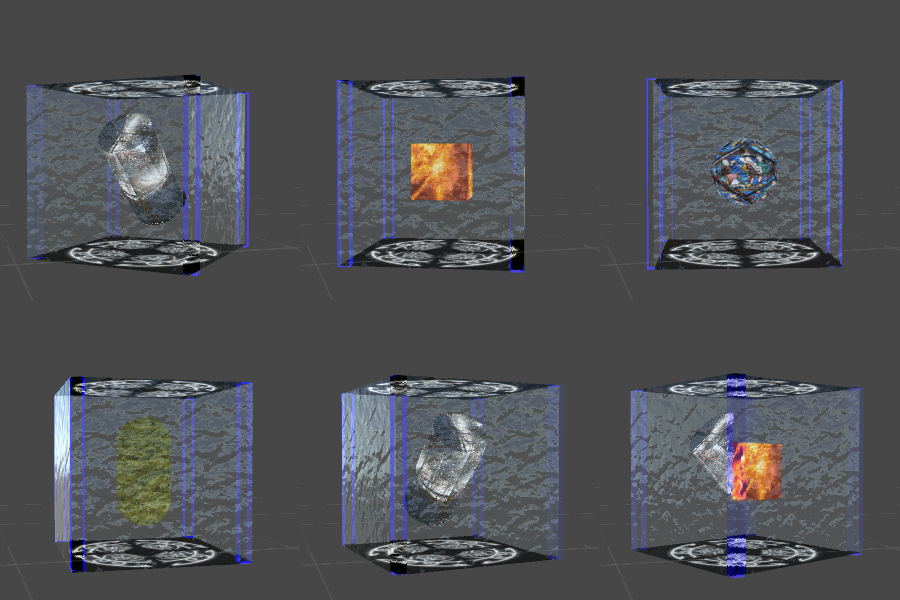
渲染管线
遮罩层:
- Shader "ShaderCookbook/StencilEnumMask"
- {
- Properties
- {
- _MainTex ("Texture", 2D) = "white" {}
- [ForceInt]
- _StencilRef("StencilRef",float) = 0
- [Enum(UnityEngine.Rendering.CompareFunction)]
- _StencilComp("StencilComp",int) =0
- [Enum(UnityEngine.Rendering.StencilOp)]
- _StencilOp("StencilOp",int)=0
- [ForceInt]
- _StencilReadMask("ReadMask",int)=255
- [ForceInt]
- _StencilWriteMask("WriteMask",int)=255
- [MaterialToggle]
- _ZWrite("zWrite",float)=0
- }
- SubShader
- {
- Tags { "RenderType"="StencilMaskOpaque"
- "Queue" = "Geometry-100"
- "IgnoreProjector" = "True" }
- LOD 100
- Pass
- {
- ColorMask 0
- ZWrite [_ZWrite]
- Stencil{
- Ref [_StencilRef]
- Comp[_StencilComp]
- Pass[_StencilOp]
- ReadMask[_StencilReadMask]
- WriteMask[_StencilWriteMask]
- }
- CGPROGRAM
- // make fog work
- struct appdata
- {
- float4 vertex : POSITION;
- float2 uv : TEXCOORD0;
- };
- struct v2f
- {
- float2 uv : TEXCOORD0;
- UNITY_FOG_COORDS(1)
- float4 vertex : SV_POSITION;
- };
- sampler2D _MainTex;
- float4 _MainTex_ST;
- v2f vert (appdata v)
- {
- v2f o;
- o.vertex = UnityObjectToClipPos(v.vertex);
- o.uv = TRANSFORM_TEX(v.uv, _MainTex);
- UNITY_TRANSFER_FOG(o,o.vertex);
- return o;
- }
- fixed4 frag (v2f i) : SV_Target
- {
- // sample the texture
- fixed4 col = tex2D(_MainTex, i.uv);
- // apply fog
- UNITY_APPLY_FOG(i.fogCoord, col);
- return col;
- }
- ENDCG
- }
- }
- }
显示层:
- Shader "ShaderCookbook/StencilEnum"
- {
- Properties
- {
- _MainTex ("Texture", 2D) = "white" {}
- [ForceInt]
- _StencilRef("StencilRef",float) = 0
- [Enum(UnityEngine.Rendering.CompareFunction)]
- _StencilComp("StencilComp",int) =0
- [Enum(UnityEngine.Rendering.StencilOp)]
- _StencilOp("StencilOp",int)=0
- [ForceInt]
- _StencilReadMask("ReadMask",int)=255
- [ForceInt]
- _StencilWriteMask("WriteMask",int)=255
- }
- SubShader
- {
- Tags { "RenderType"="opaque" }
- LOD 100
- Pass
- {
- Stencil{
- Ref [_StencilRef]
- Comp[_StencilComp]
- Pass[_StencilOp]
- ReadMask[_StencilReadMask]
- WriteMask[_StencilWriteMask]
- }
- CGPROGRAM
- // make fog work
- struct appdata
- {
- float4 vertex : POSITION;
- float2 uv : TEXCOORD0;
- };
- struct v2f
- {
- float2 uv : TEXCOORD0;
- UNITY_FOG_COORDS(1)
- float4 vertex : SV_POSITION;
- };
- sampler2D _MainTex;
- float4 _MainTex_ST;
- v2f vert (appdata v)
- {
- v2f o;
- o.vertex = UnityObjectToClipPos(v.vertex);
- o.uv = TRANSFORM_TEX(v.uv, _MainTex);
- UNITY_TRANSFER_FOG(o,o.vertex);
- return o;
- }
- fixed4 frag (v2f i) : SV_Target
- {
- // sample the texture
- fixed4 col = tex2D(_MainTex, i.uv);
- // apply fog
- UNITY_APPLY_FOG(i.fogCoord, col);
- return col;
- }
- ENDCG
- }
- }
- }
Ad
这里推荐一款可视化shader编程工具,对美术同学非常友好,就像建模工具中的材质编辑器一样
点赞鼓励下,(づ ̄3 ̄)づ╭❤~
作者:世纪末的魔术师
出处:https://www.cnblogs.com/Firepad-magic/
Unity最受欢迎插件推荐:点击查看
本文版权归作者和博客园共有,欢迎转载,但未经作者同意必须保留此段声明,且在文章页面明显位置给出原文连接,否则保留追究法律责任的权利。

 浙公网安备 33010602011771号