

Halcon二维码查找
一、二维码简介
1 . 类型多样,常见的有QR Code二维码、 Data Matrix二维码等。
2.高密度编码,信息容量大。
3.容错能力强,具有纠错功能:二维码因穿孔、污损等引起局部损坏时,照样可以正确得到识读,损毁面积达50%仍可恢复信息。
4.译码可靠性高:它比普通条码译码错误率百万分之二要低得多,误码率不超过千万分之一。
5.可引入加密措施:保密性、防伪性好。
二、图像预处理和二维码增强
对比度太低:scale_image(或使用外部程序scale_image_range),增强图像的对比度。
图像模糊:emphasize锐化图像,使二维码看起来更清晰。
三、解码涉及的主要算子
read_image :读图
create_data_code_2d_model :创建二维码模型
find_data_code_2d :查找二维码
clear_data_code_2d_model :清除二维码模型
还有几个算子也值得注意一下:
set_data_code_2d_param :设置解码时的参数
get_data_code_2d_param :获取解码时的参数(如果没有设置过,则获得的是默认值)
get_data_code_2d_results :获得解码后的一些结果
get_data_code_2d_objects:获得解码后的一些图形对象,如"module_1_rois"前景点的区域,"module_0_rois"背景点的区域,要获取对象需要set_data_code_2d_param中"persistence"值为1
四、提高解码能力的其他措施
如果二维码图像预处理以后,仍旧解码困难或者解码率不高,那么可以通过以下措施进一步提高解码能力:
1、如果整张图信息太多,则可以先把二维码区域挖出来,使用reduce_domain和crop_domain算子,这样不仅可以降低解码难度,还可以减少解码时间。
2、当二维码很小的时候,可以尝试用zoom_image_factor放大了二维码图像。
3、create_data_code_2d_model ('QR Code', [], [], DataCodeHandleQR)
创建模型时,[ ]中不填内容,实际默认属性名是‘default_parameters’,默认属性值是‘standard_recognition’。
如果想大幅度提高解码成功率,可以将属性值置为‘enhanced_recognition’或者‘maximum_recognition’。注意:解码能力越强,解码时间越长。
4、find_data_code_2d (Image, SymbolXLDs, DataCodeHandle, 'train', 'all', ResultHandles, DecodedDataStrings)
该算子中的GenParamNames、GenParamValues默认是空的,就是说直接找,找不到拉倒。如果是'train',就是一面找一面调整模板参数。
默认情况下,它只会最多找到1个二维码。如果想找出更多的二维码(例如3个),可以这样:
find_data_code_2d (Image2, SymbolXLDs, DataCodeHandle, 'stop_after_result_num', 3, ResultHandles, DecodedDataStrings)
5、如果对于质量很差的二维码,可以模拟日常手机扫码时的操作,即多次改变曝光,多次解码的方式
6.当图像效果很差,可以提高图像的对比度,比如enhance_contrast,gray_opening_shape,gray_erosion_shape,median_image,scale_image等
7、通过set_data_code_2d_param算子设置解码时的参数,可以有效提高解码能力。
8.当当前找不到可以采用二维码的训练模式,训练后生成比较好的参数,再保存二维码,再来查找.
五、set_data_code_2d_param算子的参数解析
|
'default_parameters' |
‘standard_recognition’、‘enhanced_recognition’、‘maximum_recognition’ |
|
'timeout' |
延迟时间,超过这个时间还没找到就不找了 |
|
'polarity' |
极性,可设置'dark_on_light'(白色背景黑码)或者'light_on_dark' |
|
'module_size_min' |
最小码粒像素大小,码粒大小指的二维码中矩形颗粒的宽度(存疑) |
|
'module_size_max' |
最大码粒像素大小 |
| ‘contrast_tolerance’ | 码变形容忍度,'low'和‘high','low'查找时间小,可能有些找不到,'high’查找时间长,查找结果好 |
| 'mirrored' | 码是否镜像 |
| 'small_modules_robustness' | 小二维码的鲁棒性,'low'和'high',‘high'时间长,查找结果好 |
| 'module_size_min' | 单元格的最小像素值 |
查找例子1:
*提高解码率的设置项:
*1、'default_parameters', ''enhanced_recognition''
*2、'polarity', 'dark_on_light'
*3、['module_size_min','module_size_max']
*4、挖出二维码区域,挖得越精确越好(周围最好不要有其他黑色像素块干扰),这一部分我现在只是粗略挖了一下
*5、增强图像对比度,我设计的函数enhanced_contrast (将图像色阶从0-255重新映射到Min到Max之间)

* create_data_code_2d_model ('QR Code', 'default_parameters', 'enhanced_recognition', DataCodeHandleQR)
create_data_code_2d_model ('QR Code', [], [], DataCodeHandleQR)

set_data_code_2d_param (DataCodeHandleQR, 'default_parameters', 'enhanced_recognition')
set_data_code_2d_param (DataCodeHandleQR, 'timeout', 200)
set_data_code_2d_param (DataCodeHandleQR, 'polarity', 'dark_on_light')

* 码粒个数设置(有几种二维码设置这个参数非法)
* set_data_code_2d_param(DataCodeHandleQR,'symbol_size_max', 11)
* set_data_code_2d_param(DataCodeHandleQR,'symbol_size_max', 31)

count := 0
dev_set_line_width (3)
dev_set_draw('margin')

list_files ('OK_NG', ['files','follow_links','recursive'], ImageFiles)
tuple_regexp_select (ImageFiles, ['\\.(tif|tiff|gif|bmp|jpg|jpeg|jp2|png|pcx|pgm|ppm|pbm|xwd|ima|hobj)$','ignore_case'], ImageFiles)
for i:= 0 to |ImageFiles|-1 by 1
    read_image(Image,ImageFiles[i])

    *挖出条码区域,提高解码率和解码速度
    gen_rectangle1 (Rectangle, 50, 100, 560, 700)
    reduce_domain (Image, Rectangle, ImageReduced)
    crop_domain (ImageReduced, ImagePart)

    *增强图像对比度(后文有该函数说明)
    enhanced_contrast (ImagePart, Image2, 40, 180)

    * 码粒像素设置
    set_data_code_2d_param(DataCodeHandleQR, ['module_size_min','module_size_max'], [12,40])

    *如果GenParamNames, GenParamValues不填,那么默认只找一个二维码,将'stop_after_result_num'设置为3指最多找3个
*     find_data_code_2d (Image2, SymbolXLDs, DataCodeHandleQR, [], [], ResultHandles, DecodedDataStrings)
    find_data_code_2d (Image2, SymbolXLDs, DataCodeHandleQR, 'stop_after_result_num', 3, ResultHandles, DecodedDataStrings)

    tuple_length (DecodedDataStrings, Length)

    *找不到的话,改一下参数再找一遍
    if (Length == 0)
        set_data_code_2d_param (DataCodeHandleQR, ['module_size_min','module_size_max'], [20,40])
        find_data_code_2d (Image2, SymbolXLDs, DataCodeHandleQR, [], [], ResultHandles, DecodedDataStrings)
    endif

    tuple_length (DecodedDataStrings, Length)
    if (Length > 0 )
        count := count + 1
    endif

    *这个算子好像并不能评价质量
    get_data_code_2d_results (DataCodeHandleQR, 'all_candidates', 'quality_isoiec15415_labels', ResultValues)
    get_data_code_2d_param (DataCodeHandleQR, 'polarity', GenParamValues)
    dev_display(SymbolXLDs)
    disp_message (3600, '解码结果:' + DecodedDataStrings, 'image', 20, 50, 'black', 'true')
    disp_message (3600, '解码成功率:' + count + '/' +|ImageFiles| , 'image', 40, 50, 'black', 'true')
*      stop ()
endfor
函数enhanced_contrast (ImagePart, Image2, 40, 180)的具体实现是:
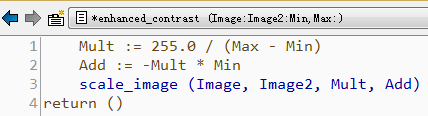
Mult := 255.0 / (Max - Min)
Add := -Mult * Min
scale_image (Image, Image2, Mult, Add)
return ()
查找例子2(训练模式):

训练前后得到的参数对比
* ***************************************************************
* This example program demonstrates how to train a 2d data model
* for a class of ECC 200 data matrix symbols and how to obtain
* the values of the model parameters before and after the training.
* Furthermore it is shown how to write the trained data code model
* into a file and how to read the saved data code model which
* is then used to find all ECC200 symbols in a sequenz of images.
*
* Initialize image path and visual settings
dev_update_off ()
dev_close_window ()
ImageFiles := 'datacode/ecc200/ecc200_cpu_0'
ImageNum := 16
read_image (Image, ImageFiles + '07')
dev_open_window (0, 0, 760, 570, 'black', WindowHandle)
set_display_font (WindowHandle, 14, 'mono', 'true', 'false')
dev_set_line_width (3)
dev_set_color ('green')
*
* Display short description
* This program demonstrates the training of a 2d data code model
* and how to write the trained model into a file and also how to
* read the saved model from the file. The model is then used
* to find data codes in a sequence of images.
Message := 'This program demonstrates the training of a 2d data code'
Message[1] := 'model, how to write the trained model into a file, and'
Message[2] := 'also how to read the saved model from the file. The'
Message[3] := 'model is then used to find data codes in a sequence of'
Message[4] := 'images.'
Message[5] := 'Furthermore it is shown how to obtain the values of the'
Message[6] := 'model parameters before and after the training.'
disp_message (WindowHandle, Message, 'window', 12, 12, 'black', 'true')
disp_continue_message (WindowHandle, 'black', 'true')
stop ()
*
* Step 1: Create a 2d data code model
* -------------------------------------------------------
* Create a 2d data code model of the 2d data code class
* 'Data Matrix ECC 200'. The operator returns a handle to
* the 2d data code model which can be used for all further
* operations on the data code.
create_data_code_2d_model ('Data Matrix ECC 200', [], [], DataCodeHandle)
*
* Get model parameters before the training
* -------------------------------------------------------
query_data_code_2d_params (DataCodeHandle, 'get_model_params', GenParamName)
get_data_code_2d_param (DataCodeHandle, GenParamName, ModelBeforeTraining)
*
* Step 2: Train the model
* -------------------------------------------------------
* Train the model on a dark and a bright image
*
* Dark image
read_image (Image, 'datacode/ecc200/ecc200_cpu_007')
find_data_code_2d (Image, SymbolXLDs, DataCodeHandle, 'train', 'all', ResultHandles, DecodedDataStrings)
dev_display (Image)
dev_display (SymbolXLDs)
TitleMessage := 'Train on a dark image'
display_found_data_codes (SymbolXLDs, WindowHandle, DecodedDataStrings, TitleMessage, [], 'forest green', 'black')
disp_continue_message (WindowHandle, 'black', 'true')
stop ()
*
* Bright image
read_image (Image, 'datacode/ecc200/ecc200_cpu_008')
find_data_code_2d (Image, SymbolXLDs, DataCodeHandle, 'train', 'all', ResultHandles, DecodedDataStrings)
dev_display (Image)
dev_display (SymbolXLDs)
TitleMessage := 'Train on a bright image'
display_found_data_codes (SymbolXLDs, WindowHandle, DecodedDataStrings, TitleMessage, [], 'forest green', 'black')
disp_continue_message (WindowHandle, 'black', 'true')
stop ()
*
* Get model parameters after the training
* -------------------------------------------------------
get_data_code_2d_param (DataCodeHandle, GenParamName, ModelAfterTraining)
*
* Display the model parameters
dev_clear_window ()
ModelAdaption := (GenParamName + ':')$'-35' + ModelBeforeTraining$'15' + ' -> ' + ModelAfterTraining
disp_message (WindowHandle, 'Model parameters before and after the training:', 'window', 12, 12, 'white', 'false')
disp_message (WindowHandle, ModelAdaption, 'window', 60, 12, 'white', 'false')
disp_continue_message (WindowHandle, 'black', 'true')
stop ()
*
* Step 3: Write the model into a file
* --------------------------------------------------------
* Save the model in a file so that it can be used later
write_data_code_2d_model (DataCodeHandle, '2d_data_code_model.dcm')
*
* Display message about saved file and next step
dev_clear_window ()
Message := 'The data code model is saved in \'2d_data_code_model.dcm\'.'
Message[1] := ' '
Message[2] := 'In the next step the saved model is read and used to'
Message[3] := 'find data codes in a sequenz of images.'
disp_message (WindowHandle, Message, 'window', 12, 12, 'black', 'true')
disp_continue_message (WindowHandle, 'black', 'true')
stop ()
*
* Step 4: Read an existing 2d data code model
* ----------------------------------------------------------
* Read the previously saved data code model
read_data_code_2d_model ('2d_data_code_model.dcm', DataCodeHandle)
*
* Step 5: Read the data codes
* -------------------------------------------------------
* Search and read the data codes in each image and
* display the decoded string for each found data code
for Index := 7 to 16 by 1
    read_image (Image, ImageFiles + Index$'.2d')
    dev_display (Image)
    *
    * Find and decode the data codes and measure the runtime
    count_seconds (T1)
    find_data_code_2d (Image, SymbolXLDs, DataCodeHandle, [], [], ResultHandles, DecodedDataStrings)
    count_seconds (T2)
    Time := 1000 * (T2 - T1)
    *
    * Display the results
    TitleMessage := 'Image ' + (Index - 6) + ' of ' + (ImageNum - 6)
    ResultMessage := 'Data code found in ' + Time$'.1f' + ' ms'
    display_found_data_codes (SymbolXLDs, WindowHandle, DecodedDataStrings, TitleMessage, ResultMessage, 'forest green', 'black')
    *
    * Deactivate the following lines to run the program without breaks
    if (Index < ImageNum)
        disp_continue_message (WindowHandle, 'black', 'true')
        stop ()
    endif
endfor

 浙公网安备 33010602011771号