
ROS2 - Gazebo物理仿真平台
ROS机器人开发,机器人当然是主角,如果我们手边没有实物机器人,怎么办呢?没问题,机器人三维物理仿真平台Gazebo,了解一下。
一、Gazebo仿真平台
Gazebo是ROS系统中最为常用的三维物理仿真平台,支持动力学引擎,可以实现高质量的图形渲染,不仅可以模拟机器人及周边环境,还可以加入摩擦力、弹性系数等物理属性。

比如我们要开发一个火星车,那就可以在Gazebo中模拟火星表面的环境,再比如我们做无人机,续航和限飞都导致我们没有办法频繁用实物做实验,此时不妨使用Gazebo先做仿真,等算法开发的差不多了,再部署到实物上来运行。
所以类似Gazebo这样的仿真平台,可以帮助我们验证机器人算法、优化机器人设计、测试机器人场景应用,为机器人开发提供更多可能。
1.1 安装测试
Gazebo如何使用呢?我们不妨先把它给跑起来,互相认识一下。
1.1.1 安装
为了确保系统中已经完整安装了Gazebo相关的功能包,我们可以通过这样一个命令,简单直接的把和Gazebo相关的包都给装上:
zhengyang@ubuntu:~/dev_ws$ sudo apt install ros-humble-gazebo-*
注意:这里安装我们要运行在ubuntu宿主机上,像NanoPC-T6这样的嵌入式ARM设备上运行Gazebo这类3D物理仿真软件,即使成功安装,也可能面临性能严重不足的问题。
1.1.2 运行
接着我们通过这句命令启动Gazebo:
zhengyang@ubuntu:~/dev_ws$ source /usr/share/gazebo/setup.sh
zhengyang@ubuntu:~/dev_ws$ ros2 launch gazebo_ros gazebo.launch.py
打开Gazebo的时候,默认是没有模型的,需要手动下载配置。
1.1.3 导入模型
下载模型,osrf库包含许多常用模型:
zhengyang@ubuntu:~$ mkdir ~/.gazebo/models
zhengyang@ubuntu:~$ cd ~/.gazebo/models
zhengyang@ubuntu:~/.gazebo/models$ git clone --depth 1 https://github.com/osrf/gazebo_models.git
zhengyang@ubuntu:~/.gazebo/models$ mv gazebo_models/* ./
zhengyang@ubuntu:~/.gazebo/models$ rm -rf gazebo_models/
查看我们下载的模型:
zhengyang@ubuntu:~/.gazebo/models$ ls
ambulance                             fast_food                        polaris_ranger_xp900
apartment                             fire_hose_long                   polaris_ranger_xp900_no_roll_cage
apollo15_landing_site_1000x1000       fire_hose_long_curled            police_station
arm_part                              fire_hydrant                     postbox
arrow_red                             fire_station                     post_office
asphalt_plane                         fire_truck                       powerplant
asus_xtion_pro_camera                 first_2015_trash_can             pr2
ball_bearing                          follower_vehicle                 pr2_gripper
beer                                  fountain                         prius_hybrid
bin_4_dropping_task                   gasket_part                      prius_hybrid_sensors
bookshelf                             gas_station                      pulley_part
bowl                                  gazebo                           quadrotor
box_target_green                      gear_part                        r2_description
......
再次打开Gazebo便可以加载我们下载好的models了。
1.1.4 测试
打开Gazebo,在Insert面板中选择ambulance模型导入,查看效果;

1.2 Gazebo GUI简介
接下来,我们将对Gazebo图形用户界面进行介绍。我们将学习到一些基本操作,例如按钮的功能以及如何在场景中导航。
启动Gazebo后,你将看到这个界面:

Gazebo交互界面由许多组成部分,接下来将逐一介绍。
1.2.1 场景(Scene)
场景是模拟器的主要部分,是仿真模型显示的地方,你可以在这操作仿真对象,使其与环境进行交互。
1.2.2 面板(Panels)
面板分为左右两侧,可以把两侧的面板设置为显示、隐藏或调整它的大小。
1.2.2.1 左侧面板
启动Gazebo时,默认情况下会显示左侧面板。面板中有三个选项卡:
World:该选项卡显示当前场景中的模型,并允许您查看和修改模型参数,例如它们的姿势。您也可以通过展开GUI选项并调整相机姿势来更改相机视角;Insert:该选项卡是向仿真场景中添加新对象(模型),要查看模型列表,需要单击箭头展开文件夹。单击(并释放)要插入的模型,然后在场景中再次单击以添加它;Layers:该选项卡组织并显示仿真中可用的不同可视化组,一个图层可以包含一个或多个模型,打开或关闭图层将显示或隐藏该图层中的模型。这是一个可选功能,因此在大多数情况下,此选项卡将为空;
1.2.2.2 右侧面板
默认情况下,右侧面板处于隐藏状态。单击并拖动该栏以将其打开。右面板可用于与选定模型的移动部件(关节)交互。如果场景中没有选择模型,面板将不显示任何信息。
1.2.3 工具栏(Toolbars)
Gazebo界面有两个工具栏。一个位于场景上方,另一个位于下方。
1.2.3.1 顶部工具栏

顶部工具栏为主工具栏,包含一些与模拟器交互时最常用的选项,如按钮:选择、移动、旋转和缩放;创建简单形状(例如立方体、球体、圆柱体)以及复制/粘贴。
- 选择模型(
Select mode):在场景中做标注; - 转换模式(
Translate mode):选择要移动的模型; - 旋转模式(
Rotate mode):选择要旋转的模型; - 缩放模式(
Scale mode):选择要缩放的模型; - 撤消/重做(
Undo/Redo):撤消/重做场景中的操作; - 灯光(
Lights):将灯光添加到场景; - 复制/粘贴(
Copy/Paste):复制/粘贴场景中的模型; - 对齐(
Align):将模型彼此对齐; - 捕捉(
Snap):将一个模型捕捉到另一个模型; - 更改视图(
Change view):从不同角度查看场景。
1.2.3.2 底部工具栏

底部工具栏显示有关仿真的数据,如仿真时间(Simulation time)及其与真实时间(Real time)的关系;
- 仿真时间是指当仿真运行时,时间在仿真环境中过得有多快,仿真可以比真实时间慢或快,具体取决于运行仿真所需的计算量;
- 真实时间是指在仿真环境中运行时实际经过的时间,仿真时间和真实时间的比率称为实时因子;
世界状态每迭代一次就更新一次,您可以在底部工具栏的右侧看到迭代次数,每次迭代都会将仿真推进一个固定的秒数,称为步长。默认情况下,步长为1ms。您可以按暂停按钮暂停仿真,并使用步长按键一次执行多个步长。
1.2.3.3 菜单栏
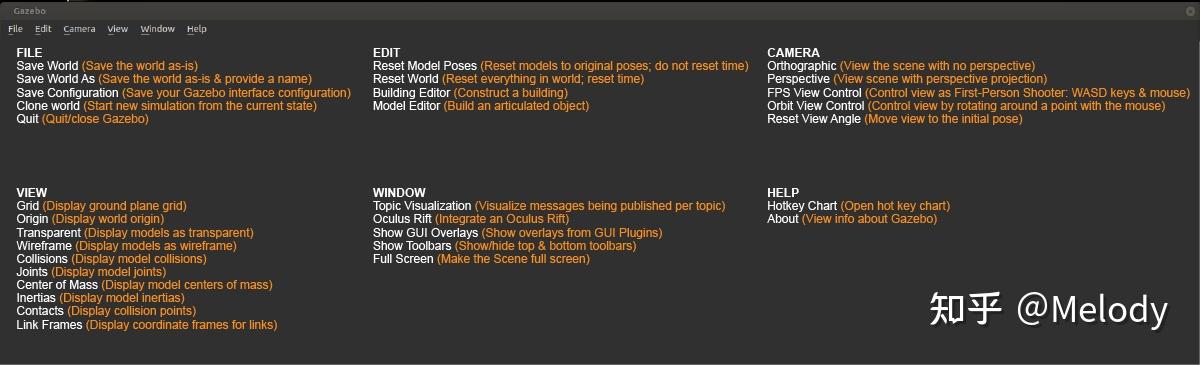
像大多数应用程序一样,Gazebo顶部有一个应用程序菜单。某些菜单选项会显示工具栏中。在场景中,右键单击上下文菜单选项,可查看各种菜单。注意:有些Linux桌面会隐藏应用程序菜单。如果看不到菜单,请将光标移到应用程序窗口的顶部,菜单就会出现。
1.2.4 鼠标
鼠标在场景中导航时非常有用。强烈建议使用带滚轮的鼠标。下面是在场景中导航和更改视角的基本鼠标操作。右键单击模型将打开一个包含各种选项的上下文菜单。

认识了Gazebo,接下来是不是该试试机器人仿真啦?
大家还记得之前课程中,我们设计的移动机器人模型么?我们一起尝试把它放到Gazebo中,还要控制它在仿真环境中运动。
1.3 模型文件
Gazebo支持多种模型文件格式,它们通常分为两大类:模型描述文件和模型资源文件。
下图清晰地展示了这两大类及其包含的具体格式:

1.3.1 模型描述文件
这是Gazebo模型的“大脑”,用于定义模型的结构、物理属性、关节和插件等。
1.3.1.1 SDF (Simulation Description Format)
Gazebo原生、最核心且功能最强大的格式,文件后缀为.sdf 或 .world。其特点:
- 分层描述:一个
<model>可以嵌套包含另一个<model>,非常适合构建复杂的复合模型(如一辆带传感器的机器人汽车); - 功能全面:除了基本的模型定义,还原生支持光照、大气、物理引擎参数等完整的仿真环境设置;
- 版本化:格式有版本号(如
SDF 1.6,1.9),不同版本的Gazebo支持不同的SDF版本。
使用场景:构建Gazebo世界(.world文件)、定义复杂机器人模型、配置完整的仿真环境。
1.3.1.2 URDF (Unified Robot Description Format)
ROS生态中的标准机器人描述格式,在Gazebo中通过插件兼容,文件后缀为.urdf 或 .xacro。其特点:
- 树形结构:机器人模型必须是一个没有闭环的树形结构(通过关节连接连杆),这很符合大多数机器人的实际结构;
- 侧重机器人:主要用于描述单个机器人;
- 需要扩展:原生
URDF缺乏仿真所需的许多属性(如摩擦系数、惯性细节)。为了在Gazebo中正常使用,通常需要在URDF标签内添加Gazebo特定的扩展标签(如<gazebo>)。
使用场景:主要在ROS项目中描述机器人模型,.xacro 文件可以通过 ros2 run xacro xacro 命令预处理生成 .urdf 文件。
1.3.2 模型资源文件
这些是“血肉”,为模型提供具体的几何形状、视觉外观和特效。
1.3.2.1 3D网格文件
这是最关键的资源文件,决定了模型的3D形状。
Collada(.dae):Gazebo官方推荐的格式。支持颜色、纹理贴图、多材质和法线贴图等高级视觉特性,效果最好;OBJ(.obj):广泛支持的简单格式,同样支持纹理贴图(需配合.mtl材质文件);STL(.stl):非常常见的3D打印格式,但只包含纯几何三角面片,不支持颜色和纹理,在Gazebo中视觉效果单一。
1.3.2.2 材质与纹理文件
OGRE材质脚本 (.material):用于定义复杂的着色器、纹理混合等高级渲染效果。
图像纹理文件 (.png, .jpg):贴在3D网格表面的图片,提供真实感。
1.3.2.3 粒子效果文件
定义烟雾、火焰、水流等动态粒子效果。
1.3.3 标准模型目录
一个标准的Gazebo模型包应包含以下文件:
model_name/
├── model.config          # 模型的元数据:名称、作者、版本、描述
├── model.sdf             # 模型的主体SDF描述文件(也可以是一个指向.world的配置)
└── meshes/               # 存放所有3D网格文件(.dae, .obj, .stl)
    ├── visual_mesh.dae
    └── collision_mesh.stl (通常用更简化的网格)
这个模型文件夹可以放在你的Gazebo模型路径下(如 ~/.gazebo/models/),Gazebo启动时会自动扫描并加载。
二、自定义模型案例
我们在《ROS2之URDF建模》设计好的URDF模型此时还不能直接放到Gazebo中,需要我们做一些优化。这里给大家介绍一个URDF文件格式的升级版本——XACRO文件。
我们就通过XACRO文件对移动机器人的模型做一下优化,我们首先要使用这句命令安装必要的功能包;
zhengyang@ubuntu:~/.gazebo/models$ sudo apt install ros-humble-xacro
同样也是对机器人URDF模型的创建,XACRO文件加入了更多编程化的实现方法,可以让模型创建更友好。比如:
- 宏定义:一个小车有
4个轮子,每个轮子都一样,我们就没必要创建4个一样的link,像函数定义一样,做一个可重复使用的模块就可以了; - 文件包含:复杂机器人的模型文件可能会很长,为了切分不同的模块,比如底盘、传感器,我们还可以把不同模块的模型放置在不同的文件中,然后再用一个总体文件做包含调用;
- 可编程接口:比如在
XACRO模型文件中,定义一些常量,描述机器人的尺寸,定义一些变量,在调用宏定义的时候传递数据,还可以在模型中做数据计算,甚至加入条件语句,比如你的机器人叫A,就有摄像头,如果叫B,就没有摄像头;
下面我们将详细介绍其核心语法和用法。
2.1 常量定义
用于定义可重用的常量值,是变量管理的基础;
<!-- 定义属性(类似常量) -->
<xacro:property name="wheel_radius" value="0.1" />
<xacro:property name="wheel_length" value="0.05" />
<xacro:property name="pi" value="3.14159" />

<!-- 使用属性 -->
<cylinder radius="${wheel_radius}" length="${wheel_length}" />

<!-- 属性可以相互引用 -->
<xacro:property name="wheel_circumference" value="${2 * pi * wheel_radius}" />

<!-- 动态计算属性 -->
<xacro:property name="default_origin">
  <origin xyz="0 0 0" rpy="0 0 0" />
</xacro:property>
<xacro:property>标签用来定义一些常量,比如这样定义一个\(\pi\)的常量名为pi,值为3.14159,在调用的时候,通过$加大括号,里边就可以使用定义好的常量了。
2.2 数学计算
XACRO支持丰富的数学运算和条件表达式;
<!-- 基本算术运算 -->
<cylinder radius="${wheel_radius * 1.1}" />
<origin xyz="${wheel_radius * 2} 0 0" />

<!-- 三角函数、数学函数 -->
<box size="${sin(pi/4) * 2} ${cos(pi/4)} 0.1" />

<!-- 条件表达式(三元运算符) -->
<xacro:property name="use_simple_collision" value="true" />
<geometry>
  <xacro:if value="${use_simple_collision}">
    <cylinder radius="${wheel_radius}" length="${wheel_length}" />
  </xacro:if>
  <xacro:unless value="${use_simple_collision}">
    <mesh filename="package://my_robot/meshes/complex_wheel.stl" />
  </xacro:unless>
</geometry>

<!-- 比较运算 -->
<xacro:property name="large_wheel" value="${wheel_radius > 0.15}" />
如果需要做数学计算,同样是在${}中进行,比如某一个位置,我们可以通过这两个常量做运算得到,就加入了加法和除法运算。
2.3 宏定义
宏是代码复用的关键,可以看作函数或模板;
<!-- 基本宏定义:定义一个轮子 -->
<xacro:macro name="wheel" params="name parent_link *origin">
  <joint name="${name}_joint" type="continuous">
    <parent link="${parent_link}" />
    <child link="${name}_link" />
    <insert_block name="origin" />  <!-- 插入 origin 块内容 -->
    <axis xyz="0 1 0" />
  </joint>

  <link name="${name}_link">
    <visual>
      <geometry>
        <cylinder radius="${wheel_radius}" length="${wheel_length}" />
      </geometry>
      <material name="black" />
    </visual>
    <collision>
      <geometry>
        <cylinder radius="${wheel_radius}" length="${wheel_length}" />
      </geometry>
    </collision>
    <inertial>
      <mass value="0.5" />
      <inertia ixx="0.001" ixy="0" ixz="0" iyy="0.001" iyz="0" izz="0.001" />
    </inertial>
  </link>
</xacro:macro>

<!-- 使用宏 -->
<xacro:wheel name="left_front" parent_link="base_link">
  <origin xyz="0.3 0.2 0" rpy="0 0 0" />
</xacro:wheel>

<!-- 带默认参数的宏 -->
<xacro:macro name="sensor" params="name x:=0 y:=0 z:=0">
  <link name="${name}">
    <visual>
      <origin xyz="${x} ${y} ${z}" />
      <geometry><box size="0.01 0.01 0.01" /></geometry>
    </visual>
  </link>
</xacro:macro>

<!-- 使用默认参数 -->
<xacro:sensor name="laser1" />          <!-- 使用默认 (0,0,0) -->
<xacro:sensor name="laser2" x="0.1" />  <!-- 只覆盖 x 参数 -->
宏的定义方式是通过这个<xacro:macro>标签描述的,还可以像函数一样,设置里边会用到的一些参数,比如这里的A、B、C。
当需要使用这个宏的时候,通过宏名字的标签,来调用,同时要记得把几个参数设置好。
2.4 文件包含
将大型机器人模型分解为多个文件;
<!-- 主文件: robot.xacro -->
<?xml version="1.0"?>
<robot name="my_robot" xmlns:xacro="http://www.ros.org/wiki/xacro">

  <!-- 包含其他文件 -->
  <xacro:include filename="$(find my_robot_description)/urdf/materials.xacro" />
  <xacro:include filename="$(find my_robot_description)/urdf/common_properties.xacro" />

  <!-- 使用包含文件中定义的宏 -->
  <base />

  <!-- 包含带参数的宏文件 -->
  <xacro:include filename="$(find my_robot_description)/urdf/wheels.xacro" />
  <xacro:four_wheel_drive base_parent="base_link" />
</robot>
2.5 块参数与内容插入
高级宏特性,允许传递xml块;
<!-- 定义接受块参数的宏 -->
<xacro:macro name="enhanced_link" params="name *visual *collision *inertial">
  <link name="${name}">
    <xacro:insert_block name="visual" />
    <xacro:insert_block name="collision" />
    <xacro:insert_block name="inertial" />
  </link>
</xacro:macro>

<!-- 使用块参数 -->
<xacro:enhanced_link name="custom_link">
  <visual>
    <geometry><box size="1 0.5 0.2" /></geometry>
    <material name="blue" />
  </visual>
  <collision>
    <geometry><box size="1 0.5 0.2" /></geometry>
  </collision>
  <inertial>
    <mass value="10.0" />
    <inertia ixx="0.1" ixy="0" ixz="0" iyy="0.1" iyz="0" izz="0.1" />
  </inertial>
</xacro:enhanced_link>
2.6 项目结构
一个完整的项目结构如下“
my_robot_description/
├── package.xml
├── CMakeLists.txt
├── urdf/
│   ├── robot.xacro                 # 主文件
│   ├── materials.xacro             # 材质定义
│   ├── sensors/                    # 传感器模块
│   │   ├── lidar.xacro
│   │   └── camera.xacro
│   ├── chassis.xacro               # 底盘
│   └── wheels.xacro                # 轮子定义
├── meshes/                         # 3D网格文件
│   └── chassis.dae
└── launch/
    └── display.launch.py          # 启动文件
三、机器人仿真
创建my_learning_urdf的Python版本的功能包;
pi@NanoPC-T6:~/dev_ws$ cd src
pi@NanoPC-T6:~/dev_ws/src$ ros2 pkg create --build-type ament_python my_learning_gazebo
在包中创建如下文件夹:
urdf:存放机器人模型的URDF或xacro文件;meshes:放置URDF中引用的模型渲染文件;launch:保存相关启动文件;worlds:世界地图;rviz:保存rviz的配置文件。
我们需要修改setup.py文件,添加配置文件:
import os
from glob import glob

    ...

    data_files=[
        ('share/ament_index/resource_index/packages',
            ['resource/' + package_name]),
        ('share/' + package_name, ['package.xml']),
        (os.path.join('share', package_name, 'launch'), glob(os.path.join('launch', '*.launch.py'))),
        (os.path.join('share', package_name, 'urdf'), glob(os.path.join('urdf', '*.*'))),
        (os.path.join('share', package_name, 'urdf/sensors'), glob(os.path.join('urdf/sensors', '*.*'))),
        (os.path.join('share', package_name, 'meshes'), glob(os.path.join('meshes', '*.*'))),
        (os.path.join('share', package_name, 'worlds'), glob(os.path.join('worlds', '*.*'))),
        (os.path.join('share', package_name, 'rviz'), glob(os.path.join('rviz', '*.rviz'))),
    ],
    ...
完整的目录结构如下:
zhengyang@ubuntu:~/dev_ws$ tree src/my_learning_gazebo
src/my_learning_gazebo
├── launch
│   ├── load_mbot_camera_into_gazebo.launch.py
│   ├── load_mbot_laser_into_gazebo.launch.py
│   ├── load_mbot_rgbd_into_gazebo.launch.py
│   ├── load_urdf_into_gazebo.launch.py
│   ├── mbot_camera.launch.py
│   ├── mbot_laser.launch.py
│   ├── mbot.launch.py
│   └── mbot_rgbd.launch.py
├── meshes
│   ├── kinect.dae
│   ├── kinect.jpg
│   └── kinect.tga
├── my_learning_gazebo
│   └── __init__.py
├── package.xml
├── resource
│   └── my_learning_gazebo
├── rviz
│   └── urdf_gazebo_config.rviz
├── setup.cfg
├── setup.py
├── urdf
│   ├── mbot_base_gazebo.xacro
│   ├── mbot_gazebo.xacro
│   ├── mbot_with_camera_gazebo.xacro
│   ├── mbot_with_kinect_gazebo.xacro
│   ├── mbot_with_laser_gazebo.xacro
│   ├── mbot_with_rgbd_gazebo.xacro
│   ├── sensors
│   │   ├── camera_gazebo.xacro
│   │   ├── kinect_gazebo.xacro
│   │   ├── lidar_gazebo.xacro
│   │   └── rgbd_gazebo.xacro
│   └── two_wheeled_robot_nav2.urdf
└── worlds
    ├── empty_world.model
    └── neighborhood.world
接下来我们只介绍部分源码,完整代码下载《src/my_learning_gazebo》。
3.1 完善机器人仿真模型
3.1.1 urdf/mbot_gazebo.xacro
在urdf下新建文件mbot_gazebo.xacro;
<?xml version="1.0"?>
<robot name="mbot" xmlns:xacro="http://www.ros.org/wiki/xacro">

    <xacro:include filename="$(find my_learning_gazebo)/urdf/mbot_base_gazebo.xacro" />

    <xacro:mbot_base_gazebo/>

</robot>
在urdf下新建文件mbot_base_gazebo.xacro;
点击查看详情
<?xml version="1.0"?>
<robot name="mbot" xmlns:xacro="http://www.ros.org/wiki/xacro">

    <!-- PROPERTY LIST -->
    <xacro:property name="M_PI" value="3.1415926"/>
    <xacro:property name="base_mass"   value="1" />
    <xacro:property name="base_radius" value="0.20"/>
    <xacro:property name="base_length" value="0.16"/>

    <xacro:property name="wheel_mass"   value="0.2" />
    <xacro:property name="wheel_radius" value="0.06"/>
    <xacro:property name="wheel_length" value="0.025"/>
    <xacro:property name="wheel_joint_y" value="0.19"/>
    <xacro:property name="wheel_joint_z" value="0.05"/>

    <xacro:property name="caster_mass"    value="0.2" />
    <xacro:property name="caster_radius"  value="0.015"/> <!-- wheel_radius - ( base_length/2 - wheel_joint_z) -->
    <xacro:property name="caster_joint_x" value="0.18"/>

    <!-- Defining the colors used in this robot -->
    <material name="yellow">
        <color rgba="1 0.4 0 1"/>
    </material>
    <material name="black">
        <color rgba="0 0 0 0.95"/>
    </material>
    <material name="gray">
        <color rgba="0.75 0.75 0.75 1"/>
    </material>

    <!-- Macro for inertia matrix -->
    <xacro:macro name="sphere_inertial_matrix" params="m r">
        <inertial>
            <mass value="${m}" />
            <inertia ixx="${2*m*r*r/5}" ixy="0" ixz="0"
                iyy="${2*m*r*r/5}" iyz="0"
                izz="${2*m*r*r/5}" />
        </inertial>
    </xacro:macro>

    <xacro:macro name="cylinder_inertial_matrix" params="m r h">
        <inertial>
            <mass value="${m}" />
            <inertia ixx="${m*(3*r*r+h*h)/12}" ixy = "0" ixz = "0"
                iyy="${m*(3*r*r+h*h)/12}" iyz = "0"
                izz="${m*r*r/2}" />
        </inertial>
    </xacro:macro>

    <!-- Macro for robot wheel -->
    <xacro:macro name="wheel" params="prefix reflect">
        <joint name="${prefix}_wheel_joint" type="continuous">
            <origin xyz="0 ${reflect*wheel_joint_y} ${-wheel_joint_z}" rpy="0 0 0"/>
            <parent link="base_link"/>
            <child link="${prefix}_wheel_link"/>
            <axis xyz="0 1 0"/>
        </joint>

        <link name="${prefix}_wheel_link">
            <visual>
                <origin xyz="0 0 0" rpy="${M_PI/2} 0 0" />
                <geometry>
                    <cylinder radius="${wheel_radius}" length = "${wheel_length}"/>
                </geometry>
                <material name="gray" />
            </visual>
            <collision>
                <origin xyz="0 0 0" rpy="${M_PI/2} 0 0" />
                <geometry>
                    <cylinder radius="${wheel_radius}" length = "${wheel_length}"/>
                </geometry>
            </collision>
            <xacro:cylinder_inertial_matrix  m="${wheel_mass}" r="${wheel_radius}" h="${wheel_length}" />
        </link>

        <gazebo reference="${prefix}_wheel_link">
            <material>Gazebo/Gray</material>
            <mu1>100000.0</mu1>
            <mu2>100000.0</mu2>
        </gazebo>

        <!-- Transmission is important to link the joints and the controller -->
        <transmission name="${prefix}_wheel_joint_trans">
            <type>transmission_interface/SimpleTransmission</type>
            <joint name="${prefix}_wheel_joint" >
                <hardwareInterface>hardware_interface/VelocityJointInterface</hardwareInterface>
            </joint>
            <actuator name="${prefix}_wheel_joint_motor">
                <hardwareInterface>hardware_interface/VelocityJointInterface</hardwareInterface>
                <mechanicalReduction>1</mechanicalReduction>
            </actuator>
        </transmission>
    </xacro:macro>

    <!-- Macro for robot caster -->
    <xacro:macro name="caster" params="prefix reflect">
        <joint name="${prefix}_caster_joint" type="fixed">
            <origin xyz="${reflect*caster_joint_x} 0 ${-(base_length/2 + caster_radius)}" rpy="0 0 0"/>
            <parent link="base_link"/>
            <child link="${prefix}_caster_link"/>
        </joint>

        <link name="${prefix}_caster_link">
            <visual>
                <origin xyz="0 0 0" rpy="0 0 0"/>
                <geometry>
                    <sphere radius="${caster_radius}" />
                </geometry>
                <material name="black" />
            </visual>
            <collision>
                <origin xyz="0 0 0" rpy="0 0 0"/>
                <geometry>
                    <sphere radius="${caster_radius}" />
                </geometry>
            </collision>
            <xacro:sphere_inertial_matrix  m="${caster_mass}" r="${caster_radius}" />
        </link>

        <gazebo reference="${prefix}_caster_link">
            <material>Gazebo/Black</material>
        </gazebo>
    </xacro:macro>

    <xacro:macro name="mbot_base_gazebo">
        <link name="base_footprint">
            <visual>
                <origin xyz="0 0 0" rpy="0 0 0" />
                <geometry>
                    <box size="0.001 0.001 0.001" />
                </geometry>
            </visual>
        </link>
        <gazebo reference="base_footprint">
            <turnGravityOff>false</turnGravityOff>
        </gazebo>

        <joint name="base_footprint_joint" type="fixed">
            <origin xyz="0 0 ${base_length/2 + caster_radius*2}" rpy="0 0 0" />
            <parent link="base_footprint"/>
            <child link="base_link" />
        </joint>

        <link name="base_link">
            <visual>
                <origin xyz=" 0 0 0" rpy="0 0 0" />
                <geometry>
                    <cylinder length="${base_length}" radius="${base_radius}"/>
                </geometry>
                <material name="yellow" />
            </visual>
            <collision>
                <origin xyz=" 0 0 0" rpy="0 0 0" />
                <geometry>
                    <cylinder length="${base_length}" radius="${base_radius}"/>
                </geometry>
            </collision>
            <xacro:cylinder_inertial_matrix  m="${base_mass}" r="${base_radius}" h="${base_length}" />
        </link>

        <gazebo reference="base_link">
            <material>Gazebo/Blue</material>
        </gazebo>

        <xacro:wheel prefix="left"  reflect="1"/>
        <xacro:wheel prefix="right" reflect="-1"/>

        <xacro:caster prefix="front" reflect="-1"/>
        <xacro:caster prefix="back"  reflect="1"/>

        <!-- controller -->
        <gazebo>
            <plugin name="differential_drive_controller"
                    filename="libgazebo_ros_diff_drive.so">
                  <update_rate>30</update_rate>
                  <left_joint>left_wheel_joint</left_joint>
                  <right_joint>right_wheel_joint</right_joint>
                  <wheel_separation>${wheel_joint_y*2}</wheel_separation>
                  <wheel_diameter>${2*wheel_radius}</wheel_diameter>
                  <max_wheel_torque>20</max_wheel_torque>
                  <max_wheel_acceleration>1.0</max_wheel_acceleration>
                  <command_topic>cmd_vel</command_topic>
                  <publish_odom>true</publish_odom>
                  <publish_odom_tf>true</publish_odom_tf>
                  <publish_wheel_tf>true</publish_wheel_tf>
                  <odometry_topic>odom</odometry_topic>
                  <odometry_frame>odom</odometry_frame>
                  <robot_base_frame>base_footprint</robot_base_frame>
                  <odometry_source>1</odometry_source>
            </plugin>
        </gazebo>
    </xacro:macro>

</robot>
这个模型是基于《ROS2之URDF建模》中的mbot_base.urdf模型文件升级来的,构建步骤如下:
- 完善物理参数:第一步是确保每一个
link都有惯性参数和碰撞属性,因为Gazebo是物理仿真平台,必要的物理参数是一定需要的; - 添加
Gazebo标签:第二步是为link添加gazebo标签,主要是为了可以在gazebo中渲染每一个link的颜色,因为URDF中的颜色系统和gazebo中的不同,所以得做一步这样的冗余配置; - 配置传动装置:第三步是要给运动的
joint配置传动装置,可以理解为仿真了一个电机; - 添加控制器插件:第四步,要添加一个
gazebo的控制器插件,小车是差速控制的,那就添加差速控制器插件,这样在不同角度下两个电机的速度分配,就可以交给控制器插件来完成了。
3.1.2 worlds/neighborhood.world
在worlds目录下新建neighborhood.world文件:
点击查看详情
<?xml version="1.0"?>
<sdf version='1.6'>
<world name='default'>
<!-- Here is where we place objects inside our world -->
<model name='ground_plane'>
<static>1</static>
<link name='link'>
<collision name='collision'>
<geometry>
<plane>
<normal>0 0 1</normal>
<size>100 100</size>
</plane>
</geometry>
<surface>
<friction>
<ode>
<mu>100</mu>
<mu2>50</mu2>
</ode>
<torsional>
<ode/>
</torsional>
</friction>
<contact>
<ode/>
</contact>
<bounce/>
</surface>
<max_contacts>10</max_contacts>
</collision>
<visual name='visual'>
<cast_shadows>0</cast_shadows>
<geometry>
<plane>
<normal>0 0 1</normal>
<size>100 100</size>
</plane>
</geometry>
<material>
<script>
<uri>file://media/materials/scripts/gazebo.material</uri>
<name>Gazebo/Grey</name>
</script>
</material>
</visual>
<self_collide>0</self_collide>
<enable_wind>0</enable_wind>
<kinematic>0</kinematic>
</link>
</model>
<model name='asphalt_plane'>
<static>1</static>
<link name='link'>
<collision name='collision'>
<geometry>
<box>
<size>20 20 0.1</size>
</box>
</geometry>
<max_contacts>10</max_contacts>
<surface>
<contact>
<ode/>
</contact>
<bounce/>
<friction>
<ode>
<mu>100</mu>
<mu2>50</mu2>
</ode>
<torsional>
<ode/>
</torsional>
<ode/>
</friction>
</surface>
</collision>
<visual name='visual'>
<cast_shadows>0</cast_shadows>
<geometry>
<box>
<size>20 20 0.1</size>
</box>
</geometry>
<material>
<script>
<uri>model://asphalt_plane/materials/scripts</uri>
<uri>model://asphalt_plane/materials/textures</uri>
<name>vrc/asphalt</name>
</script>
</material>
</visual>
<self_collide>0</self_collide>
<enable_wind>0</enable_wind>
<kinematic>0</kinematic>
</link>
<pose frame=''>-10.1692 -7.43707 0 0 -0 0</pose>
</model>
<model name='asphalt_plane_clone'>
<static>1</static>
<link name='link'>
<collision name='collision'>
<geometry>
<box>
<size>20 20 0.1</size>
</box>
</geometry>
<max_contacts>10</max_contacts>
<surface>
<contact>
<ode/>
</contact>
<bounce/>
<friction>
<ode>
<mu>100</mu>
<mu2>50</mu2>
</ode>
<torsional>
<ode/>
</torsional>
<ode/>
</friction>
</surface>
</collision>
<visual name='visual'>
<cast_shadows>0</cast_shadows>
<geometry>
<box>
<size>20 20 0.1</size>
</box>
</geometry>
<material>
<script>
<uri>model://asphalt_plane/materials/scripts</uri>
<uri>model://asphalt_plane/materials/textures</uri>
<name>vrc/asphalt</name>
</script>
</material>
</visual>
<self_collide>0</self_collide>
<enable_wind>0</enable_wind>
<kinematic>0</kinematic>
</link>
<pose frame=''>-10.1864 12.6443 0 0 -0 0</pose>
</model>
<model name='asphalt_plane_clone_clone'>
<static>1</static>
<link name='link'>
<collision name='collision'>
<geometry>
<box>
<size>20 20 0.1</size>
</box>
</geometry>
<max_contacts>10</max_contacts>
<surface>
<contact>
<ode/>
</contact>
<bounce/>
<friction>
<ode>
<mu>100</mu>
<mu2>50</mu2>
</ode>
<torsional>
<ode/>
</torsional>
<ode/>
</friction>
</surface>
</collision>
<visual name='visual'>
<cast_shadows>0</cast_shadows>
<geometry>
<box>
<size>20 20 0.1</size>
</box>
</geometry>
<material>
<script>
<uri>model://asphalt_plane/materials/scripts</uri>
<uri>model://asphalt_plane/materials/textures</uri>
<name>vrc/asphalt</name>
</script>
</material>
</visual>
<self_collide>0</self_collide>
<enable_wind>0</enable_wind>
<kinematic>0</kinematic>
</link>
<pose frame=''>8.71597 12.1785 0 0 -0 0</pose>
</model>
<model name='asphalt_plane_clone_clone_0'>
<static>1</static>
<link name='link'>
<collision name='collision'>
<geometry>
<box>
<size>20 20 0.1</size>
</box>
</geometry>
<max_contacts>10</max_contacts>
<surface>
<contact>
<ode/>
</contact>
<bounce/>
<friction>
<ode>
<mu>100</mu>
<mu2>50</mu2>
</ode>
<torsional>
<ode/>
</torsional>
<ode/>
</friction>
</surface>
</collision>
<visual name='visual'>
<cast_shadows>0</cast_shadows>
<geometry>
<box>
<size>20 20 0.1</size>
</box>
</geometry>
<material>
<script>
<uri>model://asphalt_plane/materials/scripts</uri>
<uri>model://asphalt_plane/materials/textures</uri>
<name>vrc/asphalt</name>
</script>
</material>
</visual>
<self_collide>0</self_collide>
<enable_wind>0</enable_wind>
<kinematic>0</kinematic>
</link>
<pose frame=''>8.60996 -7.34898 0 0 -0 0</pose>
</model>
<model name='post_office'>
<static>1</static>
<link name='link'>
<collision name='collision'>
<geometry>
<mesh>
<uri>model://post_office/meshes/post_office.dae</uri>
</mesh>
</geometry>
<max_contacts>10</max_contacts>
<surface>
<contact>
<ode/>
</contact>
<bounce/>
<friction>
<torsional>
<ode/>
</torsional>
<ode/>
</friction>
</surface>
</collision>
<visual name='visual'>
<geometry>
<mesh>
<uri>model://post_office/meshes/post_office.dae</uri>
</mesh>
</geometry>
</visual>
<self_collide>0</self_collide>
<enable_wind>0</enable_wind>
<kinematic>0</kinematic>
</link>
<pose frame=''>13.5893 -15.2061 0 0 -0 0</pose>
</model>
<model name='House 1'>
<static>1</static>
<link name='link'>
<collision name='collision'>
<geometry>
<mesh>
<uri>model://house_1/meshes/house_1.dae</uri>
<scale>1.5 1.5 1.5</scale>
</mesh>
</geometry>
<max_contacts>10</max_contacts>
<surface>
<contact>
<ode/>
</contact>
<bounce/>
<friction>
<torsional>
<ode/>
</torsional>
<ode/>
</friction>
</surface>
</collision>
<visual name='visual'>
<geometry>
<mesh>
<uri>model://house_1/meshes/house_1.dae</uri>
<scale>1.5 1.5 1.5</scale>
</mesh>
</geometry>
<material>
<script>
<uri>model://house_1/materials/scripts</uri>
<uri>model://house_1/materials/textures</uri>
<name>House_1/Diffuse</name>
</script>
<shader type='normal_map_tangent_space'>
<normal_map>House_1_Normal.png</normal_map>
</shader>
</material>
</visual>
<self_collide>0</self_collide>
<enable_wind>0</enable_wind>
<kinematic>0</kinematic>
</link>
<pose frame=''>11.3349 26.7368 0 0 -0 0</pose>
</model>
<model name='House 2'>
<static>1</static>
<link name='link'>
<collision name='collision'>
<geometry>
<mesh>
<uri>model://house_2/meshes/house_2.dae</uri>
<scale>1.5 1.5 1.5</scale>
</mesh>
</geometry>
<max_contacts>10</max_contacts>
<surface>
<contact>
<ode/>
</contact>
<bounce/>
<friction>
<torsional>
<ode/>
</torsional>
<ode/>
</friction>
</surface>
</collision>
<visual name='visual'>
<geometry>
<mesh>
<uri>model://house_2/meshes/house_2.dae</uri>
<scale>1.5 1.5 1.5</scale>
</mesh>
</geometry>
<material>
<script>
<uri>model://house_2/materials/scripts</uri>
<uri>model://house_2/materials/textures</uri>
<uri>model://house_1/materials/textures</uri>
<name>House_2/Diffuse</name>
</script>
<shader type='normal_map_tangent_space'>
<normal_map>model://house_1/materials/textures/House_1_Normal.png</normal_map>
</shader>
</material>
</visual>
<self_collide>0</self_collide>
<enable_wind>0</enable_wind>
<kinematic>0</kinematic>
</link>
<pose frame=''>-15.2439 -13.9588 0 0 -0 0</pose>
</model>
<model name='House 3'>
<static>1</static>
<link name='link'>
<collision name='collision'>
<geometry>
<mesh>
<uri>model://house_3/meshes/house_3.dae</uri>
<scale>1.5 1.5 1.5</scale>
</mesh>
</geometry>
<max_contacts>10</max_contacts>
<surface>
<contact>
<ode/>
</contact>
<bounce/>
<friction>
<torsional>
<ode/>
</torsional>
<ode/>
</friction>
</surface>
</collision>
<visual name='visual'>
<geometry>
<mesh>
<uri>model://house_3/meshes/house_3.dae</uri>
<scale>1.5 1.5 1.5</scale>
</mesh>
</geometry>
<material>
<script>
<uri>model://house_3/materials/scripts</uri>
<uri>model://house_3/materials/textures</uri>
<uri>model://house_1/materials/textures</uri>
<name>House_3/Diffuse</name>
</script>
<shader type='normal_map_tangent_space'>
<normal_map>model://house_1/materials/textures/House_1_Normal.png</normal_map>
</shader>
</material>
</visual>
<self_collide>0</self_collide>
<enable_wind>0</enable_wind>
<kinematic>0</kinematic>
</link>
<pose frame=''>-12.3159 24.012 0 0 -0 0</pose>
</model>
<model name='grey_wall'>
<static>1</static>
<link name='link'>
<pose frame=''>0 0 1.4 0 -0 0</pose>
<collision name='collision'>
<geometry>
<box>
<size>7.5 0.2 2.8</size>
</box>
</geometry>
<max_contacts>10</max_contacts>
<surface>
<contact>
<ode/>
</contact>
<bounce/>
<friction>
<torsional>
<ode/>
</torsional>
<ode/>
</friction>
</surface>
</collision>
<visual name='visual'>
<cast_shadows>0</cast_shadows>
<geometry>
<box>
<size>7.5 0.2 2.8</size>
</box>
</geometry>
<material>
<script>
<uri>model://grey_wall/materials/scripts</uri>
<uri>model://grey_wall/materials/textures</uri>
<name>vrc/grey_wall</name>
</script>
</material>
</visual>
<self_collide>0</self_collide>
<enable_wind>0</enable_wind>
<kinematic>0</kinematic>
</link>
<pose frame=''>-4.8114 -17.6626 0 0 -0 0</pose>
</model>
<model name='grey_wall_clone'>
<static>1</static>
<link name='link'>
<pose frame=''>0 0 1.4 0 -0 0</pose>
<collision name='collision'>
<geometry>
<box>
<size>7.5 0.2 2.8</size>
</box>
</geometry>
<max_contacts>10</max_contacts>
<surface>
<contact>
<ode/>
</contact>
<bounce/>
<friction>
<torsional>
<ode/>
</torsional>
<ode/>
</friction>
</surface>
</collision>
<visual name='visual'>
<cast_shadows>0</cast_shadows>
<geometry>
<box>
<size>7.5 0.2 2.8</size>
</box>
</geometry>
<material>
<script>
<uri>model://grey_wall/materials/scripts</uri>
<uri>model://grey_wall/materials/textures</uri>
<name>vrc/grey_wall</name>
</script>
</material>
</visual>
<self_collide>0</self_collide>
<enable_wind>0</enable_wind>
<kinematic>0</kinematic>
</link>
<pose frame=''>1.84642 -17.6367 0 0 -0 0</pose>
</model>
<model name='grey_wall_clone_0'>
<static>1</static>
<link name='link'>
<pose frame=''>0 0 1.4 0 -0 0</pose>
<collision name='collision'>
<geometry>
<box>
<size>7.5 0.2 2.8</size>
</box>
</geometry>
<max_contacts>10</max_contacts>
<surface>
<contact>
<ode/>
</contact>
<bounce/>
<friction>
<torsional>
<ode/>
</torsional>
<ode/>
</friction>
</surface>
</collision>
<visual name='visual'>
<cast_shadows>0</cast_shadows>
<geometry>
<box>
<size>7.5 0.2 2.8</size>
</box>
</geometry>
<material>
<script>
<uri>model://grey_wall/materials/scripts</uri>
<uri>model://grey_wall/materials/textures</uri>
<name>vrc/grey_wall</name>
</script>
</material>
</visual>
<self_collide>0</self_collide>
<enable_wind>0</enable_wind>
<kinematic>0</kinematic>
</link>
<pose frame=''>4.62088 -17.6372 0 0 -0 0</pose>
</model>
<model name='grey_wall_clone_clone'>
<static>1</static>
<link name='link'>
<pose frame=''>0 0 1.4 0 -0 0</pose>
<collision name='collision'>
<geometry>
<box>
<size>7.5 0.2 2.8</size>
</box>
</geometry>
<max_contacts>10</max_contacts>
<surface>
<contact>
<ode/>
</contact>
<bounce/>
<friction>
<torsional>
<ode/>
</torsional>
<ode/>
</friction>
</surface>
</collision>
<visual name='visual'>
<cast_shadows>0</cast_shadows>
<geometry>
<box>
<size>7.5 0.2 2.8</size>
</box>
</geometry>
<material>
<script>
<uri>model://grey_wall/materials/scripts</uri>
<uri>model://grey_wall/materials/textures</uri>
<name>vrc/grey_wall</name>
</script>
</material>
</visual>
<self_collide>0</self_collide>
<enable_wind>0</enable_wind>
<kinematic>0</kinematic>
</link>
<pose frame=''>-4.48764 26.0166 0 0 -0 0</pose>
</model>
<model name='grey_wall_clone_clone_clone'>
<static>1</static>
<link name='link'>
<pose frame=''>0 0 1.4 0 -0 0</pose>
<collision name='collision'>
<geometry>
<box>
<size>7.5 0.2 2.8</size>
</box>
</geometry>
<max_contacts>10</max_contacts>
<surface>
<contact>
<ode/>
</contact>
<bounce/>
<friction>
<torsional>
<ode/>
</torsional>
<ode/>
</friction>
</surface>
</collision>
<visual name='visual'>
<cast_shadows>0</cast_shadows>
<geometry>
<box>
<size>7.5 0.2 2.8</size>
</box>
</geometry>
<material>
<script>
<uri>model://grey_wall/materials/scripts</uri>
<uri>model://grey_wall/materials/textures</uri>
<name>vrc/grey_wall</name>
</script>
</material>
</visual>
<self_collide>0</self_collide>
<enable_wind>0</enable_wind>
<kinematic>0</kinematic>
</link>
<pose frame=''>16.935 15.0582 0 0 -0 0</pose>
</model>
<model name='grey_wall_clone_clone_clone_clone'>
<static>1</static>
<link name='link'>
<pose frame=''>0 0 1.4 0 -0 0</pose>
<collision name='collision'>
<geometry>
<box>
<size>7.5 0.2 2.8</size>
</box>
</geometry>
<max_contacts>10</max_contacts>
<surface>
<contact>
<ode/>
</contact>
<bounce/>
<friction>
<torsional>
<ode/>
</torsional>
<ode/>
</friction>
</surface>
</collision>
<visual name='visual'>
<cast_shadows>0</cast_shadows>
<geometry>
<box>
<size>7.5 0.2 2.8</size>
</box>
</geometry>
<material>
<script>
<uri>model://grey_wall/materials/scripts</uri>
<uri>model://grey_wall/materials/textures</uri>
<name>vrc/grey_wall</name>
</script>
</material>
</visual>
<self_collide>0</self_collide>
<enable_wind>0</enable_wind>
<kinematic>0</kinematic>
</link>
<pose frame=''>18.767 9.41754 0 0 0 -1.56734</pose>
</model>
<model name='grey_wall_clone_clone_clone_clone_0'>
<static>1</static>
<link name='link'>
<pose frame=''>0 0 1.4 0 -0 0</pose>
<collision name='collision'>
<geometry>
<box>
<size>7.5 0.2 2.8</size>
</box>
</geometry>
<max_contacts>10</max_contacts>
<surface>
<contact>
<ode/>
</contact>
<bounce/>
<friction>
<torsional>
<ode/>
</torsional>
<ode/>
</friction>
</surface>
</collision>
<visual name='visual'>
<cast_shadows>0</cast_shadows>
<geometry>
<box>
<size>7.5 0.2 2.8</size>
</box>
</geometry>
<material>
<script>
<uri>model://grey_wall/materials/scripts</uri>
<uri>model://grey_wall/materials/textures</uri>
<name>vrc/grey_wall</name>
</script>
</material>
</visual>
<self_collide>0</self_collide>
<enable_wind>0</enable_wind>
<kinematic>0</kinematic>
</link>
<pose frame=''>18.7963 2.45369 0 0 0 -1.56734</pose>
</model>
<model name='grey_wall_clone_clone_clone_clone_1'>
<static>1</static>
<link name='link'>
<pose frame=''>0 0 1.4 0 -0 0</pose>
<collision name='collision'>
<geometry>
<box>
<size>7.5 0.2 2.8</size>
</box>
</geometry>
<max_contacts>10</max_contacts>
<surface>
<contact>
<ode/>
</contact>
<bounce/>
<friction>
<torsional>
<ode/>
</torsional>
<ode/>
</friction>
</surface>
</collision>
<visual name='visual'>
<cast_shadows>0</cast_shadows>
<geometry>
<box>
<size>7.5 0.2 2.8</size>
</box>
</geometry>
<material>
<script>
<uri>model://grey_wall/materials/scripts</uri>
<uri>model://grey_wall/materials/textures</uri>
<name>vrc/grey_wall</name>
</script>
</material>
</visual>
<self_collide>0</self_collide>
<enable_wind>0</enable_wind>
<kinematic>0</kinematic>
</link>
<pose frame=''>18.8058 -4.41342 0 0 0 -1.56734</pose>
</model>
<model name='grey_wall_clone_clone_clone_clone_2'>
<static>1</static>
<link name='link'>
<pose frame=''>0 0 1.4 0 -0 0</pose>
<collision name='collision'>
<geometry>
<box>
<size>7.5 0.2 2.8</size>
</box>
</geometry>
<max_contacts>10</max_contacts>
<surface>
<contact>
<ode/>
</contact>
<bounce/>
<friction>
<torsional>
<ode/>
</torsional>
<ode/>
</friction>
</surface>
</collision>
<visual name='visual'>
<cast_shadows>0</cast_shadows>
<geometry>
<box>
<size>7.5 0.2 2.8</size>
</box>
</geometry>
<material>
<script>
<uri>model://grey_wall/materials/scripts</uri>
<uri>model://grey_wall/materials/textures</uri>
<name>vrc/grey_wall</name>
</script>
</material>
</visual>
<self_collide>0</self_collide>
<enable_wind>0</enable_wind>
<kinematic>0</kinematic>
</link>
<pose frame=''>18.8343 -11.7301 0 0 0 -1.56734</pose>
</model>
<!-- State elements are used in log files to record the current state of the simulation -->
<state world_name='default'>
<sim_time>0 0</sim_time>
<real_time>1508 791172746</real_time>
<wall_time>1559146081 981649784</wall_time>
<iterations>1104051</iterations>
<model name='Construction Barrel'>
<pose frame=''>13.4005 -5.42166 0.049999 -1e-06 -3e-06 0.0001</pose>
<scale>1 1 1</scale>
<link name='link'>
<pose frame=''>13.4005 -5.42166 0.049999 -1e-06 -3e-06 0.0001</pose>
<velocity>0 0 0 0 -0 0</velocity>
<acceleration>-2.9967 2.03365 -0.794686 1.20082 -1.20717 -0.001857</acceleration>
<wrench>-1498.35 1016.83 -397.343 0 -0 0</wrench>
</link>
</model>
<model name='Construction Barrel_clone'>
<pose frame=''>11.7814 -5.45643 0.049999 4e-06 -0 0.000101</pose>
<scale>1 1 1</scale>
<link name='link'>
<pose frame=''>11.7814 -5.45643 0.049999 4e-06 -0 0.000101</pose>
<velocity>0 0 0 0 -0 0</velocity>
<acceleration>1.88998 -3.56222 -0.642601 2.62197 -1.56197 0.005944</acceleration>
<wrench>944.989 -1781.11 -321.301 0 -0 0</wrench>
</link>
</model>
<model name='Construction Barrel_clone_0'>
<pose frame=''>9.88762 -5.55241 0.049999 3e-06 -0 9.3e-05</pose>
<scale>1 1 1</scale>
<link name='link'>
<pose frame=''>9.88762 -5.55241 0.049999 3e-06 -0 9.3e-05</pose>
<velocity>0 0 0 0 -0 0</velocity>
<acceleration>2.07604 -3.61569 -0.551712 2.75954 -1.103 0.00963</acceleration>
<wrench>1038.02 -1807.85 -275.856 0 -0 0</wrench>
</link>
</model>
<model name='Construction Barrel_clone_1'>
<pose frame=''>-19.433 18.986 0.049999 3e-06 -0 9.5e-05</pose>
<scale>1 1 1</scale>
<link name='link'>
<pose frame=''>-19.433 18.986 0.049999 3e-06 -0 9.5e-05</pose>
<velocity>0 0 0 0 -0 0</velocity>
<acceleration>1.01626 -3.19015 -0.947766 -1.44886 0.60977 -3.13192</acceleration>
<wrench>508.13 -1595.08 -473.883 0 -0 0</wrench>
</link>
</model>
<model name='Construction Barrel_clone_2'>
<pose frame=''>-19.5121 20.6998 0.049999 3e-06 -0 9.5e-05</pose>
<scale>1 1 1</scale>
<link name='link'>
<pose frame=''>-19.5121 20.6998 0.049999 3e-06 -0 9.5e-05</pose>
<velocity>0 0 0 0 -0 0</velocity>
<acceleration>1.77033 -3.51744 -0.722185 -0.630679 -1.27745 -3.13259</acceleration>
<wrench>885.165 -1758.72 -361.092 0 -0 0</wrench>
</link>
</model>
<model name='Construction Barrel_clone_3'>
<pose frame=''>-20.5577 -8.73303 0.036602 -0.051018 -0.050601 0.290507</pose>
<scale>1 1 1</scale>
<link name='link'>
<pose frame=''>-20.5577 -8.73303 0.036602 -0.051018 -0.050601 0.290507</pose>
<velocity>0 0 0 0 -0 0</velocity>
<acceleration>0.512591 -0.300594 -9.04701 0.386843 0.930656 0.209414</acceleration>
<wrench>256.296 -150.297 -4523.5 0 -0 0</wrench>
</link>
</model>
<model name='Construction Barrel_clone_4'>
<pose frame=''>-20.4876 -9.72099 0.030757 -0.000752 -0.060378 0.011096</pose>
<scale>1 1 1</scale>
<link name='link'>
<pose frame=''>-20.4876 -9.72099 0.030757 -0.000752 -0.060378 0.011096</pose>
<velocity>0 0 0 0 -0 0</velocity>
<acceleration>-0.114927 -0.390542 -12.0564 0.395765 -0.295565 2.86504</acceleration>
<wrench>-57.4634 -195.271 -6028.21 0 -0 0</wrench>
</link>
</model>
<model name='Dumpster'>
<pose frame=''>-5.92856 -15.7047 0.051378 -6e-06 -3e-06 0.000223</pose>
<scale>1 1 1</scale>
<link name='link'>
<pose frame=''>-5.92856 -15.7047 0.051378 -6e-06 -3e-06 0.000223</pose>
<velocity>0 0 0 0 -0 0</velocity>
<acceleration>0.015634 0.007432 5.68874 0.747836 -1.25753 0.000121</acceleration>
<wrench>0.015634 0.007432 5.68874 0 -0 0</wrench>
</link>
</model>
<model name='House 1'>
<pose frame=''>11.3349 26.7368 0 0 -0 0</pose>
<scale>1 1 1</scale>
<link name='link'>
<pose frame=''>11.3349 26.7368 0 0 -0 0</pose>
<velocity>0 0 0 0 -0 0</velocity>
<acceleration>0 0 0 0 -0 0</acceleration>
<wrench>0 0 0 0 -0 0</wrench>
</link>
</model>
<model name='House 2'>
<pose frame=''>-15.2439 -13.9588 0 0 -0 0</pose>
<scale>1 1 1</scale>
<link name='link'>
<pose frame=''>-15.2439 -13.9588 0 0 -0 0</pose>
<velocity>0 0 0 0 -0 0</velocity>
<acceleration>0 0 0 0 -0 0</acceleration>
<wrench>0 0 0 0 -0 0</wrench>
</link>
</model>
<model name='House 3'>
<pose frame=''>-12.3159 24.012 0 0 -0 0</pose>
<scale>1 1 1</scale>
<link name='link'>
<pose frame=''>-12.3159 24.012 0 0 -0 0</pose>
<velocity>0 0 0 0 -0 0</velocity>
<acceleration>0 0 0 0 -0 0</acceleration>
<wrench>0 0 0 0 -0 0</wrench>
</link>
</model>
<model name='asphalt_plane'>
<pose frame=''>-10.1692 -7.43707 0 0 -0 0</pose>
<scale>1 1 1</scale>
<link name='link'>
<pose frame=''>-10.1692 -7.43707 0 0 -0 0</pose>
<velocity>0 0 0 0 -0 0</velocity>
<acceleration>0 0 0 0 -0 0</acceleration>
<wrench>0 0 0 0 -0 0</wrench>
</link>
</model>
<model name='asphalt_plane_clone'>
<pose frame=''>-10.1603 12.171 0 0 -0 0</pose>
<scale>1 1 1</scale>
<link name='link'>
<pose frame=''>-10.1603 12.171 0 0 -0 0</pose>
<velocity>0 0 0 0 -0 0</velocity>
<acceleration>0 0 0 0 -0 0</acceleration>
<wrench>0 0 0 0 -0 0</wrench>
</link>
</model>
<model name='asphalt_plane_clone_clone'>
<pose frame=''>8.71597 12.1785 0 0 -0 0</pose>
<scale>1 1 1</scale>
<link name='link'>
<pose frame=''>8.71597 12.1785 0 0 -0 0</pose>
<velocity>0 0 0 0 -0 0</velocity>
<acceleration>0 0 0 0 -0 0</acceleration>
<wrench>0 0 0 0 -0 0</wrench>
</link>
</model>
<model name='asphalt_plane_clone_clone_0'>
<pose frame=''>8.60996 -7.34898 0 0 -0 0</pose>
<scale>1 1 1</scale>
<link name='link'>
<pose frame=''>8.60996 -7.34898 0 0 -0 0</pose>
<velocity>0 0 0 0 -0 0</velocity>
<acceleration>0 0 0 0 -0 0</acceleration>
<wrench>0 0 0 0 -0 0</wrench>
</link>
</model>
<model name='grey_wall'>
<pose frame=''>-4.8114 -17.6626 0 0 -0 0</pose>
<scale>1 1 1</scale>
<link name='link'>
<pose frame=''>-4.8114 -17.6626 1.4 0 -0 0</pose>
<velocity>0 0 0 0 -0 0</velocity>
<acceleration>0 0 0 0 -0 0</acceleration>
<wrench>0 0 0 0 -0 0</wrench>
</link>
</model>
<model name='grey_wall_clone'>
<pose frame=''>1.84642 -17.6367 0 0 -0 0</pose>
<scale>1 1 1</scale>
<link name='link'>
<pose frame=''>1.84642 -17.6367 1.4 0 -0 0</pose>
<velocity>0 0 0 0 -0 0</velocity>
<acceleration>0 0 0 0 -0 0</acceleration>
<wrench>0 0 0 0 -0 0</wrench>
</link>
</model>
<model name='grey_wall_clone_0'>
<pose frame=''>4.62088 -17.6372 0 0 -0 0</pose>
<scale>1 1 1</scale>
<link name='link'>
<pose frame=''>4.62088 -17.6372 1.4 0 -0 0</pose>
<velocity>0 0 0 0 -0 0</velocity>
<acceleration>0 0 0 0 -0 0</acceleration>
<wrench>0 0 0 0 -0 0</wrench>
</link>
</model>
<model name='grey_wall_clone_clone'>
<pose frame=''>-4.48764 26.0166 0 0 -0 0</pose>
<scale>1 1 1</scale>
<link name='link'>
<pose frame=''>-4.48764 26.0166 1.4 0 -0 0</pose>
<velocity>0 0 0 0 -0 0</velocity>
<acceleration>0 0 0 0 -0 0</acceleration>
<wrench>0 0 0 0 -0 0</wrench>
</link>
</model>
<model name='grey_wall_clone_clone_clone'>
<pose frame=''>18.7544 16.0387 0 0 0 -1.56734</pose>
<scale>1 1 1</scale>
<link name='link'>
<pose frame=''>18.7544 16.0387 1.4 0 0 -1.56734</pose>
<velocity>0 0 0 0 -0 0</velocity>
<acceleration>0 0 0 0 -0 0</acceleration>
<wrench>0 0 0 0 -0 0</wrench>
</link>
</model>
<model name='grey_wall_clone_clone_clone_clone'>
<pose frame=''>18.767 9.41754 0 0 0 -1.56734</pose>
<scale>1 1 1</scale>
<link name='link'>
<pose frame=''>18.767 9.41754 1.4 0 0 -1.56734</pose>
<velocity>0 0 0 0 -0 0</velocity>
<acceleration>0 0 0 0 -0 0</acceleration>
<wrench>0 0 0 0 -0 0</wrench>
</link>
</model>
<model name='grey_wall_clone_clone_clone_clone_0'>
<pose frame=''>18.7963 2.45369 0 0 0 -1.56734</pose>
<scale>1 1 1</scale>
<link name='link'>
<pose frame=''>18.7963 2.45369 1.4 0 0 -1.56734</pose>
<velocity>0 0 0 0 -0 0</velocity>
<acceleration>0 0 0 0 -0 0</acceleration>
<wrench>0 0 0 0 -0 0</wrench>
</link>
</model>
<model name='grey_wall_clone_clone_clone_clone_1'>
<pose frame=''>18.8058 -4.41342 0 0 0 -1.56734</pose>
<scale>1 1 1</scale>
<link name='link'>
<pose frame=''>18.8058 -4.41342 1.4 0 0 -1.56734</pose>
<velocity>0 0 0 0 -0 0</velocity>
<acceleration>0 0 0 0 -0 0</acceleration>
<wrench>0 0 0 0 -0 0</wrench>
</link>
</model>
<model name='grey_wall_clone_clone_clone_clone_2'>
<pose frame=''>18.8343 -11.7301 0 0 0 -1.56734</pose>
<scale>1 1 1</scale>
<link name='link'>
<pose frame=''>18.8343 -11.7301 1.4 0 0 -1.56734</pose>
<velocity>0 0 0 0 -0 0</velocity>
<acceleration>0 0 0 0 -0 0</acceleration>
<wrench>0 0 0 0 -0 0</wrench>
</link>
</model>
<model name='ground_plane'>
<pose frame=''>0 0 0 0 -0 0</pose>
<scale>1 1 1</scale>
<link name='link'>
<pose frame=''>0 0 0 0 -0 0</pose>
<velocity>0 0 0 0 -0 0</velocity>
<acceleration>0 0 0 0 -0 0</acceleration>
<wrench>0 0 0 0 -0 0</wrench>
</link>
</model>
<model name='jersey_barrier'>
<pose frame=''>16.3274 -5.65655 0 0 -0 0</pose>
<scale>1 1 1</scale>
<link name='link'>
<pose frame=''>16.3274 -5.65655 0 0 -0 0</pose>
<velocity>0 0 0 0 -0 0</velocity>
<acceleration>0 0 0 0 -0 0</acceleration>
<wrench>0 0 0 0 -0 0</wrench>
</link>
</model>
<model name='jersey_barrier_clone'>
<pose frame=''>15.8486 0.798921 0 0 -0 0</pose>
<scale>1 1 1</scale>
<link name='link'>
<pose frame=''>15.8486 0.798921 0 0 -0 0</pose>
<velocity>0 0 0 0 -0 0</velocity>
<acceleration>0 0 0 0 -0 0</acceleration>
<wrench>0 0 0 0 -0 0</wrench>
</link>
</model>
<model name='jersey_barrier_clone_0'>
<pose frame=''>11.3081 0.801131 0 0 -0 0</pose>
<scale>1 1 1</scale>
<link name='link'>
<pose frame=''>11.3081 0.801131 0 0 -0 0</pose>
<velocity>0 0 0 0 -0 0</velocity>
<acceleration>0 0 0 0 -0 0</acceleration>
<wrench>0 0 0 0 -0 0</wrench>
</link>
</model>
<model name='jersey_barrier_clone_1'>
<pose frame=''>6.52475 0.809313 0 0 -0 0</pose>
<scale>1 1 1</scale>
<link name='link'>
<pose frame=''>6.52475 0.809313 0 0 -0 0</pose>
<velocity>0 0 0 0 -0 0</velocity>
<acceleration>0 0 0 0 -0 0</acceleration>
<wrench>0 0 0 0 -0 0</wrench>
</link>
</model>
<model name='jersey_barrier_clone_2'>
<pose frame=''>15.8973 10.503 0 0 -0 0</pose>
<scale>1 1 1</scale>
<link name='link'>
<pose frame=''>15.8973 10.503 0 0 -0 0</pose>
<velocity>0 0 0 0 -0 0</velocity>
<acceleration>0 0 0 0 -0 0</acceleration>
<wrench>0 0 0 0 -0 0</wrench>
</link>
</model>
<model name='jersey_barrier_clone_3'>
<pose frame=''>11.4226 10.5084 0 0 -0 0</pose>
<scale>1 1 1</scale>
<link name='link'>
<pose frame=''>11.4226 10.5084 0 0 -0 0</pose>
<velocity>0 0 0 0 -0 0</velocity>
<acceleration>0 0 0 0 -0 0</acceleration>
<wrench>0 0 0 0 -0 0</wrench>
</link>
</model>
<model name='jersey_barrier_clone_4'>
<pose frame=''>6.71411 10.5141 0 0 -0 0</pose>
<scale>1 1 1</scale>
<link name='link'>
<pose frame=''>6.71411 10.5141 0 0 -0 0</pose>
<velocity>0 0 0 0 -0 0</velocity>
<acceleration>0 0 0 0 -0 0</acceleration>
<wrench>0 0 0 0 -0 0</wrench>
</link>
</model>
<model name='jersey_barrier_clone_5'>
<pose frame=''>3.64306 8.71609 0 0 -0 1.5691</pose>
<scale>1 1 1</scale>
<link name='link'>
<pose frame=''>3.64306 8.71609 0 0 -0 1.5691</pose>
<velocity>0 0 0 0 -0 0</velocity>
<acceleration>0 0 0 0 -0 0</acceleration>
<wrench>0 0 0 0 -0 0</wrench>
</link>
</model>
<model name='jersey_barrier_clone_5_clone'>
<pose frame=''>3.65333 3.73402 0 0 -0 1.5691</pose>
<scale>1 1 1</scale>
<link name='link'>
<pose frame=''>3.65333 3.73402 0 0 -0 1.5691</pose>
<velocity>0 0 0 0 -0 0</velocity>
<acceleration>0 0 0 0 -0 0</acceleration>
<wrench>0 0 0 0 -0 0</wrench>
</link>
</model>
<model name='mud_box'>
<pose frame=''>14.6137 5.86275 0 0 -0 0</pose>
<scale>1 1 1</scale>
<link name='link'>
<pose frame=''>14.6137 5.86275 0 0 -0 0</pose>
<velocity>0 0 0 0 -0 0</velocity>
<acceleration>0 0 0 0 -0 0</acceleration>
<wrench>0 0 0 0 -0 0</wrench>
</link>
</model>
<model name='mud_box_clone'>
<pose frame=''>7.23773 5.83307 0 0 -0 0</pose>
<scale>1 1 1</scale>
<link name='link'>
<pose frame=''>7.23773 5.83307 0 0 -0 0</pose>
<velocity>0 0 0 0 -0 0</velocity>
<acceleration>0 0 0 0 -0 0</acceleration>
<wrench>0 0 0 0 -0 0</wrench>
</link>
</model>
<model name='number1'>
<pose frame=''>-7.39232 -9.13969 0.4 0 -0 0</pose>
<scale>1 1 1</scale>
<link name='link'>
<pose frame=''>-7.39232 -9.13969 0.4 0 -0 0</pose>
<velocity>0 0 0 0 -0 0</velocity>
<acceleration>0 0 0 0 -0 0</acceleration>
<wrench>0 0 0 0 -0 0</wrench>
</link>
</model>
<model name='number2'>
<pose frame=''>-9.34625 21.2817 0.4 0 -0 0</pose>
<scale>1 1 1</scale>
<link name='link'>
<pose frame=''>-9.34625 21.2817 0.4 0 -0 0</pose>
<velocity>0 0 0 0 -0 0</velocity>
<acceleration>0 0 0 0 -0 0</acceleration>
<wrench>0 0 0 0 -0 0</wrench>
</link>
</model>
<model name='number3'>
<pose frame=''>11.0389 20.3497 0.4 0 -0 0</pose>
<scale>1 1 1</scale>
<link name='link'>
<pose frame=''>11.0389 20.3497 0.4 0 -0 0</pose>
<velocity>0 0 0 0 -0 0</velocity>
<acceleration>0 0 0 0 -0 0</acceleration>
<wrench>0 0 0 0 -0 0</wrench>
</link>
</model>
<model name='osrf_first_office'>
<pose frame=''>-24.986 6.46271 0 0 -0 1.56899</pose>
<scale>1 1 1</scale>
<link name='link'>
<pose frame=''>-24.986 6.46271 0 0 -0 1.56899</pose>
<velocity>0 0 0 0 -0 0</velocity>
<acceleration>0 0 0 0 -0 0</acceleration>
<wrench>0 0 0 0 -0 0</wrench>
</link>
</model>
<model name='playground'>
<pose frame=''>12.8763 5.61106 0 0 -0 0</pose>
<scale>1 1 1</scale>
<link name='link'>
<pose frame=''>12.8763 5.61106 0 0 -0 0</pose>
<velocity>0 0 0 0 -0 0</velocity>
<acceleration>0 0 0 0 -0 0</acceleration>
<wrench>0 0 0 0 -0 0</wrench>
</link>
</model>
<model name='post_office'>
<pose frame=''>13.5893 -15.2061 0 0 -0 0</pose>
<scale>1 1 1</scale>
<link name='link'>
<pose frame=''>13.5893 -15.2061 0 0 -0 0</pose>
<velocity>0 0 0 0 -0 0</velocity>
<acceleration>0 0 0 0 -0 0</acceleration>
<wrench>0 0 0 0 -0 0</wrench>
</link>
</model>
<model name='prius_hybrid'>
<pose frame=''>1.05252 24.4802 0.011641 -2e-06 0 0.003052</pose>
<scale>1 1 1</scale>
<link name='chassis'>
<pose frame=''>1.05252 24.4802 0.011641 -2e-06 0 0.003052</pose>
<velocity>8e-06 9e-06 2.1e-05 -3e-06 -0 5e-06</velocity>
<acceleration>-0 -0 -0 0 -0 0</acceleration>
<wrench>-6e-06 -2.2e-05 -0 0 -0 0</wrench>
</link>
<link name='front_left_wheel'>
<pose frame=''>1.81682 23.0725 0.311646 -0.028633 0.035341 0.419054</pose>
<velocity>1.5e-05 1.4e-05 3.2e-05 -4.5e-05 4.7e-05 0.000776</velocity>
<acceleration>-0 -0 0 0 -0 0</acceleration>
<wrench>-0 -0 0 0 -0 0</wrench>
</link>
<link name='front_right_wheel'>
<pose frame=''>0.296832 23.0679 0.311646 -0.015085 0.031929 0.376756</pose>
<velocity>1.5e-05 7e-06 3.1e-05 -2.2e-05 4.7e-05 0.000636</velocity>
<acceleration>-0 -0 0 0 -0 0</acceleration>
<wrench>-0 -0 0 0 -0 0</wrench>
</link>
<link name='rear_axle'>
<pose frame=''>1.0481 25.9302 0.311637 -2e-06 -4e-06 0.003052</pose>
<velocity>1e-06 1e-05 1.5e-05 -4e-06 -4e-06 5e-06</velocity>
<acceleration>-0 -0 0 -0.003541 -1.1e-05 0</acceleration>
<wrench>-0 -0 0 0 -0 0</wrench>
</link>
<link name='rear_left_wheel'>
<pose frame=''>1.8341 25.9326 0.311647 -0.036135 -3e-06 0.003052</pose>
<velocity>1e-06 1.4e-05 2.5e-05 -4.5e-05 -1e-06 5e-06</velocity>
<acceleration>0 -0 0 0 -0 0</acceleration>
<wrench>0 -0 0 0 -0 0</wrench>
</link>
<link name='rear_right_wheel'>
<pose frame=''>0.262103 25.9278 0.311647 -0.020938 8e-06 0.003052</pose>
<velocity>2e-06 7e-06 2.5e-05 -2.2e-05 2e-06 5e-06</velocity>
<acceleration>-0 -0 -0 0 -0 0</acceleration>
<wrench>-0 -0 -0 0 -0 0</wrench>
</link>
<link name='steering_wheel'>
<pose frame=''>1.41017 23.8539 0.997957 -0.000178 1.30202 1.57375</pose>
<velocity>1.1e-05 1.4e-05 2.3e-05 -3e-06 -0 5e-06</velocity>
<acceleration>-0 -0 0 0 1e-06 0</acceleration>
<wrench>-0 -0 0 0 -0 0</wrench>
</link>
</model>
<model name='radio_tower'>
<pose frame=''>-26.4658 -12.9476 0 0 -0 0</pose>
<scale>1 1 1</scale>
<link name='link'>
<pose frame=''>-26.4658 -12.9476 0 0 -0 0</pose>
<velocity>0 0 0 0 -0 0</velocity>
<acceleration>0 0 0 0 -0 0</acceleration>
<wrench>0 0 0 0 -0 0</wrench>
</link>
</model>
<model name='suv'>
<pose frame=''>-4.32179 23.343 0 0 -0 0</pose>
<scale>1 1 1</scale>
<link name='link'>
<pose frame=''>-4.32179 23.343 0 0 -0 0</pose>
<velocity>0 0 0 0 -0 0</velocity>
<acceleration>0 0 0 0 -0 0</acceleration>
<wrench>0 0 0 0 -0 0</wrench>
</link>
</model>
<light name='sun'>
<pose frame=''>0 0 10 0 -0 0</pose>
</light>
</state>
<model name='prius_hybrid'>
<pose frame=''>1.0474 24.4712 0.03 0 -0 0</pose>
<link name='chassis'>
<inertial>
<mass>1326</mass>
<pose frame=''>0 -0.266 0.48 0 -0 0</pose>
<inertia>
<ixx>2581.13</ixx>
<ixy>0</ixy>
<iyy>591.308</iyy>
<ixz>0</ixz>
<iyz>0</iyz>
<izz>2681.95</izz>
</inertia>
</inertial>
<visual name='chassis_visual'>
<geometry>
<mesh>
<uri>model://prius_hybrid/meshes/Hybrid.obj</uri>
<scale>0.01 0.01 0.01</scale>
<submesh>
<name>Hybrid</name>
<center>0</center>
</submesh>
</mesh>
</geometry>
</visual>
<visual name='interior_visual'>
<geometry>
<mesh>
<uri>model://prius_hybrid/meshes/Hybrid.obj</uri>
<scale>0.01 0.01 0.01</scale>
<submesh>
<name>Hybrid_Interior</name>
<center>0</center>
</submesh>
</mesh>
</geometry>
</visual>
<visual name='windows_visual'>
<geometry>
<mesh>
<uri>model://prius_hybrid/meshes/Hybrid.obj</uri>
<scale>0.01 0.01 0.01</scale>
<submesh>
<name>Hybrid_Windows</name>
<center>0</center>
</submesh>
</mesh>
</geometry>
</visual>
<collision name='chassis'>
<pose frame=''>0 0.05 0.625 0 -0 0</pose>
<geometry>
<box>
<size>1.7526 2.1 0.95</size>
</box>
</geometry>
<max_contacts>10</max_contacts>
<surface>
<contact>
<ode/>
</contact>
<bounce/>
<friction>
<torsional>
<ode/>
</torsional>
<ode/>
</friction>
</surface>
</collision>
<collision name='front_bumper'>
<pose frame=''>0 -2 0.458488 0 -0 0</pose>
<geometry>
<box>
<size>1.33728 0.48 0.566691</size>
</box>
</geometry>
<max_contacts>10</max_contacts>
<surface>
<contact>
<ode/>
</contact>
<bounce/>
<friction>
<torsional>
<ode/>
</torsional>
<ode/>
</friction>
</surface>
</collision>
<collision name='hood'>
<pose frame=''>0 -1.90084 0.676305 0.341247 -0 0</pose>
<geometry>
<box>
<size>1.59797 0.493107 0.265468</size>
</box>
</geometry>
<max_contacts>10</max_contacts>
<surface>
<contact>
<ode/>
</contact>
<bounce/>
<friction>
<torsional>
<ode/>
</torsional>
<ode/>
</friction>
</surface>
</collision>
<collision name='windshield'>
<pose frame=''>0 -0.875105 1.03227 0.335476 -0 0</pose>
<geometry>
<box>
<size>1.16838 1.65425 0.272347</size>
</box>
</geometry>
<max_contacts>10</max_contacts>
<surface>
<contact>
<ode/>
</contact>
<bounce/>
<friction>
<torsional>
<ode/>
</torsional>
<ode/>
</friction>
</surface>
</collision>
<collision name='top_front'>
<pose frame=''>0 0.161236 1.38604 0.13503 -0 0</pose>
<geometry>
<box>
<size>1.27915 0.625988 0.171868</size>
</box>
</geometry>
<max_contacts>10</max_contacts>
<surface>
<contact>
<ode/>
</contact>
<bounce/>
<friction>
<torsional>
<ode/>
</torsional>
<ode/>
</friction>
</surface>
</collision>
<collision name='top_rear'>
<pose frame=''>0 0.817696 1.36007 -0.068997 0 0</pose>
<geometry>
<box>
<size>1.28513 0.771189 0.226557</size>
</box>
</geometry>
<max_contacts>10</max_contacts>
<surface>
<contact>
<ode/>
</contact>
<bounce/>
<friction>
<torsional>
<ode/>
</torsional>
<ode/>
</friction>
</surface>
</collision>
<collision name='rear_window'>
<pose frame=''>0 1.64053 1.17513 -0.262017 0 0</pose>
<geometry>
<box>
<size>1.26785 1.11634 0.244286</size>
</box>
</geometry>
<max_contacts>10</max_contacts>
<surface>
<contact>
<ode/>
</contact>
<bounce/>
<friction>
<torsional>
<ode/>
</torsional>
<ode/>
</friction>
</surface>
</collision>
<collision name='trunk'>
<pose frame=''>0 1.63706 0.88818 0 -0 0</pose>
<geometry>
<box>
<size>1.78806 1.13899 0.482746</size>
</box>
</geometry>
<max_contacts>10</max_contacts>
<surface>
<contact>
<ode/>
</contact>
<bounce/>
<friction>
<torsional>
<ode/>
</torsional>
<ode/>
</friction>
</surface>
</collision>
<collision name='back_bumper'>
<pose frame=''>0 2.05445 0.57787 0 -0 0</pose>
<geometry>
<box>
<size>1.78165 0.512093 0.581427</size>
</box>
</geometry>
<max_contacts>10</max_contacts>
<surface>
<contact>
<ode/>
</contact>
<bounce/>
<friction>
<torsional>
<ode/>
</torsional>
<ode/>
</friction>
</surface>
</collision>
<self_collide>0</self_collide>
<enable_wind>0</enable_wind>
<kinematic>0</kinematic>
</link>
<link name='steering_wheel'>
<pose frame=''>0.357734 -0.627868 0.988243 -1.3021 0 0</pose>
<inertial>
<mass>1</mass>
<inertia>
<ixx>0.145833</ixx>
<ixy>0</ixy>
<ixz>0</ixz>
<iyy>0.145833</iyy>
<iyz>0</iyz>
<izz>0.125</izz>
</inertia>
</inertial>
<collision name='collision'>
<geometry>
<cylinder>
<radius>0.178172</radius>
<length>0.041845</length>
</cylinder>
</geometry>
<surface>
<contact>
<ode>
<min_depth>0.003</min_depth>
</ode>
</contact>
<bounce/>
<friction>
<torsional>
<ode/>
</torsional>
<ode/>
</friction>
</surface>
<max_contacts>10</max_contacts>
</collision>
<visual name='visual'>
<pose frame=''>0 0 0 1.3021 -0 0</pose>
<geometry>
<mesh>
<uri>model://prius_hybrid/meshes/Hybrid.obj</uri>
<scale>0.01 0.01 0.01</scale>
<submesh>
<name>Steering_Wheel</name>
<center>1</center>
</submesh>
</mesh>
</geometry>
</visual>
<self_collide>0</self_collide>
<enable_wind>0</enable_wind>
<kinematic>0</kinematic>
</link>
<link name='front_left_wheel'>
<pose frame=''>0.76 -1.41 0.3 0 -0 0</pose>
<inertial>
<mass>11</mass>
<inertia>
<ixx>0.586312</ixx>
<ixy>0</ixy>
<iyy>0.335529</iyy>
<ixz>0</ixz>
<iyz>0</iyz>
<izz>0.335529</izz>
</inertia>
</inertial>
<visual name='visual'>
<pose frame=''>0.04 0 0 0 -0 0</pose>
<geometry>
<mesh>
<uri>model://prius_hybrid/meshes/Hybrid.obj</uri>
<scale>0.01 0.01 0.01</scale>
<submesh>
<name>Wheel_Front_Left_</name>
<center>1</center>
</submesh>
</mesh>
</geometry>
</visual>
<collision name='collision'>
<pose frame=''>0 0 0 3.14159 1.57079 3.14159</pose>
<geometry>
<sphere>
<radius>0.31265</radius>
</sphere>
</geometry>
<surface>
<friction>
<ode>
<mu>0.9</mu>
<mu2>0.9</mu2>
<slip1>0</slip1>
<slip2>0</slip2>
</ode>
<torsional>
<ode/>
</torsional>
</friction>
<contact>
<ode>
<min_depth>0.001</min_depth>
<kp>1e+09</kp>
</ode>
</contact>
<bounce/>
</surface>
<max_contacts>10</max_contacts>
</collision>
<self_collide>0</self_collide>
<enable_wind>0</enable_wind>
<kinematic>0</kinematic>
</link>
<link name='front_right_wheel'>
<pose frame=''>-0.76 -1.41 0.3 0 -0 0</pose>
<inertial>
<mass>11</mass>
<inertia>
<ixx>0.586312</ixx>
<ixy>0</ixy>
<iyy>0.335529</iyy>
<ixz>0</ixz>
<iyz>0</iyz>
<izz>0.335529</izz>
</inertia>
</inertial>
<visual name='visual'>
<pose frame=''>-0.04 0 0 0 -0 0</pose>
<pose frame=''>0 0 0 0 -0 0</pose>
<geometry>
<mesh>
<uri>model://prius_hybrid/meshes/Hybrid.obj</uri>
<scale>0.01 0.01 0.01</scale>
<submesh>
<name>Wheel_Front_Right</name>
<center>1</center>
</submesh>
</mesh>
</geometry>
</visual>
<collision name='collision'>
<pose frame=''>0 0 0 3.14159 1.57079 3.14159</pose>
<geometry>
<sphere>
<radius>0.31265</radius>
</sphere>
</geometry>
<surface>
<friction>
<ode>
<mu>0.9</mu>
<mu2>0.9</mu2>
<slip1>0</slip1>
<slip2>0</slip2>
</ode>
<torsional>
<ode/>
</torsional>
</friction>
<contact>
<ode>
<min_depth>0.001</min_depth>
<kp>1e+09</kp>
</ode>
</contact>
<bounce/>
</surface>
<max_contacts>10</max_contacts>
</collision>
<self_collide>0</self_collide>
<enable_wind>0</enable_wind>
<kinematic>0</kinematic>
</link>
<link name='rear_left_wheel'>
<pose frame=''>0.786 1.45 0.3 0 -0 0</pose>
<inertial>
<mass>11</mass>
<inertia>
<ixx>0.586312</ixx>
<ixy>0</ixy>
<iyy>0.335529</iyy>
<ixz>0</ixz>
<iyz>0</iyz>
<izz>0.335529</izz>
</inertia>
</inertial>
<visual name='visual'>
<pose frame=''>0.04 0 0 0 -0 0</pose>
<geometry>
<mesh>
<uri>model://prius_hybrid/meshes/Hybrid.obj</uri>
<scale>0.01 0.01 0.01</scale>
<submesh>
<name>Wheel_Front_Left_</name>
<center>1</center>
</submesh>
</mesh>
</geometry>
</visual>
<collision name='collision'>
<pose frame=''>0 0 0 3.14159 1.57079 3.14159</pose>
<geometry>
<sphere>
<radius>0.31265</radius>
</sphere>
</geometry>
<surface>
<friction>
<ode>
<mu>1.1</mu>
<mu2>1.1</mu2>
<slip1>0</slip1>
<slip2>0</slip2>
</ode>
<torsional>
<ode/>
</torsional>
</friction>
<contact>
<ode>
<min_depth>0.001</min_depth>
<kp>1e+09</kp>
</ode>
</contact>
<bounce/>
</surface>
<max_contacts>10</max_contacts>
</collision>
<self_collide>0</self_collide>
<enable_wind>0</enable_wind>
<kinematic>0</kinematic>
</link>
<link name='rear_right_wheel'>
<pose frame=''>-0.786 1.45 0.3 0 -0 0</pose>
<inertial>
<mass>11</mass>
<inertia>
<ixx>0.586312</ixx>
<ixy>0</ixy>
<iyy>0.335529</iyy>
<ixz>0</ixz>
<iyz>0</iyz>
<izz>0.335529</izz>
</inertia>
</inertial>
<visual name='visual'>
<pose frame=''>-0.04 0 0 0 -0 0</pose>
<geometry>
<mesh>
<uri>model://prius_hybrid/meshes/Hybrid.obj</uri>
<scale>0.01 0.01 0.01</scale>
<submesh>
<name>Wheel_Front_Right</name>
<center>1</center>
</submesh>
</mesh>
</geometry>
</visual>
<collision name='collision'>
<pose frame=''>0 0 0 3.14159 1.57079 3.14159</pose>
<geometry>
<sphere>
<radius>0.31265</radius>
</sphere>
</geometry>
<surface>
<friction>
<ode>
<mu>1.1</mu>
<mu2>1.1</mu2>
<slip1>0</slip1>
<slip2>0</slip2>
</ode>
<torsional>
<ode/>
</torsional>
</friction>
<contact>
<ode>
<min_depth>0.001</min_depth>
<kp>1e+09</kp>
</ode>
</contact>
<bounce/>
</surface>
<max_contacts>10</max_contacts>
</collision>
<self_collide>0</self_collide>
<enable_wind>0</enable_wind>
<kinematic>0</kinematic>
</link>
<joint name='front_left_combined_joint' type='universal'>
<pose frame=''>0 0 0 -0.087266 0 0</pose>
<child>front_left_wheel</child>
<parent>chassis</parent>
<axis>
<xyz>0 0 1</xyz>
<limit>
<lower>-0.8727</lower>
<upper>0.8727</upper>
</limit>
<use_parent_model_frame>0</use_parent_model_frame>
<dynamics>
<spring_reference>0</spring_reference>
<spring_stiffness>0</spring_stiffness>
</dynamics>
</axis>
<axis2>
<xyz>1 0 0</xyz>
<dynamics>
<friction>18.0474</friction>
<spring_reference>0</spring_reference>
<spring_stiffness>0</spring_stiffness>
</dynamics>
<use_parent_model_frame>0</use_parent_model_frame>
</axis2>
</joint>
<joint name='front_right_combined_joint' type='universal'>
<pose frame=''>0 0 0 -0.087266 0 0</pose>
<child>front_right_wheel</child>
<parent>chassis</parent>
<axis>
<xyz>0 0 1</xyz>
<limit>
<lower>-0.8727</lower>
<upper>0.8727</upper>
</limit>
<use_parent_model_frame>0</use_parent_model_frame>
<dynamics>
<spring_reference>0</spring_reference>
<spring_stiffness>0</spring_stiffness>
</dynamics>
</axis>
<axis2>
<xyz>1 0 0</xyz>
<dynamics>
<friction>18.0474</friction>
<spring_reference>0</spring_reference>
<spring_stiffness>0</spring_stiffness>
</dynamics>
<use_parent_model_frame>0</use_parent_model_frame>
</axis2>
</joint>
<link name='rear_axle'>
<pose frame=''>0 1.45 0.3 0 -0 0</pose>
<inertial>
<mass>30</mass>
<inertia>
<ixx>0.084375</ixx>
<ixy>0</ixy>
<iyy>4.64581</iyy>
<ixz>0</ixz>
<iyz>0</iyz>
<izz>4.64581</izz>
</inertia>
</inertial>
<visual name='visual'>
<pose frame=''>0 0 0 3.14159 1.57079 3.14159</pose>
<geometry>
<cylinder>
<length>1.357</length>
<radius>0.075</radius>
</cylinder>
</geometry>
<material>
<script>
<name>Gazebo/Grey</name>
<uri>file://media/materials/scripts/gazebo.material</uri>
</script>
</material>
</visual>
<self_collide>0</self_collide>
<enable_wind>0</enable_wind>
<kinematic>0</kinematic>
</link>
<joint name='rear_axle_joint' type='revolute'>
<child>rear_axle</child>
<parent>chassis</parent>
<axis>
<xyz>0 1 0</xyz>
<limit>
<lower>-0.0508906</lower>
<upper>0.0508906</upper>
</limit>
<dynamics>
<spring_stiffness>20000</spring_stiffness>
<damping>2000</damping>
<spring_reference>0</spring_reference>
</dynamics>
<use_parent_model_frame>0</use_parent_model_frame>
</axis>
</joint>
<joint name='rear_left_wheel_joint' type='revolute'>
<child>rear_left_wheel</child>
<parent>rear_axle</parent>
<axis>
<xyz>1 0 0</xyz>
<dynamics>
<friction>12.0316</friction>
<spring_reference>0</spring_reference>
<spring_stiffness>0</spring_stiffness>
</dynamics>
<use_parent_model_frame>0</use_parent_model_frame>
<limit>
<lower>-1e+16</lower>
<upper>1e+16</upper>
</limit>
</axis>
</joint>
<joint name='rear_right_wheel_joint' type='revolute'>
<child>rear_right_wheel</child>
<parent>rear_axle</parent>
<axis>
<xyz>1 0 0</xyz>
<dynamics>
<friction>12.0316</friction>
<spring_reference>0</spring_reference>
<spring_stiffness>0</spring_stiffness>
</dynamics>
<use_parent_model_frame>0</use_parent_model_frame>
<limit>
<lower>-1e+16</lower>
<upper>1e+16</upper>
</limit>
</axis>
</joint>
<joint name='steering_joint' type='revolute'>
<pose frame=''>-0.002 0 0 0 -0 0</pose>
<parent>chassis</parent>
<child>steering_wheel</child>
<axis>
<xyz>0 0.964095 0.265556</xyz>
<limit>
<lower>-7.85</lower>
<upper>7.85</upper>
</limit>
<dynamics>
<damping>1</damping>
<spring_reference>0</spring_reference>
<spring_stiffness>0</spring_stiffness>
</dynamics>
<use_parent_model_frame>1</use_parent_model_frame>
</axis>
<physics>
<ode>
<cfm_damping>1</cfm_damping>
<limit>
<cfm>0</cfm>
<erp>0.2</erp>
</limit>
</ode>
</physics>
</joint>
</model>
<model name='suv'>
<static>1</static>
<link name='link'>
<collision name='collision'>
<pose frame=''>0 0 0 0 0 -1.5708</pose>
<geometry>
<mesh>
<scale>0.06 0.06 0.06</scale>
<uri>model://suv/meshes/suv.obj</uri>
</mesh>
</geometry>
<max_contacts>10</max_contacts>
<surface>
<contact>
<ode/>
</contact>
<bounce/>
<friction>
<torsional>
<ode/>
</torsional>
<ode/>
</friction>
</surface>
</collision>
<visual name='visual'>
<pose frame=''>0 0 0 0 0 -1.5708</pose>
<geometry>
<mesh>
<scale>0.06 0.06 0.06</scale>
<uri>model://suv/meshes/suv.obj</uri>
</mesh>
</geometry>
</visual>
<self_collide>0</self_collide>
<enable_wind>0</enable_wind>
<kinematic>0</kinematic>
</link>
<pose frame=''>-4.32179 23.343 0 0 -0 0</pose>
</model>
<model name='Dumpster'>
<link name='link'>
<collision name='collision'>
<geometry>
<mesh>
<scale>1.5 1.5 1.5</scale>
<uri>model://dumpster/meshes/dumpster.dae</uri>
</mesh>
</geometry>
<max_contacts>10</max_contacts>
<surface>
<contact>
<ode/>
</contact>
<bounce/>
<friction>
<torsional>
<ode/>
</torsional>
<ode/>
</friction>
</surface>
</collision>
<visual name='visual'>
<geometry>
<mesh>
<scale>1.5 1.5 1.5</scale>
<uri>model://dumpster/meshes/dumpster.dae</uri>
</mesh>
</geometry>
<material>
<script>
<uri>model://dumpster/materials/scripts</uri>
<uri>model://dumpster/materials/textures</uri>
<name>Dumpster/Diffuse</name>
</script>
</material>
</visual>
<self_collide>0</self_collide>
<inertial>
<inertia>
<ixx>1</ixx>
<ixy>0</ixy>
<ixz>0</ixz>
<iyy>1</iyy>
<iyz>0</iyz>
<izz>1</izz>
</inertia>
<mass>1</mass>
</inertial>
<enable_wind>0</enable_wind>
<kinematic>0</kinematic>
</link>
<pose frame=''>-5.92924 -15.7046 0 0 -0 0</pose>
</model>
<model name='jersey_barrier'>
<static>1</static>
<link name='link'>
<visual name='visual'>
<geometry>
<mesh>
<uri>model://jersey_barrier/meshes/jersey_barrier.dae</uri>
</mesh>
</geometry>
</visual>
<collision name='upright'>
<pose frame=''>0 0 0.5715 0 -0 0</pose>
<geometry>
<box>
<size>4.06542 0.3063 1.143</size>
</box>
</geometry>
<max_contacts>10</max_contacts>
<surface>
<contact>
<ode/>
</contact>
<bounce/>
<friction>
<torsional>
<ode/>
</torsional>
<ode/>
</friction>
</surface>
</collision>
<collision name='base'>
<pose frame=''>0 0 0.032258 0 -0 0</pose>
<geometry>
<box>
<size>4.06542 0.8107 0.064516</size>
</box>
</geometry>
<max_contacts>10</max_contacts>
<surface>
<contact>
<ode/>
</contact>
<bounce/>
<friction>
<torsional>
<ode/>
</torsional>
<ode/>
</friction>
</surface>
</collision>
<collision name='base2'>
<pose frame=''>0 0 0.1 0 -0 0</pose>
<geometry>
<box>
<size>4.06542 0.65 0.1</size>
</box>
</geometry>
<max_contacts>10</max_contacts>
<surface>
<contact>
<ode/>
</contact>
<bounce/>
<friction>
<torsional>
<ode/>
</torsional>
<ode/>
</friction>
</surface>
</collision>
<collision name='base3'>
<pose frame=''>0 0 0.2 0 -0 0</pose>
<geometry>
<box>
<size>4.06542 0.5 0.1</size>
</box>
</geometry>
<max_contacts>10</max_contacts>
<surface>
<contact>
<ode/>
</contact>
<bounce/>
<friction>
<torsional>
<ode/>
</torsional>
<ode/>
</friction>
</surface>
</collision>
<collision name='left-angle'>
<pose frame=''>0 -0.224 0.2401 0.9 -0 0</pose>
<geometry>
<box>
<size>4.06542 0.5 0.064516</size>
</box>
</geometry>
<max_contacts>10</max_contacts>
<surface>
<contact>
<ode/>
</contact>
<bounce/>
<friction>
<torsional>
<ode/>
</torsional>
<ode/>
</friction>
</surface>
</collision>
<collision name='right-angle'>
<pose frame=''>0 0.224 0.2401 -0.9 0 0</pose>
<geometry>
<box>
<size>4.06542 0.5 0.064516</size>
</box>
</geometry>
<max_contacts>10</max_contacts>
<surface>
<contact>
<ode/>
</contact>
<bounce/>
<friction>
<torsional>
<ode/>
</torsional>
<ode/>
</friction>
</surface>
</collision>
<self_collide>0</self_collide>
<enable_wind>0</enable_wind>
<kinematic>0</kinematic>
</link>
<pose frame=''>16.3274 -7.43166 0 0 -0 0</pose>
</model>
<model name='osrf_first_office'>
<static>1</static>
<link name='link'>
<collision name='collision'>
<geometry>
<mesh>
<uri>model://osrf_first_office/meshes/osrf_first_office.dae</uri>
</mesh>
</geometry>
<max_contacts>10</max_contacts>
<surface>
<contact>
<ode/>
</contact>
<bounce/>
<friction>
<torsional>
<ode/>
</torsional>
<ode/>
</friction>
</surface>
</collision>
<visual name='visual'>
<geometry>
<mesh>
<uri>model://osrf_first_office/meshes/osrf_first_office.dae</uri>
</mesh>
</geometry>
</visual>
<self_collide>0</self_collide>
<enable_wind>0</enable_wind>
<kinematic>0</kinematic>
</link>
<pose frame=''>-21.234 5.02965 0 0 -0 0</pose>
</model>
<model name='Construction Barrel'>
<link name='link'>
<inertial>
<pose frame=''>0 0 0.4 0 -0 0</pose>
<mass>500</mass>
<inertia>
<ixx>51.2096</ixx>
<iyy>51.2096</iyy>
<izz>25</izz>
<ixy>0</ixy>
<ixz>0</ixz>
<iyz>0</iyz>
</inertia>
</inertial>
<collision name='collision'>
<geometry>
<mesh>
<uri>model://construction_barrel/meshes/construction_barrel.dae</uri>
</mesh>
</geometry>
<max_contacts>10</max_contacts>
<surface>
<contact>
<ode/>
</contact>
<bounce/>
<friction>
<torsional>
<ode/>
</torsional>
<ode/>
</friction>
</surface>
</collision>
<visual name='visual'>
<geometry>
<mesh>
<uri>model://construction_barrel/meshes/construction_barrel.dae</uri>
</mesh>
</geometry>
</visual>
<self_collide>0</self_collide>
<enable_wind>0</enable_wind>
<kinematic>0</kinematic>
</link>
<pose frame=''>13.3997 -5.42245 0 0 -0 0</pose>
</model>
<model name='Construction Barrel_clone'>
<link name='link'>
<inertial>
<pose frame=''>0 0 0.4 0 -0 0</pose>
<mass>500</mass>
<inertia>
<ixx>51.2096</ixx>
<iyy>51.2096</iyy>
<izz>25</izz>
<ixy>0</ixy>
<ixz>0</ixz>
<iyz>0</iyz>
</inertia>
</inertial>
<collision name='collision'>
<geometry>
<mesh>
<uri>model://construction_barrel/meshes/construction_barrel.dae</uri>
</mesh>
</geometry>
<max_contacts>10</max_contacts>
<surface>
<contact>
<ode/>
</contact>
<bounce/>
<friction>
<torsional>
<ode/>
</torsional>
<ode/>
</friction>
</surface>
</collision>
<visual name='visual'>
<geometry>
<mesh>
<uri>model://construction_barrel/meshes/construction_barrel.dae</uri>
</mesh>
</geometry>
</visual>
<self_collide>0</self_collide>
<enable_wind>0</enable_wind>
<kinematic>0</kinematic>
</link>
<pose frame=''>11.7814 -5.45646 0.049999 3e-06 -0 2.2e-05</pose>
</model>
<model name='Construction Barrel_clone_0'>
<link name='link'>
<inertial>
<pose frame=''>0 0 0.4 0 -0 0</pose>
<mass>500</mass>
<inertia>
<ixx>51.2096</ixx>
<iyy>51.2096</iyy>
<izz>25</izz>
<ixy>0</ixy>
<ixz>0</ixz>
<iyz>0</iyz>
</inertia>
</inertial>
<collision name='collision'>
<geometry>
<mesh>
<uri>model://construction_barrel/meshes/construction_barrel.dae</uri>
</mesh>
</geometry>
<max_contacts>10</max_contacts>
<surface>
<contact>
<ode/>
</contact>
<bounce/>
<friction>
<torsional>
<ode/>
</torsional>
<ode/>
</friction>
</surface>
</collision>
<visual name='visual'>
<geometry>
<mesh>
<uri>model://construction_barrel/meshes/construction_barrel.dae</uri>
</mesh>
</geometry>
</visual>
<self_collide>0</self_collide>
<enable_wind>0</enable_wind>
<kinematic>0</kinematic>
</link>
<pose frame=''>9.88757 -5.55244 0.049999 3e-06 -0 2.2e-05</pose>
</model>
<model name='Construction Barrel_clone_1'>
<link name='link'>
<inertial>
<pose frame=''>0 0 0.4 0 -0 0</pose>
<mass>500</mass>
<inertia>
<ixx>51.2096</ixx>
<iyy>51.2096</iyy>
<izz>25</izz>
<ixy>0</ixy>
<ixz>0</ixz>
<iyz>0</iyz>
</inertia>
</inertial>
<collision name='collision'>
<geometry>
<mesh>
<uri>model://construction_barrel/meshes/construction_barrel.dae</uri>
</mesh>
</geometry>
<max_contacts>10</max_contacts>
<surface>
<contact>
<ode/>
</contact>
<bounce/>
<friction>
<torsional>
<ode/>
</torsional>
<ode/>
</friction>
</surface>
</collision>
<visual name='visual'>
<geometry>
<mesh>
<uri>model://construction_barrel/meshes/construction_barrel.dae</uri>
</mesh>
</geometry>
</visual>
<self_collide>0</self_collide>
<enable_wind>0</enable_wind>
<kinematic>0</kinematic>
</link>
<pose frame=''>-19.433 18.986 0.049999 3e-06 -0 2.2e-05</pose>
</model>
<model name='Construction Barrel_clone_2'>
<link name='link'>
<inertial>
<pose frame=''>0 0 0.4 0 -0 0</pose>
<mass>500</mass>
<inertia>
<ixx>51.2096</ixx>
<iyy>51.2096</iyy>
<izz>25</izz>
<ixy>0</ixy>
<ixz>0</ixz>
<iyz>0</iyz>
</inertia>
</inertial>
<collision name='collision'>
<geometry>
<mesh>
<uri>model://construction_barrel/meshes/construction_barrel.dae</uri>
</mesh>
</geometry>
<max_contacts>10</max_contacts>
<surface>
<contact>
<ode/>
</contact>
<bounce/>
<friction>
<torsional>
<ode/>
</torsional>
<ode/>
</friction>
</surface>
</collision>
<visual name='visual'>
<geometry>
<mesh>
<uri>model://construction_barrel/meshes/construction_barrel.dae</uri>
</mesh>
</geometry>
</visual>
<self_collide>0</self_collide>
<enable_wind>0</enable_wind>
<kinematic>0</kinematic>
</link>
<pose frame=''>-19.5121 20.6998 0.049999 3e-06 -0 2.2e-05</pose>
</model>
<model name='Construction Barrel_clone_3'>
<link name='link'>
<inertial>
<pose frame=''>0 0 0.4 0 -0 0</pose>
<mass>500</mass>
<inertia>
<ixx>51.2096</ixx>
<iyy>51.2096</iyy>
<izz>25</izz>
<ixy>0</ixy>
<ixz>0</ixz>
<iyz>0</iyz>
</inertia>
</inertial>
<collision name='collision'>
<geometry>
<mesh>
<uri>model://construction_barrel/meshes/construction_barrel.dae</uri>
</mesh>
</geometry>
<max_contacts>10</max_contacts>
<surface>
<contact>
<ode/>
</contact>
<bounce/>
<friction>
<torsional>
<ode/>
</torsional>
<ode/>
</friction>
</surface>
</collision>
<visual name='visual'>
<geometry>
<mesh>
<uri>model://construction_barrel/meshes/construction_barrel.dae</uri>
</mesh>
</geometry>
</visual>
<self_collide>0</self_collide>
<enable_wind>0</enable_wind>
<kinematic>0</kinematic>
</link>
<pose frame=''>-20.3846 -8.20464 0.049999 3e-06 -0 2.2e-05</pose>
</model>
<model name='Construction Barrel_clone_4'>
<link name='link'>
<inertial>
<pose frame=''>0 0 0.4 0 -0 0</pose>
<mass>500</mass>
<inertia>
<ixx>51.2096</ixx>
<iyy>51.2096</iyy>
<izz>25</izz>
<ixy>0</ixy>
<ixz>0</ixz>
<iyz>0</iyz>
</inertia>
</inertial>
<collision name='collision'>
<geometry>
<mesh>
<uri>model://construction_barrel/meshes/construction_barrel.dae</uri>
</mesh>
</geometry>
<max_contacts>10</max_contacts>
<surface>
<contact>
<ode/>
</contact>
<bounce/>
<friction>
<torsional>
<ode/>
</torsional>
<ode/>
</friction>
</surface>
</collision>
<visual name='visual'>
<geometry>
<mesh>
<uri>model://construction_barrel/meshes/construction_barrel.dae</uri>
</mesh>
</geometry>
</visual>
<self_collide>0</self_collide>
<enable_wind>0</enable_wind>
<kinematic>0</kinematic>
</link>
<pose frame=''>-20.4983 -9.69285 0.049999 3e-06 -0 2.2e-05</pose>
</model>
<model name='radio_tower'>
<static>1</static>
<link name='link'>
<collision name='collision'>
<geometry>
<mesh>
<uri>model://radio_tower/meshes/radio_tower.dae</uri>
</mesh>
</geometry>
<max_contacts>10</max_contacts>
<surface>
<contact>
<ode/>
</contact>
<bounce/>
<friction>
<torsional>
<ode/>
</torsional>
<ode/>
</friction>
</surface>
</collision>
<visual name='visual'>
<geometry>
<mesh>
<uri>model://radio_tower/meshes/radio_tower.dae</uri>
</mesh>
</geometry>
</visual>
<self_collide>0</self_collide>
<enable_wind>0</enable_wind>
<kinematic>0</kinematic>
</link>
<pose frame=''>-25.5184 -11.4971 0 0 -0 0</pose>
</model>
<model name='playground'>
<static>1</static>
<link name='link'>
<collision name='collision'>
<geometry>
<mesh>
<uri>model://playground/meshes/playground.dae</uri>
</mesh>
</geometry>
<max_contacts>10</max_contacts>
<surface>
<contact>
<ode/>
</contact>
<bounce/>
<friction>
<torsional>
<ode/>
</torsional>
<ode/>
</friction>
</surface>
</collision>
<visual name='visual'>
<geometry>
<mesh>
<uri>model://playground/meshes/playground.dae</uri>
</mesh>
</geometry>
</visual>
<self_collide>0</self_collide>
<enable_wind>0</enable_wind>
<kinematic>0</kinematic>
</link>
<pose frame=''>12.8763 5.61106 0 0 -0 0</pose>
</model>
<model name='mud_box'>
<static>1</static>
<link name='link'>
<collision name='collision'>
<geometry>
<box>
<size>8 10 0.2</size>
</box>
</geometry>
<max_contacts>10</max_contacts>
<surface>
<contact>
<ode/>
</contact>
<bounce/>
<friction>
<torsional>
<ode/>
</torsional>
<ode/>
</friction>
</surface>
</collision>
<visual name='visual_1'>
<pose frame=''>-2 2.5 0 0 -0 0</pose>
<cast_shadows>0</cast_shadows>
<geometry>
<box>
<size>4 5 0.2</size>
</box>
</geometry>
<material>
<script>
<uri>model://mud_box/materials/scripts</uri>
<uri>model://mud_box/materials/textures</uri>
<name>vrc/mud</name>
</script>
</material>
</visual>
<visual name='visual_2'>
<pose frame=''>2 2.5 0 0 -0 0</pose>
<cast_shadows>0</cast_shadows>
<geometry>
<box>
<size>4 5 0.2</size>
</box>
</geometry>
<material>
<script>
<uri>model://mud_box/materials/scripts</uri>
<uri>model://mud_box/materials/textures</uri>
<name>vrc/mud</name>
</script>
</material>
</visual>
<visual name='visual_3'>
<pose frame=''>2 -2.5 0 0 -0 0</pose>
<cast_shadows>0</cast_shadows>
<geometry>
<box>
<size>4 5 0.2</size>
</box>
</geometry>
<material>
<script>
<uri>model://mud_box/materials/scripts</uri>
<uri>model://mud_box/materials/textures</uri>
<name>vrc/mud</name>
</script>
</material>
</visual>
<visual name='visual_4'>
<pose frame=''>-2 -2.5 0 0 -0 0</pose>
<cast_shadows>0</cast_shadows>
<geometry>
<box>
<size>4 5 0.2</size>
</box>
</geometry>
<material>
<script>
<uri>model://mud_box/materials/scripts</uri>
<uri>model://mud_box/materials/textures</uri>
<name>vrc/mud</name>
</script>
</material>
</visual>
<self_collide>0</self_collide>
<enable_wind>0</enable_wind>
<kinematic>0</kinematic>
</link>
<pose frame=''>14.6137 5.86275 0 0 -0 0</pose>
</model>
<model name='mud_box_clone'>
<static>1</static>
<link name='link'>
<collision name='collision'>
<geometry>
<box>
<size>8 10 0.2</size>
</box>
</geometry>
<max_contacts>10</max_contacts>
<surface>
<contact>
<ode/>
</contact>
<bounce/>
<friction>
<torsional>
<ode/>
</torsional>
<ode/>
</friction>
</surface>
</collision>
<visual name='visual_1'>
<pose frame=''>-2 2.5 0 0 -0 0</pose>
<cast_shadows>0</cast_shadows>
<geometry>
<box>
<size>4 5 0.2</size>
</box>
</geometry>
<material>
<script>
<uri>model://mud_box/materials/scripts</uri>
<uri>model://mud_box/materials/textures</uri>
<name>vrc/mud</name>
</script>
</material>
</visual>
<visual name='visual_2'>
<pose frame=''>2 2.5 0 0 -0 0</pose>
<cast_shadows>0</cast_shadows>
<geometry>
<box>
<size>4 5 0.2</size>
</box>
</geometry>
<material>
<script>
<uri>model://mud_box/materials/scripts</uri>
<uri>model://mud_box/materials/textures</uri>
<name>vrc/mud</name>
</script>
</material>
</visual>
<visual name='visual_3'>
<pose frame=''>2 -2.5 0 0 -0 0</pose>
<cast_shadows>0</cast_shadows>
<geometry>
<box>
<size>4 5 0.2</size>
</box>
</geometry>
<material>
<script>
<uri>model://mud_box/materials/scripts</uri>
<uri>model://mud_box/materials/textures</uri>
<name>vrc/mud</name>
</script>
</material>
</visual>
<visual name='visual_4'>
<pose frame=''>-2 -2.5 0 0 -0 0</pose>
<cast_shadows>0</cast_shadows>
<geometry>
<box>
<size>4 5 0.2</size>
</box>
</geometry>
<material>
<script>
<uri>model://mud_box/materials/scripts</uri>
<uri>model://mud_box/materials/textures</uri>
<name>vrc/mud</name>
</script>
</material>
</visual>
<self_collide>0</self_collide>
<enable_wind>0</enable_wind>
<kinematic>0</kinematic>
</link>
<pose frame=''>7.23773 5.83307 0 0 -0 0</pose>
</model>
<model name='jersey_barrier_clone'>
<static>1</static>
<link name='link'>
<visual name='visual'>
<geometry>
<mesh>
<uri>model://jersey_barrier/meshes/jersey_barrier.dae</uri>
</mesh>
</geometry>
</visual>
<collision name='upright'>
<pose frame=''>0 0 0.5715 0 -0 0</pose>
<geometry>
<box>
<size>4.06542 0.3063 1.143</size>
</box>
</geometry>
<max_contacts>10</max_contacts>
<surface>
<contact>
<ode/>
</contact>
<bounce/>
<friction>
<torsional>
<ode/>
</torsional>
<ode/>
</friction>
</surface>
</collision>
<collision name='base'>
<pose frame=''>0 0 0.032258 0 -0 0</pose>
<geometry>
<box>
<size>4.06542 0.8107 0.064516</size>
</box>
</geometry>
<max_contacts>10</max_contacts>
<surface>
<contact>
<ode/>
</contact>
<bounce/>
<friction>
<torsional>
<ode/>
</torsional>
<ode/>
</friction>
</surface>
</collision>
<collision name='base2'>
<pose frame=''>0 0 0.1 0 -0 0</pose>
<geometry>
<box>
<size>4.06542 0.65 0.1</size>
</box>
</geometry>
<max_contacts>10</max_contacts>
<surface>
<contact>
<ode/>
</contact>
<bounce/>
<friction>
<torsional>
<ode/>
</torsional>
<ode/>
</friction>
</surface>
</collision>
<collision name='base3'>
<pose frame=''>0 0 0.2 0 -0 0</pose>
<geometry>
<box>
<size>4.06542 0.5 0.1</size>
</box>
</geometry>
<max_contacts>10</max_contacts>
<surface>
<contact>
<ode/>
</contact>
<bounce/>
<friction>
<torsional>
<ode/>
</torsional>
<ode/>
</friction>
</surface>
</collision>
<collision name='left-angle'>
<pose frame=''>0 -0.224 0.2401 0.9 -0 0</pose>
<geometry>
<box>
<size>4.06542 0.5 0.064516</size>
</box>
</geometry>
<max_contacts>10</max_contacts>
<surface>
<contact>
<ode/>
</contact>
<bounce/>
<friction>
<torsional>
<ode/>
</torsional>
<ode/>
</friction>
</surface>
</collision>
<collision name='right-angle'>
<pose frame=''>0 0.224 0.2401 -0.9 0 0</pose>
<geometry>
<box>
<size>4.06542 0.5 0.064516</size>
</box>
</geometry>
<max_contacts>10</max_contacts>
<surface>
<contact>
<ode/>
</contact>
<bounce/>
<friction>
<torsional>
<ode/>
</torsional>
<ode/>
</friction>
</surface>
</collision>
<self_collide>0</self_collide>
<enable_wind>0</enable_wind>
<kinematic>0</kinematic>
</link>
<pose frame=''>15.8486 0.798921 0 0 -0 0</pose>
</model>
<model name='jersey_barrier_clone_0'>
<static>1</static>
<link name='link'>
<visual name='visual'>
<geometry>
<mesh>
<uri>model://jersey_barrier/meshes/jersey_barrier.dae</uri>
</mesh>
</geometry>
</visual>
<collision name='upright'>
<pose frame=''>0 0 0.5715 0 -0 0</pose>
<geometry>
<box>
<size>4.06542 0.3063 1.143</size>
</box>
</geometry>
<max_contacts>10</max_contacts>
<surface>
<contact>
<ode/>
</contact>
<bounce/>
<friction>
<torsional>
<ode/>
</torsional>
<ode/>
</friction>
</surface>
</collision>
<collision name='base'>
<pose frame=''>0 0 0.032258 0 -0 0</pose>
<geometry>
<box>
<size>4.06542 0.8107 0.064516</size>
</box>
</geometry>
<max_contacts>10</max_contacts>
<surface>
<contact>
<ode/>
</contact>
<bounce/>
<friction>
<torsional>
<ode/>
</torsional>
<ode/>
</friction>
</surface>
</collision>
<collision name='base2'>
<pose frame=''>0 0 0.1 0 -0 0</pose>
<geometry>
<box>
<size>4.06542 0.65 0.1</size>
</box>
</geometry>
<max_contacts>10</max_contacts>
<surface>
<contact>
<ode/>
</contact>
<bounce/>
<friction>
<torsional>
<ode/>
</torsional>
<ode/>
</friction>
</surface>
</collision>
<collision name='base3'>
<pose frame=''>0 0 0.2 0 -0 0</pose>
<geometry>
<box>
<size>4.06542 0.5 0.1</size>
</box>
</geometry>
<max_contacts>10</max_contacts>
<surface>
<contact>
<ode/>
</contact>
<bounce/>
<friction>
<torsional>
<ode/>
</torsional>
<ode/>
</friction>
</surface>
</collision>
<collision name='left-angle'>
<pose frame=''>0 -0.224 0.2401 0.9 -0 0</pose>
<geometry>
<box>
<size>4.06542 0.5 0.064516</size>
</box>
</geometry>
<max_contacts>10</max_contacts>
<surface>
<contact>
<ode/>
</contact>
<bounce/>
<friction>
<torsional>
<ode/>
</torsional>
<ode/>
</friction>
</surface>
</collision>
<collision name='right-angle'>
<pose frame=''>0 0.224 0.2401 -0.9 0 0</pose>
<geometry>
<box>
<size>4.06542 0.5 0.064516</size>
</box>
</geometry>
<max_contacts>10</max_contacts>
<surface>
<contact>
<ode/>
</contact>
<bounce/>
<friction>
<torsional>
<ode/>
</torsional>
<ode/>
</friction>
</surface>
</collision>
<self_collide>0</self_collide>
<enable_wind>0</enable_wind>
<kinematic>0</kinematic>
</link>
<pose frame=''>11.3081 0.801131 0 0 -0 0</pose>
</model>
<model name='jersey_barrier_clone_1'>
<static>1</static>
<link name='link'>
<visual name='visual'>
<geometry>
<mesh>
<uri>model://jersey_barrier/meshes/jersey_barrier.dae</uri>
</mesh>
</geometry>
</visual>
<collision name='upright'>
<pose frame=''>0 0 0.5715 0 -0 0</pose>
<geometry>
<box>
<size>4.06542 0.3063 1.143</size>
</box>
</geometry>
<max_contacts>10</max_contacts>
<surface>
<contact>
<ode/>
</contact>
<bounce/>
<friction>
<torsional>
<ode/>
</torsional>
<ode/>
</friction>
</surface>
</collision>
<collision name='base'>
<pose frame=''>0 0 0.032258 0 -0 0</pose>
<geometry>
<box>
<size>4.06542 0.8107 0.064516</size>
</box>
</geometry>
<max_contacts>10</max_contacts>
<surface>
<contact>
<ode/>
</contact>
<bounce/>
<friction>
<torsional>
<ode/>
</torsional>
<ode/>
</friction>
</surface>
</collision>
<collision name='base2'>
<pose frame=''>0 0 0.1 0 -0 0</pose>
<geometry>
<box>
<size>4.06542 0.65 0.1</size>
</box>
</geometry>
<max_contacts>10</max_contacts>
<surface>
<contact>
<ode/>
</contact>
<bounce/>
<friction>
<torsional>
<ode/>
</torsional>
<ode/>
</friction>
</surface>
</collision>
<collision name='base3'>
<pose frame=''>0 0 0.2 0 -0 0</pose>
<geometry>
<box>
<size>4.06542 0.5 0.1</size>
</box>
</geometry>
<max_contacts>10</max_contacts>
<surface>
<contact>
<ode/>
</contact>
<bounce/>
<friction>
<torsional>
<ode/>
</torsional>
<ode/>
</friction>
</surface>
</collision>
<collision name='left-angle'>
<pose frame=''>0 -0.224 0.2401 0.9 -0 0</pose>
<geometry>
<box>
<size>4.06542 0.5 0.064516</size>
</box>
</geometry>
<max_contacts>10</max_contacts>
<surface>
<contact>
<ode/>
</contact>
<bounce/>
<friction>
<torsional>
<ode/>
</torsional>
<ode/>
</friction>
</surface>
</collision>
<collision name='right-angle'>
<pose frame=''>0 0.224 0.2401 -0.9 0 0</pose>
<geometry>
<box>
<size>4.06542 0.5 0.064516</size>
</box>
</geometry>
<max_contacts>10</max_contacts>
<surface>
<contact>
<ode/>
</contact>
<bounce/>
<friction>
<torsional>
<ode/>
</torsional>
<ode/>
</friction>
</surface>
</collision>
<self_collide>0</self_collide>
<enable_wind>0</enable_wind>
<kinematic>0</kinematic>
</link>
<pose frame=''>6.52475 0.809313 0 0 -0 0</pose>
</model>
<model name='jersey_barrier_clone_2'>
<static>1</static>
<link name='link'>
<visual name='visual'>
<geometry>
<mesh>
<uri>model://jersey_barrier/meshes/jersey_barrier.dae</uri>
</mesh>
</geometry>
</visual>
<collision name='upright'>
<pose frame=''>0 0 0.5715 0 -0 0</pose>
<geometry>
<box>
<size>4.06542 0.3063 1.143</size>
</box>
</geometry>
<max_contacts>10</max_contacts>
<surface>
<contact>
<ode/>
</contact>
<bounce/>
<friction>
<torsional>
<ode/>
</torsional>
<ode/>
</friction>
</surface>
</collision>
<collision name='base'>
<pose frame=''>0 0 0.032258 0 -0 0</pose>
<geometry>
<box>
<size>4.06542 0.8107 0.064516</size>
</box>
</geometry>
<max_contacts>10</max_contacts>
<surface>
<contact>
<ode/>
</contact>
<bounce/>
<friction>
<torsional>
<ode/>
</torsional>
<ode/>
</friction>
</surface>
</collision>
<collision name='base2'>
<pose frame=''>0 0 0.1 0 -0 0</pose>
<geometry>
<box>
<size>4.06542 0.65 0.1</size>
</box>
</geometry>
<max_contacts>10</max_contacts>
<surface>
<contact>
<ode/>
</contact>
<bounce/>
<friction>
<torsional>
<ode/>
</torsional>
<ode/>
</friction>
</surface>
</collision>
<collision name='base3'>
<pose frame=''>0 0 0.2 0 -0 0</pose>
<geometry>
<box>
<size>4.06542 0.5 0.1</size>
</box>
</geometry>
<max_contacts>10</max_contacts>
<surface>
<contact>
<ode/>
</contact>
<bounce/>
<friction>
<torsional>
<ode/>
</torsional>
<ode/>
</friction>
</surface>
</collision>
<collision name='left-angle'>
<pose frame=''>0 -0.224 0.2401 0.9 -0 0</pose>
<geometry>
<box>
<size>4.06542 0.5 0.064516</size>
</box>
</geometry>
<max_contacts>10</max_contacts>
<surface>
<contact>
<ode/>
</contact>
<bounce/>
<friction>
<torsional>
<ode/>
</torsional>
<ode/>
</friction>
</surface>
</collision>
<collision name='right-angle'>
<pose frame=''>0 0.224 0.2401 -0.9 0 0</pose>
<geometry>
<box>
<size>4.06542 0.5 0.064516</size>
</box>
</geometry>
<max_contacts>10</max_contacts>
<surface>
<contact>
<ode/>
</contact>
<bounce/>
<friction>
<torsional>
<ode/>
</torsional>
<ode/>
</friction>
</surface>
</collision>
<self_collide>0</self_collide>
<enable_wind>0</enable_wind>
<kinematic>0</kinematic>
</link>
<pose frame=''>15.8973 10.503 0 0 -0 0</pose>
</model>
<model name='jersey_barrier_clone_3'>
<static>1</static>
<link name='link'>
<visual name='visual'>
<geometry>
<mesh>
<uri>model://jersey_barrier/meshes/jersey_barrier.dae</uri>
</mesh>
</geometry>
</visual>
<collision name='upright'>
<pose frame=''>0 0 0.5715 0 -0 0</pose>
<geometry>
<box>
<size>4.06542 0.3063 1.143</size>
</box>
</geometry>
<max_contacts>10</max_contacts>
<surface>
<contact>
<ode/>
</contact>
<bounce/>
<friction>
<torsional>
<ode/>
</torsional>
<ode/>
</friction>
</surface>
</collision>
<collision name='base'>
<pose frame=''>0 0 0.032258 0 -0 0</pose>
<geometry>
<box>
<size>4.06542 0.8107 0.064516</size>
</box>
</geometry>
<max_contacts>10</max_contacts>
<surface>
<contact>
<ode/>
</contact>
<bounce/>
<friction>
<torsional>
<ode/>
</torsional>
<ode/>
</friction>
</surface>
</collision>
<collision name='base2'>
<pose frame=''>0 0 0.1 0 -0 0</pose>
<geometry>
<box>
<size>4.06542 0.65 0.1</size>
</box>
</geometry>
<max_contacts>10</max_contacts>
<surface>
<contact>
<ode/>
</contact>
<bounce/>
<friction>
<torsional>
<ode/>
</torsional>
<ode/>
</friction>
</surface>
</collision>
<collision name='base3'>
<pose frame=''>0 0 0.2 0 -0 0</pose>
<geometry>
<box>
<size>4.06542 0.5 0.1</size>
</box>
</geometry>
<max_contacts>10</max_contacts>
<surface>
<contact>
<ode/>
</contact>
<bounce/>
<friction>
<torsional>
<ode/>
</torsional>
<ode/>
</friction>
</surface>
</collision>
<collision name='left-angle'>
<pose frame=''>0 -0.224 0.2401 0.9 -0 0</pose>
<geometry>
<box>
<size>4.06542 0.5 0.064516</size>
</box>
</geometry>
<max_contacts>10</max_contacts>
<surface>
<contact>
<ode/>
</contact>
<bounce/>
<friction>
<torsional>
<ode/>
</torsional>
<ode/>
</friction>
</surface>
</collision>
<collision name='right-angle'>
<pose frame=''>0 0.224 0.2401 -0.9 0 0</pose>
<geometry>
<box>
<size>4.06542 0.5 0.064516</size>
</box>
</geometry>
<max_contacts>10</max_contacts>
<surface>
<contact>
<ode/>
</contact>
<bounce/>
<friction>
<torsional>
<ode/>
</torsional>
<ode/>
</friction>
</surface>
</collision>
<self_collide>0</self_collide>
<enable_wind>0</enable_wind>
<kinematic>0</kinematic>
</link>
<pose frame=''>11.4226 10.5084 0 0 -0 0</pose>
</model>
<model name='jersey_barrier_clone_4'>
<static>1</static>
<link name='link'>
<visual name='visual'>
<geometry>
<mesh>
<uri>model://jersey_barrier/meshes/jersey_barrier.dae</uri>
</mesh>
</geometry>
</visual>
<collision name='upright'>
<pose frame=''>0 0 0.5715 0 -0 0</pose>
<geometry>
<box>
<size>4.06542 0.3063 1.143</size>
</box>
</geometry>
<max_contacts>10</max_contacts>
<surface>
<contact>
<ode/>
</contact>
<bounce/>
<friction>
<torsional>
<ode/>
</torsional>
<ode/>
</friction>
</surface>
</collision>
<collision name='base'>
<pose frame=''>0 0 0.032258 0 -0 0</pose>
<geometry>
<box>
<size>4.06542 0.8107 0.064516</size>
</box>
</geometry>
<max_contacts>10</max_contacts>
<surface>
<contact>
<ode/>
</contact>
<bounce/>
<friction>
<torsional>
<ode/>
</torsional>
<ode/>
</friction>
</surface>
</collision>
<collision name='base2'>
<pose frame=''>0 0 0.1 0 -0 0</pose>
<geometry>
<box>
<size>4.06542 0.65 0.1</size>
</box>
</geometry>
<max_contacts>10</max_contacts>
<surface>
<contact>
<ode/>
</contact>
<bounce/>
<friction>
<torsional>
<ode/>
</torsional>
<ode/>
</friction>
</surface>
</collision>
<collision name='base3'>
<pose frame=''>0 0 0.2 0 -0 0</pose>
<geometry>
<box>
<size>4.06542 0.5 0.1</size>
</box>
</geometry>
<max_contacts>10</max_contacts>
<surface>
<contact>
<ode/>
</contact>
<bounce/>
<friction>
<torsional>
<ode/>
</torsional>
<ode/>
</friction>
</surface>
</collision>
<collision name='left-angle'>
<pose frame=''>0 -0.224 0.2401 0.9 -0 0</pose>
<geometry>
<box>
<size>4.06542 0.5 0.064516</size>
</box>
</geometry>
<max_contacts>10</max_contacts>
<surface>
<contact>
<ode/>
</contact>
<bounce/>
<friction>
<torsional>
<ode/>
</torsional>
<ode/>
</friction>
</surface>
</collision>
<collision name='right-angle'>
<pose frame=''>0 0.224 0.2401 -0.9 0 0</pose>
<geometry>
<box>
<size>4.06542 0.5 0.064516</size>
</box>
</geometry>
<max_contacts>10</max_contacts>
<surface>
<contact>
<ode/>
</contact>
<bounce/>
<friction>
<torsional>
<ode/>
</torsional>
<ode/>
</friction>
</surface>
</collision>
<self_collide>0</self_collide>
<enable_wind>0</enable_wind>
<kinematic>0</kinematic>
</link>
<pose frame=''>6.71411 10.5141 0 0 -0 0</pose>
</model>
<model name='jersey_barrier_clone_5'>
<static>1</static>
<link name='link'>
<visual name='visual'>
<geometry>
<mesh>
<uri>model://jersey_barrier/meshes/jersey_barrier.dae</uri>
</mesh>
</geometry>
</visual>
<collision name='upright'>
<pose frame=''>0 0 0.5715 0 -0 0</pose>
<geometry>
<box>
<size>4.06542 0.3063 1.143</size>
</box>
</geometry>
<max_contacts>10</max_contacts>
<surface>
<contact>
<ode/>
</contact>
<bounce/>
<friction>
<torsional>
<ode/>
</torsional>
<ode/>
</friction>
</surface>
</collision>
<collision name='base'>
<pose frame=''>0 0 0.032258 0 -0 0</pose>
<geometry>
<box>
<size>4.06542 0.8107 0.064516</size>
</box>
</geometry>
<max_contacts>10</max_contacts>
<surface>
<contact>
<ode/>
</contact>
<bounce/>
<friction>
<torsional>
<ode/>
</torsional>
<ode/>
</friction>
</surface>
</collision>
<collision name='base2'>
<pose frame=''>0 0 0.1 0 -0 0</pose>
<geometry>
<box>
<size>4.06542 0.65 0.1</size>
</box>
</geometry>
<max_contacts>10</max_contacts>
<surface>
<contact>
<ode/>
</contact>
<bounce/>
<friction>
<torsional>
<ode/>
</torsional>
<ode/>
</friction>
</surface>
</collision>
<collision name='base3'>
<pose frame=''>0 0 0.2 0 -0 0</pose>
<geometry>
<box>
<size>4.06542 0.5 0.1</size>
</box>
</geometry>
<max_contacts>10</max_contacts>
<surface>
<contact>
<ode/>
</contact>
<bounce/>
<friction>
<torsional>
<ode/>
</torsional>
<ode/>
</friction>
</surface>
</collision>
<collision name='left-angle'>
<pose frame=''>0 -0.224 0.2401 0.9 -0 0</pose>
<geometry>
<box>
<size>4.06542 0.5 0.064516</size>
</box>
</geometry>
<max_contacts>10</max_contacts>
<surface>
<contact>
<ode/>
</contact>
<bounce/>
<friction>
<torsional>
<ode/>
</torsional>
<ode/>
</friction>
</surface>
</collision>
<collision name='right-angle'>
<pose frame=''>0 0.224 0.2401 -0.9 0 0</pose>
<geometry>
<box>
<size>4.06542 0.5 0.064516</size>
</box>
</geometry>
<max_contacts>10</max_contacts>
<surface>
<contact>
<ode/>
</contact>
<bounce/>
<friction>
<torsional>
<ode/>
</torsional>
<ode/>
</friction>
</surface>
</collision>
<self_collide>0</self_collide>
<enable_wind>0</enable_wind>
<kinematic>0</kinematic>
</link>
<pose frame=''>1.2053 9.62693 0 0 -0 0</pose>
</model>
<model name='jersey_barrier_clone_5_clone'>
<static>1</static>
<link name='link'>
<visual name='visual'>
<geometry>
<mesh>
<uri>model://jersey_barrier/meshes/jersey_barrier.dae</uri>
</mesh>
</geometry>
</visual>
<collision name='upright'>
<pose frame=''>0 0 0.5715 0 -0 0</pose>
<geometry>
<box>
<size>4.06542 0.3063 1.143</size>
</box>
</geometry>
<max_contacts>10</max_contacts>
<surface>
<contact>
<ode/>
</contact>
<bounce/>
<friction>
<torsional>
<ode/>
</torsional>
<ode/>
</friction>
</surface>
</collision>
<collision name='base'>
<pose frame=''>0 0 0.032258 0 -0 0</pose>
<geometry>
<box>
<size>4.06542 0.8107 0.064516</size>
</box>
</geometry>
<max_contacts>10</max_contacts>
<surface>
<contact>
<ode/>
</contact>
<bounce/>
<friction>
<torsional>
<ode/>
</torsional>
<ode/>
</friction>
</surface>
</collision>
<collision name='base2'>
<pose frame=''>0 0 0.1 0 -0 0</pose>
<geometry>
<box>
<size>4.06542 0.65 0.1</size>
</box>
</geometry>
<max_contacts>10</max_contacts>
<surface>
<contact>
<ode/>
</contact>
<bounce/>
<friction>
<torsional>
<ode/>
</torsional>
<ode/>
</friction>
</surface>
</collision>
<collision name='base3'>
<pose frame=''>0 0 0.2 0 -0 0</pose>
<geometry>
<box>
<size>4.06542 0.5 0.1</size>
</box>
</geometry>
<max_contacts>10</max_contacts>
<surface>
<contact>
<ode/>
</contact>
<bounce/>
<friction>
<torsional>
<ode/>
</torsional>
<ode/>
</friction>
</surface>
</collision>
<collision name='left-angle'>
<pose frame=''>0 -0.224 0.2401 0.9 -0 0</pose>
<geometry>
<box>
<size>4.06542 0.5 0.064516</size>
</box>
</geometry>
<max_contacts>10</max_contacts>
<surface>
<contact>
<ode/>
</contact>
<bounce/>
<friction>
<torsional>
<ode/>
</torsional>
<ode/>
</friction>
</surface>
</collision>
<collision name='right-angle'>
<pose frame=''>0 0.224 0.2401 -0.9 0 0</pose>
<geometry>
<box>
<size>4.06542 0.5 0.064516</size>
</box>
</geometry>
<max_contacts>10</max_contacts>
<surface>
<contact>
<ode/>
</contact>
<bounce/>
<friction>
<torsional>
<ode/>
</torsional>
<ode/>
</friction>
</surface>
</collision>
<self_collide>0</self_collide>
<enable_wind>0</enable_wind>
<kinematic>0</kinematic>
</link>
<pose frame=''>3.65333 3.73402 0 0 -0 1.5691</pose>
</model>
<!-- Define the lighting of the world -->
<light name='sun' type='directional'>
<cast_shadows>1</cast_shadows>
<pose frame=''>0 0 10 0 -0 0</pose>
<diffuse>0.8 0.8 0.8 1</diffuse>
<specular>0.2 0.2 0.2 1</specular>
<attenuation>
<range>1000</range>
<constant>0.9</constant>
<linear>0.01</linear>
<quadratic>0.001</quadratic>
</attenuation>
<direction>-0.5 0.1 -0.9</direction>
</light>
<!-- Define the physics of the world -->
<gravity>0 0 -9.8</gravity>
<magnetic_field>6e-06 2.3e-05 -4.2e-05</magnetic_field>
<atmosphere type='adiabatic'/>
<physics name='default_physics' default='0' type='ode'>
<max_step_size>0.001</max_step_size>
<real_time_factor>1</real_time_factor>
<real_time_update_rate>1000</real_time_update_rate>
</physics>
<scene>
<ambient>0.4 0.4 0.4 1</ambient>
<background>0.7 0.7 0.7 1</background>
<shadows>1</shadows>
</scene>
<audio>
<device>default</device>
</audio>
<wind/>
<!-- Define the latitude, longitude, and elevation -->
<spherical_coordinates>
<surface_model>EARTH_WGS84</surface_model>
<latitude_deg>47.840640</latitude_deg>
<longitude_deg>10.619944</longitude_deg>
<elevation>740.0</elevation>
<!-- currently gazebo has a bug: instead of outputing lat, long, altitude in ENU
(x = East, y = North and z = Up) as the default configurations, it's outputting (-E)(-N)U,
therefore we rotate the default frame 180 so that it would go back to ENU -->
<heading_deg>180</heading_deg>
</spherical_coordinates>
<!-- Define the user perspective of the world -->
<gui fullscreen='0'>
<camera name='user_camera'>
<pose frame=''>35.0 3.5 43.0 0.0 0.85 -3.1295</pose>
<view_controller>orbit</view_controller>
<projection_type>perspective</projection_type>
</camera>
</gui>
<!-- Import our own robot and set the location where we want to spawn it -->
<!--
<include>
<pose>0.0 0.0 0.0 0.0 0.0 0.0</pose>
<uri>model://two_wheeled_robot_description</uri>
</include>
-->
</world>
</sdf>
3.2 构建仿真环境
接下来就考虑如何把模型加载到Gazebo中了,需要用到一个gazebo提供的功能节点spwan_entity。
3.2.1 launch/load_urdf_into_gazebo.launch.py
在launch文件夹下创建load_urdf_into_gazebo.launch.py文件;
import os

from ament_index_python.packages import get_package_share_directory


from launch import LaunchDescription
from launch.actions import IncludeLaunchDescription
from launch.launch_description_sources import PythonLaunchDescriptionSource

from launch_ros.actions import Node


def generate_launch_description():


    # Include the robot_state_publisher launch file, provided by our own package. Force sim time to be enabled
    # !!! MAKE SURE YOU SET THE PACKAGE NAME CORRECTLY !!!

    package_name='my_learning_gazebo' #<--- CHANGE ME
    world_file_path = 'worlds/neighborhood.world'

    pkg_path = os.path.join(get_package_share_directory(package_name))
    world_path = os.path.join(pkg_path, world_file_path)

    # Pose where we want to spawn the robot
    spawn_x_val = '0.0'
    spawn_y_val = '0.0'
    spawn_z_val = '0.0'
    spawn_yaw_val = '0.0'

    mbot = IncludeLaunchDescription(
                PythonLaunchDescriptionSource([os.path.join(
                    get_package_share_directory(package_name),'launch','mbot.launch.py'
                )]), launch_arguments={'use_sim_time': 'true', 'world':world_path}.items()
    )

    # Include the Gazebo launch file, provided by the gazebo_ros package
    gazebo = IncludeLaunchDescription(
                PythonLaunchDescriptionSource([os.path.join(
                    get_package_share_directory('gazebo_ros'), 'launch', 'gazebo.launch.py')]),
             )

    # Run the spawner node from the gazebo_ros package. The entity name doesn't really matter if you only have a single robot.
    spawn_entity = Node(package='gazebo_ros', executable='spawn_entity.py',
                        arguments=['-topic', 'robot_description',
                                   '-entity', 'mbot',
                                   '-x', spawn_x_val,
                                   '-y', spawn_y_val,
                                   '-z', spawn_z_val,
                                   '-Y', spawn_yaw_val],
                        output='screen')


    # Launch them all!
    return LaunchDescription([
        mbot,
        gazebo,
        spawn_entity,
    ])
负责一次性启动Gazebo仿真环境、加载机器人模型,并把机器人“投放”到世界里。这个文件的工作流是:
① 算出路径(找到地图在哪);
② 启动 mbot 节点(准备好机器人的模型数据)
③ 启动 Gazebo 窗口(准备好世界)
④ 启动 spawn_entity(把模型数据发给Gazebo,让机器人出现在世界里)。
3.2.2 launch/mbot.launch.py
在launch文件夹下创建mbot.launch.py文件;
import os

from ament_index_python.packages import get_package_share_directory

from launch import LaunchDescription
from launch.substitutions import LaunchConfiguration
from launch.actions import DeclareLaunchArgument
from launch_ros.actions import Node

import xacro


def generate_launch_description():

    # Check if we're told to use sim time
    use_sim_time = LaunchConfiguration('use_sim_time')

    # Process the URDF file
    pkg_path = os.path.join(get_package_share_directory('my_learning_gazebo'))
    xacro_file = os.path.join(pkg_path,'urdf','mbot_gazebo.xacro')
    robot_description_config = xacro.process_file(xacro_file)

    # Create a robot_state_publisher node
    params = {'robot_description': robot_description_config.toxml(), 'use_sim_time': use_sim_time}
    node_robot_state_publisher = Node(
        package='robot_state_publisher',
        executable='robot_state_publisher',
        output='screen',
        parameters=[params]
    )


    # Launch!
    return LaunchDescription([
        DeclareLaunchArgument(
            'use_sim_time',
            default_value='false',
            description='Use sim time if true'),

        node_robot_state_publisher
    ])
把机器人的模型文件(Xacro)解析成ROS能看懂的格式(URDF),并发布出去。
3.3 机器人运动仿真
编译程序:
zhengyang@ubuntu:~/dev_ws$ colcon build --paths src/my_learning_gazebo
zhengyang@ubuntu:~/dev_ws$ source install/setup.sh
我们需要运行两句命令,首先打开第一个终端,启动仿真环境;
zhengyang@ubuntu:~/dev_ws$ source /usr/share/gazebo/setup.sh
zhengyang@ubuntu:~/dev_ws$ ros2 launch my_learning_gazebo load_urdf_into_gazebo.launch.py

打开第二个终端,启动键盘控制节点;
zhengyang@ubuntu:~/dev_ws$ ros2 run teleop_twist_keyboard teleop_twist_keyboard
通过键盘上的 u、i、o、j、k、l、m 几个按键,就可以控制机器人前后左右运动啦。
整个仿真有点像控制小海龟的过程,不过此时的机器人和仿真环境,已经比小海龟复杂很多了。
以上就是Gazebo机器人的仿真的基本流程。
参考文章
[1] 古月居ROS2入门教程学习笔记

 浙公网安备 33010602011771号