

前言
功能要求开发的小程序以及h5在视频下滑切换要保持和抖音一样的流畅播放,同时绕过谷歌的视频禁止有声自动播放,也要解决视频过多滑动过快导致的白屏和视频无法自动播放的功能。
第一步 使用Taro的 Swiper 和 Video
思路在于使用Swiper的上下滑动包裹着Video,实现流畅滑动切换视频的功能,但 SwiperItem 我们不能直接用获取的视频列表进行循环,因为视频列表一般都是做分页,往往都是几百条数据,直接循环就会导致在30条及往上的时候就卡顿白屏,触发页面的重熏染,影响体验。故我们限制死3个 SwiperItem,然后通过滑动切换计算当前列表的下标,动态渲染里面的 Video。
<Swiper
        className='Swiper'
        current={current}
        duration={700}
        vertical
        circular
        onAnimationFinish={e => {
          togglePlay(e.detail.current)
          switchPlay(e.detail.current)
        }}
        onChange={e => {
          e.stopPropagation()
          setCurrent(e.detail.current)
          throttle(handleSwiperChange, e.detail.current, 700)
        }
      }>
        {renderedVideos.map((e, i) => (
          <SwiperItem key={i}>
            <NewVideo
              ref={el => refs.current[i] = el}
              video_url={e.video_url}
              cover_img={e.cover_img}
              videoIndex={videoIndex}
              item={e}
              isActive={videoIndex === i}
              switchPlay={switchPlay}
            />
          </SwiperItem>
        ))}
      </Swiper>
const [current, setCurrent] = useState<number>(0)  // 索引
const [oldCurrent, setOldCurrent] = useState(0) // 旧索引
const [currentIndex, setCurrentIndex] = useState(0) // 当前视频在完整列表中的索引

  const handleSwiperChange = (i:number) => {
    setVideoIndex(i)

    if ((i > oldCurrent && !(i === 2 && oldCurrent === 0)) || (i === 0 && oldCurrent === 2)) {
      setCurrentIndex(currentIndex + 1)
    } else {
      setCurrentIndex(currentIndex - 1)
    }

    if (currentIndex >= videoList.length - 3) init()
    setOldCurrent(i)
  }

  // 核心:根据当前索引,计算需要渲染的3个视频(当前、下一个、上一个)
  const renderedVideos = useMemo(() => {
    const prevIndex = (currentIndex - 1 + videoList.length) % videoList.length;
    const nextIndex = (currentIndex + 1) % videoList.length;

    return [videoList[prevIndex], videoList[currentIndex % videoList.length], videoList[nextIndex]]
  }, [videoList, currentIndex]);
第二步 利用Video创建对应的类组件,然后加上点赞关注等等
这里不方便加上过多代码,所以点赞关注等细节这种非常简单的就自己加,主要跟你们说下思路
<Video
            // ref={videoRef}
            id={`video_${index}`}
            src={video_url}
            className='video-player'
            loop
            // muted={!videoPlayingState}
            muted={false}
            poster={cover_img}
            objectFit='cover'
            onClick={() => switchPlay(index)}
            onPlay={() =>
              this.setState({
                videoPlayingState: true,
              })
            }
            onPause={() => {
              this.setState({
                videoPlayingState: false,
              })
            }}
          >
            <NewImage src="common/play_btn" suffix='svg' className={isPlaying ? ' hidden-btn' : ''} />
          </Video>
          { !isActive && <View className='cover-img' onClick={() => switchPlay(index)} /> }
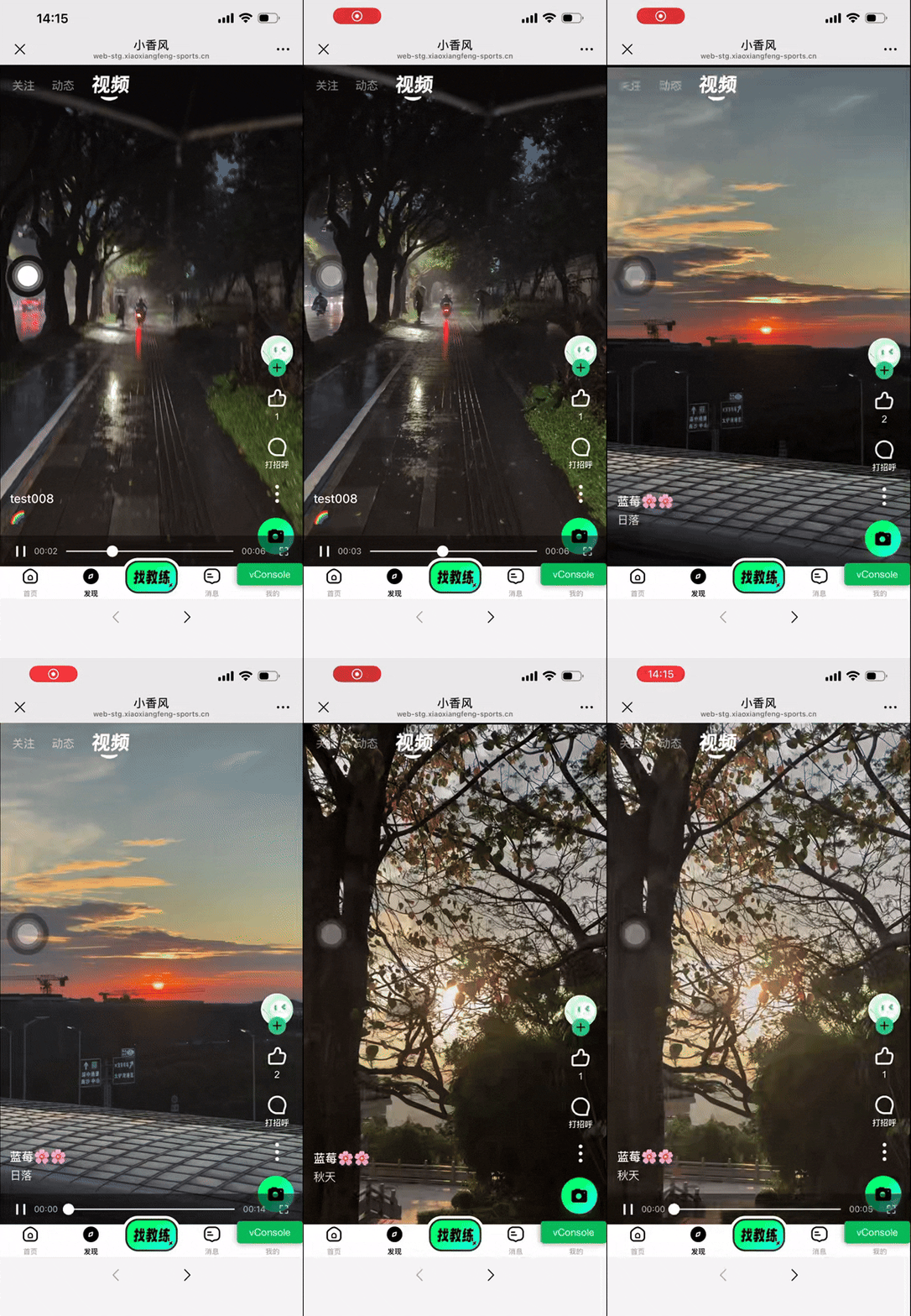
最终效果图展示:
有兴趣的也可以看看我公司的线下预约教练的网站 https://web.xiaoxiangfeng-sports.cn/pages_main/home/index

 浙公网安备 33010602011771号