


Docker_mysql基础管理
1、docker环境登录mysql
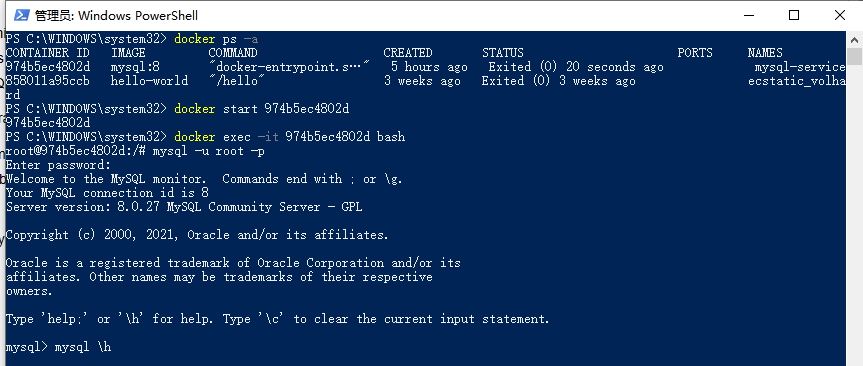
PS C:\WINDOWS\system32> docker ps -a
CONTAINER ID IMAGE COMMAND CREATED STATUS PORTS NAMES
974b5ec4802d mysql:8 "docker-entrypoint.s…" 5 hours ago Exited (0) 20 seconds ago mysql-service
858011a95ccb hello-world "/hello" 3 weeks ago Exited (0) 3 weeks ago ecstatic_volhard
PS C:\WINDOWS\system32> docker start 974b5ec4802d
974b5ec4802d
PS C:\WINDOWS\system32> docker exec -it 974b5ec4802d bash
root@974b5ec4802d:/# mysql -u root -p
Enter password:
Welcome to the MySQL monitor. Commands end with ; or \g.
Your MySQL connection id is 8
Server version: 8.0.27 MySQL Community Server - GPL
Copyright (c) 2000, 2021, Oracle and/or its affiliates.
Oracle is a registered trademark of Oracle Corporation and/or its
affiliates. Other names may be trademarks of their respective
owners.
Type 'help;' or '\h' for help. Type '\c' to clear the current input statement.
mysql>
2、选择要操作的mysql数据库
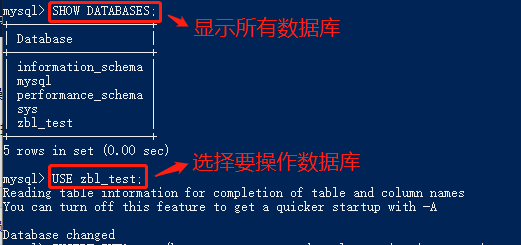
·SHOW DATABASES; --显示所有数据
·USE 数据库名称
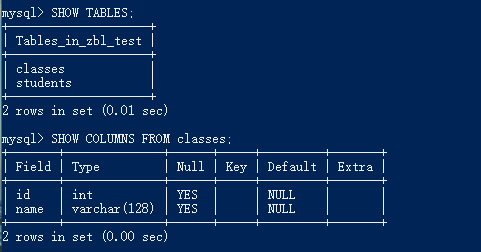
·SHOW TABLES; --显示该数据库下所有数据表,前提使用USE语句进入该数据库
·SHOW COLUMNS FROM 数据表; --显示数据表的属性,属性类型,主键信息 ,是否为 NULL,默认值等其他信息
·SHOW INDEX FROM classes; --显示数据表的详细索引信息,包括PRIMARY KEY(主键)
·SHOW TABLE STATUS FROM zbl_test; --显示数据库 zbl_test中所有表的信息

参考:

 浙公网安备 33010602011771号