
dplyr 常用函数 [介绍篇]
常用的5个函数
mutate() adds new variables that are functions of existing variables 根据已有变量添加新变量
select() picks variables based on their names. 根据变量名提取变量
filter() picks cases based on their values. 根据变量的值提取
summarise() reduces multiple values down to a single summary. 精简多个变量到单个的总结
arrange() changes the ordering of the rows. 改变行的顺序
以上函数都可结合group_by,允许分组操作。更多的学习日志可通过vignette("dplyr")查看。除了这些单张表外,dplyr 还可执行双表操作,可通过bignette("two-table")进一步查看。
dplyr是根据数据的存储特性的来设计的,这意味着在操作本地数据框的同时,你还可以通过额外的R带代码操作远程的数据表格。安装dbplyr包后,阅读vignette("databases", package = "dbplyr")。
如果是新接触dplyr,最好从《R for data science》的 data import chapter开始。
安装
# 获得dplyr的最简单途径是安装整个tidyverse:
install.packages("tidyverse")
# 也可直接安装dplyr:
install.packages("dplyr")
开发者版本
为了使用bug及时修复,或者使用开发版本的特征,可以从GitHub安装dplyr。
# install.packages("devtools")
devtools::install_github("tidyverse/dplyr")
备忘单
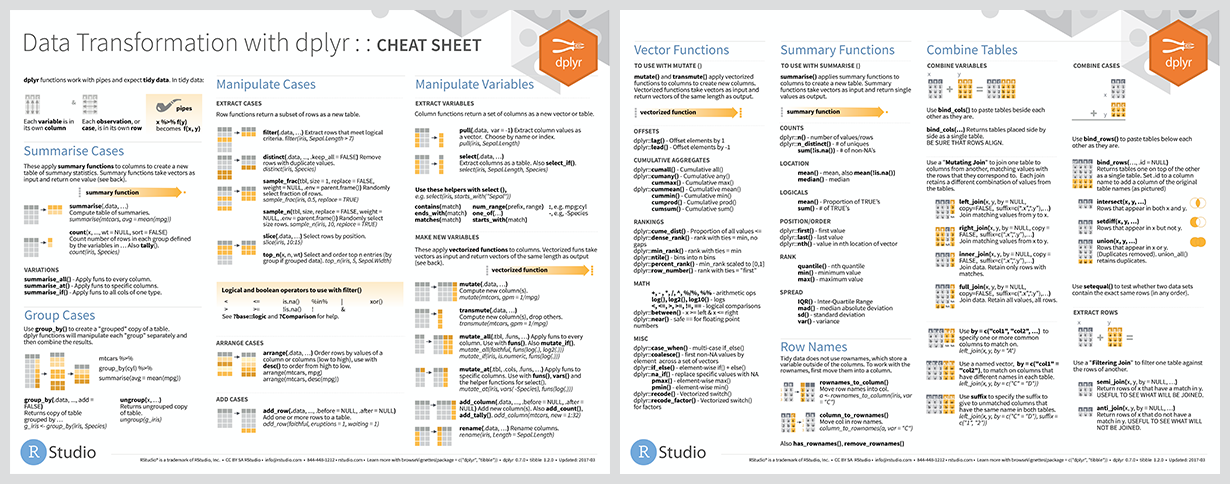
使用方法
library(dplyr)

starwars %>%
  filter(species == "Droid")
#> # A tibble: 5 x 13
#>   name  height  mass hair_color skin_color eye_color birth_year gender
#>   <chr>  <int> <dbl> <chr>      <chr>      <chr>          <dbl> <chr>
#> 1 C-3PO    167    75 <NA>       gold       yellow           112 <NA>
#> 2 R2-D2     96    32 <NA>       white, bl… red               33 <NA>
#> 3 R5-D4     97    32 <NA>       white, red red               NA <NA>
#> 4 IG-88    200   140 none       metal      red               15 none
#> 5 BB8       NA    NA none       none       black             NA none
#> # … with 5 more variables: homeworld <chr>, species <chr>, films <list>,
#> #   vehicles <list>, starships <list>

starwars %>%
  select(name, ends_with("color"))
#> # A tibble: 87 x 4
#>   name           hair_color skin_color  eye_color
#>   <chr>          <chr>      <chr>       <chr>
#> 1 Luke Skywalker blond      fair        blue
#> 2 C-3PO          <NA>       gold        yellow
#> 3 R2-D2          <NA>       white, blue red
#> 4 Darth Vader    none       white       yellow
#> 5 Leia Organa    brown      light       brown
#> # … with 82 more rows

starwars %>%
  mutate(name, bmi = mass / ((height / 100)  ^ 2)) %>%
  select(name:mass, bmi)
#> # A tibble: 87 x 4
#>   name           height  mass   bmi
#>   <chr>           <int> <dbl> <dbl>
#> 1 Luke Skywalker    172    77  26.0
#> 2 C-3PO             167    75  26.9
#> 3 R2-D2              96    32  34.7
#> 4 Darth Vader       202   136  33.3
#> 5 Leia Organa       150    49  21.8
#> # … with 82 more rows

starwars %>%
  arrange(desc(mass))
#> # A tibble: 87 x 13
#>   name  height  mass hair_color skin_color eye_color birth_year gender
#>   <chr>  <int> <dbl> <chr>      <chr>      <chr>          <dbl> <chr>
#> 1 Jabb…    175  1358 <NA>       green-tan… orange         600   herma…
#> 2 Grie…    216   159 none       brown, wh… green, y…       NA   male
#> 3 IG-88    200   140 none       metal      red             15   none
#> 4 Dart…    202   136 none       white      yellow          41.9 male
#> 5 Tarf…    234   136 brown      brown      blue            NA   male
#> # … with 82 more rows, and 5 more variables: homeworld <chr>,
#> #   species <chr>, films <list>, vehicles <list>, starships <list>

starwars %>%
  group_by(species) %>%
  summarise(
    n = n(),
    mass = mean(mass, na.rm = TRUE)
  ) %>%
  filter(n > 1,
         mass > 50)
#> # A tibble: 8 x 3
#>   species      n  mass
#>   <chr>    <int> <dbl>
#> 1 Droid        5  69.8
#> 2 Gungan       3  74
#> 3 Human       35  82.8
#> 4 Kaminoan     2  88
#> 5 Mirialan     2  53.1
#> # … with 3 more rows
获取帮助
如果很明确的遇到bug,去github上反馈。如果要提问或者套路,可通过rstudio社区或者邮箱

 浙公网安备 33010602011771号