

软件工程日报--vue的深度学习
vue的深度学习
本次学习了vue脚手架的知识,使用的是选项api,
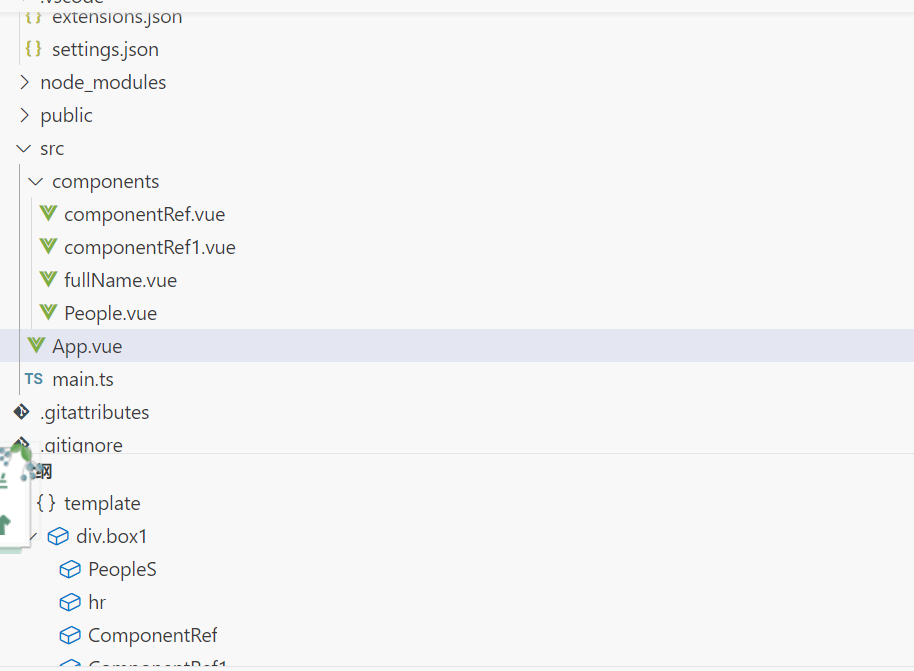
初步分析
对于脚手架目录进行简单分析
src:用于存放源码,我们一般写代码的地方,其中的app.vue是根组件,components中存放其他组件,其他组件可以加到根组件下方
<template>

  <div class="fullName">
    <input type="text" v-model="firstName" placeholder="First Name">
    <input type="text" v-model="lastName" placeholder="Last Name">
    <p> 全名:{{ fullName }} </p>

  </div>
</template>

<script lang="ts" setup>

import { ref,computed } from 'vue';

const firstName = ref('');
const lastName = ref('');
const fullName = computed(() => {
    return firstName.value + '-' + lastName.value;
    //`${firstName.value} ${lastName.value}`;
})

</script>

<style lang="scss" scoped>

input{
    width: 200px;
    padding: 10px;
    margin: 10px;
    border: 2px solid #ccc;


}

<template>


   <div class="box1">
           哈哈哈
          <PeopleS></PeopleS>
    <hr>

        <ComponentRef></ComponentRef>
         <ComponentRef1></ComponentRef1>
         <FullName></FullName>
   </div>
</template>

<script lang="ts">

 import ComponentRef from './components/componentRef.vue';
import ComponentRef1 from './components/componentRef1.vue';
import FullName from './components/fullName.vue';
import PeopleS from './components/People.vue'

export default {
  name: 'App',
  components:{PeopleS,ComponentRef,ComponentRef1,FullName},
  data() {
   return {
    }
  }
}

</script>

<style >
.box1{
    width: 400px;
    height: 1000px;
    background-color: rgba(121, 103, 108, 0.742);
}

</style>

</style>
在控制台中输入 npm run dev可以运行前端项目

 浙公网安备 33010602011771号