

软件工程日报--酒店客房管理系统(环境搭建和客房类别的实现相关功能)
环境搭建和客房类别的实现相关功能
在之前的学习中发现自己对于不少的业务逻辑还是不熟练,所以准备多实现几个项目,来锻炼能力,增加速度.同时我还准备使用利用ai来加快速度
环境搭建
还是常规的几个层次的搭建这里不再过多赘述
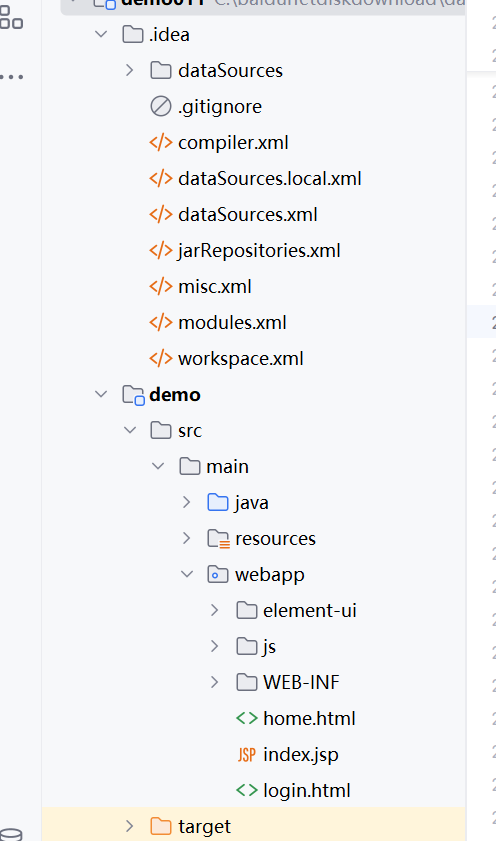
kind
这个是客房类别的管理,这里书写了它的三层的后端的代码,
package com.shop.pojo;

public class Kind {


    private String type ;
    private String number;
    private String express;

    public Kind() {
    }

    public Kind(String type, String number, String express) {
        this.type = type;
        this.number = number;
        this.express = express;
    }

    public String getType() {
        return type;
    }

    public void setType(String type) {
        this.type = type;
    }

    public String getNumber() {
        return number;
    }

    public void setNumber(String number) {
        this.number = number;
    }

    public String getExpress() {
        return express;
    }

    public void setExpress(String express) {
        this.express = express;
    }
}

package com.shop.mapper;

import com.shop.pojo.Kind;
import org.apache.ibatis.annotations.*;

import java.util.List;

public interface KindMapper {

    /**
     * 插入一条 Kind 记录
     * @param kind 要插入的 Kind 对象
     * @return 插入成功的记录数
     */
    @Insert("INSERT INTO tb_kind (type, number, express) VALUES (#{type}, #{number}, #{express})")
    int insertKind(Kind kind);

    /**
     * 根据 ID 删除 Kind 记录
     * 这里假设表中有一个 id 字段,实际情况可根据表结构调整
     * @param id 要删除的记录的 ID
     * @return 删除成功的记录数
     */
    @Delete("DELETE FROM tb_kind WHERE id = #{id}")
    int deleteKindById(int id);

    /**
     * 更新 Kind 记录
     * @param kind 要更新的 Kind 对象
     * @return 更新成功的记录数
     */
    @Update("UPDATE tb_kind SET type = #{type}, number = #{number}, express = #{express} WHERE id = #{id}")
    int updateKind(Kind kind);

    /**
     * 根据 ID 查询 Kind 记录
     * 这里假设表中有一个 id 字段,实际情况可根据表结构调整
     * @param id 要查询的记录的 ID
     * @return 查询到的 Kind 对象
     */
//    @Select("SELECT * FROM kind WHERE id = #{id}")
//    @Results({
//            @Result(property = "type", column = "type"),
//            @Result(property = "number", column = "number"),
//            @Result(property = "express", column = "express")
//    })
//    Kind selectKindById(int id);

    /**
     * 查询所有 Kind 记录
     * @return 包含所有 Kind 对象的列表
     */
    @Select("SELECT * FROM tb_kind")
    @Results({
            @Result(property = "type", column = "type"),
            @Result(property = "number", column = "number"),
            @Result(property = "express", column = "express")
    })
    List<Kind> selectAllKinds();

}
package com.shop.service;

import com.shop.mapper.KindMapper;
import com.shop.pojo.Kind;
import org.apache.ibatis.io.Resources;
import org.apache.ibatis.session.SqlSession;
import org.apache.ibatis.session.SqlSessionFactory;
import org.apache.ibatis.session.SqlSessionFactoryBuilder;

import java.io.IOException;
import java.io.InputStream;
import java.util.List;

public class KindService {
    private static final String CONFIG_FILE = "mybatis-config.xml";
    private static SqlSessionFactory sqlSessionFactory;

    static {
        try {
            InputStream inputStream = Resources.getResourceAsStream(CONFIG_FILE);
            sqlSessionFactory = new SqlSessionFactoryBuilder().build(inputStream);
        } catch (IOException e) {
            e.printStackTrace();
        }
    }

    /**
     * 插入一条 Kind 记录
     * @param kind 要插入的 Kind 对象
     * @return 插入成功的记录数
     */
    public int insertKind(Kind kind) {
        try (SqlSession session = sqlSessionFactory.openSession()) {
            KindMapper mapper = session.getMapper(KindMapper.class);
            int result = mapper.insertKind(kind);
            session.commit();
            return result;
        }
    }

    /**
     * 根据 ID 删除 Kind 记录
     * @param id 要删除的记录的 ID
     * @return 删除成功的记录数
     */
    public int deleteKindById(int id) {
        try (SqlSession session = sqlSessionFactory.openSession()) {
            KindMapper mapper = session.getMapper(KindMapper.class);
            int result = mapper.deleteKindById(id);
            session.commit();
            return result;
        }
    }

    /**
     * 更新 Kind 记录
     * @param kind 要更新的 Kind 对象
     * @return 更新成功的记录数
     */
    public int updateKind(Kind kind) {
        try (SqlSession session = sqlSessionFactory.openSession()) {
            KindMapper mapper = session.getMapper(KindMapper.class);
            int result = mapper.updateKind(kind);
            session.commit();
            return result;
        }
    }

    /**
     * 查询所有 Kind 记录
     * @return 包含所有 Kind 对象的列表
     */
    public List<Kind> selectAllKinds() {
        try (SqlSession session = sqlSessionFactory.openSession()) {
            KindMapper mapper = session.getMapper(KindMapper.class);
            return mapper.selectAllKinds();
        }
    }
}
在前端是这样的.
<!DOCTYPE html>
<html lang="en">
<head>
    <meta charset="UTF-8">
    <title>Title</title>
  <script src="js/axios-0.18.0.js"></script>
  <script src="js/vue.js"></script>
  <script src="element-ui/lib/index.js"></script>
  <link rel="stylesheet" href="element-ui/lib/theme-chalk/index.css">

  <style>
    .el-header {
      background-color: #B3C0D1;
      color: #333;
      line-height: 60px;
    }

    .el-aside {
      color: #333;
    }
  </style>

</head>
<body>

<div id="app">
  <el-container style="height: 500px; border: 1px solid #eee">
    <el-aside width="200px" style="background-color: rgb(238, 241, 246)">
      <el-menu :default-openeds="['1', '3']">
        <el-submenu index="1">
          <template slot="title"><i class="el-icon-message"></i>导航一</template>

            <el-menu-item index="1-1">选项1</el-menu-item>
            <el-menu-item index="1-2">选项2</el-menu-item>
            <el-menu-item index="1-3">选项3</el-menu-item>
          <el-menu-item index="1-4">选项4</el-menu-item>


          </el-submenu>
        </el-submenu>

        </el-submenu>
      </el-menu>
    </el-aside>

    <el-container>
      <el-header style="text-align: right; font-size: 12px">
        <span>管理系统</span>
      </el-header>

      <el-main>


        <!--搜索表单-->
        <el-form :inline="true" :model="item" class="demo-form-inline">

<!--          <el-form-item label="当前状态">-->
<!--            <el-select v-model="item" placeholder="当前状态">-->
<!--              <el-option label="启用" value="1"></el-option>-->
<!--              <el-option label="禁用" value="0"></el-option>-->
<!--            </el-select>-->
<!--          </el-form-item>-->

          <el-form-item label="房间名称">
            <el-input v-model="item.type" placeholder="房间名称"></el-input>
          </el-form-item>

          <el-form-item label="房间人数">
            <el-input v-model="item.number" placeholder="房间人数"></el-input>
          </el-form-item>

          <el-form-item>
            <el-button type="primary" @click="onSubmit">查询</el-button>
          </el-form-item>
        </el-form>

<!--      新增  -->
        <el-row>

          <el-button type="primary" plain @click="dialogVisible = true">新增</el-button>

        </el-row>


<!--        表格渲染-->
        <el-table :data="tableData">
          <el-table-column
                  label="下标"
                  type="index"
                  width="100">
          </el-table-column>
          <el-table-column prop="type" label="类型" width="140">
          </el-table-column>
          <el-table-column prop="number" label="人数" width="120">
          </el-table-column>
          <el-table-column prop="express" label="备注">
          </el-table-column>


          <el-table-column
                  fixed="right"
                  label="操作"
                  width="120">

            <template slot-scope="scope">
              <el-button
                      @click.native.prevent="deleteItem(scope.$index, tableData)"
                      type="text"
                      size="small">
                移除
              </el-button>

              <el-button
                      type="text"
                      size="small"
                      @click="initItem(scope.$index)">
                修改
              </el-button>


            </template>

          </el-table-column>


        </el-table>
      </el-main>
    </el-container>
  </el-container>


  <!--添加数据对话框表单-->
  <el-dialog
          title="编辑品牌"
          :visible.sync="dialogVisible"
          width="30%"
  >

    <el-form ref="form" :model="item" label-width="80px">
      <el-form-item label="房间名称">
        <el-input v-model="item.type"></el-input>
      </el-form-item>

      <el-form-item label="房间人数">
        <el-input v-model="item.number"></el-input>
      </el-form-item>

<!--      <el-form-item label="补充">-->
<!--        <el-input v-model="item.express"></el-input>-->
<!--      </el-form-item>-->

      <el-form-item label="备注">
        <el-input type="textarea" v-model="item.express"></el-input>
      </el-form-item>

<!--      <el-form-item label="状态">-->
<!--        <el-switch v-model="brand.status"-->
<!--                   active-value="1"-->
<!--                   inactive-value="0"-->
<!--        ></el-switch>-->
      </el-form-item>


      <el-form-item>
        <el-button type="primary" @click="addItem">提交</el-button>
        <el-button @click="dialogVisible = false">取消</el-button>
      </el-form-item>
    </el-form>

  </el-dialog>

  <!--修改数据对话框表单-->
  <el-dialog
          title="修改房间信息"
          :visible.sync="dialogVisible1"
          width="30%"
  >

    <el-form ref="form" :model="item"   label-width="80px">
      <el-form-item label="房间名称">
        <el-input v-model="item.type"></el-input>
      </el-form-item>

      <el-form-item label="房间人数">
        <el-input v-model="item.number"></el-input>
      </el-form-item>


      <el-form-item label="备注">
        <el-input type="textarea" v-model="item.express"></el-input>
      </el-form-item>


      </el-form-item>


      <el-form-item>
        <el-button type="primary" @click="changeBrand()">提交</el-button>
        <el-button @click="dialogVisible1 = false">取消</el-button>
      </el-form-item>
    </el-form>

  </el-dialog>


</div>

</body>
<script>
  new Vue({
    el: '#app',
    mounted() {

      axios.post("http://localhost:7469/demo/kind/selectAll").then((res) => {
        // location.href = "http://localhost:7469/demo/home.html";
          alert("success");
          this.tableData = res.data;

      })


    },
    data(){

      return{
        tableData:[],
        dialogVisible: false,
        dialogVisible1: false,
        item:{
          type:"",
          number:"",
          express:""
        },

      }

    },
    methods: {
      addItem() {
        console.log(this.item);

        axios.post("http://localhost:7469/demo/kind/addKind", this.item).then((res) => {

          if (res.data == "success") {

            alert("添加成功");

          } else {
            alert("添加失败")
          }
          this.dialogVisible = false;
        })

      },


    }


  })
</script>


</html>

 浙公网安备 33010602011771号