
Mysql
1 LRU
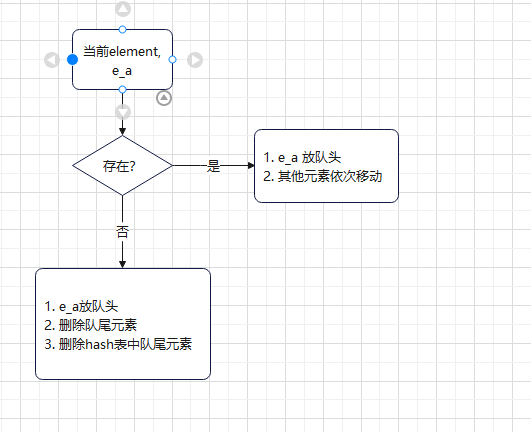
example

HashMap + DeLinkedList
2 Mysql Architecture
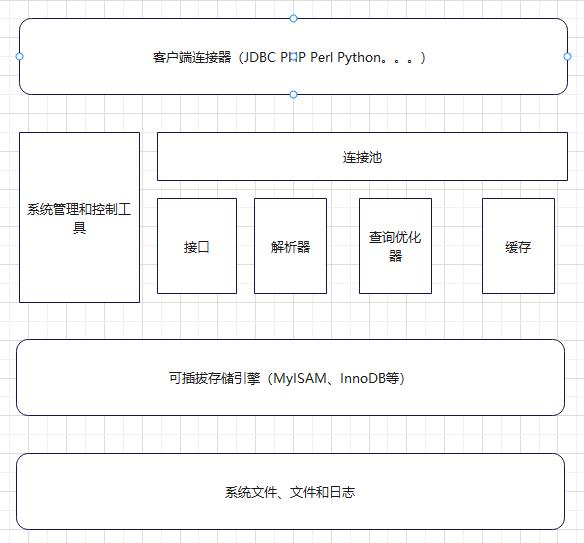
3 Log
1)error log
2)query log
3)binlog
only record changes, not something like select.
4)slow query log
long_query
4 data file
frm - table frame
myd MyISAM-data
myi MyISAM-index
ibd,InNoDB data + index
ibdata1
config
my.cnf, my.ini
5 SQL
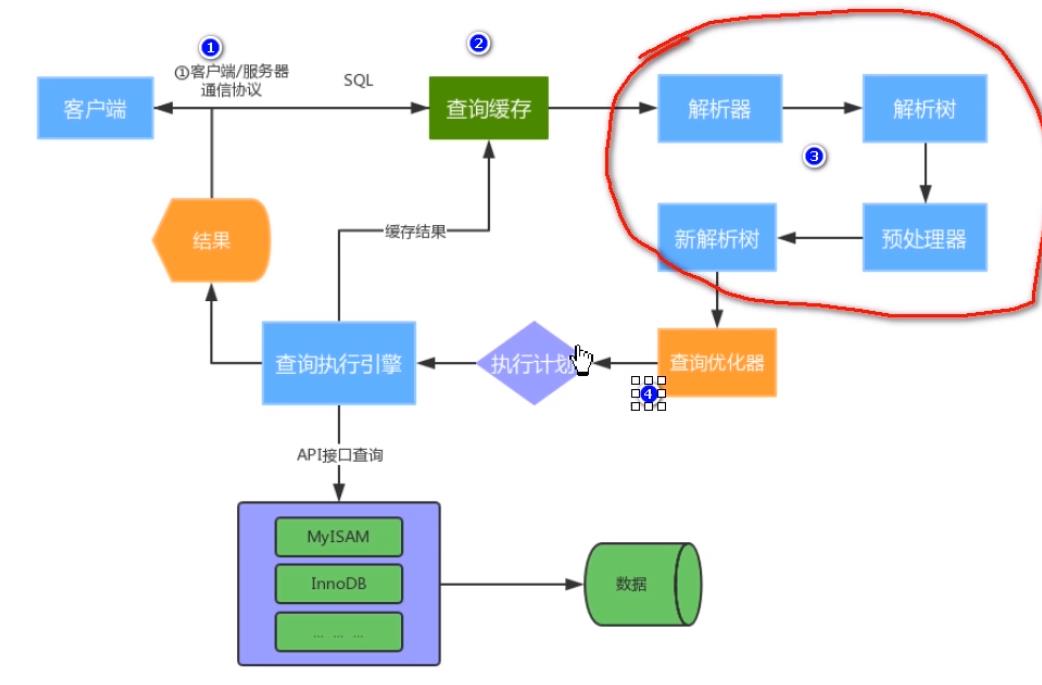
6 communication mechanism
full-duplex:receive send simultiniously,
half-dulex:receive or send at one moment
simplex:one action
7 cache
L1 cache, L2 cache,
search in cache firstly.
8 engine
1) InnoDB is a transaction-safe storage engine with full ACID compliance.
2)MyISAM does not support transactions, does not support foreign keys, has fast access speed, and is beneficial for queries.
3)Memory:
-
All data stored in RAM
-
No disk I/O for data access
-
Table structure persists (.frm file), but data disappears on restart
4)Archive:only support insert and select.
5)Csv:
6)BlackHole:
7)Federated:
8)Merg_MyISAM:
9 Difference between InnoDB and MyISAM
| InnoDB | MYISAM | |
| transaction and foreign key | transaction-safe storage engine with full ACID compliance. | does not support transactions, does not support foreign keys, has fast access speed, and is beneficial for queries. |
|
MySQL Lock Mechanism |
||
| Index structure | Clustered index stores index and row data together - it caches both the index and the actual record. | Non-clustered index stores index separate from the actual data records - the index contains pointers to the data. |
| concurrent ability | 4 isolation level |
Table Lock Impact on Concurrency |
| storage file | frm, idb | frm,myd,myi |
| senarios |
|
No transaction support required |
10 InnoDB

10 Undo Log
11 Redo Log
1) Introduction
Redo Log is generated as transactions are created. When dirty pages are written to disk, the corresponding Redo Log is deleted. In the event of a database crash, it performs redo operations.
Similar to WAL (Write-Ahead Logging). Because Redo Log uses sequential writes, it is very fast. However, data on disk in the database is not sequential, so it is not written directly to the database files.
2)
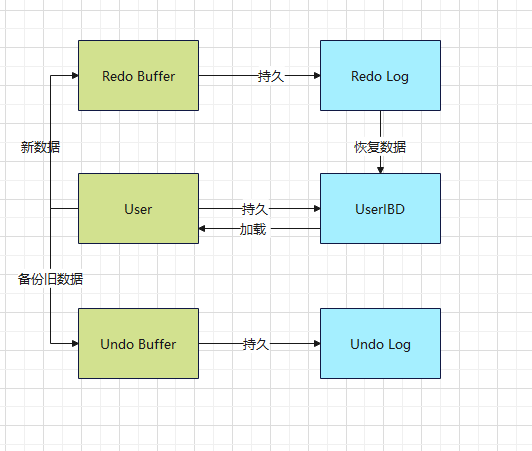
Redo Log records are continuous and fast, while user data on disk is non-continuous. Writing directly to disk would impact I/O.
Redo Log uses a circular write mode to write to files. There is a Write Position and a Checkpoint.
12 Binlog
1) Usage Scenarios
Master-Slave Replication: Enabled on the master. Binlog data from the master can be transmitted to the slave to achieve data consistency between master and slave.
Data Recovery: Can recover after accidentally deleting a database or table. Data is restored using the `mysqlbinlog` command.
13 Difference between Redo Log and binlog
Redo Log vs Binlog Comparison
| Aspect | Redo Log | Binlog |
|---|---|---|
| Engine Level | InnoDB engine | MySQL Server (all engines) |
| Log Type | Physical log - records data page update status | Logical log - records update process |
| Write Mode | Circular (fixed space, overwrites) | Incremental (appends, never overwrites) |
| Recovery | Automatic - used for crash recovery after server failure (宕机) | Manual - used for master-slave replication or data recovery (needs manual restore) |
14 Index Types
1)Ordinary Index: Basic index with no uniqueness constraint
2) Unique Index
Allows NULL values
3) Primary Key Index
Does NOT allow NULL values
4) Compound Index
Can replace multiple single indexes
Saves overhead
5) Fulltext Index
- Has minimum and maximum content length limits (configurable)
- Uses word segmentation methods
- Higher efficiency than `LIKE`
- Uses special syntax: `MATCH ... AGAINST` (default: equality matching)
- Must be created on string/text columns
15 Index Principles
Physical storage:
- Indexes are physically stored in data files (InnoDB: `.ibd` files)
- Stored using data pages
Trade-off:
- ✅ Speeds up retrieval
- ❌ Slows down INSERT/UPDATE/DELETE operations
1) Binary Search
- High efficiency when data is
2) Hash Index
16 B Tree & B+ Tree
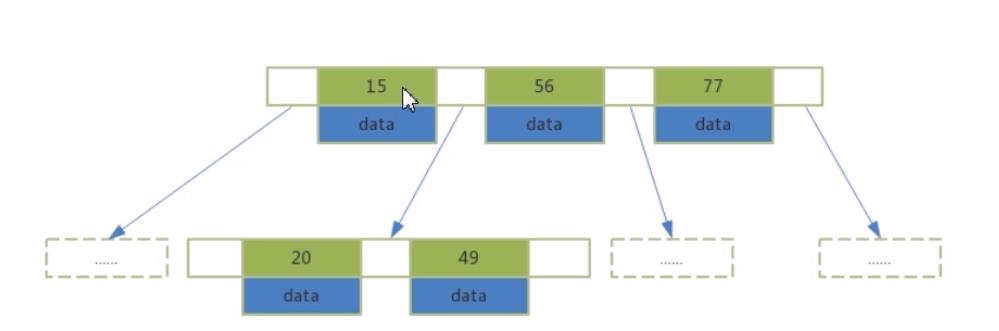
- Index keys and data are stored throughout the entire tree
- Each node can store multiple index keys and their corresponding data
- Tree nodes are arranged in ascending order from left to right
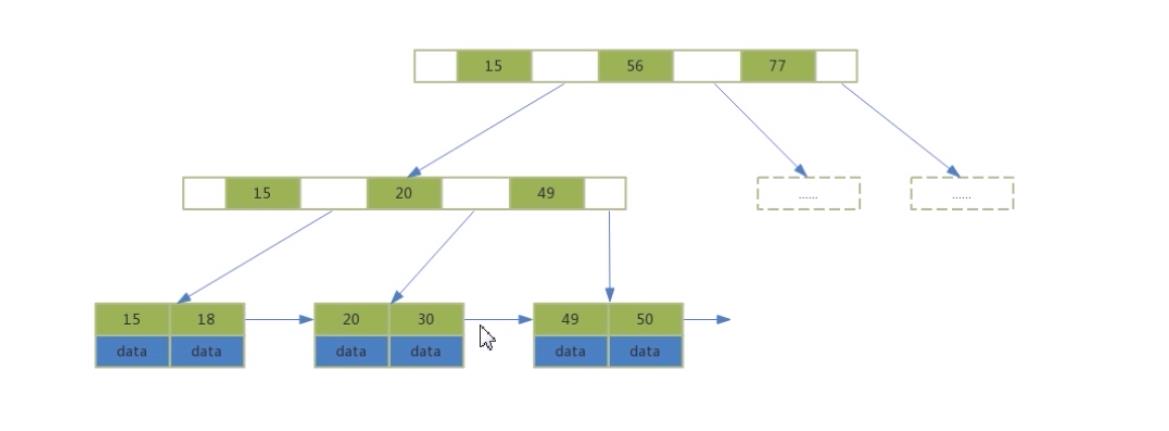
- Data is all stored in leaf nodes
- Non-leaf nodes contain only indexes, allowing them to store more index values, which benefits range queries
- Leaf nodes contain all index keys and their corresponding data
- Leaf nodes are connected by pointers, improving range access performance
16 Clustered Index and Secondary Index
1) Clustered Index
Definition:
-
The index is the primary key index
-
Leaf nodes contain full row data
InnoDB requirement:
-
InnoDB must have a clustered index
How it's determined:
17 Secondary Index
Definition:
-
Also called secondary index
-
Stores both the index value and the primary key value
-
Takes up less space than the primary key
-
Improves query efficiency for non-primary key columns

18 Explain
|
keyword |
Description |
|
Select_type |
SIMPLE,PRIMARY,UNION,DEPNEDENT,UNION RESULT, SUBQUERY.... |
|
type |
|
|
possible_keys |
|
|
keys |
|
|
rows |
|
|
key_len |
Indicates the number of bytes used by the query, and whether the composite index was fully utilized. |
|
Extra |
|
19 Key Optimization Principles:
| Key points | Senarios | Description |
|
Covering Index |
When using a secondary index, the query may need to perform a two-tree traversal:
|
Only need to traverse one tree to get all column data, Try to use composite indexes whenever possible
|
|
Leftmost Prefix Rule |
When using a composite index (multiple columns), queries must use the index columns starting from the leftmost to benefit from the index. |
select id from user where age = 18 and name = 'a' Scenario: Adding a composite index on (age, name) select id from user where name = 'a' Root cause: name is the second column in the composite index, cannot be used at the beginning |
| index and like |
Only when the percent sign is written at the end will the index be used. The index is pushed down to the storage layer. |
|
| index and null | 如果 某一列NULL值,索引还有效吗? | null needs more space |
| index and sorting |
ORDER BY should preferably use index to avoid filesort First pass: Read only sort columns and row pointers, sort in memory Single pass: Read all columns needed for the query from disk
Sort in sort_buffer memory Return results directly If sort_buffer is insufficient:
Avoid SELECT * |
|
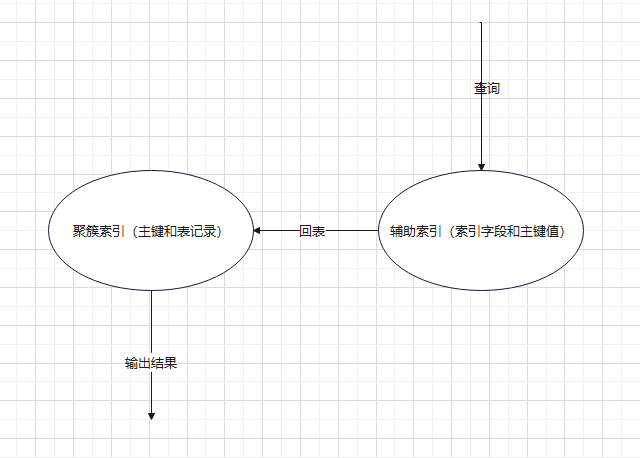
show valiable slow_query
20 ACID
| Atomicity |
A transaction either executes completely or not at all Buffer Pool -> flush to disk |
If there is dirty data that hasn't been flushed to disk, how are modified data changes guaranteed to take effect? Redo logs are used for flushing to disk. If a transaction hasn't been committed but dirty pages in the Buffer Pool have been flushed to disk, how can data that shouldn't exist be undone? Undo logs are used for rollback. |
| Consistency | Before a transaction begins and after it ends, database integrity is not violated |
|
| Isolation | The execution of one transaction is not interfered with by other transactions |
|
| Durability |
|

|
WAL
31 MYSQL Concurrency
- Lost update: Multiple transactions updating the same row lead to information loss. (Rollback covering, commit covering; one transaction's commit operation overwrites data already committed by other transactions.)
- dirty read:Dirty read: A transaction reads data that has been modified by another transaction but not yet committed.
- Non-repeatable read: A transaction reads the same row multiple times and gets different results.
- phantom read:Multiple queries with the same condition within a transaction return inconsistent results. The results of subsequent queries differ from previous ones, with more or fewer rows of data appearing.
32 MVCC
Improve the concurrent ability for mysql. multiple version concurrency control
- Copy On Write: When a read or write operation occurs, data can be backed up, and then the metadata is locked for writing. The backup records can be used for reads by other transactions and also for necessary data rollbacks. This only works under the Read Committed and Repeatable Read isolation levels.
- Snapshot read: Reads the snapshot version of a record without locking. (At the RR level, a view is created internally at the first read and reused for subsequent reads. At the RC level, a new view is generated for each read based on the latest records. SELECT queries use snapshot reads.)
- Current read: Reads the latest version of a record, and all returned records are locked. (When a SELECT is followed by FOR UPDATE or LOCK IN SHARE MODE, it's a current read. INSERT, DELETE, and UPDATE operations also trigger current reads
33 Isolation Level
| isolation level | description | dirty read | not repeatable read | commit covering | phantom read | |
| read uncommited | x | could happen | could happen | could happen | could happen | |
| read commited | Can only read data that has been committed by other sessions, which solves dirty reads, but non-repeatable reads may occur. | x | x | could happen | could happen | could happen |
| repeatable read | Ensuring that multiple concurrent instances reading data see the same data; using snapshots solves this issue. | x | x | x | x |
session B insert, session A update can show the insert data |
| serialization | x | x | x | x | x |
concurrent problem
Example:
two session
1) begin ....(some operations) commit
2) begin ... (some operations) commit
For example, session 1 gets different results during queries but hasn't committed yet, because session 2 performed different operations.
34 Relationship between Transaction Isolation Levels and Locks
-
Relationship between Transaction Isolation Levels and Locks
Transaction isolation levels are part of the SQL standard and serve as a solution for transaction concurrency control. They are an encapsulation of locks and MVCC.
Locks are the foundation of concurrency control.
For users, the first step is to choose an isolation level. When the isolation level cannot solve the problem, then consider manually setting locks. -
Isolation Level Control
You can use the command line to enter BEGIN to start.
36 Next-Lock
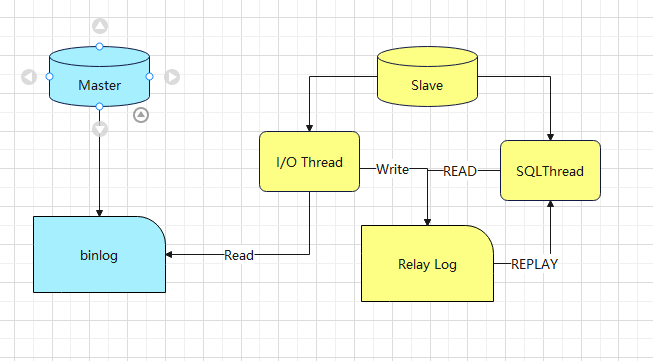
-
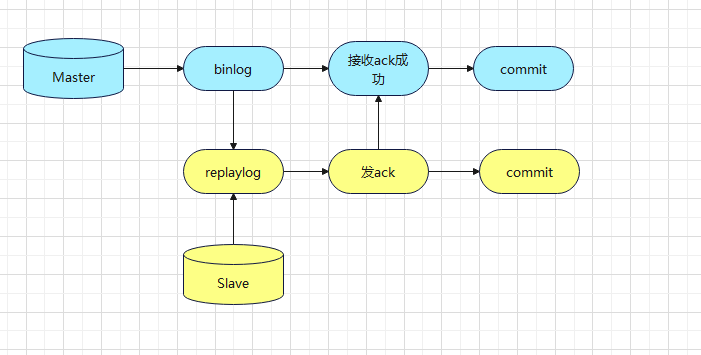
Master logs database changes to Binlog
-
Records all data change operations (DML/DDL)
-
-
Slave reads master's binlog and writes to its own Relay log
-
I/O thread connects to master and requests binlog
-
Writes received content to local relay log
-
-
Slave reads relay log and replays it to its own database
-
SQL thread reads relay log contents
-
Replays (executes) operations locally
-
Completes data synchronization to slave database
-
41 read write seperation

42 Database Sharding - Vertical and Horizontal Splitting
A table's data volume should generally be controlled under 10 million records. If data is too large, NoSQL or database/table sharding is needed.
1) Vertical Splitting
Split tables across multiple databases.
Splitting tables: Split columns apart.
Advantages:
-
Business logic becomes clearer
-
Solves the problem of too many fields
Disadvantages:
-
Data volume doesn't decrease
-
Number of tables increases
2) Horizontal Splitting
Split a table horizontally into multiple tables.
Advantages:
-
Solves the problem of excessive data volume
Disadvantages:
-
Cross-database join performance is poor
-
Splitting rules are difficult to define
-
Scaling and maintenance are more challenging

 浙公网安备 33010602011771号