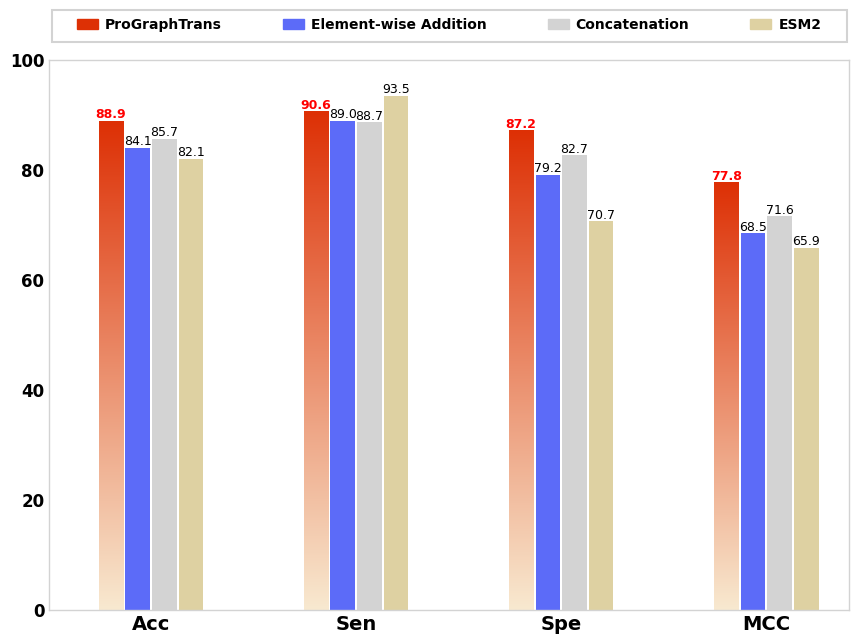
效果
![image]()
代码
import matplotlib.pyplot as plt
import numpy as np
from matplotlib.patches import Rectangle
from matplotlib.ticker import FixedLocator, FixedFormatter

# 数据
models = ['ProGraphTrans', 'Element-wise Addition', 'Concatenation', 'ESM2']
benchmarks = ['Acc', 'Sen', 'Spe', 'MCC']


data = [
    [88.9, 90.6, 87.2, 77.8],
    [84.1, 89.0, 79.2, 68.5],
    [85.7, 88.7, 82.7, 71.6],
    [82.1, 93.5, 70.7, 65.9]
]

# 颜色值
colors = ['#dd3005', '#5c6bf8', '#d3d3d3', '#ded1a2']

# 创建图表
fig, ax = plt.subplots(figsize=(10, 8))  # 设置图表尺寸为 12 英寸宽、8 英寸高

# ==================== 可调节参数 ====================
legend_y_offset = 1.15  # 控制图例垂直位置(越大距离柱状图越远)
legend_shift = -0.05  # 控制图例和矩形框整体下移的距离(负值表示下移)
rect_padding = 0.02  # 矩形框内边距
rect_linewidth = 1.5  # 矩形框线宽
rect_color = '#d3d3d3'  # 矩形框颜色(浅灰色)

# 自定义空白长度(单位为英寸)
top_margin_inch = 1.5  # 图表顶部留白
bottom_margin_inch = 1.0  # 图表底部留白
left_margin_inch = 1.0  # 图表左侧留白
right_margin_inch = 1.0  # 图表右侧留白

# 获取当前图表的总宽度和高度(单位为英寸)
fig_width_inch, fig_height_inch = fig.get_size_inches()

# 计算比例
top_margin_ratio = top_margin_inch / fig_height_inch
bottom_margin_ratio = bottom_margin_inch / fig_height_inch
left_margin_ratio = left_margin_inch / fig_width_inch
right_margin_ratio = right_margin_inch / fig_width_inch

# 自定义 y 轴范围
y_min = 0  # y 轴最小值
y_max = 100  # y 轴最大值
# ==================================================

width = 0.12
gap_within_group = 0.01
gap_between_groups = 0.15
x = range(len(benchmarks))
offset = 0.15

# 计算 x 轴范围
left_edge = -offset
right_edge = len(benchmarks) - 1 + 2 * offset + gap_between_groups * (len(benchmarks) - 1)
ax.set_xlim(left_edge, right_edge)

# 定义渐变色函数
def gradient_color(height, color_top="#dd3005", color_bottom="#f8e9d0"):
    gradient = np.linspace(0, 1, 256).reshape(-1, 1)
    gradient = np.hstack((gradient, gradient))
    cmap = plt.cm.colors.LinearSegmentedColormap.from_list("gradient", [color_bottom, color_top])
    return cmap(gradient)

# 绘制柱状图
for i in range(len(models)):
    positions = [xi + offset + (width + gap_within_group) * i for xi in x]

    if i == 0:
        for j, pos in enumerate(positions):
            height = data[i][j]
            ax.imshow(gradient_color(height),
                      extent=[pos - width / 2, pos + width / 2, 0, height],
                      aspect="auto", origin="lower")
    else:
        ax.bar(positions, data[i], width, color=colors[i])

    for j, pos in enumerate(positions):
        height = data[i][j]
        ax.text(pos, height, '%.1f' % data[i][j],
                ha='center', va='bottom', fontsize=9,
                color='red' if i == 0 else 'black',
                fontweight='bold' if i == 0 else 'normal')

# 设置轴标签和样式
ax.set_xticks([p + offset + (width + gap_within_group) * (len(models) - 1) / 2 for p in x])
ax.set_xticklabels(benchmarks, fontsize=14, fontweight='bold')
# ax.set_ylabel('Scores', fontsize=14, fontweight='bold')

# 设置 y 轴范围
ax.set_ylim(y_min, y_max)

# 设置 y 轴数字加粗
y_ticks = ax.get_yticks()  # 获取当前 y 轴刻度值
y_tick_labels = [f'{int(tick)}' for tick in y_ticks]  # 格式化刻度标签

# 使用 FixedLocator 和 FixedFormatter
ax.yaxis.set_major_locator(FixedLocator(y_ticks))  # 设置刻度位置
ax.yaxis.set_major_formatter(FixedFormatter(y_tick_labels))  # 设置刻度标签

for label in ax.get_yticklabels():
    label.set_fontsize(12)  # 设置字体大小
    label.set_fontweight('bold')  # 设置字体加粗

for spine in ax.spines.values():
    spine.set_color('#d3d3d3')
    spine.set_linewidth(1.0)
ax.tick_params(axis='both', which='both', length=0)


legend_elements = [Rectangle((0, 0), 1, 1, color=c, label=m)
                   for m, c in zip(models, colors)]
legend = ax.legend(handles=legend_elements,
                   loc='upper center',
                   bbox_to_anchor=(0.5, legend_y_offset + legend_shift),  # 放置在柱状图上方
                   ncol=len(models),
                   fontsize=15,
                   prop={'weight': 'bold'},  # 设置图例文本加粗
                   frameon=False,
                   columnspacing=4.4,  # 增大列间距以均匀分布
                   handletextpad=0.5,  # 图例标记与文本之间的间距
                   handlelength=1.5)  # 图例标记长度

# 获取图例的边界框
fig.canvas.draw()
legend_bbox = legend.get_tightbbox(fig.canvas.get_renderer())
legend_bbox = legend_bbox.transformed(fig.transFigure.inverted())


# 动态计算矩形框的宽度和高度
rect_x = 0.5 - (legend_bbox.width / 2 + rect_padding)  # 水平居中
rect_width = legend_bbox.width + 2 * rect_padding  # 矩形框宽度
rect_y = legend_bbox.ymin - legend_bbox.height-2.5*rect_padding  # 垂直居中
rect_height =  2 * rect_padding  # 矩形框高度

# 绘制矩形框
rect = Rectangle((rect_x, rect_y),
                 rect_width,
                 rect_height,
                 transform=fig.transFigure,
                 edgecolor=rect_color,  # 浅灰色
                 facecolor='none',
                 linewidth=rect_linewidth,  # 加粗
                 clip_on=False)
fig.patches.append(rect)

# 自定义左右上下留白距离
plt.subplots_adjust(
    top=1 - top_margin_ratio,  # 上方留白
    bottom=bottom_margin_ratio,  # 下方留白
    left=left_margin_ratio,  # 左侧留白
    right=1 - right_margin_ratio  # 右侧留白
)


plt.savefig('Figs/struct_aware.pdf', dpi=300, bbox_inches='tight')  # 设置 dpi=100,确保分辨率为 1200x800
plt.show()


 浙公网安备 33010602011771号