
在项目中使用DataForm时,我们经常会用到ComboxBox这个控件。然而视乎有很多值得我们注意的问题。下面以一个实例讲解下吧!
(一)实例简介:我用Employee和Department两个实体,用WCF RIA Service作为数据通信方式。
(1)实体截图:

(2)MainPage.xaml代码如下:
代码

<Grid x:Name="LayoutRoot" Background="White">
        <StackPanel>
        <toolkit:DataForm  Name="dataForm1" VerticalAlignment="Top" Width="400" ItemsSource="{Binding Path=Data,ElementName=employeeDomainDataSource}"  >
            <toolkit:DataForm.EditTemplate>
                <DataTemplate>
                    <StackPanel>
                        <toolkit:DataField Label="员工编号:">
                            <TextBox Text="{Binding EmployeeID,Mode=TwoWay}" Width="200"/>
                        </toolkit:DataField>
                        <toolkit:DataField Label="员工姓名:">
                            <TextBox Text="{Binding EmployeeName,Mode=TwoWay}" Width="200"/>
                        </toolkit:DataField>
                        <toolkit:DataField Label="所属部门">
                            <ComboBox ItemsSource="{Binding Path=Data,Mode=TwoWay,ElementName=departmentDomainDataSource}" DisplayMemberPath="DepartmentName" SelectedItem="{Binding Path=DepartmentID,Mode=TwoWay}" Width="200" />
                        </toolkit:DataField>
                    </StackPanel>
                </DataTemplate>
            </toolkit:DataForm.EditTemplate>
        </toolkit:DataForm>
        <ComboBox ItemsSource="{Binding Path=Data,Mode=TwoWay,ElementName=departmentDomainDataSource}" DisplayMemberPath="DepartmentName" SelectedItem="{Binding Path=DepartmentID,Mode=TwoWay}" Height="27" Width="200" />
        </StackPanel>
        <riaControls:DomainDataSource AutoLoad="True"  LoadedData="departmentDomainDataSource_LoadedData" Name="departmentDomainDataSource" QueryName="GetDepartmentsQuery" >
            <riaControls:DomainDataSource.DomainContext>
                <my:EmployeeContext />
            </riaControls:DomainDataSource.DomainContext>
        </riaControls:DomainDataSource>
        <riaControls:DomainDataSource AutoLoad="True"  LoadedData="employeeDomainDataSource_LoadedData" Name="employeeDomainDataSource" QueryName="GetEmployeesQuery" >
            <riaControls:DomainDataSource.DomainContext>
                <my:EmployeeContext />
            </riaControls:DomainDataSource.DomainContext>
        </riaControls:DomainDataSource>
    </Grid>
(3)运行截图:

(二)现象:
DataForm中的ComboBox,数据没有绑定上。而在DataForm之外的ComboBox数据绑定上了。后来我又加一个ListBox,与ComboBox绑定出现同样的问题!
(三)解决办法:
将我们要将departmentDomainDataSource放入到 <UserControl.Resources></UserControl.Resources>标记中,并且加上x:Key xaml标记。在绑定时候直接将departmentDDS作为静态资源绑定即可!就这样DataForm中的ComboBox数据就可以绑定成功了!
修改后的代码如下:
代码

   <Grid x:Name="LayoutRoot" Background="White">
        <StackPanel>
        <toolkit:DataForm  Name="dataForm1" VerticalAlignment="Top" Width="400" ItemsSource="{Binding Path=Data,ElementName=employeeDomainDataSource}"  >
            <toolkit:DataForm.EditTemplate>
                <DataTemplate>
                    <StackPanel>
                        <toolkit:DataField Label="员工编号:">
                            <TextBox Text="{Binding EmployeeID,Mode=TwoWay}" Width="200"/>
                        </toolkit:DataField>
                        <toolkit:DataField Label="员工姓名:">
                            <TextBox Text="{Binding EmployeeName,Mode=TwoWay}" Width="200"/>
                        </toolkit:DataField>
                        <toolkit:DataField Label="所属部门">
                               <ComboBox ItemsSource="{Binding Path=Data,Mode=TwoWay,Source={StaticResource departmentDDS}}" DisplayMemberPath="DepartmentName" SelectedItem="{Binding Path=DepartmentID,Mode=TwoWay}" Width="200" />
                            </toolkit:DataField>
                    </StackPanel>
                </DataTemplate>
            </toolkit:DataForm.EditTemplate>
        </toolkit:DataForm>
        <ComboBox ItemsSource="{Binding Path=Data,Mode=TwoWay,ElementName=departmentDomainDataSource}" DisplayMemberPath="DepartmentName" SelectedItem="{Binding Path=DepartmentID,Mode=TwoWay}"  Height="27" Width="200" />
        </StackPanel>
        <riaControls:DomainDataSource AutoLoad="True"  LoadedData="employeeDomainDataSource_LoadedData" Name="employeeDomainDataSource" QueryName="GetEmployeesQuery" >
            <riaControls:DomainDataSource.DomainContext>
                <my:EmployeeContext />
            </riaControls:DomainDataSource.DomainContext>
        </riaControls:DomainDataSource>
    </Grid>
(四)小结:
我们在空间中嵌套需要绑定结合数据源的控件(ComboBox,ListBox,TreeView等)时,嵌套控件不能直接绑定数据源,要将数据源以Resource方式作为静态资源绑定到数据集合控件。
(五)后续的问题:
这个只是将Department绑定到了ComboBox上了,但是每个员工都是第一个部门,这个不符合我们的预计绑定!那怎样解决这个办法呢!在下面篇讲解解决这个办法!
本篇继续上篇内容说: 除了上篇的一个问题,其实还有一个问题:就是当我们改选部门时也会报错。如下所述:
(一)现象:
当我们选择其他的部门的时候,就会出现“输入类型不正确”,错误截图如下:
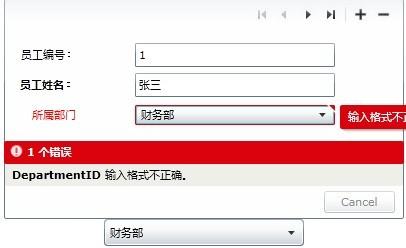
(二)分析及解决方法:
这是由于SelectedItem是Department类型,而DepartmentID是int类型。添加一个类型转换器DepartementConverter,并在SelectedItem中加上Converter={StaticResource departmentConverter}实现了Department<=>DepartmentID类型互换,类型转换器代码如下:
代码

//添加命名空间
using System.Windows.Data;
using System.Linq;
using ComboxInDataForm.Web;

namespace ComboxInDataForm.Converter
{
    public class DepartementConverter:IValueConverter
    {
        public DomainDataSource ItemsSource { get; set; }
        public object Convert(object value, Type targetType, object parameter, System.Globalization.CultureInfo culture)
        {
            int Id = (int)value;
            var returnValue = ItemsSource.Data.Cast<Department>().Where(item => item.DepartmentID == Id).FirstOrDefault();
            return returnValue;
        }
        public object ConvertBack(object value, Type targetType, object parameter, System.Globalization.CultureInfo culture)
        {
            Department objectEntity = value as Department;
            int returnValue = 0;
            if (objectEntity != null)
            {
                returnValue = objectEntity.DepartmentID;
            }
            return returnValue;
        }
    }
}
这种方式绑定后台不需要写任何代码,只需要在前台中写,MainPage.xaml代码如下:
代码

 <UserControl.Resources>
            <riaControls:DomainDataSource AutoLoad="True"  x:Key="departmentDDS" LoadedData="departmentDomainDataSource_LoadedData"    QueryName="GetDepartmentsQuery" >
                <riaControls:DomainDataSource.DomainContext>
                    <my:EmployeeContext />
                </riaControls:DomainDataSource.DomainContext>
            </riaControls:DomainDataSource>
            <local:DepartementConverter x:Key="departmentConverter" ItemsSource="{StaticResource departmentDDS}"/>
        </UserControl.Resources>

        <Grid x:Name="LayoutRoot" Background="White">
        <StackPanel>
        <toolkit:DataForm  Name="dataForm1" VerticalAlignment="Top" Width="400" ItemsSource="{Binding Path=Data,ElementName=employeeDomainDataSource}"  >
            <toolkit:DataForm.EditTemplate>
                <DataTemplate>
                    <StackPanel>
                        <toolkit:DataField Label="员工编号:">
                            <TextBox Text="{Binding EmployeeID,Mode=TwoWay}" Width="200"/>
                        </toolkit:DataField>
                        <toolkit:DataField Label="员工姓名:">
                            <TextBox Text="{Binding EmployeeName,Mode=TwoWay}" Width="200"/>
                        </toolkit:DataField>
                        <toolkit:DataField Label="所属部门">
                                <ComboBox ItemsSource="{Binding Path=Data,Source={StaticResource departmentDDS}}" DisplayMemberPath="DepartmentName" SelectedItem="{Binding Path=DepartmentID,Mode=TwoWay,Converter={StaticResource departmentConverter}}"  Width="200" />
                            </toolkit:DataField>
                    </StackPanel>
                </DataTemplate>
            </toolkit:DataForm.EditTemplate>
        </toolkit:DataForm>
        </StackPanel>
        <riaControls:DomainDataSource AutoLoad="True"  LoadedData="employeeDomainDataSource_LoadedData" Name="employeeDomainDataSource" QueryName="GetEmployeesQuery" >
            <riaControls:DomainDataSource.DomainContext>
                <my:EmployeeContext />
            </riaControls:DomainDataSource.DomainContext>
        </riaControls:DomainDataSource>
    </Grid>
(三) 小结: 当我们利用相互转换的类型转换器后,上篇的问题就已经解决了!类型转换器起到很重要的作用! (四) 后续问题: 当我们点下一个员工:在回到上一个员工,会发现上个员工部门发生了错位,这个应该是DataForm的一个Bug吧!如下图:
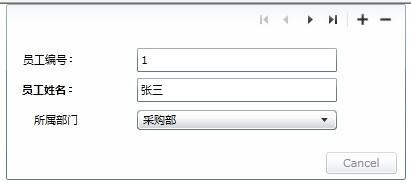
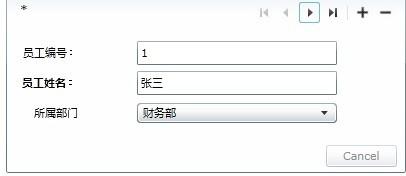 解决办法: (1)不使用DataForm的分页功能,而是用DataGrid(选中行)+DataForm(单条记录)实现分页 (2)重写ComboBox,添加 SelectedValue的自定义ComboBox (3)第三方控件

 浙公网安备 33010602011771号