Selenium4自动化测试2--元素定位By.ID,By.CLASS_NAME,By.TAG_NAME
系列导航
一、Selenium4自动化测试1--Chrome浏览器和chromedriver
二、Selenium4自动化测试2--元素定位By.ID,By.CLASS_NAME,By.TAG_NAME
四、jSelenium4自动化测试4--元素定位By.XPATH,元素定位最佳顺序
五、Selenium4自动化测试5--控件获取数据--ALERT弹窗、Confirm弹窗、Prompt弹窗
六、Selenium4自动化测试6--控件获取数据--下拉框级联选择、checkbox选择、时间选择器
七、Selenium4自动化测试7--控件获取数据--radio单选框、select下拉框选择、iframe
八、Selenium4自动化测试8--控件获取数据--上传、下载、https和切换分页
三、元素定位方式
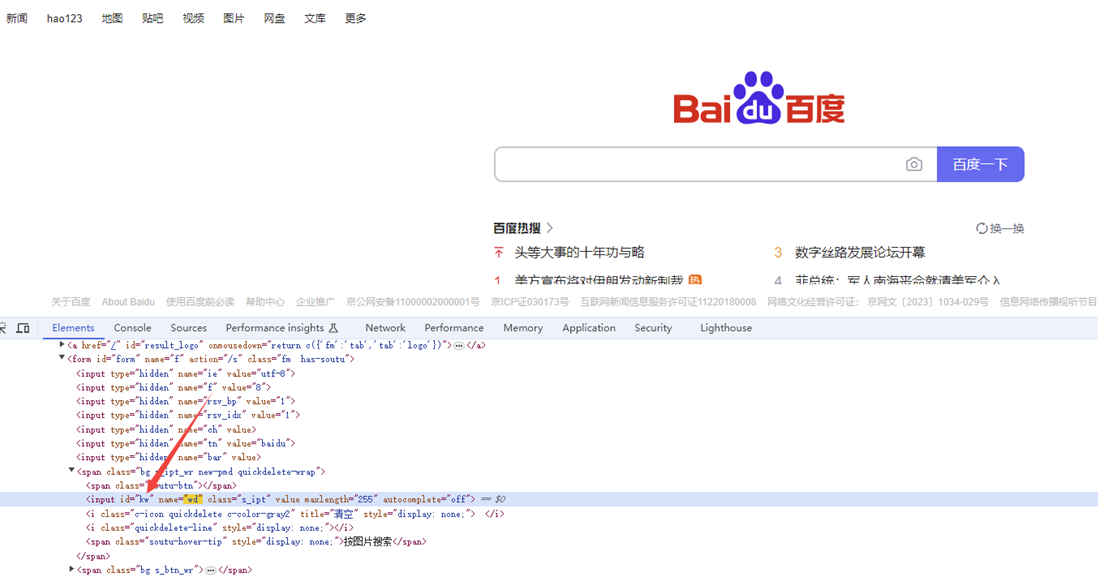
1-通过id定位,By.ID
id属性在HTML中是唯一的,因此使用id定位可以确保找到页面上唯一的元素。
由于id是唯一的,浏览器在查找元素时可以快速定位到目标元素,提高了定位的效率。
import time

#pip install selenium
from selenium import webdriver
from selenium.webdriver.common.by import By
# 指定浏览器的位置,解决浏览器驱动和浏览器版本不匹配的问题
chrome_location = r'D:\pythonProject2023\SeleniumFirst\chrome-win64\chrome.exe'
options = webdriver.ChromeOptions()
options.binary_location = chrome_location
driver = webdriver.Chrome(options=options)
# 使用get方法,访问网址
driver.get('https://www.baidu.com/')
#窗口最大化
driver.maximize_window()
#1 找到输入框的位置,输入万笑佛博客园
element = driver.find_element(By.ID,'kw')
element.send_keys("老虎资源分享")
#2 找到搜索框的位置,点击搜索
#单数查找
driver.find_element(By.CLASS_NAME,'s_btn').click()

time.sleep(3)
driver.quit()
2-通过类名定位,By.CLASS_NAME

import time
from selenium import webdriver
from selenium.webdriver.common.by import By
# 指定浏览器的位置,解决浏览器驱动和浏览器版本不匹配的问题
chrome_location = r'D:\pythonProject2023\SeleniumFirst\chrome-win64\chrome.exe'
options = webdriver.ChromeOptions()
options.binary_location = chrome_location
driver = webdriver.Chrome(options=options)
# 窗口最大化
driver.maximize_window()
driver.get("https://www.bilibili.com/")
# 只获取class属性的第一个元素
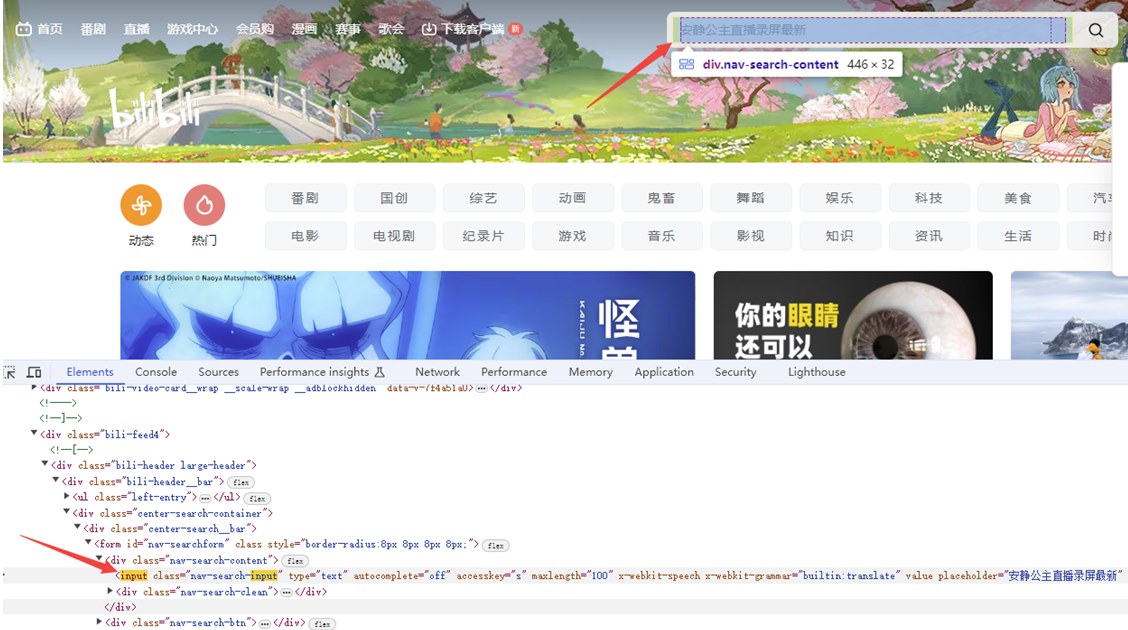
driver.find_element(By.CLASS_NAME,'nav-search-input').send_keys("老虎资源分享")
time.sleep(3)
driver.find_element(By.CLASS_NAME,'channel-link').click()
# 获取class属性的所有元素
# driver.find_elements(By.CLASS_NAME,'channel-link')[4].click()
# for ele in driver.find_elements(By.CLASS_NAME,'channel-link'):
#     print(ele.text)
# 错误用法
#driver.find_element(By.CLASS_NAME,'icon-bg icon-bg__channel').click()

time.sleep(3)
3-通过标签名定位,By.TAG_NAME
一个网页,相同的标签的元素的概率非常高,因为我们尽量少通过tag_name定位单个元素
import time
from selenium import webdriver
from selenium.webdriver.common.by import By
# 指定浏览器的位置,解决浏览器驱动和浏览器版本不匹配的问题
chrome_location = r'D:\pythonProject2023\SeleniumFirst\chrome-win64\chrome.exe'
options = webdriver.ChromeOptions()
options.binary_location = chrome_location
driver = webdriver.Chrome(options=options)


# 窗口最大化
driver.maximize_window()
driver.get("https://www.bilibili.com/")
driver.find_element(By.TAG_NAME, "input").send_keys("老虎资源分享")

time.sleep(3)
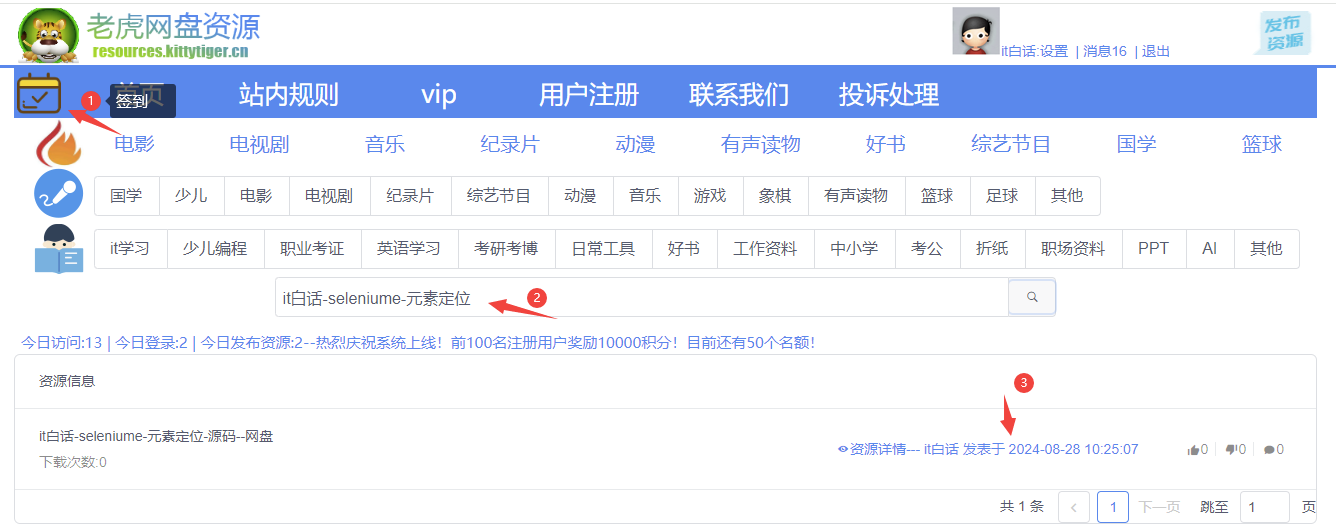
1、源码获取方式(免费):
(1)登录-注册:http://resources.kittytiger.cn/
(2)签到获取积分
(3)搜索:it白话-seleniume-元素定位
获取网盘地址获得源码

 浙公网安备 33010602011771号