
第九节:Centos Stream 9.0 部署基于Asp.Net Core 9.0的船员项目实操(2个前端+1个API)
一. 说明
1. 环境
服务器:阿里云的 Centos Stream 9.0
数据库:SQLServer 2014 (位于单独的DB服务器)
必备运行环境:aspnetcore-runtime-9.0
前端挂载工具:nginx 1.27.4
Api部署工具:采用自托管的方式部署,且发布成服务运行
2. 需求
部署船员项目,包括一个服务端API+两个前端。
(1) Api部署为服务的模式,设置开机自动启动,端口为8103,服务器名称:crewShipApi.service
(2) 两个前端项目,其中船员系统端口为8101、船员管理后台端口为8102
二. 前置准备
1. 服务器相关配置
(1) 阿里云平台上配置白名单,端口开发
(2) 服务器上关闭防火墙,并查看状态
【systemctl stop firewalld】【systemctl disable firewalld】, 【systemctl status firewalld】
2. Core9.0环境安装
(1) 只需安装运行时即可,不需要全部安装sdk 【sudo dnf install aspnetcore-runtime-9.0 -y】
(2) 安装完成后,通过指令查看是否安装成功 【dotnet --info】
详见:https://www.cnblogs.com/yaopengfei/p/13766711.html
3. Nginx安装
采用基于源代码编译的方式安装,详见:https://www.cnblogs.com/yaopengfei/p/13766324.html
安装地址:/root/mydevelop/nginx
三. 实操步骤
1 API部署
(1) 创建对应目录
在root目录下创建crewship2文件夹,用来存放api发布包和后面的前端发布包
【mkdir crewship2】
(2) 代码配置
A. 制作“可移植+环境依赖”的发布包,注意代码中需要开发端口 8103
var builder = WebApplication.CreateBuilder(args);
builder.WebHost.UseUrls("http://*:8103");
B. 代码中要配置允许跨域请求的端口
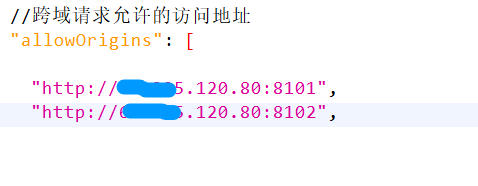
截止此处,在/root/crewship2/api 目录下,运行指令【dotnet YpfCore.AdminWeb.dll】是可以正常启动项目的,但是我们要制作成服务
(3) 创建服务文件
A 在 /etc/systemd/system 目录下创建文件 crewShipApi.service
【cd /etc/systemd/system】【touch crewShipApi.service】

B 服务文件中的内容如下
[Unit]
Description=CrewShip Api
After=network.target

[Service]
WorkingDirectory=/root/crewship2/api
ExecStart=/usr/bin/dotnet /root/crewship2/api/YpfCore.AdminWeb.dll
Restart=always
RestartSec=10
KillSignal=SIGINT
SyslogIdentifier=dotnet-app
User=root
Environment=ASPNETCORE_ENVIRONMENT=Production
Environment=ASPNETCORE_URLS=http://*:8103

[Install]
WantedBy=multi-user.target
(4) 重新加载 Systemd 管理器配置
【sudo systemctl daemon-reload】
(5) 启动服务
【sudo systemctl start crewShipApi.service】
(6) 设置开机自动启动 【可选】
【sudo systemctl enable crewShipApi.service】
(7) 检查服务是否正常
【sudo systemctl status crewShipApi.service】
若服务正常运行,会显示 Active: active (running) 信息。

(8) 其他指令
【sudo journalctl -u crewShipApi.service】 查看服务日志
【sudo systemctl stop crewShipApi.service】关闭服务
【sudo systemctl disable crewShipApi.service】关闭开机自动启动
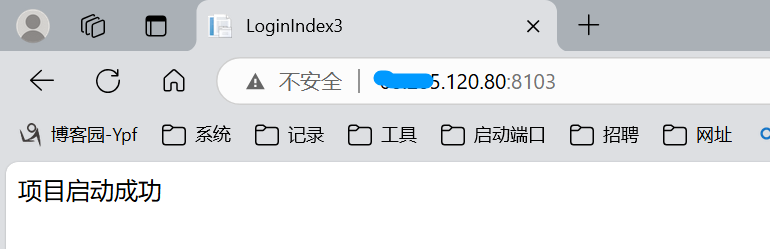
测试:访问8103端口,正常访问
2 前端部署
(1) 拷贝前端项目发布包

(2) nginx的安装目录下,修改配置文件
进入目录 【cd /root/mydevelop/nginx/conf】 修改nignx.conf文件,内容如下
user  root;
worker_processes  2;
error_log  /root/mydevelop/nginx/logs/error.log  info;
events {
    worker_connections  1024;
}

http {
    include       mime.types;
    default_type  application/octet-stream;
    sendfile        on;
    keepalive_timeout  65;
    #gzip  on;

   #web项目
    server {
        listen       8101;
        server_name  localhost;

        location / {
            root   /root/crewship2/website;   #项目根目录
            index  loginIndex.html;
        }

        error_page   500 502 503 504  /50x.html;
        location = /50x.html {
            root   /usr/share/nginx/html;
        }
    }
    #管理后台项目
     server {
        listen       8102;
        server_name  localhost;

        location / {
            root   /root/crewship2/background_website;  #项目根目录
            index  index.html;
        }

        error_page   500 502 503 504  /50x.html;
        location = /50x.html {
            root   /usr/share/nginx/html;
        }
    }

}
(3) 启动nginx
启动【nginx】 (如果已经启动了,要先关闭一下 【nginx -s stop】)
(4) 测试
访问 8101 和 8102 两个前端项目,均可以正常登录使用
!
- 作 者 : Yaopengfei(姚鹏飞)
- 博客地址 : http://www.cnblogs.com/yaopengfei/
- 声 明1 : 如有错误,欢迎讨论,请勿谩骂^_^。
- 声 明2 : 原创博客请在转载时保留原文链接或在文章开头加上本人博客地址,否则保留追究法律责任的权利。

 浙公网安备 33010602011771号