
课程大纲
[!todo]
- 网络基本概念
- 网络配置文件
- 查看及配置网络
- 连通性探测
- 查看网络连接
- 域名相关
- 下载传输
物理地址/逻辑地址
网卡
- MAC地址(Media Access Control):媒体访问控制(物理地址)
- IP(Internet Protocal Address):互联网协议地址(逻辑地址)
192.168.142.132
47.106.11.166
公有私有
局域网——使用私有IP地址
互联网——使用公有IP地址
| 公有IP地址的范围 | 私有IP地址的范围 |
|---|---|
| A类的公有IP: 1.0.0.0-9.255.255.255 11.0.0.0-126.255.255.255 B类的公有IP: 128.0.0.0-172.15.255.255 172.32.0.0-191.255.255.255 C类的公有IP: 192.0.0.0-192.168.255.255 192.169.0.0-223.255.255.255 |
A类私有IP地址: 10.0.0.0-10.255.255.255 B类私有IP地址: 172.16.0.0-172.31.255.255 C类私有IP地址: 192.168.0.0-192.168.255.255 |
NAT
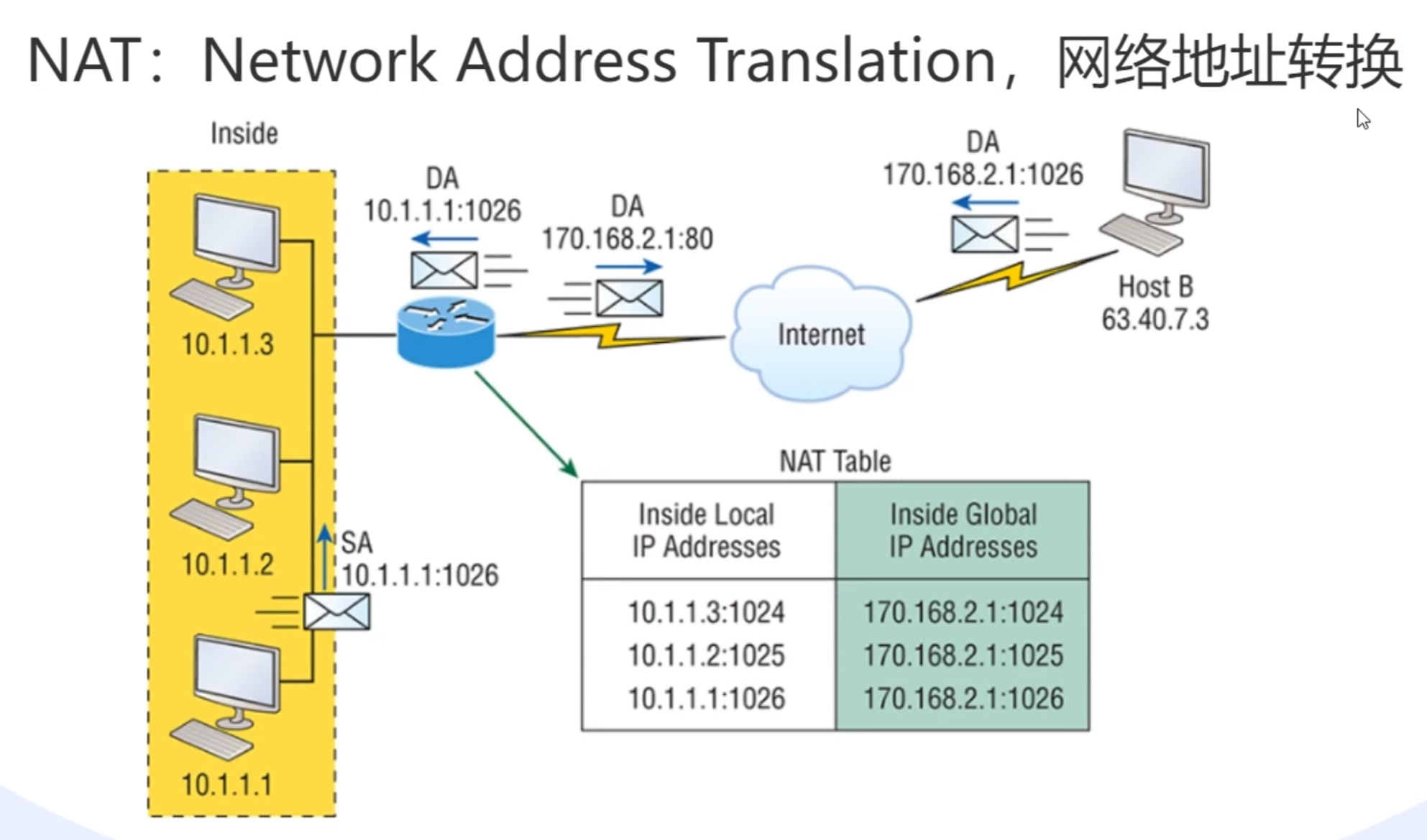
将私有的ip地址通过网络地址转换为共享的公有ip,也可以用一些工具将私有ip通过内网穿透的方式去映射出一个公有ip(不稳定),或者去买一个弹性的公网ip(每年要付钱,不然收回)
IPv4、IPv6
点分十进制IP地址掩码转换二进制和十六进制
| 47 | 106 | 8 | 188 | |
|---|---|---|---|---|
| 结果: | ||||
| Bin 二进制: | 00101111 | 01101010 | 00001000 | 10111100 |
| Hex十六进制: | 2F | 6A | 08 | BC |
https://tool.520101.com/wangluo/ipjisuan/
IPv4: 4个8位二进制, $2^{32}=$ 全部约42亿, 实际可用约25亿
公网IP地址的分配
NIC(Network Information Center)分配
ISP(网络业务提供商)、网络基础设施提供商
全中国一共有多少IP地址?
https://mp.weixin.qq.com/s/zdBPFN9j5MhIV4s8kC7g0w
IPv6是128位的,一共有$2^{128}$个
动态、静态IP
DHCP(Dynamic Host Configuration Protocol) 动态
static 静态
127.0.0.1
环回地址(loop back)
可以ping通代表网卡安装正常
连接这个ip =连接这台电脑(自己给自己发数据)
端口port
作用: 区分程序
范围: 0-65535
系统端口, 0 到 1023
用户端口, 也称为注册端口, 1024-49151
动态端口, 也称为私有或临时端口, 49152-65535
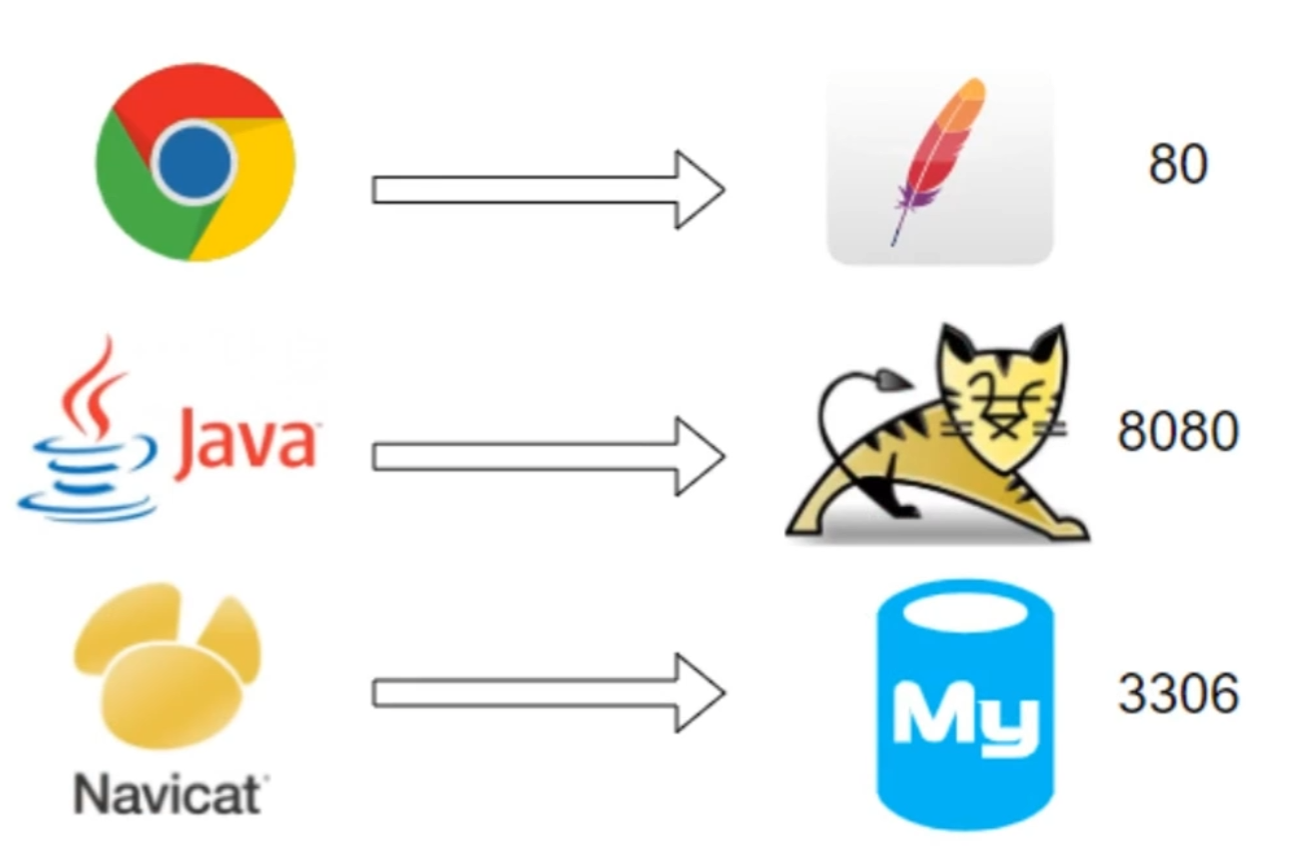
电脑跟电脑通信就是程序跟程序通信
域名 Domain Name
作用: 替代 IP,方便识记
域名如何转换为 IP: Domain Name System - DNS(可以理解为存储了域名与ip地址映射关系的一张表/数据库)
域名与 IP 的数量关系: 多对一
域名 Domain Name
子域名 www.baidu.com map.baidu.com
localhost(通常指向环回地址/也代表了本机的地址)
网络配置文件
| 文件 | 作用 |
|---|---|
/etc/sysconfig/network-scripts/ifcfg-ens33 |
网卡配置文件 |
/etc/sysconfig/network-scripts/ifcfg-lo |
环回地址配置文件 |
/etc/hosts |
主机名与IP的映射 |
/etc/resolv.conf |
DNS配置,由ens33自动覆盖 |
ifconfig
全拼: network interfaces configuring
位于net-tools工具包
可以动态配置网络参数
其他选项参数: https://www.linuxcool.com/
ifconfig和ip
LINUX NET-TOOLS VS IPROUTE2
| net-tools | iproute2 |
|---|---|
| arp -na | ip neigh |
| ifconfig | ip link |
| ifconfig -a | ip addr show |
| ifconfig --help | ip help |
| ifconfig -s | ip -s link |
| ifconfig eth0 up | ip link set eth0 up |
| ipmaddr | ip maddr |
| iptunnel | ip tunnel |
| netstat | ss |
| netstat -i | ip -s link |
| netstat -g | ip maddr |
| netstat -l | ss -l |
| netstat -r | ip route |
| route add | ip route add |
| route del | ip route del |
| route -n | ip route show |
| vconfig | ip link |
ip
位于iproute工具包
添加设备、启动停止网络设备、设置IP、设置网关……
其他选项参数: https://www.linuxcool.com/
ping
全拼: Packet Internet Groper, 因特网包探索器
ping baidu.com
ping 192.168.142.151
telnet
明文传输,没有加密不安全
远程登录
telnet bbs.newsmth.net
探测端口
telnet 192.168.142.132 80
telnet 192.168.142.132 22
netstat (ss)
全拼: network statistics
查看程序的网络连接情况:
netstat -ap | grep ssh
查看端口的网络连接情况:
netstat -ap | grep 3306
域名相关
nslookup
nslookup baidu.com
A记录: IP地址
CNAME: 域名别名
MX: 邮件服务器
dig (domain information groper)
dig baidu.com
dig www.xtu.edu.cn A +noall +answer
dig www.xtu.edu.cn MX +noall +answer
dig www.xtu.edu.cn NS +noall +answer
host
host baidu.com
host -t MX www.baidu.com
常规方式
Xshell 拖曳——上传
xftp——双向,或者 Filezilla、FlashFTP
sz file name——下载
rz——上传
vmtools 拖动——传入
QQ——双向
wget
wget https://download.redis.io/releases/redis-6.0.9.tar.gz
wget -O redis.tar.gz https://download.redis.io/releases/redis-6.0.9.tar.gz
wget -c 断点续传
wget -b 后台下载
wget -i filelist.txt 同时下载多个
tail -f wget-log 查看下载进度
scp
全拼: Secure Copy
scp 1.txt root@192.168.142.66:/tmp
scp -r folder root@192.168.142.66:/tmp
curl
全拼: Client URL
curl https://www.baidu.com > page.html
curl -X POST -d 'a=1&b=nihao' URL
curl -H "Content-Type: application/json" -X POST -d '{"abc":123,"bcd":"nihao"}' URL
防火墙 Firewall
iptables 工具
查看已开放的端口
firewall-cmd --list-ports
开启 80 端口
firewall-cmd --zone=public --add-port=80/tcp --permanent
重启防火墙
firewall-cmd --reload
停止防火墙
systemctl stop firewalld.service
禁止防火墙开机启动
systemctl disable firewalld.service
删除规则
firewall-cmd --zone=public --remove-port=80/tcp --permanent



