
python读写json文件
1. 新建json文件
- 打开记事本,重命名为
.json后缀
使用的样例如下,注意看json文件格式:
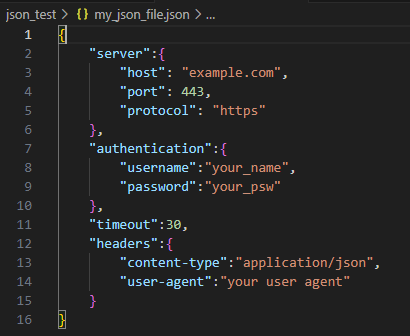
{
    "server":{
        "host": "example.com",
        "port": 443,
        "protocol": "https"
    },
    "authentication":{
        "username":"your_name",
        "password":"your_psw"
    },
    "timeout":30,
    "headers":{
        "content-type":"application/json",
        "user-agent":"your user agent"
    }
}
2. 用python打开json文件
- json模块为python自带,不需要安装
load可以把json文件加载出来dict可以把json格式变为字典
import json

# fill path
file_path = r'json_test\my_json_file.json'

# open json file
with open(file_path, 'r') as file:
    # load json data
    data = json.load(file)

print(data)

# convert json to dictionary
data_dic = dict(data)
print(data_dic)
3. 使用json数据
# use json data
my_host = data['server']['host']
my_auth = data['authentication']['username']
print(my_host)
print(my_auth)
4. 改变json数据内容
# update the values in json data
data['server']['host'] = 'new_host'
data['authentication']['username'] = 'new_username'
5. 把文件变回json格式
- 用
dumps
# convert the update values back to json format
update_json = json.dumps(data)
6. 把更新后的json文件写入为新的json文件
# update file store path
output_new_json_file_path = r'json_test\my_update_json_file.json'

# write into
with open(output_new_json_file_path, 'w') as file:
    file.write(update_json)

print("json file update successfully!")
7. 整体代码
import json

# fill path
file_path = r'json_test\my_json_file.json'

# open json file
with open(file_path, 'r') as file:
    # load json data
    data = json.load(file)

print(data)

# convert json to dictionary
data_dic = dict(data)
print(data_dic)

# use json data
my_host = data['server']['host']
my_auth = data['authentication']['username']
print(my_host)
print(my_auth)

# update the values in json data
data['server']['host'] = 'new_host'
data['authentication']['username'] = 'new_username'

# convert the update values back to json format
update_json = json.dumps(data)

# update file store path
output_new_json_file_path = r'json_test\my_update_json_file.json'

# write into
with open(output_new_json_file_path, 'w') as file:
    file.write(update_json)

print("json file update successfully!")
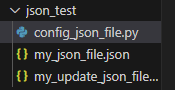
9. 新建的json文件一览

 浙公网安备 33010602011771号