

JAVA中不同类型内存读写性能差异
数据载体
java中有三种数据载体,当我们进行序列化操作时,必然选择其中之一
- byte[],
- HeapByteBuffer,
- DirectByteBuffer
那么这三种之间数据的读写性能如何呢?
今天我测评了一下,方便今后做性能优化时进行参考
先上结论
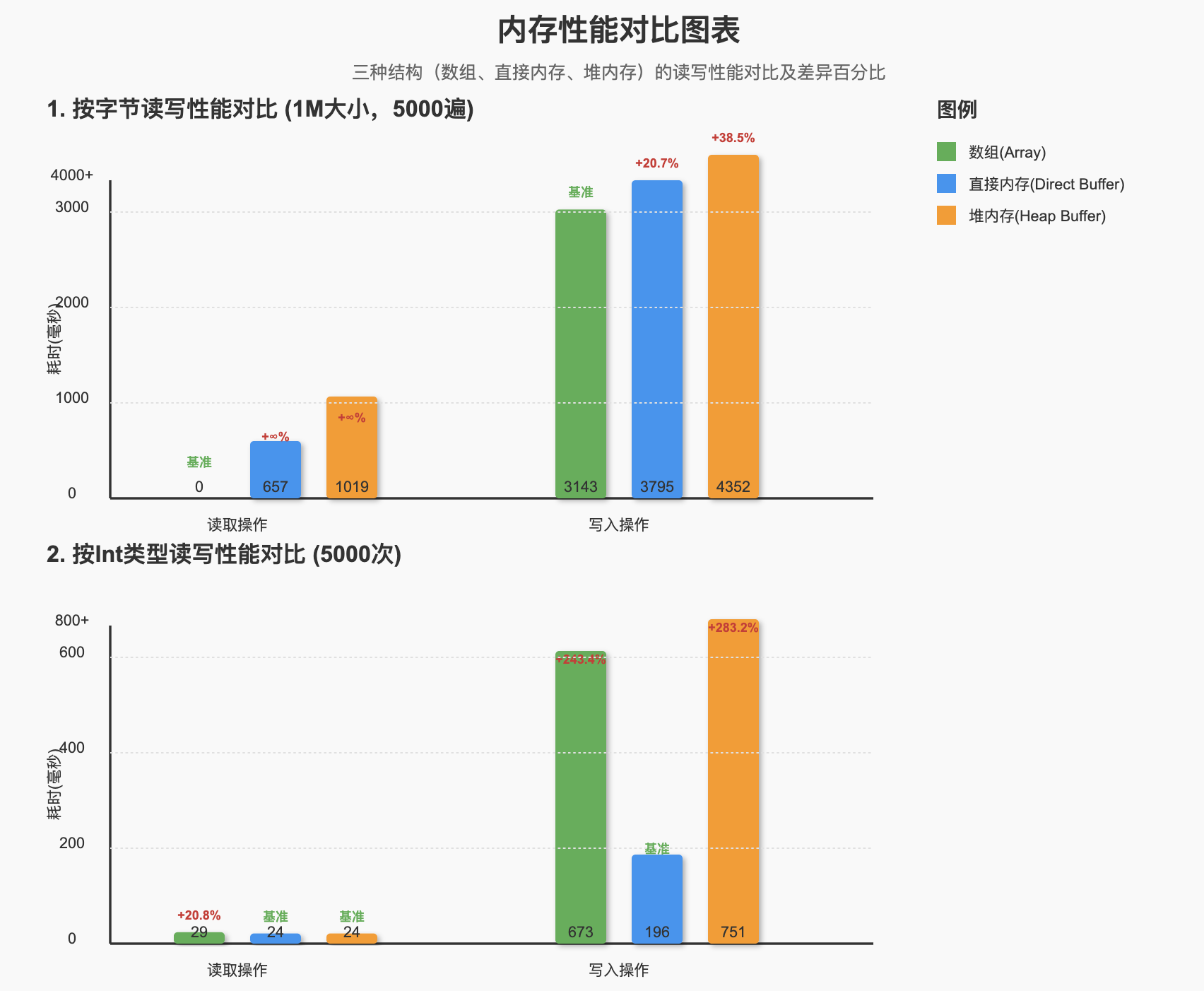
三种结构分别为1M大小,按字节读写5000遍的耗时,单位是毫秒
| 数组(Array) | 直接内存(Direct Buffer) | 堆内存(Heap Buffer) | |
|---|---|---|---|
| 读取 | 0 | 657 | 1019 |
| 写入 | 3143 | 3795 | 4352 |
- 在读取方面,byte数组远超Buffer类型
- 直接内存比堆内存相对来说也要快不少
按Int类型的读写5000次耗时
| 数组(Array) | 直接内存(Direct Buffer) | 堆内存(Heap Buffer) | |
|---|---|---|---|
| 读取 | 29 | 24 | 24 |
| 写入 | 673 | 196 | 751 |
- 三种结构读取方面,数组略差一些,但总体相差不大
- 写入方面直接内存显著快于其他两种
- 按int类型读写各方面都显著快于按字节读写
性能差异图
测试过程
主流程
	private static final int BUFFER_SIZE = 1024 * 1024;  // 1MB缓冲区
    private static final int INT_COUNT = BUFFER_SIZE / 4; // 可容纳的int数量(每个int占4字节)
    private static final int ITERATIONS = 5000;          // 操作迭代次数

    public static void main(String[] args) {
        ByteBuffer heapBuffer = ByteBuffer.allocate(BUFFER_SIZE);
        ByteBuffer directBuffer = ByteBuffer.allocateDirect(BUFFER_SIZE);
        byte[] data = new byte[BUFFER_SIZE];
        ThreadLocalRandom.current().nextBytes(data);
        heapBuffer.put(data);
        directBuffer.put(data);

        System.out.println("预热开始");
        for (int i = 0; i < 10; i++) {
            testIntByIntRead(directBuffer);
            testIntByIntRead(heapBuffer);
            testIntByIntWrite(heapBuffer);
            testIntByIntWrite(directBuffer);
            testIntByIntRead(data);
            testIntByIntWrite(data);
        }
        System.out.println("预热结束");

        long time;
        time = testIntByIntRead(directBuffer);
        System.out.println("Direct Buffer read" + ":" + TimeUnit.NANOSECONDS.toMillis(time));
        time = testIntByIntRead(heapBuffer);
        System.out.println("Heap Buffer read" + ":" + TimeUnit.NANOSECONDS.toMillis(time));
        time = testIntByIntRead(data);
        System.out.println("Array read" + ":" + TimeUnit.NANOSECONDS.toMillis(time));

        time = testIntByIntWrite(heapBuffer);
        System.out.println("Heap Buffer write" + ":" + TimeUnit.NANOSECONDS.toMillis(time));
        time = testIntByIntWrite(directBuffer);
        System.out.println("Direct Buffer write" + ":" + TimeUnit.NANOSECONDS.toMillis(time));
        time = testIntByIntWrite(data);
        System.out.println("Array write" + ":" + TimeUnit.NANOSECONDS.toMillis(time));
    }
按字节读写
	// 按byte写
	private static long testByteByByteWrite(ByteBuffer buffer) {
        long start = System.nanoTime();
        for (int i = 0; i < ITERATIONS; i++) {
            buffer.clear();
            for (int j = 0; j < BUFFER_SIZE; j++) {
                buffer.put((byte) (j % 127));  // 逐字节写入
            }
        }
        return System.nanoTime() - start;

    }
	// 按byte读
    private static long testByteByByteRead(ByteBuffer buffer) {
        long start = System.nanoTime();
        for (int i = 0; i < ITERATIONS; i++) {
            buffer.flip();
            for (int j = 0; j < BUFFER_SIZE; j++) {
                buffer.get();  // 逐字节读取
            }
        }
        return System.nanoTime() - start;
    }
    // 按byte读(byte数组)
    private static long testByteByByteRead(byte[] buffer) {
        long start = System.nanoTime();
        for (int i = 0; i < ITERATIONS; i++) {
            for (int j = 0; j < BUFFER_SIZE; j++) {
                byte b = buffer[j];  // 逐字节读取
            }
        }
        return System.nanoTime() - start;
    }
	// 按byte写(byte数组)
    private static long testByteByByteWrite(byte[] buffer) {
        long start = System.nanoTime();
        for (int i = 0; i < ITERATIONS; i++) {
            for (int j = 0; j < BUFFER_SIZE; j++) {
                buffer[j] = (byte) (j % 127); // 逐字节写入
            }
        }
        return System.nanoTime() - start;
    }
按int读写
	// 按int写
	private static long testIntByIntWrite(ByteBuffer buffer) {
        long start = System.nanoTime();
        for (int i = 0; i < ITERATIONS; i++) {
            buffer.clear();
            for (int j = 0; j < INT_COUNT; j++) {
                buffer.putInt(j);  // 逐int写入
            }
        }
        return System.nanoTime() - start;
    }
	// 按int读
    private static long testIntByIntRead(ByteBuffer buffer) {
        long start = System.nanoTime();
        for (int i = 0; i < ITERATIONS; i++) {
            buffer.flip();
            for (int j = 0; j < INT_COUNT; j++) {
                buffer.getInt();  // 逐int读取
            }
        }
        return System.nanoTime() - start;
    }
    // 按int写(byte数组)
    private static long testIntByIntWrite(byte[] buffer) {
        long start = System.nanoTime();
        for (int i = 0; i < ITERATIONS; i++) {
            for (int j = 0; j < INT_COUNT; j++) {
                intToBytesLittleEndian(j,buffer,j*4);  // 逐int写入
            }
        }
        return System.nanoTime() - start;
    }

	// 按int读(byte数组)
    private static long testIntByIntRead(byte[] buffer) {
        long start = System.nanoTime();
        for (int i = 0; i < ITERATIONS; i++) {
            for (int j = 0; j < INT_COUNT; j++) {
                bytesToIntLittleEndian(buffer,j*4);  // 逐int读取
            }
        }
        return System.nanoTime() - start;
    }
测试过程如有问题,欢迎指出
本文来自博客园,作者:无所事事O_o,转载请注明原文链接:https://www.cnblogs.com/wsss/p/19263390
推荐一下我的微信小程序 - “二次验证码TOTP”
- 有任何建议或需求可以直接联系我
- 免费云端加密备份 :换机不丢失,安全又便捷
- API快速集成 :提供开放API,实现自动化验证码获取
- 多端共享:基于微信小程度,可同时在手机,PC端共同使用,一键复制
- 扫描二维码试用,或微信小程序搜索"二次验证码TOTP"


 浙公网安备 33010602011771号