
(jmeter笔记)Beanshell取样器,管理redis
import redis.clients.jedis.Jedis;
import org.apache.commons.lang3.StringUtils;
import java.util.Map;
import java.util.logging.Logger;

public class RedisExample {
    private static final Logger log = Logger.getLogger(RedisExample.class.getName());

    public static void main(String[] args) {
        // Redis服务器地址
        String host = "10.0.0.1";
        // Redis服务端口号
        int port = 16379;
        // Redis密码
        String password = "******";
        // 获取Redis键值
        String key = "EXAM_DATA_ANALYSIS_FILES${ksfxid}";

        try (Jedis jedis = new Jedis(host, port)) {
            // 判断密码是否为空,不为空时校验密码
            if (StringUtils.isNotBlank(password)) {
                jedis.auth(password);
            }

            // 定位DB
            jedis.select(10);

            // 获取哈希key对应的值
            Map<String, String> gethash = jedis.hgetAll(key);
            log.info("==========>>>>>>>>>:" + key);
            log.info("gethash is :" + gethash);
            log.info("gethash keys are :" + gethash.keySet());
            log.info("gethash values are :" + gethash.values());

            // 将结果存储到变量中(假设vars是一个Map对象)
            Map<String, Object> vars = new HashMap<>();
            vars.put("redisKey", gethash.keySet().toString());
            vars.put("redisValues", gethash.values().toString());

            log.info("Stored keys and values in vars");
        } catch (Exception e) {
            log.severe("Error occurred: " + e.getMessage());
        } finally {
            log.info("Closed jedis connection");
        }
    }
}
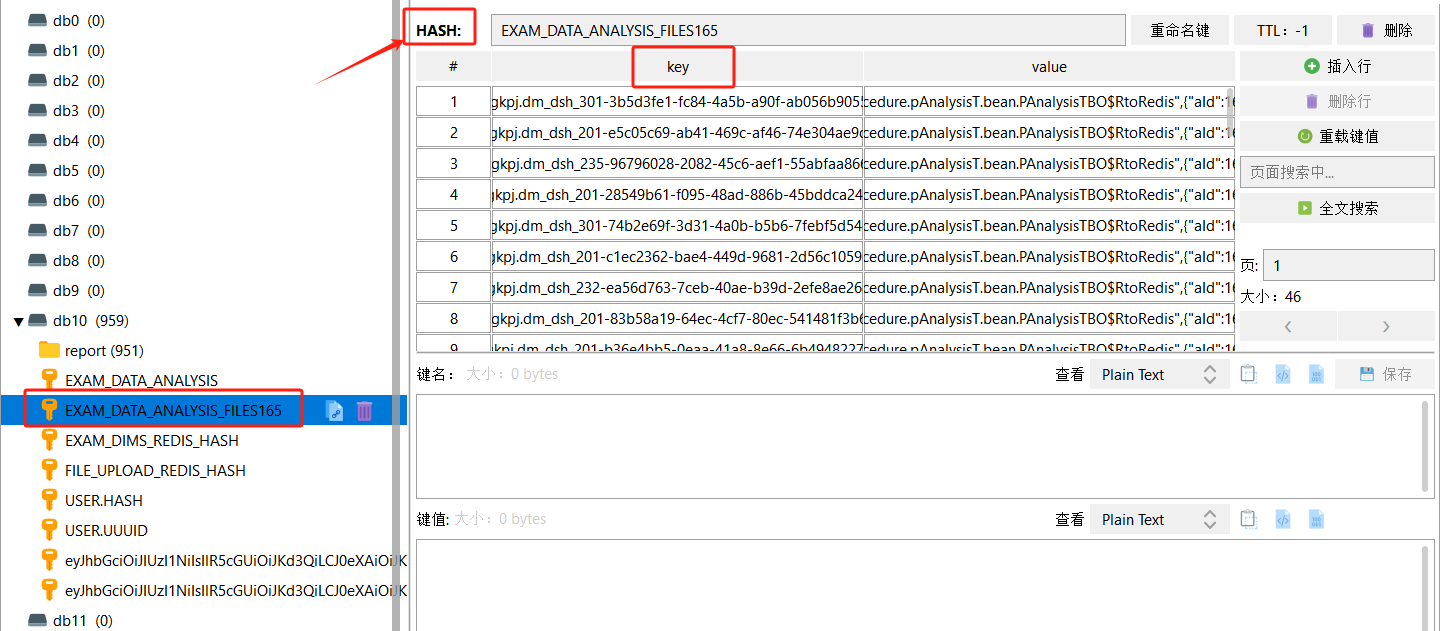
结合下图,可见上面表示的意思,RD用的HASH类型,
Redis键值:左侧红框内的内容,不懂创建就知道了;
jedis.select():定位索引,见配置用的哪个库;
jedis.hgetAll():读取所有key,见右侧Key列
本文来自博客园,作者:茫茫人海中的一颗沙尘,转载请注明原文链接:https://www.cnblogs.com/worldbugMsg/p/18643161

 浙公网安备 33010602011771号