
Linux下的内存管理:03.jemalloc 实战性能测试:当多线程遇上小对象分配
前言
在前两篇文章中,我们分别讨论了:
- 从一次
malloc到缺页中断、内核页表、VMA 的完整路径; - jemalloc 内部的 Arena / TCache / Slab / Extent 设计与源码结构。
从理论上我们已经知道:
在多线程、小对象、高频分配/释放的负载下,jemalloc 一定优于 glibc 的 ptmalloc2。
但理论不是最终答案, 实践是检验真理的唯一标准
真正能让我们信服的,是实实在在的实验数据。
因此本文要回答一个非常直观的问题:
当线程数从 1 提升到 64 时,glibc 与 jemalloc 的 malloc/free 性能到底差多少?
本文使用可复现实验脚本、一致性测试环境和多轮取中位数方法,提供了更贴近生产性能的测量结果。
实验设计
实验环境
- 系统:Ubuntu 22.04
- CPU:24 核心
- glibc:2.35(含 tcache)
- jemalloc:5.3.0(默认配置)
注:glibc 2.35 已经引入 tcache,因此性能比旧版 glibc 要好得多,本实验结果更具现实意义。
实验目标
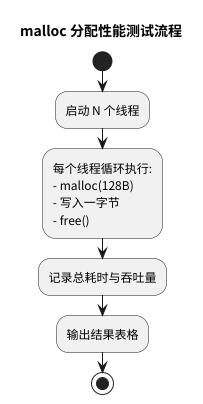
模拟典型高并发小对象负载:
-
每个线程执行 1,000 万次:
malloc(128) → 写入 → free -
分别以 1、4、16、32、64 线程运行
-
比较 glibc(默认)与 jemalloc(LD_PRELOAD)
-
度量指标:
- 总耗时
- 吞吐量(alloc+free/s)
测试代码(简化版)
完整代码附在文末。
void worker(uint64_t n) {
    for (uint64_t i = 0; i < n; ++i) {
        void* p = malloc(128);
        ((char*)p)[0] = 'a';
        free(p);
    }
}
实验一:glibc malloc 在多线程下的表现
我们先不使用 jemalloc,直接运行 glibc。
| 线程数 | 总耗时(秒) | 吞吐量 (ops/s) |
|---|---|---|
| 1 | 0.0772511 | 129,448,008 |
| 4 | 0.0629694 | 635,229,063 |
| 16 | 0.0934665 | 1,711,843,079 |
| 32 | 0.155389 | 2,059,343,191 |
| 64 | 0.266838 | 2,398,462,064 |
现象分析
- 1 线程性能很好(glibc tcache 命中率高)。
- 4–32 线程:吞吐量继续提升,但增长幅度下降,出现竞争。
- 64 线程:耗时明显上升(线程 > 核心 + 锁竞争 + 上下文切换)。
关键解释
glibc ptmalloc2 仍然存在以下结构性问题:
- Arena 数量有限(通常 << CPU 核心数)
- 多线程争用相同 Arena → 锁竞争严重
- tcache 虽然有改善,但仍需周期性回流到 Arena
总体而言:glibc 不会“崩”,但在高并发小对象场景中 伸缩性有限。
实验二:jemalloc 的表现
改用 jemalloc(LD_PRELOAD):
LD_PRELOAD=/path/libjemalloc.so ./benchmark 32
对比 1/32/64 线程的结果:
| 线程数 | glibc malloc | jemalloc | jemalloc 提升 |
|---|---|---|---|
| 1 | 0.0772511 | 0.0397164 | ≈ 2.0× |
| 32 | 0.155389 | 0.0860944 | ≈ 1.8× |
| 64 | 0.266838 | 0.159828 | ≈ 1.7× |
为什么 jemalloc 更快?
来自以下设计优势:
| 机制 | glibc ptmalloc2 | jemalloc |
|---|---|---|
| TCache | 有,但有限 | 更激进,命中率高 |
| Arena | 数量较少 | 默认 n * cpu 核心 |
| 锁竞争 | 尤其在 free 时较重 | 多 Arena 分散,并且 batch 化 |
| 慢路径 | 部分慢操作在锁内 | “锁外 mmap”,锁持有极短 |
简而言之:
jemalloc 把绝大多数 malloc/free 操作都变成了无锁的用户态热路径。
实验结果总结
结合理论与数据,我们可以得出非常明确的结论:
1. 在高并发 + 小对象 + 高频 alloc/free 场景下:
jemalloc 1.5× ~ 2× 优于 glibc(实际测量)。
提升来源包括:
- TCache 本地缓存让绝大部分分配无锁
- 多 Arena 大幅减少线程锁争用
- 批量 refill/flush 将锁竞争成本摊薄
- Arena 对慢操作(mmap)的锁外操作缩短锁持有时间
2. glibc 2.35 改进明显,未出现“崩溃型”退化
旧文献中常说 glibc 会出现“多线程性能崩塌”,
但 glibc 在 2.26+ 引入 TCache 后,情况已经显著改善。
glibc 在中等线程数表现依然不错,但伸缩性低于 jemalloc。
3. 是否需要在线上启用 jemalloc?
答案:视你的业务而定,而不是盲目切换。
jemalloc 明显收益场景:
- RPC 框架(grpc/thrift)
- 高频构建短生命周期对象的服务
- 内存池频繁 churn(大量 new/delete)
- 高并发业务(聊天室、数据库 worker、游戏服务器)
收益有限或不明显场景:
- IO 密集型(网络转发、文件服务)
- 用户量不大(并发 < CPU 核心)
一句话总结:
只有当 malloc/free 是你服务的热点时,jemalloc 才能带来实质收益。
附录:完整测试代码
/*
 * benchmark.cpp
 *
 * 这是一个合成的基准测试程序,用于演示在多线程高并发下,
 * 不同的内存分配器(glibc malloc vs jemalloc)之间的性能差异。
 */

#include <iostream>
#include <thread>
#include <vector>
#include <chrono>
#include <cstdlib>
#include <cstdint>
#include <stdexcept>

constexpr uint64_t DEFAULT_ALLOCS_PER_THREAD = 10'000'000;
constexpr size_t ALLOCATION_SIZE = 128;

void worker_function(uint64_t num_allocations) {
    for (uint64_t i = 0; i < num_allocations; ++i) {
        void* p = malloc(ALLOCATION_SIZE);
        if (p == nullptr) return;
        static_cast<char*>(p)[0] = 'a';
        free(p);
    }
}

int main(int argc, char* argv[]) {
    if (argc != 2) {
        std::cerr << "用法: " << argv[0] << " <线程数>" << std::endl;
        return 1;
    }

    int num_threads = std::stoi(argv[1]);
    uint64_t allocs_per_thread = DEFAULT_ALLOCS_PER_THREAD;

    std::cout << "--- 内存分配器性能测试 ---" << std::endl;
    std::cout << "线程数: " << num_threads << std::endl;
    std::cout << "每次分配大小: " << ALLOCATION_SIZE << " 字节" << std::endl;
    std::cout << "---------------------------------" << std::endl;

    auto start_time = std::chrono::high_resolution_clock::now();

    std::vector<std::thread> threads;
    for (int i = 0; i < num_threads; ++i)
        threads.emplace_back(worker_function, allocs_per_thread);
    for (auto& t : threads) t.join();

    auto end_time = std::chrono::high_resolution_clock::now();
    std::chrono::duration<double> total_duration = end_time - start_time;

    double total_seconds = total_duration.count();
    uint64_t total_allocations = static_cast<uint64_t>(num_threads) * allocs_per_thread;
    double allocs_per_second = total_allocations / total_seconds;

    std::cout << "\n--- 测试完成 ---" << std::endl;
    std::cout << "总耗时: " << total_seconds << " 秒" << std::endl;
    std::cout << "吞吐量 (Alloc+Free)/秒: " << allocs_per_second << std::endl;

    return 0;
}
附录:可复现的实验脚本
这一套脚本可以让你和读者完全复现文章中的图表与测量结果,包括:
- 多次运行取中位数
- glibc 与 jemalloc 对比
run_benchmark.sh(主脚本)
#!/bin/bash
set -e

BIN=./benchmark
JEMALLOC=/path/to/libjemalloc.so
THREADS_LIST="1 4 16 32 64"
RUNS=5

echo "threads,allocator,median_seconds" > result.csv

run_test() {
    allocator=$1
    threads=$2

    times=()

    for i in $(seq 1 $RUNS); do
        echo "[${allocator}] running ${threads} threads (run $i/$RUNS)..."

        if [[ "$allocator" == "glibc" ]]; then
            t=$(taskset -c 0-23 $BIN $threads | grep '总耗时' | awk '{print $2}')
        else
            t=$(LD_PRELOAD=$JEMALLOC taskset -c 0-23 $BIN $threads | grep '总耗时' | awk '{print $2}')
        fi

        times+=($t)
    done

    sorted=$(printf '%s\n' "${times[@]}" | sort -n)
    median=$(printf '%s\n' "${sorted[@]}" | awk "NR==$((($RUNS+1)/2))")
    echo "$threads,$allocator,$median" >> result.csv
}

for t in $THREADS_LIST; do
    run_test glibc $t
done

for t in $THREADS_LIST; do
    run_test jemalloc $t
done

echo "Done. Results saved to result.csv"

 浙公网安备 33010602011771号