
nginx 代理php
centos 7.6
nginx 编译安装

./configure --prefix=/data/apps/nginx \
--user=nginx \
--group=nginx \
--with-http_stub_status_module \
--with-http_ssl_module \
--with-http_gzip_static_module \
--with-stream \
--with-http_v2_module \
--with-http_realip_module \
--with-http_sub_module \
--with-stream_realip_module \
--with-stream_ssl_module \
--with-stream_ssl_preread_module

make && make install
yum 安装php-72
yum install epel-release -y
yum install http://rpms.remirepo.net/enterprise/remi-release-7.rpm  -y
yum -y install yum-utils
yum-config-manager --enable remi-php72
sudo yum -y install php php-opcache
sudo yum -y install php-mysql php-gd php-ldap php-odbc php-pear php-xml php-xmlrpc php-mbstring php-soap curl curl-devel
sudo yum -y install php-mbstring
sudo yum -y install php-json
sudo yum -y install php-xml
sudo yum -y install php-fedora-autoloader
sudo yum -y install php-sodium
sudo yum -y install php
sudo yum -y install php-gd
sudo yum -y install php-devel
sudo yum -y install php-mysql php-gd php-ldap php-odbc php-pear php-xml php-xmlrpc php-mbstring php-soap curl curl-devel php-devel
sudo yum -y install php-mysql php-gd php-ldap php-odbc php-pear php-xml php-xmlrpc php-mbstring php-soap curl curl-devel php-devel php-gd
sudo yum -y install php-mysql php-gd php-ldap php-odbc php-pear php-xml php-xmlrpc php-mbstring php-soap curl curl-devel php-devel php-pdo
sudo yum -y install php-mysql php-gd php-ldap php-odbc php-pear php-xml php-xmlrpc php-mbstring php-soap curl curl-devel php-devel php-pdo php-process
sudo yum -y install php-mysql php-gd php-ldap php-odbc php-pear php-xml php-xmlrpc php-mbstring php-soap curl curl-devel php-devel php-pecl
sudo yum -y install php-mysql php-gd php-ldap php-odbc php-pear php-xml php-xmlrpc php-mbstring php-soap curl curl-devel php-devel php-mysqlnd
sudo yum -y install php-mysql php-gd php-ldap php-odbc php-pear php-xml php-xmlrpc php-mbstring php-soap curl curl-devel php-devel php-ldap
sudo yum -y install php-mysql php-gd php-ldap php-odbc php-pear php-xml php-xmlrpc php-mbstring php-soap curl curl-devel php-devel php-cli
sudo yum -y install php-mysql php-gd php-ldap php-odbc php-pear php-xml php-xmlrpc php-mbstring php-soap curl curl-devel php-devel php-pecl-msgpack
sudo yum -y install php-mysql php-gd php-ldap php-odbc php-pear php-xml php-xmlrpc php-mbstring php-soap curl curl-devel php-devel php-pecl-msgpack php-pecl-redis5
sudo yum -y install php-mysql php-gd php-ldap php-odbc php-pear php-xml php-xmlrpc php-mbstring php-soap curl curl-devel php-devel php-pecl-msgpack php-pecl-redis5 php-pear
sudo yum -y install php-mysql php-gd php-ldap php-odbc php-pear php-xml php-xmlrpc php-mbstring php-soap curl curl-devel php-devel php-pecl-msgpack php-pecl-redis5 php-bcmath
sudo yum -y install php-mysql php-gd php-ldap php-odbc php-pear php-xml php-xmlrpc php-mbstring php-soap curl curl-devel php-devel php-pecl-msgpack php-pecl-redis5 php-bcmath php-pecl-zip oniguruma5php
cat nginx.conf
worker_processes  auto;
user nginx nginx;
events {
    worker_connections  1024;
}
http {
    include       mime.types;
    default_type  application/octet-stream;
    sendfile        on;
    keepalive_timeout  65;
    server {
        listen       80;
        server_name  localhost;
        location / {
            root   html;
            index  index.html index.htm;
        }
        error_page   500 502 503 504  /50x.html;
        location = /50x.html {
            root   html;
        }
    }
   # 设置访问日志的路径和格式
   log_format main '$remote_addr - $remote_user [$time_local] "$request" '
                    '$status $body_bytes_sent "$http_referer" '
                    '"$http_user_agent" "$http_x_forwarded_for"';
   # 访问日志
   access_log  /var/log/nginx/access.log  main;
   # 错误日志
   error_log  /var/log/nginx/error.log warn;
   include vhost/*.conf;

}
 cat vhost/www.conf
server {
    listen 80;
    server_name project1.example.com;

    root /usr/local/nginx/html/;
    index index.php index.html index.htm;

    location / {
        try_files $uri $uri/ /index.php?$query_string;
    }

    location ~ \.php$ {
        include     fastcgi_params;
        fastcgi_pass  unix:/var/run/php-fpm.sock;
        fastcgi_index index.php;
        fastcgi_param SCRIPT_FILENAME $document_root$fastcgi_script_name;
    }

}
编译一个php测试页面
cat /usr/local/nginx/html/info.php
<?php
phpinfo();
访问:
http://project1.example.com/info.php
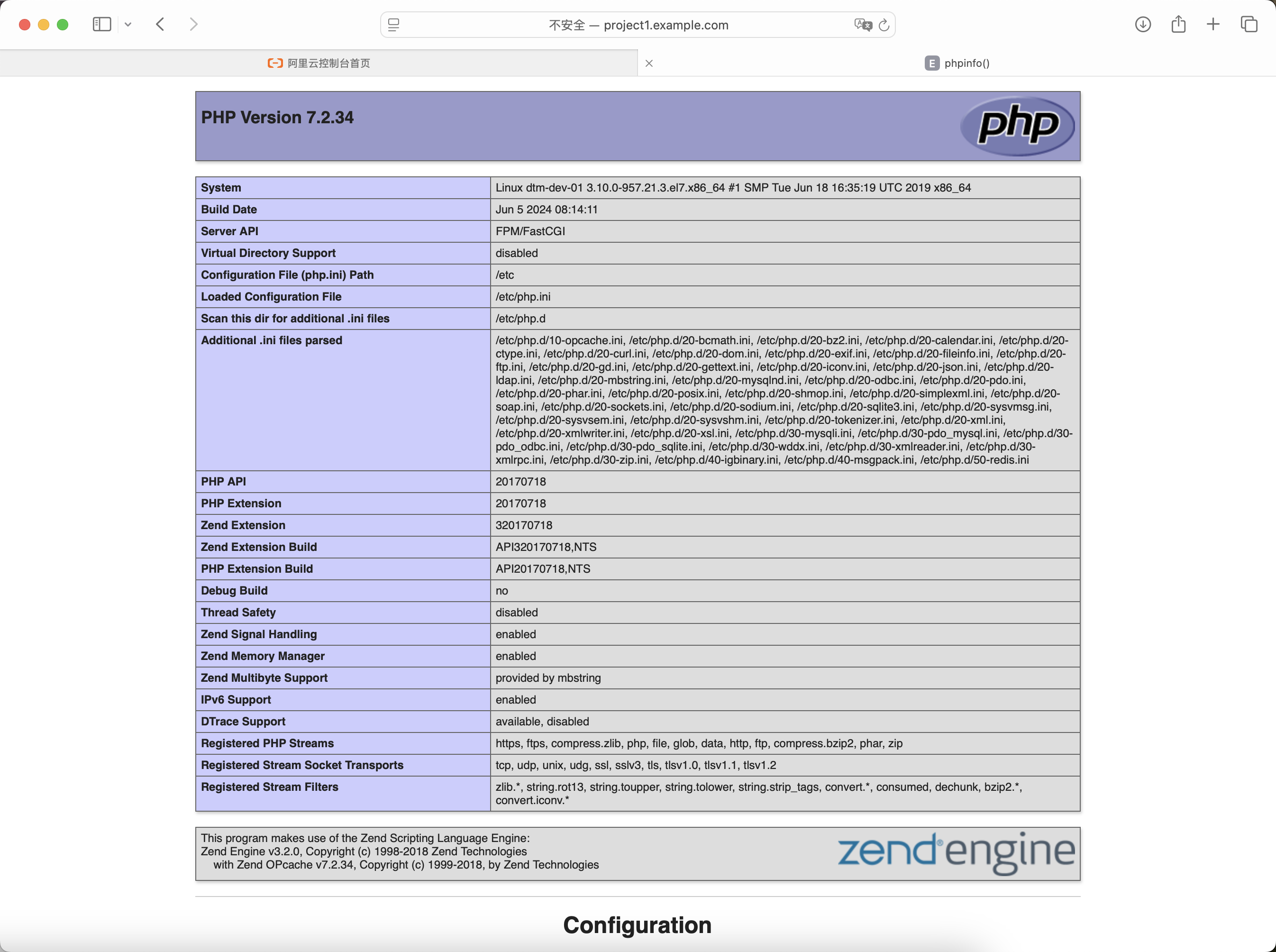
问题1:页面提示 文件找不到
查看nginx日志如下提示
2024/07/27 07:50:20 [error] 56623#0: *172 FastCGI sent in stderr: "Primary script unknown" while reading response header from upstream, client: 117.129.44.196, server: project1.example.com, request: "GET /info.php HTTP/1.1", upstream: "fastcgi://unix:/var/run/php-fpm.sock:", host: "project1.example.com"
2、通过排除法定位问题
首先: 要保障这俩用户是一致的,selinux和防火墙是关闭的
egrep "user = nginx|group = nginx" /etc/php-fpm.d/www.conf
egrep "user nginx nginx" /data/apps/nginx/conf/nginx.conf
其次:排除目录权限的问题
大家可能都有自己的自定义项目目录。
遇到问题拍错的时候建议先按最小化配置也就是我上面的示例去测试
然后检查项目上一级目录、项目目录是不是都是755

 浙公网安备 33010602011771号