
How to Use System Services in SmartFusion 2
系统控制器 用户指导手册:
SmartFusion 2 SOC and IGLOO 2 System Controller (Earlier UG0450)
系统控制器 模拟 用户指导手册:
UG0837: IGLOO2 and SmartFusion2 FPGA System Services Simulation User Guide
系统认证服务
Using Device Certificate System Service in SmartFusion2 - Libero SoC v11.7 Application Note
MSS、Fabric 和 system controller 通信框架 , COMM_BLK 详细信息 查看 SmartFusion 2 Microcontroller Subsystem User Guide
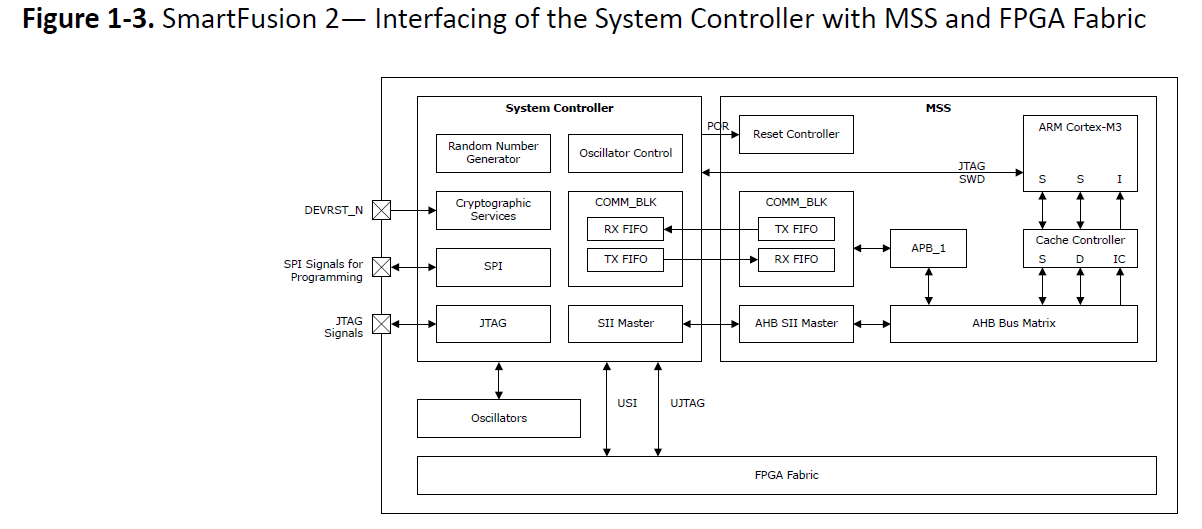
2. 提供的服务列表
| 服务列表 | 详细说明 |
| Device and Design Information Services |
128bit 设备唯一编号获取; 用户code获取服务;libero 烧录之前设置; 设备认证服务; 用户设计版本服务;libero 烧录之前设置; |
| Flash*Freeze Service | 进入 Flash_Freeze 状态 |
| Cryptographic Services | 加密服务, AES,SHA,HMAC, |
| DPA-Resistant Key Tree Services | DPA 加密服务; |
| Elliptic Curve Cryptography Services | 椭圆曲线密码服务 |
| SRAM-PUF Services | SRAM-PUF 密钥生成,存储服务,认证服务; |
| Non-Deterministic Random Bit Generator (NRBG) Services | 非确定性随机数服务 |
| Zeroization Service | 0初始化服务 |
| Programming Service | 编程服务,包括ISP和IAP |
| NVM Data Integrity Check Service | nvm 数据完整性校验服务 |
| Asynchronous Messages | 异步消息服务 |
3.14 How to Use System Services in SmartFusion 2
上代码,获取 128 bit 唯一 设备ID :
#include <stdio.h>
#include ”drivers/mss_sys_services/mss_sys_services.h”
#include “drivers/mss_uart/mss_uart.h”


static void display_hex_values(const uint8_t * in_buffer, uint32_t byte_length);

mss_uart_instance_t * const gp_my_uart = &g_mss_uart0;

int main()
{
    uint8_t serial_number[16];
    uint8_t status;

    /*--------------------------------------------------------------------------
    * Initilize the system services communication with the System Controller.
    */
    MSS_SYS_init(MSS_SYS_NO_EVENT_HANDLER);

    /*--------------------------------------------------------------------------
    * Initilize the MMUART with required configuration
    */
    MSS_UART_init(gp_my_uart,
    MSS_UART_57600_BAUD,
    MSS_UART_DATA_8_BITS | MSS_UART_NO_PARITY | MSS_UART_ONE_STOP_BIT);

    /*--------------------------------------------------------------------------
    * Fetch the Device Serial Number (DSN).
    */
    status = MSS_SYS_get_serial_number(serial_number);

    /*--------------------------------------------------------------------------
    * Check the service status for SUCCESS and then display the DSN on UART terminal
    */
    if(MSS_SYS_SUCCESS == status)
    {
        MSS_UART_polled_tx_string(gp_my_uart,
        (const uint8_t*)“Device serial number: ”);
        display_hex_values(serial_number, sizeof(serial_number));
    }

    for(;;)
    {
        ;
    }
    return 0;
}

/*==============================================================================
Display content of buffer passed as parameter as hex values
*/
static void display_hex_values(const uint8_t * in_buffer,uint32_t byte_length)
{
    uint8_t display_buffer[128];
    uint32_t inc;

    if(byte_length > 16u)
    {
        MSS_UART_polled_tx_string( gp_my_uart,(const uint8_t*)“\r\n” );
    }

    for(inc = 0; inc < byte_length; ++inc)
    {
        if((inc > 1u) &&(0u == (inc % 16u)))
        {
            MSS_UART_polled_tx_string( gp_my_uart,(const uint8_t*)“\r\n” );
        }

        snprintf((char *)display_buffer, sizeof(display_buffer), “%02x ”, in_buffer[inc]);

        MSS_UART_polled_tx_string(gp_my_uart, display_buffer);
    }
}


 浙公网安备 33010602011771号