
黄金点游戏(三)——bs前端设计
黄金点游戏bs架构——前端设计
-
index.html主页- 主页左侧为导航栏,设计实现游戏导航和结果数据表统计选项
![]()
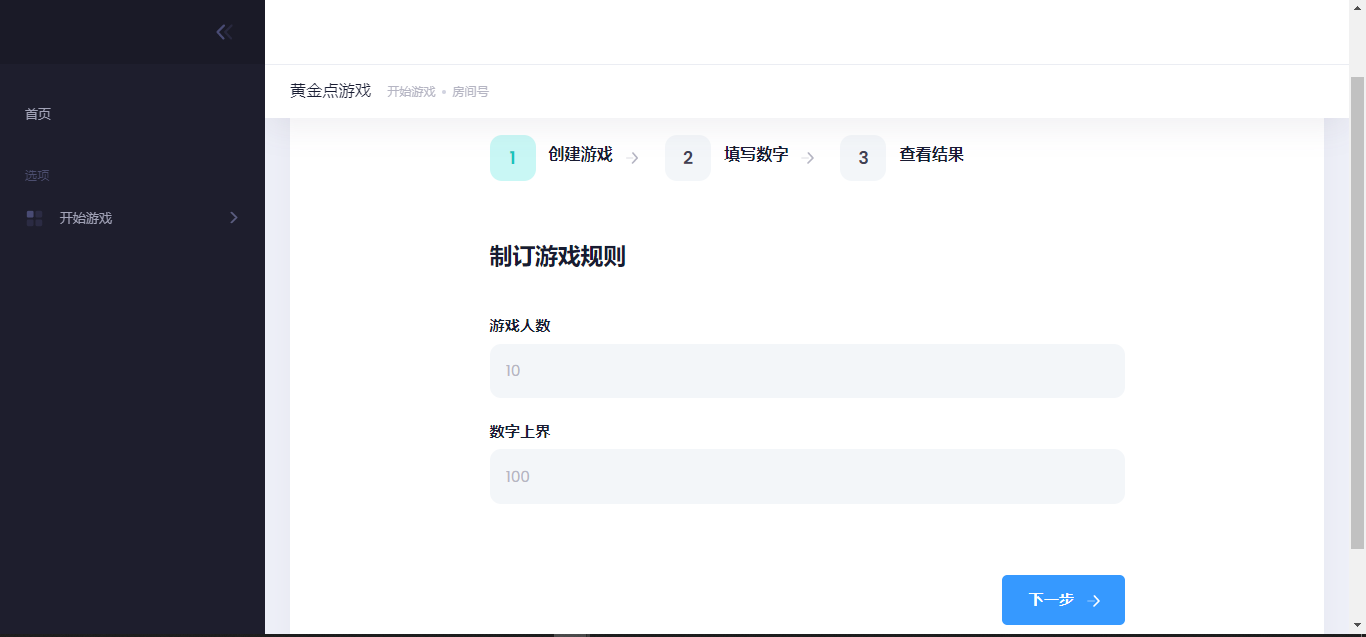
- 在开始游戏界面,创建房间
- 创建游戏
- 制定游戏规则
- 规定游戏人数
- 规定黄金点数字范围(暂时设想为数字上界)
- 制定游戏规则
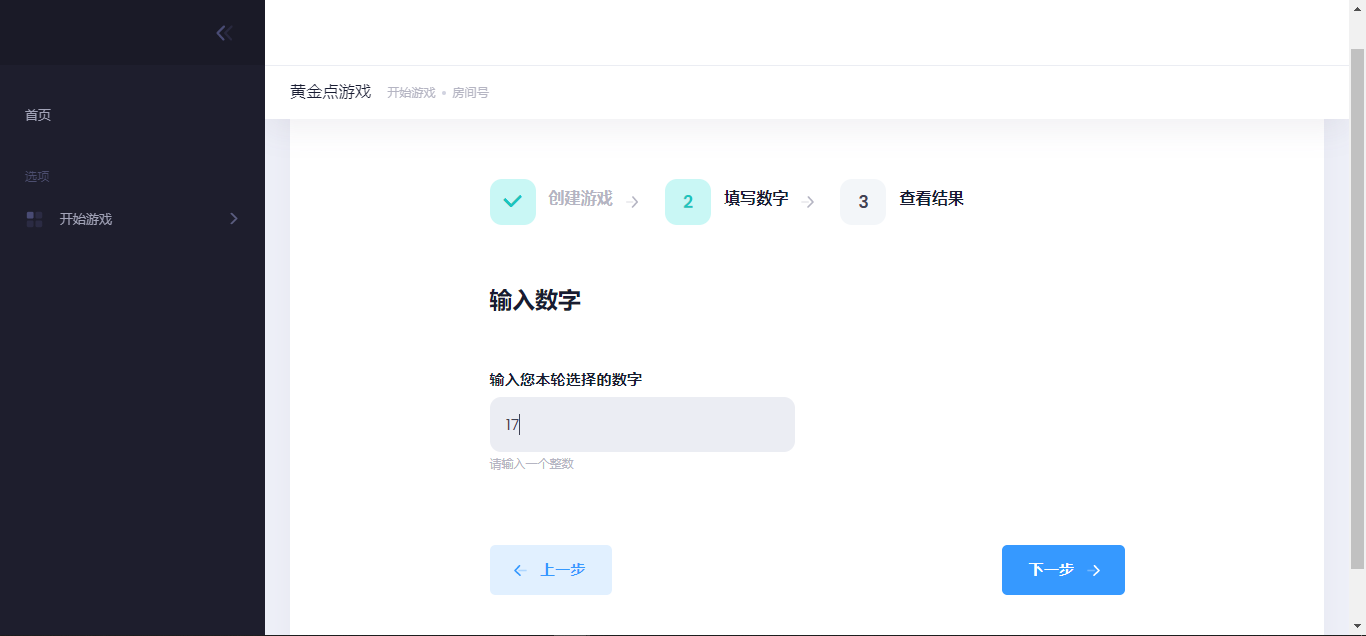
- 然后点击下一步进入填写数字选项
![]()
- 输入本轮选择的数字(暂时设计为整数)
- 点击下一步,等候结果产生
![]()
- 显示本轮名次
- 显示本轮黄金点
-
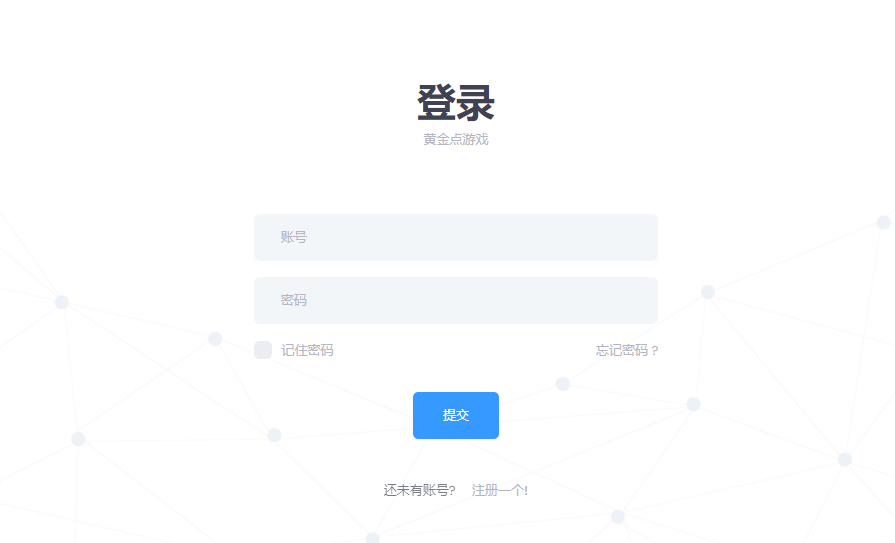
login.html登录界面-
当有登录时重定向到用户主页
-
当没有登录时提供用户名框、密码框,将信息加密后发给服务器
-
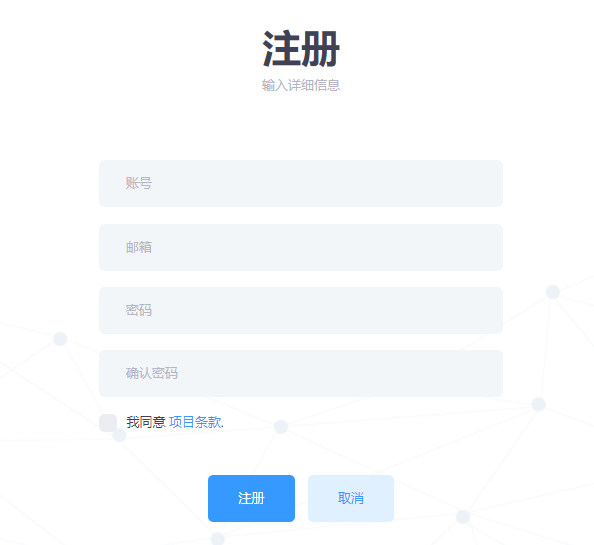
提供注册按钮选项,点击后,给出用户名框、密码框、重复密码框、电子邮件框,按要求填写后,将信息加密后发送给服务器
-
登录 ![]()
注册 ![]()
忘记密码 ![]()
代码展示如下
<!DOCTYPE html>
<!--
Template Name: Metronic - Bootstrap 4 HTML, React, Angular 9 & VueJS Admin Dashboard Theme
Author: KeenThemes
Website: http://www.keenthemes.com/
Contact: support@keenthemes.com
Follow: www.twitter.com/keenthemes
Dribbble: www.dribbble.com/keenthemes
Like: www.facebook.com/keenthemes
Purchase: https://1.envato.market/EA4JP
Renew Support: https://1.envato.market/EA4JP
License: You must have a valid license purchased only from themeforest(the above link) in order to legally use the theme for your project.
<base href="../../../../">
-->
<html lang="en">
	<!--begin::Head-->
	<head>
		<meta charset="utf-8" />
		<title>Login</title>
		<meta name="description" content="Login page example" />
		<meta name="viewport" content="width=device-width, initial-scale=1, shrink-to-fit=no" />
		<link rel="canonical" href="https://keenthemes.com/metronic" />
		<!--begin::Fonts-->
		<link rel="stylesheet" href=" https://fonts.googleapis.com/css?family=Poppins:300 ,400,500,600,700" />
		<!--end::Fonts-->
		<!--begin::Page Custom Styles(used by this page)-->
		<link href="assets/css/pages/login/classic/login-4.css" rel="stylesheet" type="text/css" />
		<!--end::Page Custom Styles-->
		<!--begin::Global Theme Styles(used by all pages)-->
		<link href="assets/plugins/global/plugins.bundle.css" rel="stylesheet" type="text/css" />
		<link href="assets/plugins/custom/prismjs/prismjs.bundle.css" rel="stylesheet" type="text/css" />
		<link href="assets/css/style.bundle.css" rel="stylesheet" type="text/css" />
		<!--end::Global Theme Styles-->
		<!--begin::Layout Themes(used by all pages)-->
		<link href="assets/css/themes/layout/header/base/light.css" rel="stylesheet" type="text/css" />
		<link href="assets/css/themes/layout/header/menu/light.css" rel="stylesheet" type="text/css" />
		<link href="assets/css/themes/layout/brand/dark.css" rel="stylesheet" type="text/css" />
		<link href="assets/css/themes/layout/aside/dark.css" rel="stylesheet" type="text/css" />
		<!--end::Layout Themes-->
		<link rel="shortcut icon" href="assets/media/logos/favicon.ico" />
	</head>
	<!--end::Head-->
	<!--begin::Body-->
	<body id="kt_body" class="header-fixed header-mobile-fixed subheader-enabled subheader-fixed aside-enabled aside-fixed aside-minimize-hoverable page-loading">
		<!--begin::Main-->
		<div class="d-flex flex-column flex-root">
			<!--begin::Login-->
			<div class="login login-4 login-signin-on d-flex flex-row-fluid" id="kt_login">
				<div class="d-flex flex-center flex-row-fluid bgi-size-cover bgi-position-top bgi-no-repeat" style="background-image: url('assets/media/bg/bg-3.jpg');">
					<div class="login-form text-center p-7 position-relative overflow-hidden">
						<!--begin::Login Header-->
						<div class="d-flex flex-center mb-15">
							<a href="#">
								<!--
									<img src="assets/media/logos/logo-letter-13.png" class="max-h-75px" alt="" />
								-->
							</a>
						</div>
						<!--end::Login Header-->
						<!--begin::Login Sign in form-->
						<div class="login-signin">
							<div class="mb-20">
								<h3 style="font-size: 3em;font-family: Microsoft Yahei;font-weight: bold;">登录</h3>
								<div class="text-muted font-weight-bold">黄金点游戏</div>
							</div>
							<form class="form" id="kt_login_signin_form">
								<div class="form-group mb-5">
									<input class="form-control h-auto form-control-solid py-4 px-8" type="text" placeholder="账号" name="username" autocomplete="off" />
								</div>
								<div class="form-group mb-5">
									<input class="form-control h-auto form-control-solid py-4 px-8" type="password" placeholder="密码" name="password" />
								</div>
								<div class="form-group d-flex flex-wrap justify-content-between align-items-center">
									<div class="checkbox-inline">
										<label class="checkbox m-0 text-muted">
										<input type="checkbox" name="remember" />
										<span></span>记住密码</label>
									</div>
									<a href="javascript:;" id="kt_login_forgot" class="text-muted text-hover-primary">忘记密码 ?</a>
								</div>
								<button id="kt_login_signin_submit" class="btn btn-primary font-weight-bold px-9 py-4 my-3 mx-4">提交</button>
							</form>
							<div class="mt-10">
								<span class="opacity-70 mr-4">还未有账号?</span>
								<a href="javascript:;" id="kt_login_signup" class="text-muted text-hover-primary font-weight-bold">注册一个!</a>
							</div>
						</div>
						<!--end::Login Sign in form-->
						<!--begin::Login Sign up form-->
						<div class="login-signup">
							<div class="mb-20">
								<h3 style="font-size: 3em;font-family: Microsoft Yahei;font-weight: bold;">注册</h3>
								<div class="text-muted font-weight-bold">输入详细信息</div>
							</div>
							<form class="form" id="kt_login_signup_form">
								<div class="form-group mb-5">
									<input class="form-control h-auto form-control-solid py-4 px-8" type="text" placeholder="账号" name="fullname" />
								</div>
								<div class="form-group mb-5">
									<input class="form-control h-auto form-control-solid py-4 px-8" type="text" placeholder="邮箱" name="email" autocomplete="off" />
								</div>
								<div class="form-group mb-5">
									<input class="form-control h-auto form-control-solid py-4 px-8" type="password" placeholder="密码" name="password" />
								</div>
								<div class="form-group mb-5">
									<input class="form-control h-auto form-control-solid py-4 px-8" type="password" placeholder="确认密码" name="cpassword" />
								</div>
								<div class="form-group mb-5 text-left">
									<div class="checkbox-inline">
										<label class="checkbox m-0">
										<input type="checkbox" name="agree" />
										<span></span>我同意
										<a href="#" class="font-weight-bold ml-1">项目条款</a>.</label>
									</div>
									<div class="form-text text-muted text-center"></div>
								</div>
								<div class="form-group d-flex flex-wrap flex-center mt-10">
									<button id="kt_login_signup_submit" class="btn btn-primary font-weight-bold px-9 py-4 my-3 mx-2">注册</button>
									<button id="kt_login_signup_cancel" class="btn btn-light-primary font-weight-bold px-9 py-4 my-3 mx-2">取消</button>
								</div>
							</form>
						</div>
						<!--end::Login Sign up form-->
						<!--begin::Login forgot password form-->
						<div class="login-forgot">
							<div class="mb-20">
								<h3 style="font-size: 3em;font-family: Microsoft Yahei;font-weight: bold;">忘记密码 ?</h3>
								<div class="text-muted font-weight-bold">请输入您的注册邮箱来重置密码</div>
							</div>
							<form class="form" id="kt_login_forgot_form">
								<div class="form-group mb-10">
									<input class="form-control form-control-solid h-auto py-4 px-8" type="text" placeholder="注册邮箱" name="email" autocomplete="off" />
								</div>
								<div class="form-group d-flex flex-wrap flex-center mt-10">
									<button id="kt_login_forgot_submit" class="btn btn-primary font-weight-bold px-9 py-4 my-3 mx-2">发送申请</button>
									<button id="kt_login_forgot_cancel" class="btn btn-light-primary font-weight-bold px-9 py-4 my-3 mx-2">取消</button>
								</div>
							</form>
						</div>
						<!--end::Login forgot password form-->
					</div>
				</div>
			</div>
			<!--end::Login-->
		</div>
		<!--end::Main-->
		<script>var HOST_URL = "https://preview.keenthemes.com/metronic/theme/html/tools/preview";</script>
		<!--begin::Global Config(global config for global JS scripts)-->
		<script>var KTAppSettings = { "breakpoints": { "sm": 576, "md": 768, "lg": 992, "xl": 1200, "xxl": 1400 }, "colors": { "theme": { "base": { "white": "#ffffff", "primary": "#3699FF", "secondary": "#E5EAEE", "success": "#1BC5BD", "info": "#8950FC", "warning": "#FFA800", "danger": "#F64E60", "light": "#E4E6EF", "dark": "#181C32" }, "light": { "white": "#ffffff", "primary": "#E1F0FF", "secondary": "#EBEDF3", "success": "#C9F7F5", "info": "#EEE5FF", "warning": "#FFF4DE", "danger": "#FFE2E5", "light": "#F3F6F9", "dark": "#D6D6E0" }, "inverse": { "white": "#ffffff", "primary": "#ffffff", "secondary": "#3F4254", "success": "#ffffff", "info": "#ffffff", "warning": "#ffffff", "danger": "#ffffff", "light": "#464E5F", "dark": "#ffffff" } }, "gray": { "gray-100": "#F3F6F9", "gray-200": "#EBEDF3", "gray-300": "#E4E6EF", "gray-400": "#D1D3E0", "gray-500": "#B5B5C3", "gray-600": "#7E8299", "gray-700": "#5E6278", "gray-800": "#3F4254", "gray-900": "#181C32" } }, "font-family": "Poppins" };</script>
		<!--end::Global Config-->
		<!--begin::Global Theme Bundle(used by all pages)-->
		<script src="assets/plugins/global/plugins.bundle.js"></script>
		<script src="assets/plugins/custom/prismjs/prismjs.bundle.js"></script>
		<script src="assets/js/scripts.bundle.js"></script>
		<!--end::Global Theme Bundle-->
		<!--begin::Page Scripts(used by this page)-->
		<script src="assets/js/pages/custom/login/login-general.js"></script>
		<!--end::Page Scripts-->
	</body>
	<!--end::Body-->
</html>
-
-
home.html用户主页- 当没有登录时重定向到登录界面
- 当登录时提供用户分值、最近用户历史的展示
- 提供主页、退出登录按钮
- 进行投票
- (暂时还未实现该前端设计,后续增加)



 浙公网安备 33010602011771号