
统计代码量
统计代码量
1. 实现方法简介
根据先前实现的程序,我已经完成了通过命令行设置指定文件夹路径,并且显示该路径下所有指定文件目录file_type_path.txt中包含的文件名的文件的绝对路径。在本次实现的项目中,我需要完成的是,对给定绝对路径的文件中的代码行数进行统计,并且汇总代码总量、文件总量和总耗时。
针对以上要求,我的设计如下:
- 通过open()函数打开文件,并用readlines()(python)或 getline()(C++)进行逐行读取,然后统计
- 在先前显示文件的程序基础上通过累加统计数量
- 在python中使用time,在C++中使用ctime进行时间计算,主要采用clock()函数获取当前时间,然后将结束时间减去开始时间得到程序运行的总时长。
- 对于空行和注释,我写了个Annotation函数用于判断是否为注释或者空行。主要方法如下,对于空行,只需要判断getline或者readlines的每一行strip('\n')是否为空“”即可;对于简单注释,我想到就是对每一行进行开头去掉‘\t’而后判断是否是‘//’或者‘#’。但这也有一个问题,就是针对多行注释,如C++中的/**/或python中的“”“,都无法完全检测,所以暂时没有实现这个功能。
- 最后通过循环显示结果
调试时遇到的问题
-
PermissionError: [Errno 13] Permission denied:
        'C:\\Windows\\assembly\\NativeImages_v4.0.30319_32\\Newtonsoft.Json'
该问题是运行中遇到的权限不足的问题,在C++或python中,都可以通过控制台使用管理员权限可以做到避免该问题。
-
UnicodeDecodeError:
    'utf-8' codec can't decode byte 0xa9 in position 77: invalid start byte
UnicodeDecodeError:
    'gbk' codec can't decode byte 0xa9 in position 77: illegal multibyte sequence
该问题是在对文件进行读取操作时,utf-8和gbk编码无法解码产生的问题。C++的读取并未出现问题,但是在python中,通过click包进行操作时则出现了问题,并且通过try···except语句修改解码类型也无法解决该问题,说明在系统中有的编码是没有采用utf-8或者gbk的,暂时还未解决该问题。
2. 核心代码
C++实现
bool Annotation_or_not(std::string line) {
	while (true) {
		if (line.find('\t') == 0 || line.find(' ') == 0) {
			line = line.substr(1);
		}
		else {
			if (line.find('//') == 0 or line.find('#') == 0)
				return true;
			else
				return false;
			break;
		}
	}
}

long long Code_Line_Count(std::string root_path) {
	std::ifstream ReadFile;
	long long n = 0;
	std::string this_line;
	ReadFile.open(root_path.c_str(), std::ios::in);//ios::in 表示以只读的方式读取文件
	if (ReadFile.fail())//文件打开失败:返回0
		return 0;
	else { //文件存在
		while (std::getline(ReadFile, this_line)) {
			if (this_line == "")
				continue;	//不统计空行
			else if (Annotation_or_not(this_line))
				continue;
			n++;
		}
	}
	ReadFile.close();
	return n;
}
Python实现
def search_file(root_path, file_type):
    path = pathlib.Path(root_path)
    total_files_number = 0
    for file in path.rglob('*'):
        total_files_number += 1
    total = 0
    file_number = 0
    for file_path in path.rglob('*' + file_type):
        count = 0
        print(str(file_path))
        click.echo(str(file_path))
        file_number += 1
        try:
            with open(file_path, 'r', encoding='utf8') as f:
                for file_line in f.readlines():
                    file_line = file_line.strip()
 		if not len(file_line) or file_line.startswith('//') or file_line.startswith('#'):    				# 非空行或注释
                        continue
                    count += 1
        except UnicodeDecodeError or PermissionError:
            pass
        total += count
    return total, file_number, total_files_number

for file_type in file_type_list:
    counts, files, total_files_number = search_file(root_path, file_type)  					file_count_list[file_type_list.index(file_type)] += counts
    total_counts += counts
end = time.perf_counter()
print("The number of total files: " + str(total_files_number))
print("The function run time is : " + str((end - begin) * 1000) + " ms")
print("The number of code lines is " + str(total_counts))
for file_type in file_type_list:
	print("The files of file type " + file_type + "\thas " + 										str(file_count_list[file_type_list.index(file_type)]) + "\tlines")
结果
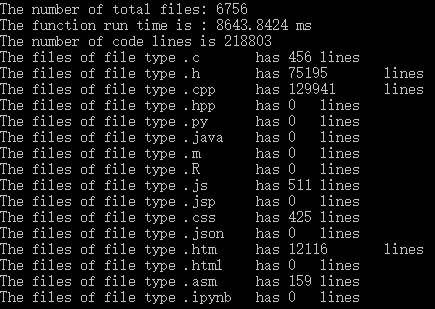
| C++ | Python | |
|---|---|---|
| 代码量统计 | 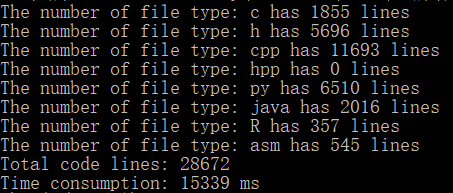 |
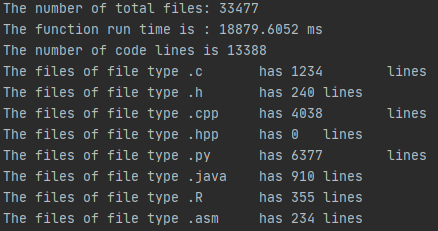 |
| C:\Window | 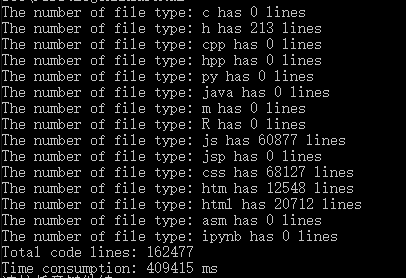 |
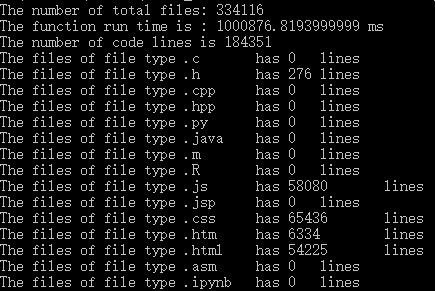 |
| VC80Samples | 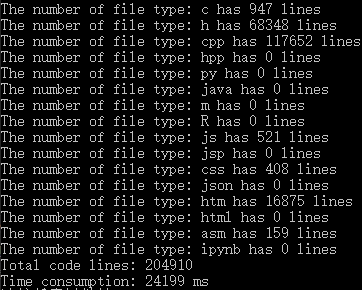 |
 |
|
结果分析
通过上表的结果分析:
- 在我本人的代码量的计算中,两种语言编出的程序差别最大,通过查看文件,我发现我的代码文件夹中存在一些”僵尸文件“,管理员没有权限删除,文件粉碎也没有效果,但是重启电脑就会发现已经清除,可能是原先某些软件擅自修改了权限导致在读取时差别较大。
- 而C:\Windows文件路径下,最主要的是遇到PermissionError的情况,最主要出现的语言是json和html,由于我也没找到合适的解决方法,所以对于出现这种Error时,我就采用直接跳过,所以会产生一些比较小的差异。
- 对于VC80Samples我觉得这些差异处于合理的范围内,因为对于空行和注释的识别,我的方法是有些问题的,所以很有可能在通过使用跨行注释时,产生漏判或误判的情况。同样的,在运行时也产生了UnicodeDecodeError,我在python中无法解决,只能选择直接跳过。
- P.S. 我事先有通过一个小的文件夹来测试过两边的代码,是能互为对照的。并且C++执行速度要比Python快,效率要更高一点,但在实际问题中,也有出现C++速度较慢的现象,我认为是由于我在使用python时,有两个解决不了的PermissionError和UnicodeDecodeError导致的,程序直接跳过,所以耗时比较少。
3. PSP表格
| PSP各阶段 | 预估耗时(分钟) | 实际耗时(分钟) | |
|---|---|---|---|
| Planning | 计划 | ||
| · Estimate | · 明确需求和其他因素,估计以下各个任务需要多少时间 | 5 | 5 |
| Development | 开发 | ||
| · Analysis | · 需求分析 (包括学习新技术、新工具的时间) | 40 | 60 |
| · Design Spec | · 生成设计文档(整体框架的设计,各模块的接口) | 2 | 2 |
| · Design Review | · 设计复审 (和同事审核设计文档) | 2 | 1 |
| · Coding Standard | · 代码规范 (为目前的开发制定或选择合适的规范) | 2 | 1 |
| · Design | · 具体设计(用流程图、伪代码等方法来设计具体模块) | 2 | 1 |
| · Coding | · 具体编码 | 60 | 83 |
| · Code Review | · 代码复审 | 10 | 10 |
| · Test | · 测试(自我测试,修改代码,提交修改) | 60 | 112 |
| Reporting | 报告 | ||
| · Test Report | · 测试报告(发现了多少bug,修复了多少) | 10 | 12 |
| · Size Measurement | · 计算工作量(多少行代码,多少次签入,多少测试用例,其他工作量) | 5 | 8 |
| · Postmortem & Process Improvement Plan | · 事后总结, 并提出过程改进计划(包括写文档、博客的时间) | 50 | 60 |
| 合计 | 248 | 355 |

 浙公网安备 33010602011771号