
记录--页面使用 scale 缩放实践
这里给大家分享我在网上总结出来的一些知识,希望对大家有所帮助

最近接到一个任务,需要把页面放大1.5倍显示。这里使用 css 里的 transform: scale(1.5) 来实现。
document.body.setAttribute(
    'style',
    `transform: scale(1.5); transform-origin: left top; width: ${window.innerWidth / 1.5}px; height: ${window.innerHeight / 1.5}px;`
);
缩放后元素大小

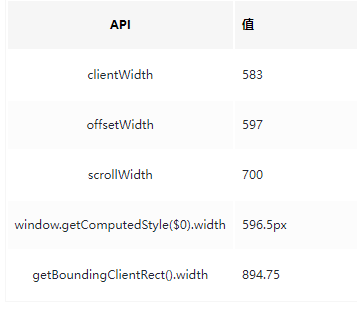
width
height
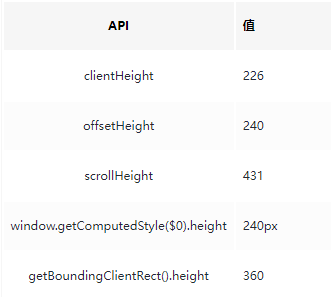
通过以上数值比较,我们发现:
clientWidth、clientHeight、offsetWidth、offsetHeight、scrollWidth、scrollHeight、window.getComputedStyle 获取的值都是缩放前的;
getBoundingClientRect获取的值是缩放后的。
这里我们以 width 为例,我们先把 getBoundingClientRect 的 width 换算成缩放前的值
894.75 / 1.5 (缩放倍数) = 596.5
我们发现换算后的值跟 getComputedStyle 获取到的值一致,是缩放前宽度的值;clientWidth、offsetWidth 的值会进行取整。
计算宽高的时候我们优先选择 getBoundingClientRect 和 getComputedStyle。
scroll
我们再来看下 scrollHeight,我们把滚动条滚动到最底部
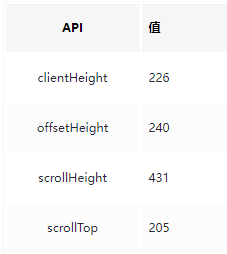
我们发现
clientHeight + scrollTop = scrollHeight
这里我们可以得出 scrollTop、scrollLeft、scrollHeight、scrollWidth 也是缩放前的值。
因此在计算宽高的时候,我们优先选择 getComputedStyle,可以避免进行换算。
这里我们将其封装成方法,方便使用:
/** 获取元素大小 */
function getElementSize(el: Element) {
    const style = window.getComputedStyle(el);
    return {
        width: parseFloat(style.width),
        height: parseFloat(style.height),
    };
}
坐标
getBoundingClientRect
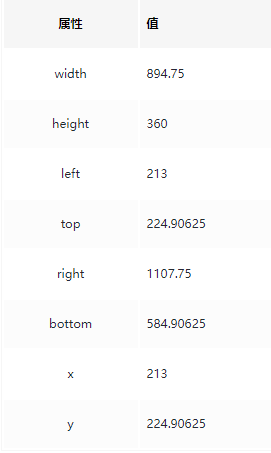
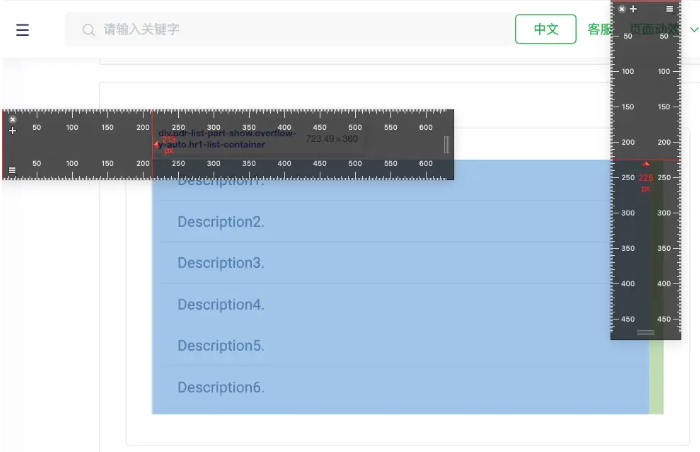
getBoundingClientRect 获取到的宽高和坐标位置都是缩放后的(即实际显示值)。
MouseEvent

MouseEvent 获取到的坐标系值也是缩放后的(即实际显示值)。
因此在和坐标位置有关的值进行计算时,推荐使用 getBoundingClientRect。
这里有一点要注意的,我们使用坐标及getBoundingClientRect宽高计算出来的值,由于这些值是缩放后的,最终设置到元素上的时候需要除以放大倍数(这里是1.5倍),因为设置在元素上的值也会被缩放。例如:
element.style.left = `${e.clientX / 1.5}px`;
element.style.width = `${element.getBoundingClientRect().width / 1.5}px`
获取 scale 的值
当我们使用坐标有关的值时避免不了进行换算,因此我们需要获取当前 scale 缩放倍数
function toNum(num: number) {
    return Number.isNaN(num) ? 1 : num;
}

function getScale(el: Element) {
    const eleRect: DOMRect = el.getBoundingClientRect();
    const computedStyle = window.getComputedStyle(el);
    const eleOutWidth = parseFloat(computedStyle.width);
    const eleOutHeight = parseFloat(computedStyle.height);

    const scaleX = toNum(Math.round((eleRect.width / eleOutWidth) * 1000) / 1000);
    const scaleY = toNum(Math.round((eleRect.height / eleOutHeight) * 1000) / 1000);

    return {
        scaleX,
        scaleY,
    };
}
getScale,传入当前元素的父元素,即可获取当前缩放倍数。例如:getScale(document.body)
{
    scaleX: 1.5
    scaleY: 1.5
}
我们得到当前水平缩放 1.5 倍,垂直缩放 1.5 倍。
总结
计算宽高的时候,优先选择 getComputedStyle。
跟坐标位置有关的,使用 getBoundingClientRect,但是计算出的值需要除以 scale 放大倍数。
本文转载于:
https://juejin.cn/post/7320079052013158426
如果对您有所帮助,欢迎您点个关注,我会定时更新技术文档,大家一起讨论学习,一起进步。


 浙公网安备 33010602011771号