.NETCORE 微服务 —— gRPC 进阶
前言
该系列文章主要是记录我个人使用.net core 搭建微服务时所需的各类组件、框架等的实际应用与集成。
前置
一、熟悉 C# 的基本语法。
二、熟悉 visual studio 2019 构建.net core 应用的基本流程
三、了解 proto 的基本语法
四、阅读过前一章节:.NETCORE 微服务 —— gRPC 入门
为什么要写进阶文章?主要是要改造客户端的代码,我们从前一章节可以看出,如果每一次都要写类似以下的代码的话,真心挺烦的!
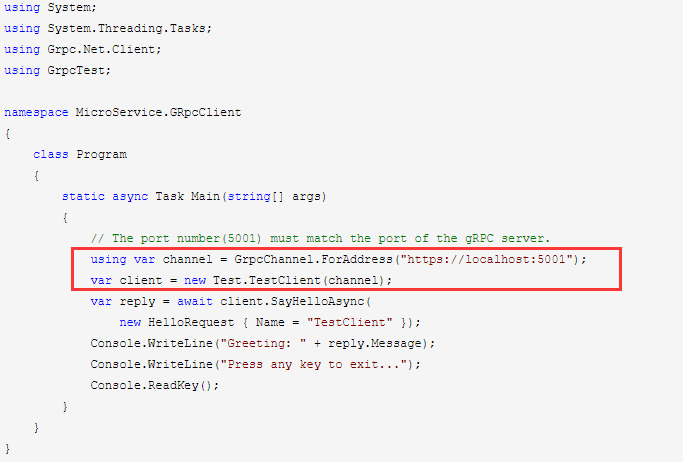
那能不能实现 .net core 的核心,在asp.net core 应用中,以DI的方式注入呢,答应是肯定的!废话不多说,让我们开始吧!
首先,新建.net core web 项目,并添加好相关引用。以下是配置好的 csproj 项目文件信息。
 1 <Project Sdk="Microsoft.NET.Sdk.Web">
 2
 3   <PropertyGroup>
 4     <TargetFramework>netcoreapp3.1</TargetFramework>
 5   </PropertyGroup>
 6
 7   <ItemGroup>
 8     <None Update="Protos\test.proto">
 9       <GrpcServices>Client</GrpcServices>
10     </None>
11   </ItemGroup>
12
13   <ItemGroup>
14     <PackageReference Include="Google.Protobuf" Version="3.11.4" />
15     <PackageReference Include="Grpc.AspNetCore" Version="2.27.0" />
16     <PackageReference Include="Grpc.Net.Client" Version="2.27.0" />
17     <PackageReference Include="Grpc.Tools" Version="2.27.0">
18       <PrivateAssets>all</PrivateAssets>
19       <IncludeAssets>runtime; build; native; contentfiles; analyzers; buildtransitive</IncludeAssets>
20     </PackageReference>
21     <PackageReference Include="Microsoft.VisualStudio.Web.CodeGeneration.Design" Version="3.1.1" />
22   </ItemGroup>
23
24   <ItemGroup>
25     <Protobuf Include="Protos\test.proto" GrpcServices="Client" />
26   </ItemGroup>
27
28 </Project>
再在 Startup.cs 文件中添加对grpc的服务支持。
 services.AddGrpcClient<Test.TestClient>(o =>
 {
   o.Address = new Uri("https://localhost:5001");
 });
还有就是添加一个用于测试访问grpc服务端的控制器。
 1 using System;
 2 using System.Collections.Generic;
 3 using System.Linq;
 4 using System.Threading.Tasks;
 5 using GrpcTest;
 6 using Microsoft.AspNetCore.Http;
 7 using Microsoft.AspNetCore.Mvc;
 8
 9 namespace MicroService.GRpcWebClient.Controllers
10 {
11     [Route("api/[controller]")]
12     [ApiController]
13     public class TestController : ControllerBase
14     {
15         private readonly Test.TestClient _testClient;
16
17         public TestController(Test.TestClient testClient)
18         {
19             _testClient = testClient;
20         }
21
22         [Route("get")]
23         public async Task<string> Get(string name)
24         {
25             var res = await _testClient.SayHelloAsync(new HelloRequest() { Name = name });
26             return res.Message;
27         }
28     }
29 }
由上面这段代码可以看出,我们把对grpc服务的配置到startup代码。这样后续再想调用该服务时就不需要再手动管理grpc的生命周期之类的了!
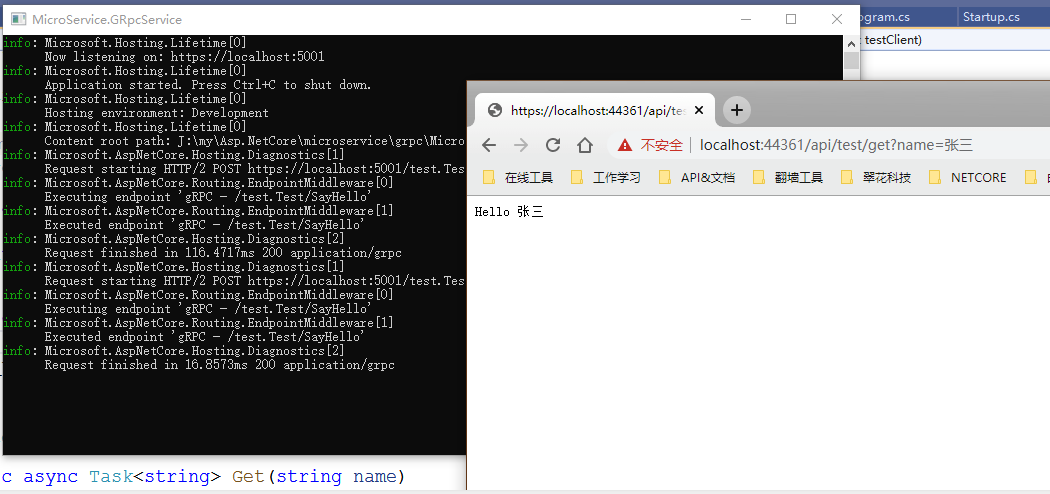
我们按顺序运行程序后。可以看到正常运行的结果。
最后,附上示例下载地址。点我去下载!

 浙公网安备 33010602011771号