
文件IO
1.文件IO函数分类
在 Linux 上操作文件时,有两套函数:标准IO、系统调用IO。标准IO的相关函数是:fopen/fread/fwrite/fseek/fflush/fclose等。系统调用IO的相关函数是:open/read/write/lseek/fsync/close。
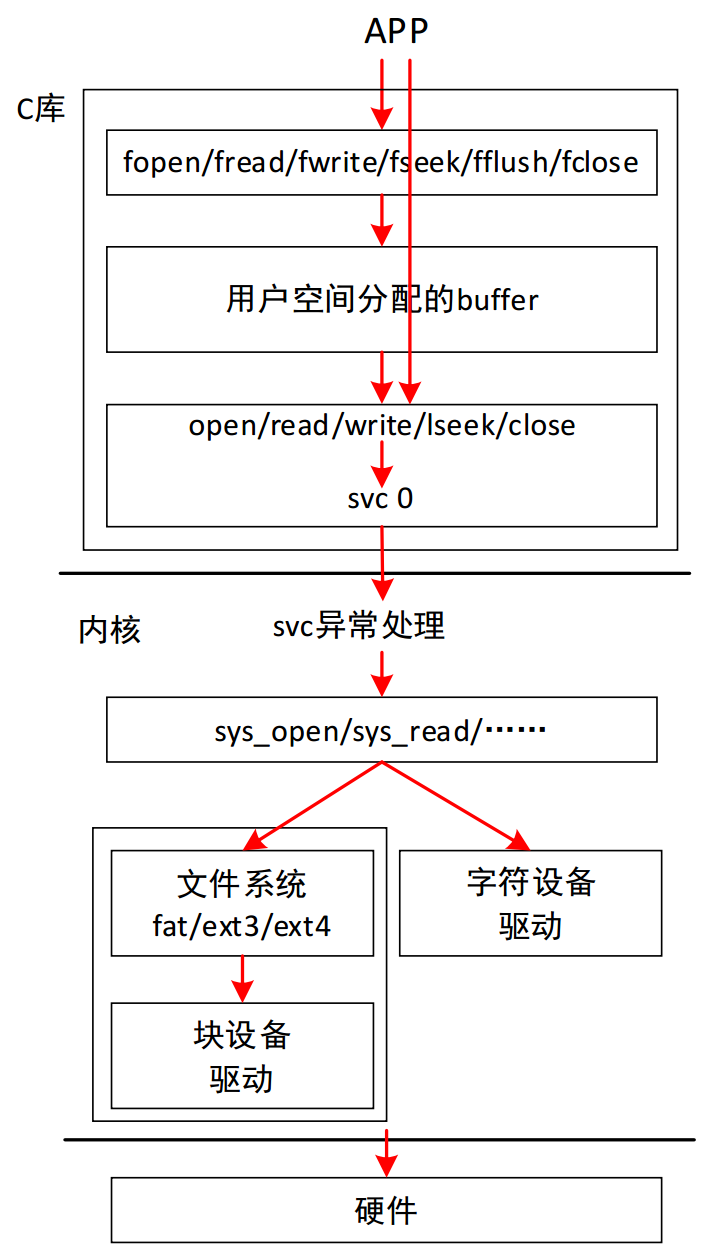
标准IO的内部,会分配一个用户空间的buffer,读写操作先经过这个buffer。在有必要时,才会调用底下的系统调用IO向内核发起操作。
所以:标准IO效率更高;但是要访问驱动程序时就不能使用标准IO,而是使用系统调用IO。
2.使用open函数打开文件
点击查看代码
#include <sys/types.h>
#include <sys/stat.h>
#include <fcntl.h>
/* 以上头文件可通过man 2 open查询 */
#include <stdio.h> /* 通过man 3 printf查询 */
#include <errno.h> /* 通过man errno查询 */
#include <string.h> /* 通过man strerror查询 */
#include <unistd.h> /* 通过man 3 sleep/man 2 close查询 */

/*
 * Usage:
 * ./open 1.txt
 * argc    = 2
 * argv[0] = "./open"
 * argv[1] = "1.txt"
 */
int main(int argc, char **argv)
{
    int fd;/* 文件描述符 */


    if(argc != 2){
        printf("Usage: %s <file>\n",argv[0]);
        return -1;
    }

    fd = open(argv[1], O_RDONLY);/* 以只读方式打开文件 */
    if(fd < 0){
        printf("can not open file %s\n", argv[1]);
        printf("errno = %d\n", errno);
        printf("err: %s\n", strerror(errno));
        perror("open"); /* perror会自动获取errno并打印对应的错误信息 */
    }
    else{
        printf("fd = %d\n", fd);
    }

    while(1){
        sleep(10);
    }

    close(fd);/* 关闭文件 */
    return 0;
}
使用
gcc -o open open.c
./open #错误使用
Usage: ./open <file>

./open dad.txt #错误使用
can not open file dad.txt
errno = 2
err: No such file or directory
open: No such file or directory

./open open.c #正确使用
fd = 3 #文件描述符
3.使用open函数创建文件
打开一个存在的文件时,无法修改其权限
新建一个文件时,可以修改其权限,除了umase限制的权限,有一种保护机制
比如
umask
0002 #则不能有otheas的w权限
点击查看代码
#include <sys/types.h>
#include <sys/stat.h>
#include <fcntl.h>
/* 以上头文件可通过man 2 open查询 */
#include <stdio.h> /* 通过man 3 printf查询 */
#include <errno.h> /* 通过man errno查询 */
#include <string.h> /* 通过man strerror查询 */
#include <unistd.h> /* 通过man 3 sleep/man 2 close查询 */

/*
 * Usage:
 * ./create 1.txt 创建文件,如果文件存在则把它清零
 * argc    = 2
 * argv[0] = "./create"
 * argv[1] = "1.txt"
 */
int main(int argc, char **argv)
{
    int fd;/* 文件描述符 */


    if(argc != 2){
        printf("Usage: %s <file>\n",argv[0]);
        return -1;
    }

    /*
     * O_RDWR   读写方式打开文件
     * O_CREAT  如果文件不存在则创建该文件
     * O_TRUNC  如果文件存在则把文件长度截为0
     * 0644     创建文件的权限,八进制表示,所有用户可读可写
     * owner group others
     * rw-   r--   rw-
     * 6     4     4
     */
    fd = open(argv[1], O_RDWR | O_CREAT | O_TRUNC, 0644);
    if(fd < 0){
        printf("can not open file %s\n", argv[1]);
        printf("errno = %d\n", errno);
        printf("err: %s\n", strerror(errno));
        perror("open"); /* perror会自动获取errno并打印对应的错误信息 */
    }
    else{
        printf("fd = %d\n", fd);
    }

    while(1){
        sleep(10);
    }

    close(fd);/* 关闭文件 */
    return 0;
}
4.使用write函数写文件
write写文件,如果文件存在则清0后写入
#include <sys/types.h>
#include <sys/stat.h>
#include <fcntl.h>
/* 以上头文件可通过man 2 open/...查询 */
#include <stdio.h> /* 通过man 3 printf/...查询 */
#include <errno.h> /* 通过man errno查询/... */
#include <string.h> /* 通过man strerror/man strlen/...查询 */
#include <unistd.h> /* 通过man 3 sleep/man 2 close/...查询 */

/*
 * Usage:
 * ./write 1.txt str1 str2
 * argc    >= 3
 * argv[0] = "./write"
 * argv[1] = "1.txt"
 */
int main(int argc, char **argv)
{
    int fd;/* 文件描述符 */
    int i;/* 循环变量 */
    int len;/* 实际写入的字节数 */

    if(argc < 3){
        printf("Usage: %s <file> <str1> <str2> ...\n",argv[0]);
        return -1;
    }

    /*
     * O_RDWR   读写方式打开文件
     * O_CREAT  如果文件不存在则创建该文件
     * O_TRUNC  如果文件存在则把文件长度截为0
     * 0644     创建文件的权限,八进制表示,所有用户可读可写
     * owner group others
     * rw-   r--   rw-
     * 6     4     4
     */
    fd = open(argv[1], O_RDWR | O_CREAT | O_TRUNC, 0644);
    if(fd < 0){
        printf("can not open file %s\n", argv[1]);
        printf("errno = %d\n", errno);
        printf("err: %s\n", strerror(errno));
        perror("open"); /* perror会自动获取errno并打印对应的错误信息 */
    }
    else{
        printf("fd = %d\n", fd);
    }

    for(i= 2; i < argc; i++){
        len = write(fd, argv[i], strlen(argv[i]));
        if(len != strlen(argv[i])){
            perror("write");
            break;
        }
        write(fd, "\r\n", 2);/* 写入换行符 */
    }

    close(fd);/* 关闭文件 */
    return 0;
}
write用法
gcc -o write write.c #编译
./write 1.txt r5ett zmt 1314 #运行
fd = 3
cat 1.txt #打印文件
r5ett
zmt
1314
write_in_pos插入,这里在第四个字节处覆盖写入
#include <sys/types.h>
#include <sys/stat.h>
#include <fcntl.h>
/* 以上头文件可通过man 2 open/...查询 */
#include <stdio.h> /* 通过man 3 printf/...查询 */
#include <errno.h> /* 通过man errno查询/... */
#include <string.h> /* 通过man strerror/man strlen/...查询 */
#include <unistd.h> /* 通过man 3 sleep/man 2 close/...查询 */

/*
 * Usage:
 * ./write 1.txt
 * argc    == 2
 * argv[0] = "./write"
 * argv[1] = "1.txt"
 */
int main(int argc, char **argv)
{
    int fd;/* 文件描述符 */
    int i;/* 循环变量 */
    int len;/* 实际写入的字节数 */

    if(argc != 2){
        printf("Usage: %s\n",argv[0]);
        return -1;
    }

    /*
     * O_RDWR   读写方式打开文件
     * O_CREAT  如果文件不存在则创建该文件
     * 0644     创建文件的权限,八进制表示,所有用户可读可写
     * owner group others
     * rw-   r--   rw-
     * 6     4     4
     */
    fd = open(argv[1], O_RDWR | O_CREAT, 0644);
    if(fd < 0){
        printf("can not open file %s\n", argv[1]);
        printf("errno = %d\n", errno);
        printf("err: %s\n", strerror(errno));
        perror("open"); /* perror会自动获取errno并打印对应的错误信息 */
    }
    else{
        printf("fd = %d\n", fd);
    }

    printf("lseek to offset 3 from file head\n");
    lseek(fd, 3, SEEK_SET);/* 文件偏移量移动到文件头部后3个字节处 */

    // for(i= 2; i < argc; i++){
    //     len = write(fd, argv[i], strlen(argv[i]));
    //     if(len != strlen(argv[i])){
    //         perror("write");
    //         break;
    //     }
    write(fd, "zmt", 3);/* 写入换行符 */
    //}

    close(fd);/* 关闭文件 */
    return 0;
}
write_in_pos用法
gcc -o wirte_in_pos write_in_pos.c #编译
./write_in_pos 1.txt #运行
fd = 3
lseek to offset 3 from file head
cat 1.txt #打印文件
r5ezmt
zmt
1314
5.使用read函数读文件
读文件
#include <sys/types.h>
#include <sys/stat.h>
#include <fcntl.h>
#include <stdio.h>
#include <errno.h>
#include <string.h>
#include <unistd.h>

/*
 * Usage:
 * ./read 1.txt
 * argc    == 2
 * argv[0] = "./read"
 * argv[1] = "1.txt"
 */
int main(int argc, char **argv)
{
    int fd;/* 文件描述符 */
    int i;/* 循环变量 */
    int len;/* 实际写入的字节数 */
    unsigned char buf[100];/* 读文件缓冲区 */

    if(argc != 2){
        printf("Usage: %s\n",argv[0]);
        return -1;
    }


    fd = open(argv[1], O_RDONLY);/* 只读方式打开文件 */
    if(fd < 0){
        printf("can not open file %s\n", argv[1]);
        printf("errno = %d\n", errno);
        printf("err: %s\n", strerror(errno));
        perror("open"); /* perror会自动获取errno并打印对应的错误信息 */
    }
    else{
        printf("fd = %d\n", fd);
    }

    /* 读文件/打印 */
    while(1){
        len = read(fd, buf, sizeof(buf) - 1);/* 读取文件内容到buf缓冲区 */
        if(len < 0){
            perror("read");
            close(fd);
            return -1;
        }
        else if(len == 0){
            break;/* 读到文件末尾,退出循环 */
        }
        else{
            buf[len] = '\0';/* 添加字符串结束标志 */
            printf("%s", buf);
        }
    }

    close(fd);/* 关闭文件 */
    return 0;
}
read用法
gcc -o read read.c #编译
echo 123r5ett > 1.txt #创建文件
./read 1.txt #使用
fd = 3
123r5ett
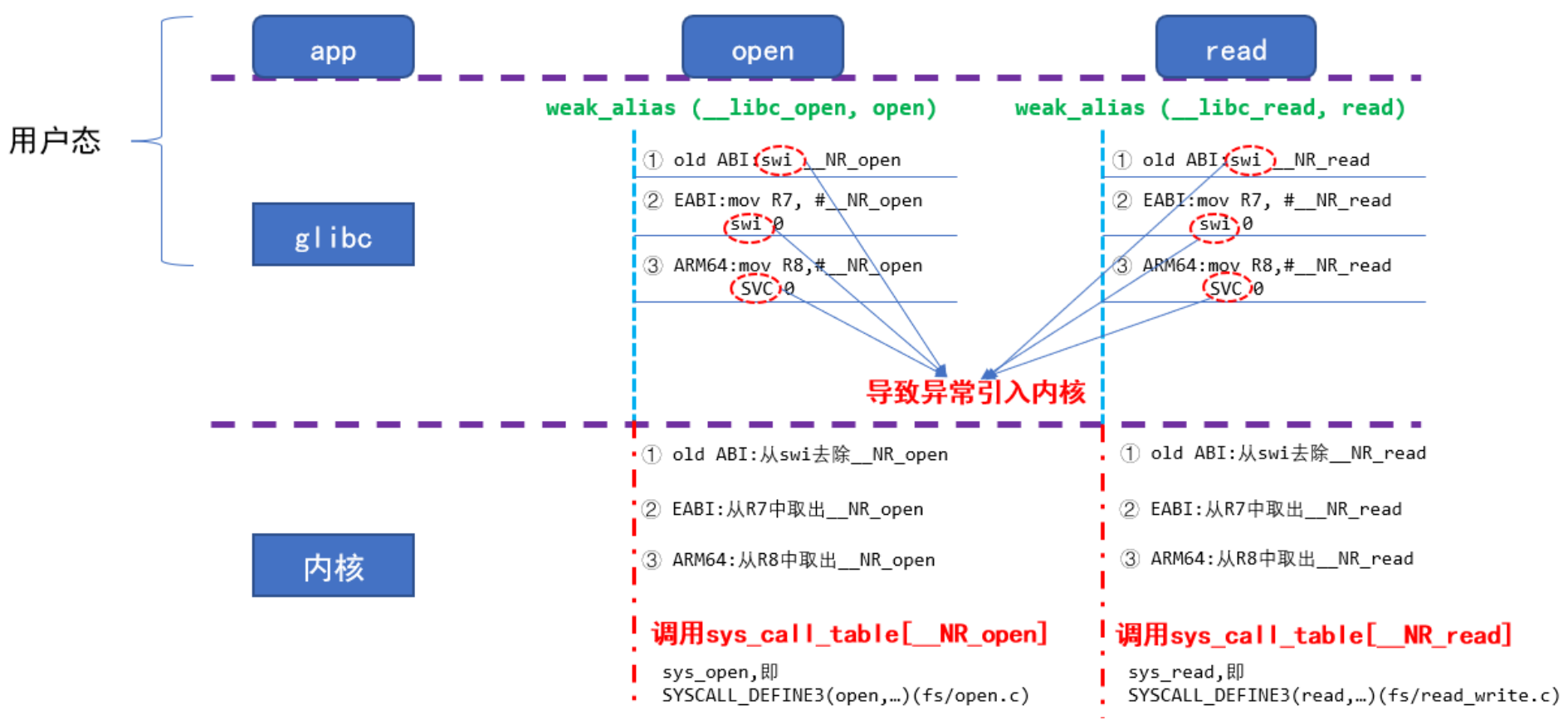
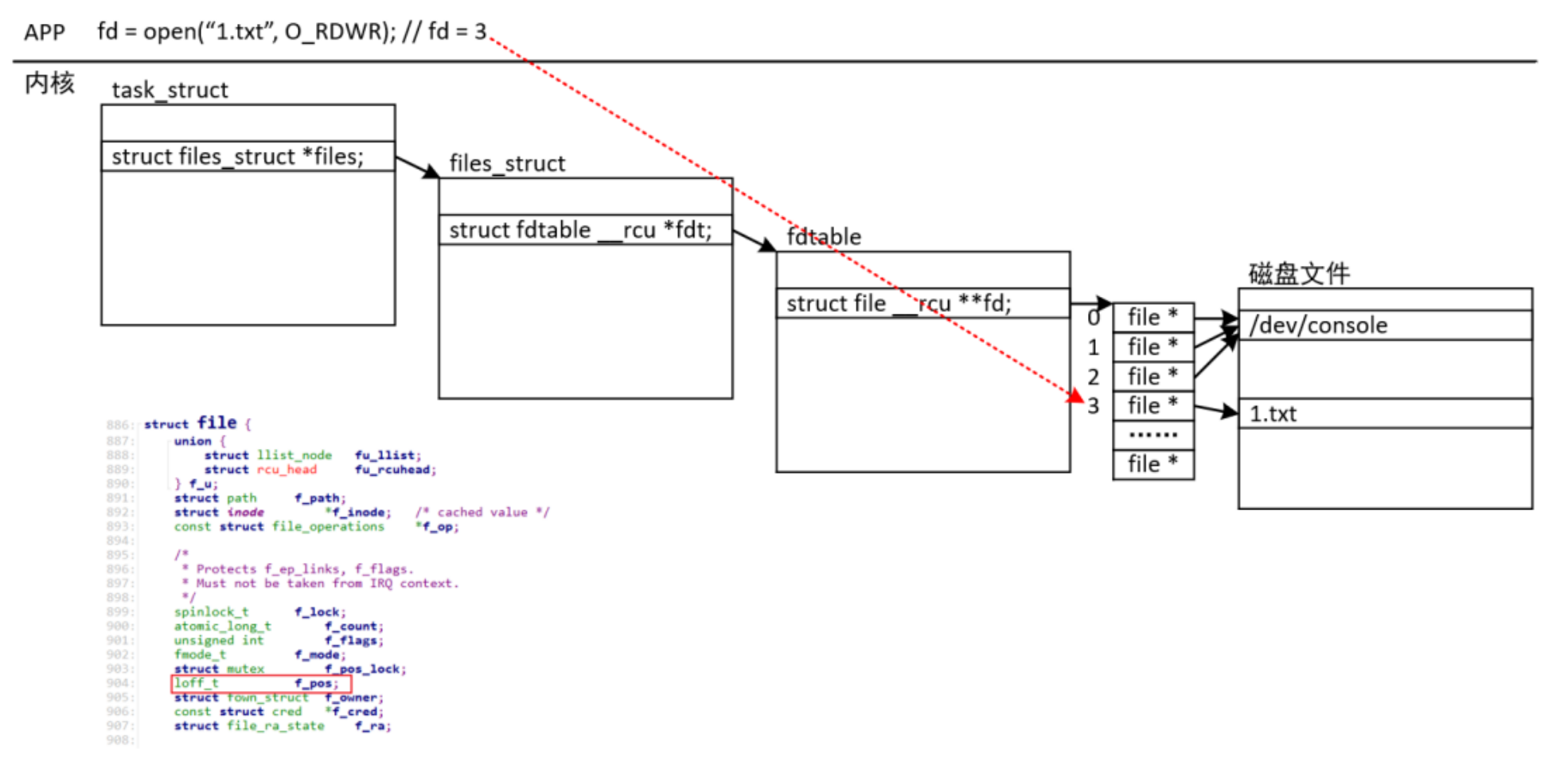
6.文件IO系统调用内部机制

 浙公网安备 33010602011771号