


(一) 如何在Python3.8上安装TensorFlow (Mac版本)
今天下载安装了Anaconda,需要在Anaconda上安装OpenCV和TensorFlow,但总会显示:
Specifications:

  - tensorflow-gpu -> python[version='3.5.*|3.6.*|3.7.*|>=3.7,<3.8.0a0|>=3.6,<3.7.0a0|>=3.5,<3.6.0a0|>=2.7,<2.8.0a0']

Your python: python=3.8
因为python=3.8是最新版本,相应的TensorFlow 还没能及时更新,需要自己下载安装TensorFlow2折腾了好久,走了很多弯路,最后使用了以下方法安装成功,希望能帮助到其他朋友:
一、检查电脑上目前的python和pip版本
python3 --version
pip3 --version
**注意:必须使用最新版本的pip,才能安装 TensorFlow 2。升级pip:
pip install --upgrade pip
二、配置python3.8运行环境
conda create -n env_name python=3.8
conda activate env_name
conda install pandas scikit-learn matplotlib notebook

pip3 install --user --upgrade tensorflow  #安装最新版本的tensorflow
三、测试是否安装成功
import tensorflow as tf
hello = tf.constant('hello,tf')
sess = tf.Session()
print(sess.run(hello))


此时可能出现报错:
AttributeError: module 'tensorflow' has no attribute 'Session'


不用担心,你的tensorflow已经安装成功,原因是你安装的tensorflow是2.0以上版本

可以将代码修改为:
import tensorflow as tf
tf.executing_eagerly()
with tf.compat.v1.Session() as sess:
hello = tf.constant('Hello, tf!')
print(sess.run(hello))
点击运行:
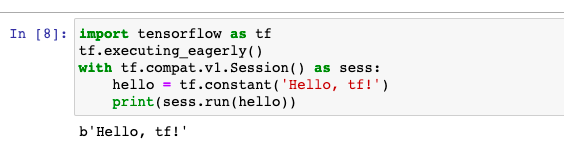
安装成功!

 浙公网安备 33010602011771号