
vue3-code-diff
vue3-code-diff
Vue2 / Vue3 可用的 code diff 插件 是 vue-code-diff
安装
# With NPM
npm i v-code-diff

# With Yarn
yarn add v-code-diff
全局注册
import {createApp} from 'vue'
import CodeDiff from 'v-code-diff'

app
  .use(CodeDiff)
  .mount('#app')
使用
<template>
  <code-diff
      :old-string="'12345'"
      :new-string="'3456'"
      file-name="test.txt"
      output-format="side-by-side"/>
</template>
局部使用
在 vue 文件中
<template>
  <code-diff
      :old-string="'12345'"
      :new-string="'3456'"
      file-name="test.txt"
      output-format="side-by-side"/>
</template>
<script lang="ts">
import {defineComponent} from 'vue'
import {CodeDiff} from 'v-code-diff'

export default defineComponent({
  components: {
    CodeDiff
  }
})
</script>
事件
| 事件名称 | 说明 | 回调参数 |
|---|---|---|
| before-render | 渲染前触发 | - |
| after-render | 渲染后触发 | - |
参数
| 参数 | 说明 | 类型 | 可选值 | 默认值 |
|---|---|---|---|---|
| highlight | 控制是否高亮代码 | boolean | - | true |
| language | 代码语言,如typescript。不填会自动判断。 查看全部支持语言 |
string | - | - |
| old-string | 陈旧的字符串 | string | - | - |
| new-string | 新的字符串 | string | - | - |
| context | 不同地方上下间隔多少行不隐藏 | number | - | - |
| outputFormat | 展示的方式 | string | line-by-line,side-by-side | line-by-line |
| drawFileList | 展示对比文件列表 | boolean | - | false |
| renderNothingWhenEmpty | 当无对比时不渲染 | boolean | - | false |
| diffStyle | 差异风格, 单词级差异或字母级差异 | string | word, char | word |
| fileName | 文件名 | string | - | - |
| isShowNoChange | 当无对比时展示源代码 | boolean | - | false |
| trim | 移除字符串前后空白字符 | boolean | - | false |
| language | 对比的文本语言 | boolean | - | false |
| noDiffLineFeed | 不 diff windows 换行符(CRLF)与 linux 换行符(LF) | boolean | - | false |
实例
main.ts
import CodeDiff from 'v-code-diff'
// use
const app = createApp(App)
app.use(VMdPreview)
app.use(CodeDiff)
vue
const oldContent = ref('123') //存旧内容
const newContent = ref('321') //存新内容
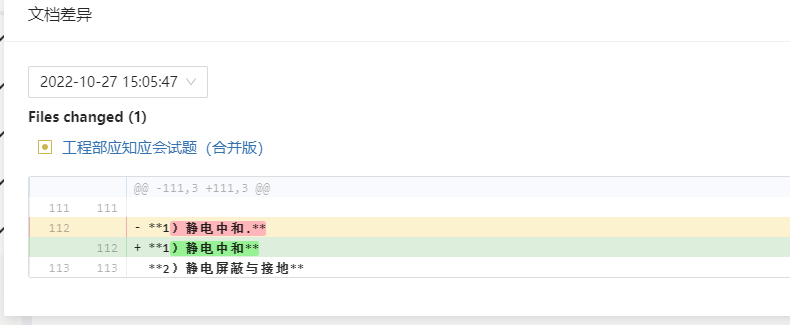
<code-diff
    :old-string="oldContent"
    :new-string="newContent"
    :file-name="rArticle.title"
    output-format="line-by-line"
    :draw-file-list="true"
    :context="1"
/>

 浙公网安备 33010602011771号