

用Flash OCX实现QQ魔法
效果图:
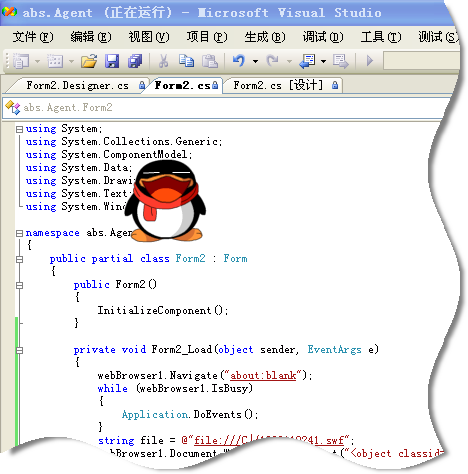
--------------------------------------------------------------------------------------------
最先想到的方法是Form的TransparentKey属性。只需把Flaxh ocx拉到窗体,
ocx控件背景颜色、窗休背景颜色和TransparentKey都设置相同的颜色值就可以实现透明了。
什么?实现不了?
嘿嘿,把系统颜色改成16位色吧!
于是找到了另一种方法........
完美方案:
在Form上放个WebBrowser,在WebBrowser中显示Flash,把WebBrowser Docuemt背景(默认是白色)和TransparentKey一致,
Form的FormBorderStyle高为none。
搞定,效果如上图。
贴上代码。
无常作品: msn : wuchangx@hotmail.com QQ: 3263262

 Form2.Designer.cs
1 using System.Windows.Forms;
2namespace abs.Agent
3{
4 partial class Form2
5 {
{
6 /**////<summary>
7 /// 必需的设计器变量。
8 ///</summary>
9 private System.ComponentModel.IContainer components = null;
10
11 /**////<summary>
12 /// 清理所有正在使用的资源。
13 ///</summary>
14 ///<param name="disposing">如果应释放托管资源,为 true;否则为 false。</param>
15 protected override void Dispose(bool disposing)
16 {
17 if (disposing && (components != null))
18 {
19 components.Dispose();
20 }
21 base.Dispose(disposing);
22 }
23
24 Windows 窗体设计器生成的代码#region Windows 窗体设计器生成的代码
25
26 /**////<summary>
27 /// 设计器支持所需的方法 - 不要
28 /// 使用代码编辑器修改此方法的内容。
29 ///</summary>
30 private void InitializeComponent()
31 {
32 this.webBrowser1 = new System.Windows.Forms.WebBrowser();
33 this.SuspendLayout();
34 //
35 // webBrowser1
36 //
37 this.webBrowser1.Dock = System.Windows.Forms.DockStyle.Fill;
38 this.webBrowser1.Location = new System.Drawing.Point(0, 0);
39 this.webBrowser1.MinimumSize = new System.Drawing.Size(20, 20);
40 this.webBrowser1.Name = "webBrowser1";
41 this.webBrowser1.ScrollBarsEnabled = false;
42 this.webBrowser1.Size = new System.Drawing.Size(505, 302);
43 this.webBrowser1.TabIndex = 0;
44 //
45 // Form2
46 //
47 this.AutoScaleDimensions = new System.Drawing.SizeF(6F, 12F);
48 this.AutoScaleMode = System.Windows.Forms.AutoScaleMode.Font;
49 this.ClientSize = new System.Drawing.Size(505, 302);
50 this.Controls.Add(this.webBrowser1);
51 this.FormBorderStyle = System.Windows.Forms.FormBorderStyle.None;
52 this.Name = "Form2";
53 this.Text = "Form2";
54 this.TopMost = true;
55 this.TransparencyKey = System.Drawing.Color.White;
56 this.Load += new System.EventHandler(this.Form2_Load);
57 this.ResumeLayout(false);
58
59 }
60
61 #endregion
62
63 private WebBrowser webBrowser1;
64 }
65 }
}
Form2.cs
1using System;
2using System.Collections.Generic;
3using System.ComponentModel;
4using System.Data;
5using System.Drawing;
6using System.Text;
7using System.Windows.Forms;
8
9namespace abs.Agent
10{
11 public partial class Form2 : Form
12 {
13 public Form2()
14 {
15 InitializeComponent();
16 }
17
18 private void Form2_Load(object sender, EventArgs e)
19 {
20 webBrowser1.Navigate("about:blank");
21 while (webBrowser1.IsBusy)
22 {
23 Application.DoEvents();
24 }
25 string file = @"file:///C|/1020110241.swf";
26 webBrowser1.Document.Write(string.Format("<object classid=\"clsid:D27CDB6E-AE6D-11cf-96B8-444553540000\" width=\"222\" height=\"186\"> <param name=\"wmode\" value=\"transparent\"><param name=\"movie\" value=\" {0}\"> <param name=\"quality\" value=\"high\"></object>",file));
27 }
28 }
29}
引用の:http://www.cnblogs.com/star65225692/archive/2008/04/02/1134810.html
--------------------------------------------------------------------------------------------
最先想到的方法是Form的TransparentKey属性。只需把Flaxh ocx拉到窗体,
ocx控件背景颜色、窗休背景颜色和TransparentKey都设置相同的颜色值就可以实现透明了。
什么?实现不了?
嘿嘿,把系统颜色改成16位色吧!
于是找到了另一种方法........
完美方案:
在Form上放个WebBrowser,在WebBrowser中显示Flash,把WebBrowser Docuemt背景(默认是白色)和TransparentKey一致,
Form的FormBorderStyle高为none。
搞定,效果如上图。
贴上代码。
无常作品: msn : wuchangx@hotmail.com QQ: 3263262
Form2.Designer.cs1
using System.Windows.Forms;2
namespace abs.Agent3
{4
partial class Form25
{6
/**////<summary>7
/// 必需的设计器变量。8
///</summary>9
private System.ComponentModel.IContainer components = null;10
11
/**////<summary>12
/// 清理所有正在使用的资源。13
///</summary>14
///<param name="disposing">如果应释放托管资源,为 true;否则为 false。</param>15
protected override void Dispose(bool disposing)16
{17
if (disposing && (components != null))18
{19
components.Dispose();20
}21
base.Dispose(disposing);22
}23
24
Windows 窗体设计器生成的代码#region Windows 窗体设计器生成的代码25
26
/**////<summary>27
/// 设计器支持所需的方法 - 不要28
/// 使用代码编辑器修改此方法的内容。29
///</summary>30
private void InitializeComponent()31
{32
this.webBrowser1 = new System.Windows.Forms.WebBrowser();33
this.SuspendLayout();34
// 35
// webBrowser136
//37
this.webBrowser1.Dock = System.Windows.Forms.DockStyle.Fill;38
this.webBrowser1.Location = new System.Drawing.Point(0, 0);39
this.webBrowser1.MinimumSize = new System.Drawing.Size(20, 20);40
this.webBrowser1.Name = "webBrowser1";41
this.webBrowser1.ScrollBarsEnabled = false;42
this.webBrowser1.Size = new System.Drawing.Size(505, 302);43
this.webBrowser1.TabIndex = 0;44
// 45
// Form246
//47
this.AutoScaleDimensions = new System.Drawing.SizeF(6F, 12F);48
this.AutoScaleMode = System.Windows.Forms.AutoScaleMode.Font;49
this.ClientSize = new System.Drawing.Size(505, 302);50
this.Controls.Add(this.webBrowser1);51
this.FormBorderStyle = System.Windows.Forms.FormBorderStyle.None;52
this.Name = "Form2";53
this.Text = "Form2";54
this.TopMost = true;55
this.TransparencyKey = System.Drawing.Color.White;56
this.Load += new System.EventHandler(this.Form2_Load);57
this.ResumeLayout(false);58
59
}60
61
#endregion62
63
private WebBrowser webBrowser1;64
}65
}Form2.cs1
using System;2
using System.Collections.Generic;3
using System.ComponentModel;4
using System.Data;5
using System.Drawing;6
using System.Text;7
using System.Windows.Forms;8
9
namespace abs.Agent10
{11
public partial class Form2 : Form12
{13
public Form2()14
{15
InitializeComponent();16
}17
18
private void Form2_Load(object sender, EventArgs e)19
{20
webBrowser1.Navigate("about:blank");21
while (webBrowser1.IsBusy)22
{23
Application.DoEvents();24
}25
string file = @"file:///C|/1020110241.swf";26
webBrowser1.Document.Write(string.Format("<object classid=\"clsid:D27CDB6E-AE6D-11cf-96B8-444553540000\" width=\"222\" height=\"186\"> <param name=\"wmode\" value=\"transparent\"><param name=\"movie\" value=\"{0}\"> <param name=\"quality\" value=\"high\"></object>",file));27
}28
}29
}引用の:http://www.cnblogs.com/star65225692/archive/2008/04/02/1134810.html

 浙公网安备 33010602011771号