C#多线程编程04-异步编程await和async
using System.Text.Json;

using var client = new HttpClient();
var taskGetList = client.GetStringAsync("https://pokeapi.co/api/v2/pokemon/");

//var response = taskGetList.Result;//该属性将阻塞主线程
var response = await taskGetList;

//await后面的代码被视为主线程,看起来像同步运行所有内容
var doc = JsonDocument.Parse(response);
JsonElement root = doc.RootElement;
JsonElement result = root.GetProperty("results");
JsonElement first = result[0];
Console.WriteLine(first.GetProperty("name"));
Console.WriteLine(first.GetProperty("url"));

Console.WriteLine("This is the end of the program.");
Console.ReadLine();
1、将所有内容放入一个方法中并且它是async方法,那么它实际上是异步运行而不是同步运行。
使用await方法
 using System.Text.Json;

//主线程
OutputFirstPokemonAsync();
Console.WriteLine("This is the end of the program.");
Console.ReadLine();

async void OutputFirstPokemonAsync()
{
    //主线程
    using var client = new HttpClient();
    //第一个任务
    var taskGetList = client.GetStringAsync("https://pokeapi.co/api/v2/pokemon/");

    //await 可以返回值
    var response = await taskGetList;//遇到await关键字,主线程被释放,主线程可以处理其它事情

    //后续方法均被视为GetStringAsync任务的延续,该延续将在另外一个新的任务中执行
    var doc = JsonDocument.Parse(response);
    JsonElement root = doc.RootElement;
    JsonElement result = root.GetProperty("results");
    JsonElement first = result[0];
    Console.WriteLine(first.GetProperty("name"));
    Console.WriteLine(first.GetProperty("url"));
2、await的特点
await关键字之后的所有内容都被视为延续,当程序运行到await关键字时,调用线程立即被释放,以便它可以自由地做任何其他事情。
await可以返回值
使用await关键字时,它会抛出聚合异常集合中的第一个异常
当使用async和await关键字时,系统会帮助管理同步上下文(invoke方法)
3、await语法
通常当你使用async和await关键字时,是在方法或函数内部使用的。
async Task methodName(...)
{
         ...
        await SomeTask;

        //任务的延续
}
若async的方法不返回任何类型时,此方法的类型是Task类型
  internal class Program
  {
      static void Main(string[] args)
      {
          Console.WriteLine("Starting to do work ");
          WorkAsync();
          Console.WriteLine("Press enter to exit");
          Console.ReadLine();
      }

      //void返回类型仅在事件处理程序使用
      async static Task WorkAsync()
      {
          await Task.Delay(2000);

          //awai后面的代码均为Task的延续
          Console.WriteLine("Work is done.");
      }
  }
存在返回值的函数
class Program
    {
    //Main方法返回类型必须是Task或Task<int>,异步方法返回void时,无法等待其完成
    async static Task Main(string[] args)
        {
            Console.WriteLine("Starting to do work ");
            var data = await FetchDataAsync();
            Console.WriteLine($"data is fetched:{data}");
            Console.WriteLine("Press enter to exit");
            Console.ReadLine();
        }


        static async Task<string> FetchDataAsync()
        {
            await Task.Delay(2000);
            Console.WriteLine("FetchDataAsync is done");
            return "Complex data";
        }

        //void返回类型仅在事件处理程序使用
        async static Task WorkAsync()
        {
            await Task.Delay(2000);

            //awai后面的代码均为Task的延续
            Console.WriteLine("Work is done.");
        }
    }
4、await使用的线程
class Program
    {
    //Main方法返回类型必须是Task或Task<int>,异步方法返回void时,无法等待其完成
    async static Task Main(string[] args)
        {
            Console.WriteLine($"1、 Main Thread id: {Thread.CurrentThread.ManagedThreadId}");
           // Console.WriteLine("Starting to do work ");
            var data = await FetchDataAsync();
            Console.WriteLine($"Data is fetched:{data}");
            Console.WriteLine($"2、 Thread id: {Thread.CurrentThread.ManagedThreadId}");
            //Console.WriteLine("Press enter to exit");
            Console.ReadLine();
        }

        static async Task<string> FetchDataAsync()
        {
            Console.WriteLine($"3、 await Before Thread id: {Thread.CurrentThread.ManagedThreadId}");
            await Task.Delay(2000);
            Console.WriteLine($"4、 await After Thread id: {Thread.CurrentThread.ManagedThreadId}");
            Console.WriteLine("FetchDataAsync is done");
            return "Complex data";
        }

     }
执行结构
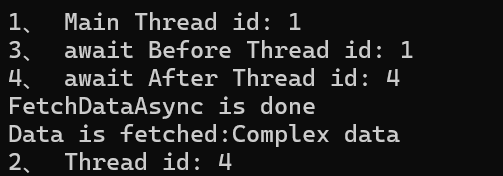
1、 Main Thread id: 1 # 主线程开始
3、 await Before Thread id: 1 # 同步部分仍在主线程
4、 await After Thread id: 4 # 异步完成后可能切换到线程池线程
FetchDataAsync is done
Data is fetched:Complex data
2、 Thread id: 4 # Main方法中await之后,继续在线程池线程执行
5、返回值的延续操作
一:await在任务完成后返回结果,以便你可以在之后的的延续中使用它。
二、await关键字之后的所有内容都被视为一个延续。
using System.Text.Json;

using var client = new HttpClient();

var ListJson = await client.GetStringAsync("https://pokeapi.co/api/v2/pokemon/");

//获取第一个宝可梦的URL
var doc = JsonDocument.Parse(ListJson);
JsonElement root = doc.RootElement;
JsonElement result = root.GetProperty("results");
JsonElement first = result[0];
var url = first.GetProperty("url").ToString();

//获取第一个宝可梦的详细消息
var FristGetDetailJson = await client.GetStringAsync(url);

//获取高度和名字
doc = JsonDocument.Parse(FristGetDetailJson);
root = doc.RootElement;
Console.WriteLine($"name: {root.GetProperty("name")}");
Console.WriteLine($"height: {root.GetProperty("height")}");

Console.WriteLine("This is the end of the program.");
Console.ReadLine();
6、使用await处理异常
var tasks = new[]
{
    Task.Run(()=>throw new InvalidOperationException("InvalidOperationException")),
    Task.Run(() => throw new ArgumentException("ArgumentException")),
    Task.Run(() => throw new Exception("Exception"))
};

await Task.WhenAll(tasks);      //抛出第一个异常
Console.WriteLine("Press Enter to exit");
7、await与同步上下文
await关键字之后的所有内容都被视为任务的延续,
在UI线程中,同步上下文的作用是确保异步操作完成后的回调(即await之后的代码)在UI线程上执行,从而允许安全地更新UI控件
await关键字会捕获当前的同步上下文(如果存在的话)。在UI线程中,这个同步上下文就是UI线程的上下文。
当异步操作完成时,await会尝试在捕获的同步上下文中执行其后续代码。这意味着,即使异步操作是在后台线程上完成的,await之后的代码也会被封送(marshal)回UI线程执行

 浙公网安备 33010602011771号