
jujutsu真的比你熟悉的git更好吗?合并冲突!
起因
jj git push报错,没有committer。
因为vscode在关闭git功能后,是无法在图形界面去做git diff的。
有种特殊情况:当一个相同的change ID,分叉出多个不同的commit ID。解决冲突的最快方法是什么?
jj git push
❯ jj git push
Error: Won't push commit b3f... since it has no author and/or committer set
Hint: Rejected commit: yutonnnr?? b3f1260f init: gen, codec. TODO: = padding
这个hint我不懂什么意思,要我拒绝b3f的提交?
jj show b3f
从已有git仓库转jj会出现这种问题,用jj show b3f查看情况
Commit ID: b3f1260fe255593a224ce4cd40f3ecb0317a1a72
Change ID: yutonnnrkpzzrlmkvlxqkrlrxtmzkoun
Author   : Nolca <30747832+Nolca@users.noreply.github.com> (2025-08-29 07:53:05)
Committer: (no name set) <(no email set)> (2025-08-30 07:16:16)
jj log
先阅读一下如何处理冲突: https://steveklabnik.github.io/jujutsu-tutorial/branching-merging-and-conflicts/conflicts.html
说实话,这本教程太长了,我只想快速上手,版本管理工具学起来都比较绕,必须多用多查,才能掌握。
这是一种很麻烦的情况,我们已经 过度脱离 远程分支了。
@  nsvypnmz 2025-08-31 00:03:24 main* 12c1b924
│  (empty)
○  qzwzwxtl 2025-08-31 00:01:55 git_head() 512ed314
│
○  urtwuxoz 2025-08-30 23:19:21 77afa126
│
○  yutonnnr?? 2025-08-30 07:16:16 b3f1260f
│
│ ◆  yutonnnr?? 2025-08-29 07:53:05 main@origin c0e9f1ed
├─╯
◆  zzzzzzzz root() 00000000
main*是当前未存储的提交
git_head()是git的HEAD指针,比jj @慢一个commit
main@origin是远程git仓库的最新提交
有一个相同的change ID,分叉出2个不同的commit ID。yutonnnr→b3f.../c0e...
这期间,我试了很多指令,但都越来越绕。当你觉得无力回天时,可以用jj op log查看历史操作,然后用jj op restore <op_id>来撤销操作。
jj op restore VS jj undo
- jj undo: 撤销一次,若再次
jj undo,会反撤销。如此在 撤销/反撤销 之间循环。 - jj op restore: 恢复任意时刻的状态
目前我用到jj op restore比jj undo更频繁。
jj rebase -s src -d dst
jj rebase -s b3f1260f -d c0e9f1ed
jj resolve # 或自行在git diff视图内编辑
jj git log
@  nsvypnmz 2025-08-31 15:03:25 main* 9cdf7f87
│
×  qzwzwxtl 2025-08-31 14:57:39 git_head() b8d05198 conflict
│
×  urtwuxoz 2025-08-31 14:57:39 ace78473 conflict
│
×  yutonnnr?? 2025-08-31 14:57:39 7a91cf03 conflict
│
◆  yutonnnr?? 2025-08-29 07:53:05 main@origin c0e9f1ed
│
~
反例:不可变的共享历史commit
像这样就不行
❯ jj rebase -s c0e -d @
Error: Commit c0e9f1ed3adf is immutable
Hint: Could not modify commit: yutonnnr?? c0e9f1ed main@origin | init: gen, codec. TODO: = padding
Hint: Immutable commits are used to protect shared history.
Hint: For more information, see:
      - https://jj-vcs.github.io/jj/latest/config/#set-of-immutable-commits
      - `jj help -k config`, "Set of immutable commits"
Hint: This operation would rewrite 1 immutable commits.
jj abandon
好呀,有3个冲突要我们一一解决,这怎么可能?还好是个小项目,直接abandon!(重要项目,就还得一个个解决冲突😰)
jj abandon qzwzwxtl urtwuxoz yutonnnr
# 手动修改冲突
jj git push
结论
jujutsu还不稳定,jjk与visualJJ插件也在这个情况下报错了,因为我用vscode插件比较多,先用git吧。纯命令行用jujutsu没啥问题。
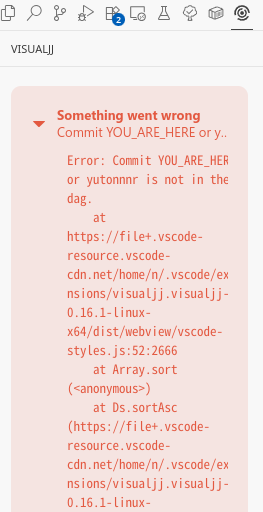
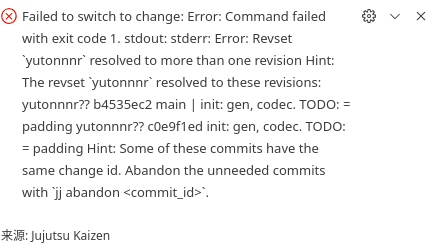
实际按这个报错去jj abandon b45 c0e,会报另外一个错误:immutable commits,要你再去打开config去调。这么麻烦,这里真不如用git。

 浙公网安备 33010602011771号