
Luajit 2.0.4 绑定 protoc-gen-lua (Windows 平台)
转载自:https://blog.csdn.net/huutu/article/details/49696795
Luajit 2.0.4 绑定 protoc-gen-lua (Windows 平台)
上一篇 protoc-gen-lua 编译、安装、使用教程 介绍了 protoc-gen-lua 的编译使用介绍,但是最后的例子,我是把 protoc-gen-lua 的 pb.c 源代码添加到工程中去进行编译的。那如果我们写了 lua 代码想直接用 lua 命令测试呢?这时候总不能每次都拿 vs 的工程来编译运行,好在我们有 Luajit 2.0.4 的源代码 和 protoc-gen-lua 中 pb.c 的源代码,代码在手天下我有,我来把这两个整合到一起,即把 protoc-gen-lua 的 pb.c 编译到 Luajit 2.0.4 中。
首先下载安装 Luajit 2.0.4 ,然后解压、编译。具体过程请看上一篇 。
然后下载安装 protobuf-2.4.1,然后解压、编译。具体过程请看上一篇。
然后下载安装 protoc-gen-lua ,然后解压、编译、具体过程请看上一篇。
转自 http://blog.csdn.net/huutu http://www.thisisgame.com.cn
说这么多就是说 看完上一篇 再来看这一篇……
Luajit 2.0.4 的编译是在 LuaJIT-2.0.4\src 中,在 Visual Studio 控制台中 执行 msvcbuild.bat 进行编译的,编译会生成 lua51.dll 、lua51.lib、luajit.exe 。
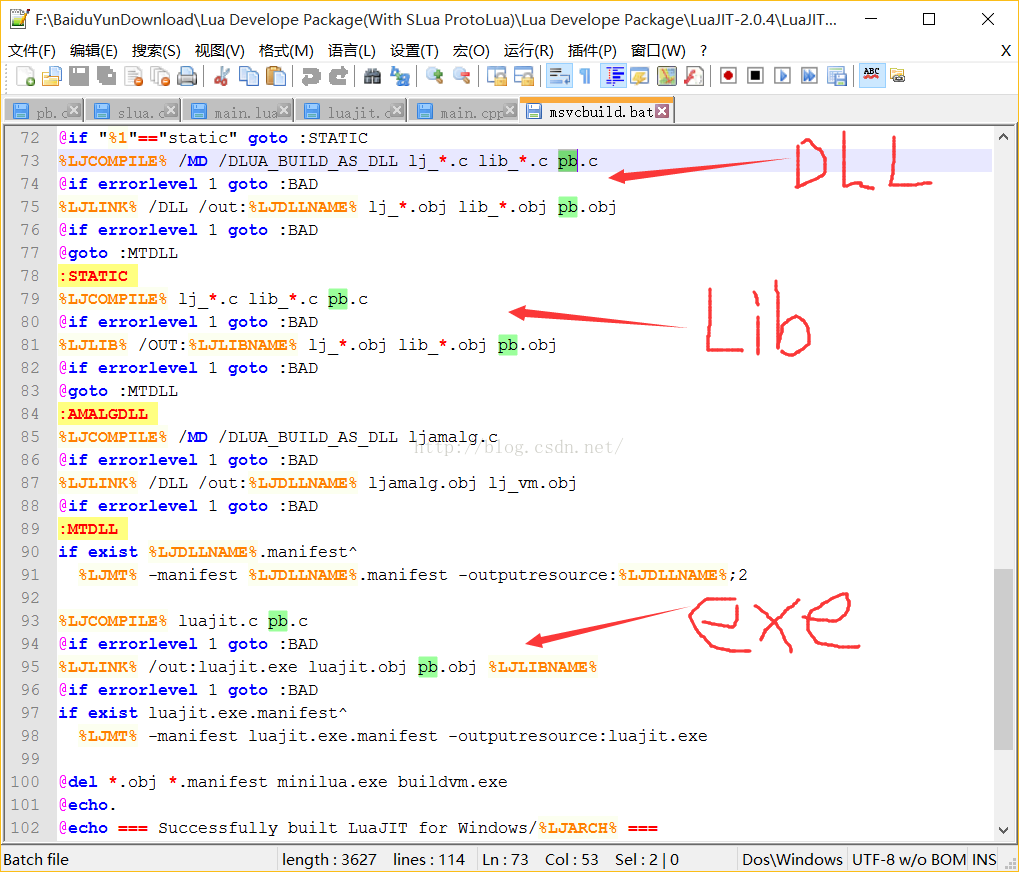
首先,拷贝 protoc-gen-lua-master\protobuf\pb.c 到 LuaJIT-2.0.4\src 目录,然后用文本编辑器打开 msvcbuild.bat ,添加 pb.c 到链接文件列表中,修改如下
-
@rem Script to build LuaJIT with MSVC.
-
@rem Copyright (C) 2005-2015 Mike Pall. See Copyright Notice in luajit.h
-
@rem
-
@rem Either open a "Visual Studio .NET Command Prompt"
-
@rem (Note that the Express Edition does not contain an x64 compiler)
-
@rem -or-
-
@rem Open a "Windows SDK Command Shell" and set the compiler environment:
-
@rem setenv /release /x86
-
@rem -or-
-
@rem setenv /release /x64
-
@rem
-
@rem Then cd to this directory and run this script.
-
-
@if not defined INCLUDE goto :FAIL
-
-
@setlocal
-
@set LJCOMPILE=cl /nologo /c /O2 /W3 /D_CRT_SECURE_NO_DEPRECATE
-
@set LJLINK=link /nologo
-
@set LJMT=mt /nologo
-
@set LJLIB=lib /nologo /nodefaultlib
-
@set DASMDIR=..\dynasm
-
@set DASM=%DASMDIR%\dynasm.lua
-
@set LJDLLNAME=lua51.dll
-
@set LJLIBNAME=lua51.lib
-
@set ALL_LIB=lib_base.c lib_math.c lib_bit.c lib_string.c lib_table.c lib_io.c lib_os.c lib_package.c lib_debug.c lib_jit.c lib_ffi.c
-
-
%LJCOMPILE% host\minilua.c
-
@if errorlevel 1 goto :BAD
-
%LJLINK% /out:minilua.exe minilua.obj
-
@if errorlevel 1 goto :BAD
-
if exist minilua.exe.manifest^
-
%LJMT% -manifest minilua.exe.manifest -outputresource:minilua.exe
-
-
@set DASMFLAGS=-D WIN -D JIT -D FFI -D P64
-
@set LJARCH=x64
-
@minilua
-
@if errorlevel 8 goto :X64
-
@set DASMFLAGS=-D WIN -D JIT -D FFI
-
@set LJARCH=x86
-
:X64
-
minilua %DASM% -LN %DASMFLAGS% -o host\buildvm_arch.h vm_x86.dasc
-
@if errorlevel 1 goto :BAD
-
-
%LJCOMPILE% /I "." /I %DASMDIR% host\buildvm*.c
-
@if errorlevel 1 goto :BAD
-
%LJLINK% /out:buildvm.exe buildvm*.obj
-
@if errorlevel 1 goto :BAD
-
if exist buildvm.exe.manifest^
-
%LJMT% -manifest buildvm.exe.manifest -outputresource:buildvm.exe
-
-
buildvm -m peobj -o lj_vm.obj
-
@if errorlevel 1 goto :BAD
-
buildvm -m bcdef -o lj_bcdef.h %ALL_LIB%
-
@if errorlevel 1 goto :BAD
-
buildvm -m ffdef -o lj_ffdef.h %ALL_LIB%
-
@if errorlevel 1 goto :BAD
-
buildvm -m libdef -o lj_libdef.h %ALL_LIB%
-
@if errorlevel 1 goto :BAD
-
buildvm -m recdef -o lj_recdef.h %ALL_LIB%
-
@if errorlevel 1 goto :BAD
-
buildvm -m vmdef -o jit\vmdef.lua %ALL_LIB%
-
@if errorlevel 1 goto :BAD
-
buildvm -m folddef -o lj_folddef.h lj_opt_fold.c
-
@if errorlevel 1 goto :BAD
-
-
@if "%1" neq "debug" goto :NODEBUG
-
@shift
-
@set LJCOMPILE=%LJCOMPILE% /Zi
-
@set LJLINK=%LJLINK% /debug
-
:NODEBUG
-
@if "%1"=="amalg" goto :AMALGDLL
-
@if "%1"=="static" goto :STATIC
-
%LJCOMPILE% /MD /DLUA_BUILD_AS_DLL lj_*.c lib_*.c pb.c
-
@if errorlevel 1 goto :BAD
-
%LJLINK% /DLL /out:%LJDLLNAME% lj_*.obj lib_*.obj pb.obj
-
@if errorlevel 1 goto :BAD
-
@goto :MTDLL
-
:STATIC
-
%LJCOMPILE% lj_*.c lib_*.c pb.c
-
@if errorlevel 1 goto :BAD
-
%LJLIB% /OUT:%LJLIBNAME% lj_*.obj lib_*.obj pb.obj
-
@if errorlevel 1 goto :BAD
-
@goto :MTDLL
-
:AMALGDLL
-
%LJCOMPILE% /MD /DLUA_BUILD_AS_DLL ljamalg.c
-
@if errorlevel 1 goto :BAD
-
%LJLINK% /DLL /out:%LJDLLNAME% ljamalg.obj lj_vm.obj
-
@if errorlevel 1 goto :BAD
-
:MTDLL
-
if exist %LJDLLNAME%.manifest^
-
%LJMT% -manifest %LJDLLNAME%.manifest -outputresource:%LJDLLNAME%;2
-
-
%LJCOMPILE% luajit.c pb.c
-
@if errorlevel 1 goto :BAD
-
%LJLINK% /out:luajit.exe luajit.obj pb.obj %LJLIBNAME%
-
@if errorlevel 1 goto :BAD
-
if exist luajit.exe.manifest^
-
%LJMT% -manifest luajit.exe.manifest -outputresource:luajit.exe
-
-
@del *.obj *.manifest minilua.exe buildvm.exe
-
@echo.
-
@echo === Successfully built LuaJIT for Windows/%LJARCH% ===
-
-
@goto :END
-
:BAD
-
@echo.
-
@echo *******************************************************
-
@echo *** Build FAILED -- Please check the error messages ***
-
@echo *******************************************************
-
@goto :END
-
:FAIL
-
@echo You must open a "Visual Studio .NET Command Prompt" to run this script
-
:END
转自 http://blog.csdn.net/huutu http://www.thisisgame.com.cn
具体添加的内容 如图
转自 http://blog.csdn.net/huutu http://www.thisisgame.com.cn
然后 执行 msvcbuild.bat 编译,肯定会出错的……,如下图

转自 http://blog.csdn.net/huutu http://www.thisisgame.com.cn
提示打不开 lua.h ,原因是 pb.c 中是用 #include<lua.h> 这种模式导入头文件

修改成 #include "lua.h" 即可

转自 http://blog.csdn.net/huutu http://www.thisisgame.com.cn
修改后再次编译,还是会报错,不过这个错 上一篇 已经遇到过了。

是因为宏定义的问题,引入了不该引入的头文件。

用宏定义隔开不执行。

转自 http://blog.csdn.net/huutu http://www.thisisgame.com.cn
再次编译,编译成功。
拿上一篇的测试工程,将 pb.c 从项目中移除,然后编译工程,就会提示错误

转自 http://blog.csdn.net/huutu http://www.thisisgame.com.cn
原因是:虽然 pb.c 被添加到了 msvcbuild.bat 中,但是 luaopen_pb 这个函数并没有导出,所以我们再对 pb.c 进行修改。让这个函数导出
首先在开始 添加宏定义
#define LUA_LIB然后给函数
int luaopen_pb (lua_State *L)添加导出属性,修改为
LUA_API int luaopen_pb (lua_State *L)再次执行 msvcbuild.bat 编译 LuaJIT-2.0.4 ,编译成功。
再次编译测试工程,编译成功。
把生成的 lua51.dll 拷贝到项目文件夹,运行,成功。

转自 http://blog.csdn.net/huutu http://www.thisisgame.com.cn
但这并不是我们的目的,继续。
用编译 LuaJIT-2.0.4 生成的 luajit.exe 去执行测试工程中的 main.lua ,发现并不能运行

原因是虽然 pb.c 中的 int luaopen_pb (lua_State *L) 被修改成了 LUA_API int luaopen_pb (lua_State *L) ,编译的时候导出了可以调用,但是在 luajit.exe 中,我们并没有调用
LUA_API int luaopen_pb (lua_State *L) 这个函数!!所以没有 load protobuf 的库。
转自 http://blog.csdn.net/huutu http://www.thisisgame.com.cn
打开 LuaJIT-2.0.4\src\luajit.c ,在 static int pmain(lua_State *L) 函数中添加 LUA_API int luaopen_pb (lua_State *L) 函数的调用。
如下图红框标识新添加的代码

转自 http://blog.csdn.net/huutu http://www.thisisgame.com.cn
再次执行 msvcbuild.bat 编译 LuaJIT-2.0.4 。
再次用 luajit.exe 去运行 main.lua 脚本,终于成功运行!


 浙公网安备 33010602011771号