


vVue Baidu Map
官网API: https://dafrok.github.io/vue-baidu-map/#/zh/index
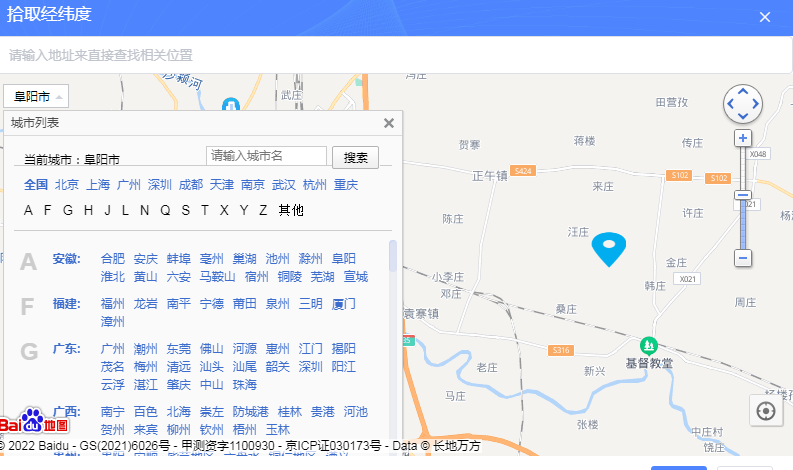
<template>
     <el-dialog title="拾取经纬度" :visible.sync="dialogVisible" id="mapDialog" :close-on-click-modal="false" append-to-body  width="800px" >
        <el-input v-model="keyword" placeholder="请输入地址来直接查找相关位置"></el-input>
        <baidu-map  style="height: calc(100% - 0.4rem);" class="map" :center="center" :zoom="zoom" @ready="handler"
                   :scroll-wheel-zoom="true"
                   @click="clickEvent"
                   ak="33B192o1jPaqOHASGGAIkoMuwi8W76j3">
            <!-- 地理位置的搜索功能 -->
            <bm-local-search :keyword="keyword" :auto-viewport="true" :location="location" style="display: none"></bm-local-search>
            <!-- 缩放比例尺的展示 -->
            <bm-navigation anchor="BMAP_ANCHOR_TOP_RIGHT"></bm-navigation>
            <!-- 城市 -->
            <bm-city-list anchor="BMAP_ANCHOR_TOP_LEFT"></bm-city-list>
            <!-- 定位 -->
            <bm-geolocation anchor="BMAP_ANCHOR_BOTTOM_RIGHT"  :showAddressBar="true" :autoLocation="true" @locationSuccess="getLoctionSuccess" ></bm-geolocation>
            <!-- 添加一个小红点的,并将当前的经纬度写入数据中 -->
            <bm-marker :position="{lng:locData.longitude, lat: locData.latitude}"></bm-marker>
            <bm-view :style="{width:'100%',height: '100%',flex: 1,marginBottom:'-15px'}"></bm-view>
        </baidu-map>
        <div class="demo-input-suffix" style="display:none;" >
            <el-link type="info">lng:</el-link><el-input  class="lineinput"  style="width:200px" size="mini" v-model.number="locData.longitude"></el-input>
            <el-link type="info">lat:</el-link><el-input  class="lineinput"  style="width:200px" size="mini" v-model.number="locData.latitude"></el-input>
            <el-link type="info">address:</el-link><el-input  class="lineinput"  style="width:200px" size="mini" v-model="locData.address"></el-input>
        </div>
        <div slot="footer" class="dialog-footer">
             <el-button type="primary" size="small"  @click.native="findlocation">保存</el-button>
            <el-button  size="small" @click.native="dialogVisible = false">取消</el-button>

        </div>
    </el-dialog>
</template>
<script>
import {BaiduMap,BmNavigation,BmView,BmGeolocation,BmCityList,BmMarker,BmLocalSearch} from 'vue-baidu-map'
    export default {
        name: "mapDialog",
        components: {
            BaiduMap,
            BmNavigation,
            BmView,
            BmGeolocation,
            BmCityList,
            BmMarker,
            BmLocalSearch
        },
        data () {
            return {
                center: {lng: 114.061618, lat: 22.550593},
                zoom: 12,
                dialogVisible:false,
                locData:{
                    longitude:'',
                    latitude:'',
                    address:'',
                },
                clientHeight:document.documentElement.clientHeight-260, // 屏幕高度
                iconUrl:'static/images/map/map_marker_check.png',
                keyword: "",
                location: "深圳市",
            }
        },
        methods: {
            show(){
                console.log('dddd');
                this.dialogVisible = true
            },
            handler ({BMap, map}) {
                let _this = this;	// 设置一个临时变量指向vue实例,因为在百度地图回调里使用this,指向的不是vue实例;
                var geolocation = new BMap.Geolocation();
                geolocation.getCurrentPosition(function(r){
                    console.log(r);
                    _this.center = {lng: r.longitude, lat: r.latitude};		// 设置center属性值
                    _this.autoLocationPoint = {lng: r.longitude, lat: r.latitude};		// 自定义覆盖物
                    _this.initLocation = true;
                },{enableHighAccuracy: true})

                window.map = map;
            },
            //点击地图监听
            clickEvent(e){
                map.clearOverlays();
                let Icon_0 = new BMap.Icon("static/images/map/map_marker_check.png", new BMap.Size(35, 64), {anchor: new BMap.Size(18, 32),imageSize: new BMap.Size(36, 36)});
                var myMarker = new BMap.Marker(new BMap.Point(e.point.lng, e.point.lat),{icon: Icon_0});
                map.addOverlay(myMarker);
                //用所定位的经纬度查找所在地省市街道等信息
                var point = new BMap.Point(e.point.lng, e.point.lat);
                var gc = new BMap.Geocoder();
                let _this = this;
                gc.getLocation(point, function (rs) {
                    var addComp = rs.addressComponents;
                    //console.log(rs.address);//地址信息
                    _this.locData.address = rs.address;

                });
                this.locData.longitude = e.point.lng;
                this.locData.latitude = e.point.lat;
                console.log('定位结果:',this.locData);
            },
            //定位成功回调
            getLoctionSuccess(point, AddressComponent, marker){
                map.clearOverlays();
                let Icon_0 = new BMap.Icon("static/images/map/map_marker_check.png", new BMap.Size(35, 64), {anchor: new BMap.Size(18, 32),imageSize: new BMap.Size(36, 36)});
                var myMarker = new BMap.Marker(new BMap.Point(point.point.lng, point.point.lat),{icon: Icon_0});
                map.addOverlay(myMarker);
                this.locData.longitude = point.point.lng;
                this.locData.latitude = point.point.lat;
            },
            findlocation(){
                console.log('提交定位结果:',this.locData);
                this.$emit("findlocdata",this.locData)
                this.dialogVisible = false
            },

        },
        // mounted() {

        // }

    }
</script>

<style>
.el-dialog__body {
    padding: 0px 0px 0px 0px;
    height: 420px;
}
</style>

 浙公网安备 33010602011771号