
UE:多屏幕全屏后只有一个屏幕显示怎么办
© mengzhishanghun · 原创文章
首发于 博客园 · 禁止未经授权转载
这里讨论的是,多个屏幕时,用N卡的Surround融合为一个屏幕,当开始游戏后发生的问题
原因
这里的代码截图是Unreal5.3.2版本
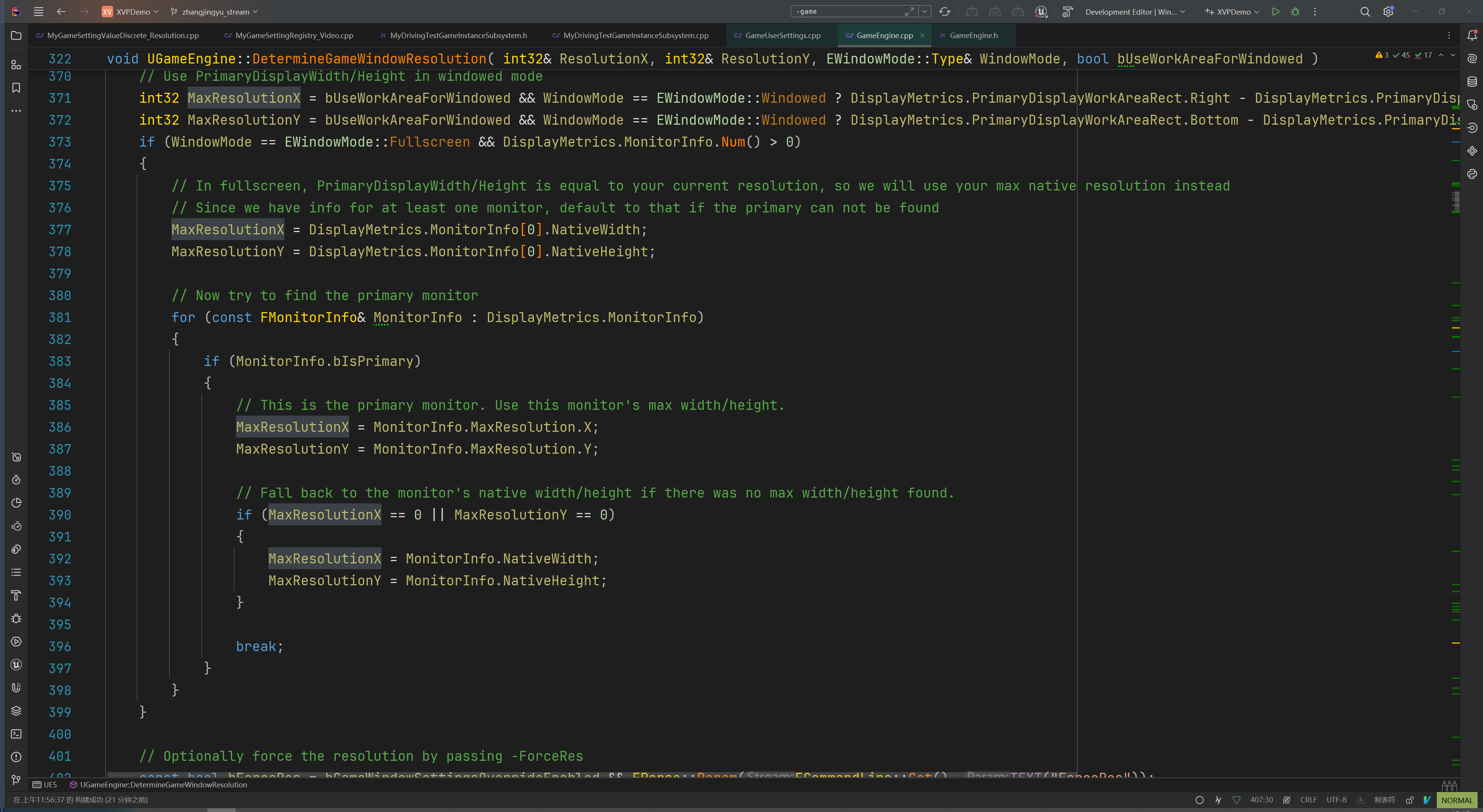
当全屏时,会获得一个最大分辨率,这个分辨率是你主屏幕的分辨率,即使是通过Surround融合成了一个大屏,这里也只获取之前单屏的分辨率,这是造成这个问题的根本原因
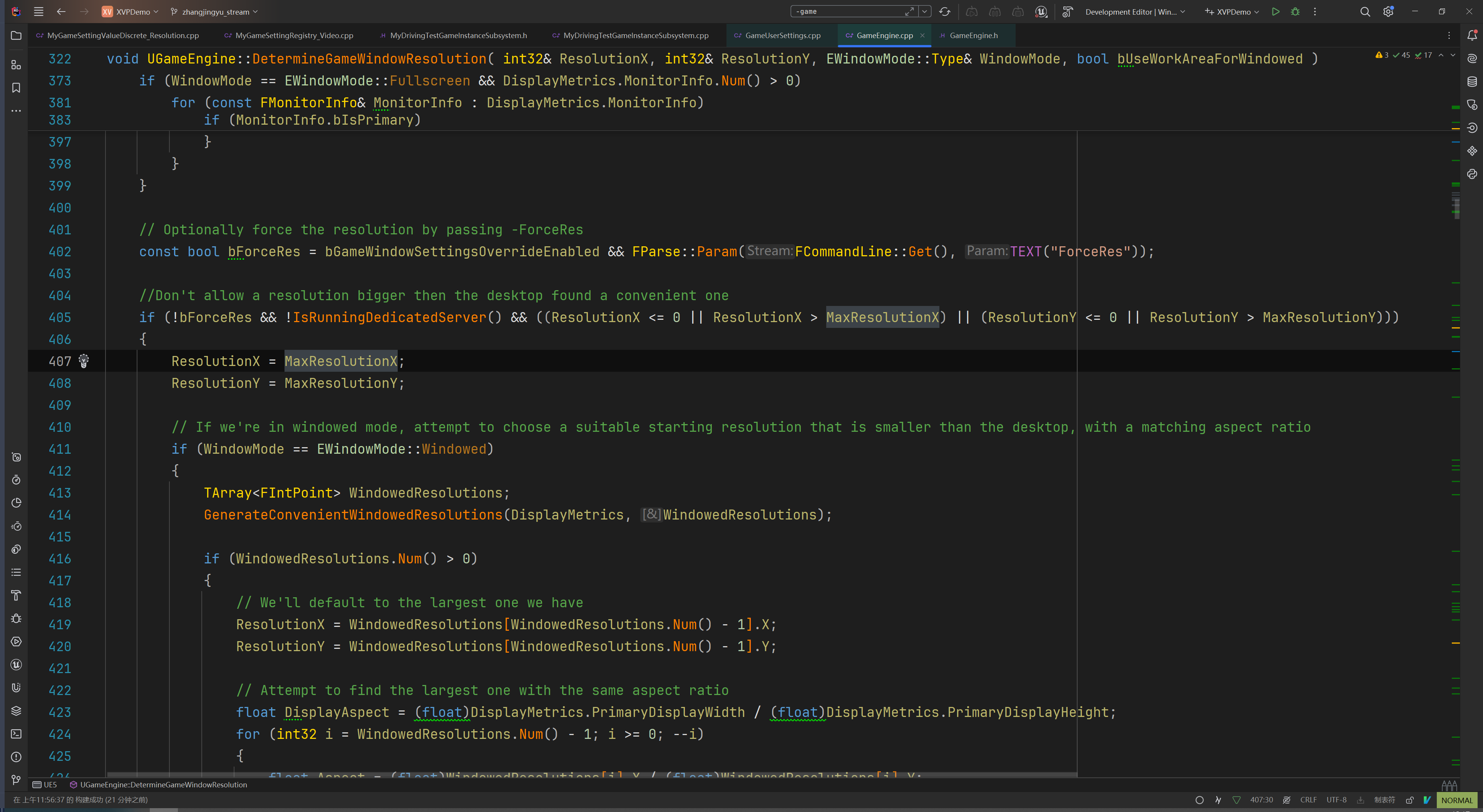
然后就是这里,会检测命令行里有没有ForceRes,如果没有并且你设置的分辨率大于你的最大分辨率,也就是单屏分辨率,就强制设置为单屏分辨率,UE全屏有个问题,就是当你的分辨率不比单屏分辨率大的时候,强制使用一个屏幕,这个问题还没有找到在哪里
所有我们能做的最简单的处理办法就是让这里读到ForceRes,来避免使用单屏幕分辨率
修改方案
方案一:程序快捷方式后面加-Fullscreen,这个是默认全屏,但是有个问题,加了这个再设置为无边框时也只有一个显示器能用,所以如果程序只这是全屏可以使用这个方案
方案二:程序快捷方式后面加-ForceRes,这个是强制分辨率,这样就可以完美避免这个问题
方案三:如果说程序不方便使用添加快捷方式的解决办法,那可以找个合适的地方调用
FString CommandLine = FCommandLine::Get();
	CommandLine += " -ForceRes";
	FCommandLine::Set(*CommandLine);

	if(const UGameUserSettings* GameUserSettings = GEngine->GetGameUserSettings();
		GameUserSettings && GameUserSettings->GetFullscreenMode() == EWindowMode::Type::Fullscreen)
	{
		const FIntPoint IntPoint = GameUserSettings->GetScreenResolution();
		GameUserSettings->RequestResolutionChange(IntPoint.X, IntPoint.Y, EWindowMode::Type::Fullscreen, true);
	}
我这里是加到了EngineSubsystem中,因为这个地方要尽可能的早
这里是把-ForceRes加入到命令行中,在下次修改为全屏的时候就可以检测到-ForceRes这个命令
下面的则是处理第一次,也就是游戏一开始时的状态,如果是全屏开始,则手动调用一下分辨率改变函数,来保证-ForceRes可以被应用
如何获取合适的分辨率
	Resolutions.Empty();
	ResolutionsFullscreen.Empty();
	ResolutionsWindowed.Empty();
	ResolutionsWindowedFullscreen.Empty();

	FDisplayMetrics InitialDisplayMetrics;
	FSlateApplication::Get().GetInitialDisplayMetrics(InitialDisplayMetrics);

	FScreenResolutionArray ResArray;
	RHIGetAvailableResolutions(ResArray, true);

	auto Screen = [&](const TFunctionRef<bool(FVector2f const& Point)>& Fn, TArray<TSharedPtr<FScreenResolutionEntry>>& ResolutionArray)
	{
		for(const auto& [Width, Height, RefreshRate] : ResArray)
		{
			if(Fn(FVector2f(Width, Height)))
			{
				TSharedRef<FScreenResolutionEntry> Entry = MakeShared<FScreenResolutionEntry>();
				Entry->Width = Width;
				Entry->Height = Height;
				ResolutionArray.Emplace(Entry);
			}
		}
	};

	const FVector2f MinResolution(1280, 720);
	const FVector2f MaxResolution(InitialDisplayMetrics.PrimaryDisplayWidth, InitialDisplayMetrics.PrimaryDisplayHeight);
	const float AspectRatio = MaxResolution.X / MaxResolution.Y;

	int32 MaxResolutionX = InitialDisplayMetrics.PrimaryDisplayWidth;
	int32 MaxResolutionY = InitialDisplayMetrics.PrimaryDisplayHeight;
	if (InitialDisplayMetrics.MonitorInfo.Num() > 0)
	{
		for (const FMonitorInfo& MonitorInfo : InitialDisplayMetrics.MonitorInfo)
		{
			if (MonitorInfo.bIsPrimary)
			{
				MaxResolutionX = MonitorInfo.MaxResolution.X;
				MaxResolutionY = MonitorInfo.MaxResolution.Y;

				if (MaxResolutionX == 0 || MaxResolutionY == 0)
				{
					MaxResolutionX = MonitorInfo.NativeWidth;
					MaxResolutionY = MonitorInfo.NativeHeight;
				}
				break;
			}
		}
	}

	auto AddRes = [&](FVector2f Res)
	{
		Res.X = MaxResolution.X * Res.Y / MaxResolution.Y;

		FScreenResolutionRHI RHI;
		RHI.Width = Res.X;
		RHI.Height = Res.Y;

		for(int32 i = 0; i < ResArray.Num(); ++i)
		{
			if(ResArray[i].Width == RHI.Width && ResArray[i].Height == RHI.Height)
			{
				return;
			}
			else if(ResArray[i].Width == RHI.Width && ResArray[i].Height > RHI.Height)
			{
				ResArray.Insert(RHI, i);
				return;
			}
			else if(ResArray[i].Width > RHI.Width)
			{
				ResArray.Insert(RHI, i);
				return;
			}
		}
		ResArray.Push(RHI);
	};

	// 常用分辨率添加,并且适配多屏
	AddRes(FVector2f(1920, 1080));
	AddRes(FVector2f(2560, 1440));
	AddRes(FVector2f(3840, 2160));

	Screen([&](FVector2f const& Point)->bool
	{
		if(Point.X >= MinResolution.X && Point.Y >= MinResolution.Y && Point.X <= MaxResolution.X && Point.Y <= MaxResolution.Y
			&& AspectRatio == Point.X / Point.Y)
		{
			return true;
		}
		return false;
	},ResolutionsWindowed);

	Screen([&](FVector2f const& Point)->bool
	{
		if(Point.X >= MinResolution.X && Point.Y >= MinResolution.Y && Point.X <= MaxResolution.X && Point.Y <= MaxResolution.Y
			&& AspectRatio == Point.X / Point.Y && Point.X > MaxResolutionX)
		{
			return true;
		}
		return false;
	},ResolutionsFullscreen);

	Screen([&](FVector2f const& Point)->bool
	{
		if( Point.X == MaxResolution.X && Point.Y == MaxResolution.Y)
		{
			return true;
		}
		return false;
	},ResolutionsWindowedFullscreen);
这个是在项目中拷贝出来的片段,仅供参考
感谢阅读,欢迎点赞、关注、收藏,有问题可在评论区交流。
如果本文对你有帮助,点击这里捐赠支持作者。

 浙公网安备 33010602011771号