
GoldenGate 12.3 MA架构介绍系列(5) - 静默安装
软件下载地址
http://www.oracle.com/technetwork/middleware/goldengate/downloads/index.html
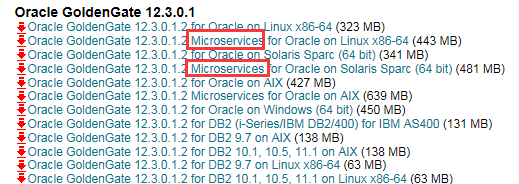
下载基于MicroService的介质后解压
创建 response file
以下是一个示例
$ more response/oggcore.rsp
####################################################################
## Copyright(c) Oracle Corporation 2016. All rights reserved. ##
## ##
## Specify values for the variables listed below to customize ##
## your installation. ##
## ##
## Each variable is associated with a comment. The comment ##
## can help to populate the variables with the appropriate ##
## values. ##
## ##
## IMPORTANT NOTE: This file should be secured to have read ##
## permission only by the oracle user or an administrator who ##
## own this installation to protect any sensitive input values. ##
## ##
####################################################################
-------------------------------------------------------------------------------
Do not change the following system generated value.
-------------------------------------------------------------------------------
oracle.install.responseFileVersion=/oracle/install/rspfmt_ogginstall_response_schema_v1
2_1_2
################################################################################
## ##
## Oracle GoldenGate installation option and details ##
## ##
################################################################################
-------------------------------------------------------------------------------
Specify the installation option.
Specify ORA12c for installing Oracle GoldenGate for Oracle Database 12c and
ORA11g for installing Oracle GoldenGate for Oracle Database 11g
-------------------------------------------------------------------------------
INSTALL_OPTION=ORA12c
-------------------------------------------------------------------------------
Specify a location to install Oracle GoldenGate
-------------------------------------------------------------------------------
SOFTWARE_LOCATION=/u01/app/oracle/product/12.3.0.1
################################################################################
## ##
## Specify details to Create inventory for Oracle installs ##
## Required only for the first Oracle product install on a system. ##
## ##
################################################################################
-------------------------------------------------------------------------------
Specify the location which holds the install inventory files.
This is an optional parameter if installing on
Windows based Operating System.
-------------------------------------------------------------------------------
INVENTORY_LOCATION=/u01/app/oraInventory
-------------------------------------------------------------------------------
Unix group to be set for the inventory directory.
This parameter is not applicable if installing on
Windows based Operating System.
-------------------------------------------------------------------------------
UNIX_GROUP_NAME=oinstall
执行安装
基于resp file执行安装程序
./runInstaller -silent -nowait -responseFile /u01/app/software/fbo_ggs_Linux_x64_services_shiphome/Disk1/response/oggcore.rsp
Starting Oracle Universal Installer...
Checking Temp space: must be greater than 120 MB. Actual 1831 MB Passed
Checking swap space: must be greater than 150 MB. Actual 4095 MB Passed
Preparing to launch Oracle Universal Installer from /tmp/OraInstall2017-09-20_09-48-44PM. Please wait ...[oracle@ip-172-30-3-146 Disk1]$ You can find the log of this install session at:
/u01/app/inventory/logs/installActions2017-09-20_09-48-44PM.log
The installation of Oracle GoldenGate Services was successful.
Please check '/u01/app/inventory/logs/silentInstall2017-09-20_09-48-44PM.log' for more details.
As a root user, execute the following script(s):
1. /u01/app/inventory/orainstRoot.sh
Successfully Setup Software.
最后再执行
$ sudo sh /u01/app/inventory/orainstRoot.sh
Changing permissions of /u01/app/inventory.
Adding read,write permissions for group.
Removing read,write,execute permissions for world.
Changing groupname of /u01/app/inventory to oracle.
The execution of the script is complete.
后记
以上步骤只是将MA软件安装完成,针对MA中各项服务及配置,还需要使用oggca.sh进行安装和配置。
具体操作可参考: http://www.cnblogs.com/margiex/p/8071957.html

 浙公网安备 33010602011771号